
Build software with an agent-first desktop IDE
Polypore is an agent-first desktop IDE where Claude and Codex CLIs drive the editor, debugger, and memory directly through a built-in MCP server.
0.1.0Add to Favorites
Why it matters
Polypore gives development teams a desktop IDE where AI agents are the primary actors, not an afterthought. Every panel-editor, terminal, debugger, memory, preview-is designed for agents to drive through MCP tools, with secrets brokered safely and a plugin SDK for custom workflows.
Outcomes
What it gets done
Let agents control the full IDE through 22+ MCP tools covering debug sessions, knowledge base, verification suites, and task management
Protect API keys and credentials by storing them in OS keyring and mediating HTTP requests so models never see plaintext
Extend the IDE with third-party panels as sandboxed iframes using the same contract built-in panels use
Run 15 slash-command skills covering brainstorming, TDD, debugging, architecture review, and the full development loop
Source
Get it from source
Spark does not host a copy of it.
Open sourceReports
Agent outcome reports
No reports yet
Overview
A Tauri-based desktop IDE that puts coding agents in direct control of the editor, debugger, diff view, and a wikilinked project memory, driven through a built-in MCP server rather than a bolted-on chat sidebar. Reach for it when you want Claude or Codex CLI sessions running inside a dockable IDE that the agent can operate through 22+ MCP tools, and when keeping secrets out of the model's plaintext context matters.
What it does
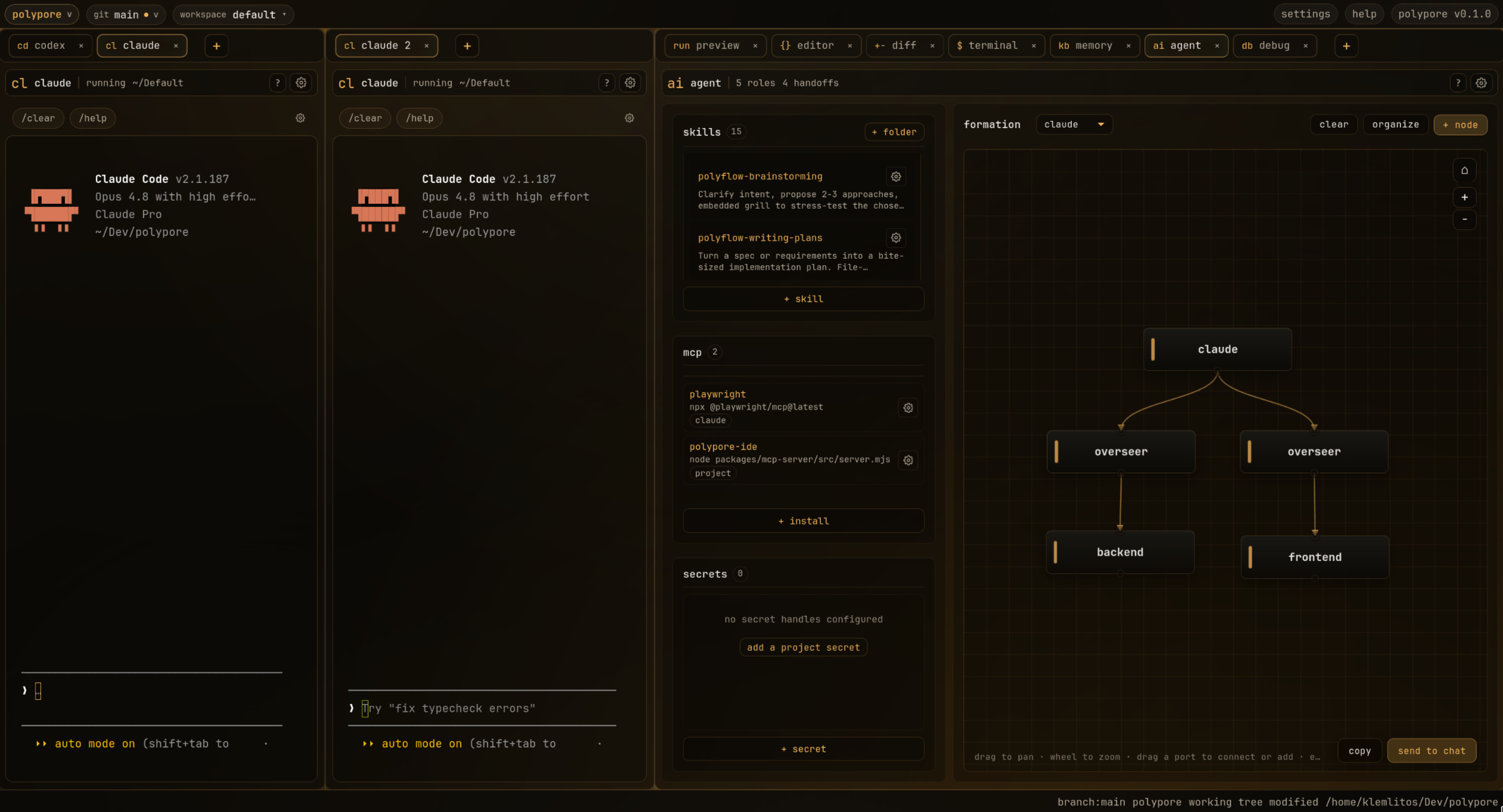
Polypore is a desktop IDE (built on Tauri 2, Rust, and React) that treats the coding agent as the primary actor rather than a sidebar feature. Every surface - editor, terminal, debugger, diff view, memory, agent management - is a dockable panel you can split, reorder, or close, and the built-in claude and codex panels run those CLIs directly with slash-command quick-launch. It ships a Node-based polypore-ide MCP sidecar that Claude Code picks up automatically from .mcp.json, giving agents 22+ tools to drive the IDE the same way a human would. Secrets stay in the OS keyring: when Polypore spawns an agent it strips registered secrets from the environment and substitutes a POLYPORE_SECRET_HANDLE_<KEY> sentinel, and agents make mediated HTTP calls through polypore.secrets.use without the model ever seeing plaintext. There is no telemetry. The app self-updates after the first install:
chmod +x Polypore_*_amd64.AppImage
./Polypore_*_amd64.AppImage
When to use - and when NOT to
Use it when you want an agent-first IDE where the Claude/Codex CLI terminal, debugger, diff/history feed, and a wikilink-based project memory panel are all wired into one MCP surface an agent can operate directly, and where secret handling matters (credentials never reach the model as plaintext). It is not a lightweight editor for people who don't want agent tooling baked into the workflow, and it is a native desktop app, not a hosted or browser-based IDE. Building from source (rather than using a prebuilt release) requires Node 20+ and Rust stable, plus on Linux the libwebkit2gtk-4.1-dev/libgtk-3-dev/libayatana-appindicator3-dev/librsvg2-dev system libraries.
Inputs and outputs
Inputs are a project directory as workspace root (overridable via POLYPORE_PROJECT_ROOT) and driving actions from either a human through the panel UI or an agent through the MCP tool namespaces: polypore.debug.* (sessions, breakpoints, stepping, console/DOM/network capture), polypore.memory.* (read/write the knowledge base, link entries, write handoff documents), polypore.verify.* (declare and run verification suites), polypore.tasks.* (create/update IDE-visible tasks), polypore.phase.* (report workflow phase to the UI), polypore.secrets.* (mediated HTTP requests), polypore.skills.*, and polypore.format.*. Outputs are live IDE state changes (editor content, debug state, diffs, task lists), a SQLite-backed project memory base of [[wikilink]]-linked entries, and secret-mediated HTTP responses where the credential value itself is never returned.
Integrations
Built-in claude and codex CLI terminal panels with slash-command quick-launch, plus 15 Polyflow slash commands (/polyflow, /polyflow-go, /polyflow-brainstorming, /polyflow-writing-plans, /polyflow-executing-plans, /polyflow-tdd, /polyflow-iterate, /polyflow-debug, /polyflow-review, /polyflow-design-interface, /polyflow-prd, /polyflow-improve-architecture, /polyflow-qa, /polyflow-glossary, /polyflow-compact) covering the development loop. The polypore-ide MCP sidecar registers automatically for Claude Code via .mcp.json. Third-party panels integrate as sandboxed iframe plugins on the same HostRpcServer contract used by built-in panels, dropped into .polypore/plugins/<id>/. An ACP adapter is available opt-in via POLYPORE_ENABLE_ACP=1.
Who it's for
Developers who want their coding agent to be a first-class actor inside the IDE - not a chat sidebar - across Linux, macOS, and Windows, and who care that secrets never reach the model in plaintext. MIT licensed, no telemetry.
Source README

Polypore
An agentic desktop IDE that treats the agent as the primary actor, not a sidebar.
Language agnostic, OS agnostic. Every surface is a dockable panel you can split, reorder, or close. The built-in panels cover most workflows; when they don't, the SDK is there.




Demo
https://github.com/user-attachments/assets/a3961bf3-46cd-4168-8e12-9acfcb2bf6b7
Screenshots
Install
Download the build for your platform from the latest release. Polypore updates itself after the first install.
| Platform | File |
|---|---|
| Linux | .AppImage (any distro), .deb (Debian/Ubuntu), .rpm (Fedora/RHEL) |
| macOS | .dmg (Apple Silicon or Intel) |
| Windows | _x64_en-US.msi or _x64-setup.exe |
On Linux the AppImage needs FUSE (fuse2 on Arch). Mark it executable and run it:
chmod +x Polypore_*_amd64.AppImage
./Polypore_*_amd64.AppImage
To build from source instead, see Getting started below.
Why Polypore
The agentic tooling space moves fast. The right models, CLIs, and orchestration patterns shift faster than a typical IDE ships releases, so Polypore is built to keep up instead of freezing a stack in place. This is not a code editor with an agent panel bolted on. The layout, the memory, the debug tooling, and the MCP server are all designed around the agent doing the work and a human steering it.
Polypore is designed to be:
- Agent-first: every panel is wired into an MCP server, so an agent can drive the editor, debugger, and memory the same way you do.
- Swappable: each surface is a sandboxed panel behind one shared contract, so any piece can be extended, replaced, or dropped without touching the core.
- Language and OS agnostic: per-project config registries instead of a hardcoded toolchain, with builds for Linux, macOS, and Windows.
- Yours: secrets stay in the OS keyring, the model never sees plaintext, and there is no telemetry.
Panels
The built-in panels, all available from the + tab button:
| Panel | What it does |
|---|---|
| claude | Claude CLI terminal with slash-command quick-launch |
| codex | Codex CLI terminal with slash-command quick-launch |
| preview | Live runtime output: browser, CLI, or any dev server |
| editor | Monaco editor with per-project diagnostics |
| diff-stack | Side-by-side diff and scrubbable history feed |
| terminal | Standalone pty terminal |
| debug | Verify runs and diagnostics |
| memory | Project knowledge base with [[wikilinks]] and context inventory |
| agent | Formation canvas, skills, MCP management, and secrets |
SDK and plugins
Third-party panels are sandboxed iframes using the same HostRpcServer contract as the built-ins. Write a plugin in any framework, drop it in .polypore/plugins/<id>/, and it appears in the panel strip. Agents can drive it through the MCP server the same way they drive built-in panels.
polypore-ide MCP server
A Node MCP sidecar ships with Polypore. Claude Code picks it up from .mcp.json automatically. It gives agents direct IDE control through 22+ tools:
| Namespace | What agents can do |
|---|---|
polypore.debug.* |
Start sessions, set breakpoints, step, capture console/DOM/network |
polypore.memory.* |
Read/write the knowledge base, link entries, write handoff documents |
polypore.verify.* |
Declare and run verification suites |
polypore.tasks.* |
Create and update tasks visible in the IDE in real time |
polypore.phase.* |
Report workflow phase to the live UI |
polypore.secrets.* |
Make mediated HTTP requests without seeing the secret value |
polypore.skills.* |
Read the active skill library |
polypore.format.* |
Trigger formatters in-editor |
Secret broker
Secrets live in the OS keyring. When Polypore spawns an agent it strips every registered secret from the environment and replaces it with a POLYPORE_SECRET_HANDLE_<KEY> sentinel. Agents call polypore.secrets.use with an HTTP request; Polypore injects the value and masks it on the way back. The model never sees plaintext.
Polyflow skills
15 slash commands in packages/polyflow/ covering the full development loop:
/polyflow /polyflow-go /polyflow-brainstorming /polyflow-writing-plans /polyflow-executing-plans /polyflow-tdd /polyflow-iterate /polyflow-debug /polyflow-review /polyflow-design-interface /polyflow-prd /polyflow-improve-architecture /polyflow-qa /polyflow-glossary /polyflow-compact
Stack
| Shell | Tauri 2, Rust |
| Renderer | React 18, Vite, TypeScript |
| Panels | Dockview |
| Editor | Monaco |
| Terminal | xterm.js, portable-pty |
| MCP sidecar | Node, JSON-RPC |
| Persistence | SQLite via rusqlite |
| Secrets | OS keyring via keyring crate |
| File watching | notify |
| Contracts | JSON Schema, codegen'd into packages/sdk/ |
Getting started
Prerequisites: Node 20+, Rust stable (rustup). Linux also needs libwebkit2gtk-4.1-dev libgtk-3-dev libayatana-appindicator3-dev librsvg2-dev.
npm ci
cd src-tauri && cargo build && cd ..
npm run app
For renderer-only development (no Tauri bridge):
npm run dev
Scripts
| Command | |
|---|---|
npm run app |
Desktop app via Tauri |
npm run app:build |
Production bundle |
npm run dev |
Vite renderer on 127.0.0.1:1420 |
npm run typecheck |
Codegen + tsc --noEmit |
npm test |
vitest renderer suite |
npm run mcp |
MCP sidecar against cwd |
npm run mcp:smoke |
JSON-RPC tools/list smoke |
npm run mcp:pipeline-smoke |
End-to-end plugin + skill + secret |
cd src-tauri && cargo test |
Rust tests |
cargo clippy --no-deps -- -D warnings |
Rust lints |
Architecture
┌────────────────────────────────────────────────────────────────────┐
│ Tauri shell (Rust, src-tauri/)                                     │
│  ├─ host_broker (HTTP)    → emits Tauri events to the renderer     │
│  ├─ secret_broker (HTTP)  → OS keyring, never returns plaintext    │
│  ├─ agent runtimes        → stdio adapters per CLI; ACP opt-in     │
│  ├─ pty (portable-pty)    ├─ persistence (rusqlite)                │
│  ├─ snapshotter           ├─ fs_watch (notify)                     │
│  └─ plugin:// protocol    → serves .polypore/plugins/<id>/<asset>  │
├────────────────────────────────────────────────────────────────────┤
│ Renderer (React + Dockview)                                        │
│  ├─ HostRpcServer (packages/host)  shared contract for all plugins │
│  ├─ PolyporeHost loopback          built-in plugins use this       │
│  ├─ PluginLoader                   3rd-party iframes use this      │
│  └─ built-in panels (plugins/)                                     │
├────────────────────────────────────────────────────────────────────┤
│ polypore-ide MCP sidecar (Node, packages/mcp-server/)              │
│  ├─ 22+ tools → host_broker for live state changes                 │
│  └─ secrets.* → secret_broker, value never returned to agent       │
└────────────────────────────────────────────────────────────────────┘
Contracts live in schemas/ and codegen into packages/sdk/src/types.gen.ts and packages/sdk/src/validators.gen.ts. Run npm run codegen after editing a schema.
Environment variables
POLYPORE_PROJECT_ROOT |
Override cwd as the workspace root |
POLYPORE_ENABLE_ACP=1 |
Opt into the ACP adapter |
POLYPORE_CONFIG_DIR |
Secrets metadata location (default ~/.config/polypore) |
POLYPORE_UPDATE_ENDPOINT |
Override the auto-updater endpoint |
FAQ
Common questions
Discussion
Questions & comments · 0
Sign In Sign in to leave a comment.