
Reduce AI token costs by filtering CLI output
lowfat is a lightweight CLI that filters verbose shell output and file content before it reaches an AI agent, cutting token cost.
0.9.0Add to Favorites
Why it matters
Lowfat helps developers reduce AI agent token consumption and costs by intelligently filtering unnecessary CLI output before it reaches the agent, making agent-assisted coding more efficient and affordable.
Outcomes
What it gets done
Filter verbose command output (git diff, docker ps, ls) to remove noise before sending to AI agents
Track and analyze which commands consume the most tokens with history ranking and stats
Integrate with Claude Code, OpenCode, Pi agent, or any shell via hooks and auto-activation
Create custom filters using the plugin DSL to handle domain-specific CLI tools like terraform
Source
Get it from source
Spark does not host a copy of it.
Open sourceReports
Agent outcome reports
No reports yet
Overview
lowfat is a lightweight CLI that filters verbose shell command output and compresses file content before an AI agent reads it, via Claude Code hooks, an OpenCode plugin, or shell integration. It ships six built-in command filters and a small DSL for writing your own, with no telemetry. Use it to cut the token cost of verbose command output and large file reads for an AI coding agent. It covers only six built-in commands compared to broader alternatives, trading breadth for a minimal, extensible core.
What it does
lowfat is a lightweight CLI tool that reduces AI agent token costs by filtering command output and file content before it reaches the model. It rewrites verbose output like git status or docker ps down to the same signal with less noise - on the bundled samples, full-level filtering cuts git log output by 80% and git diff by 38%, with an ultra level cutting further (91% and 96% respectively); the project is explicit that these are reductions of a single command's raw output, not a promise about total end-to-end agent token usage.
When to use - and when NOT to
Use it to cut the noise an AI coding agent reads from shell commands and file reads - it's built specifically around the pattern Anthropic recommends of offloading processing to hooks, implemented via lowfat's own Claude Code hook. It ships only 6 curated built-in command filters (git, docker, grep, find, ls, tree), deliberately smaller than a batteries-included alternative like rtk (100+ built-ins, 14 agent integrations); lowfat trades that breadth for a minimal core you extend yourself with a .lf filter DSL, shell, or Python via PEP 723/uv. On a small head-to-head run against rtk on the same repo, lowfat compressed git log and git status harder while rtk edged out find, so which tool wins depends on your actual command mix - the project calls its own numbers directional, not a benchmark.
Inputs and outputs
A PreToolUse Claude Code hook rewrites Bash commands through lowfat's filters before they run; a PostToolUse hook on Read compresses file content afterward - stripping comments and normalizing blanks in source code, collapsing function bodies to signatures at the ultra level, truncating Markdown code blocks and tables, stripping <style>/<script> from HTML/Vue/Svelte, truncating large JSON arrays, and replacing lock files with a package-count summary. Files with under 10% measured savings pass through unchanged. Three compression levels - lite, full, ultra - trade more aggressive dropping for smaller output; lowfat stats tracks lifetime token savings, and lowfat history ranks your own commands by potential savings so you know what to filter next.
Integrations
Beyond the Claude Code hook, lowfat auto-activates inside agent shell environments (CLAUDECODE=1, CODEX_ENV) via lowfat shell-init, installs as an OpenCode plugin with one command (lowfat opencode install), and can be wired into the Pi agent's shellCommandPrefix setting. It's local-first with no telemetry - all savings tracking stays on your machine.
cargo install lowfat
Pre-built binaries are also published on GitHub Releases, and it can be installed via Homebrew (brew install zdk/tools/lowfat). It is Apache-2.0 licensed.
Who it's for
Developers running AI coding agents who want to cut the token cost of verbose shell output and large file reads without losing the signal the agent actually needs, and who are comfortable writing their own filters for anything beyond the six built-in command families.
Source README

lowfat is a lightweight CLI tool that reduces AI token costs by filtering CLI output and file content before it reaches your agent.
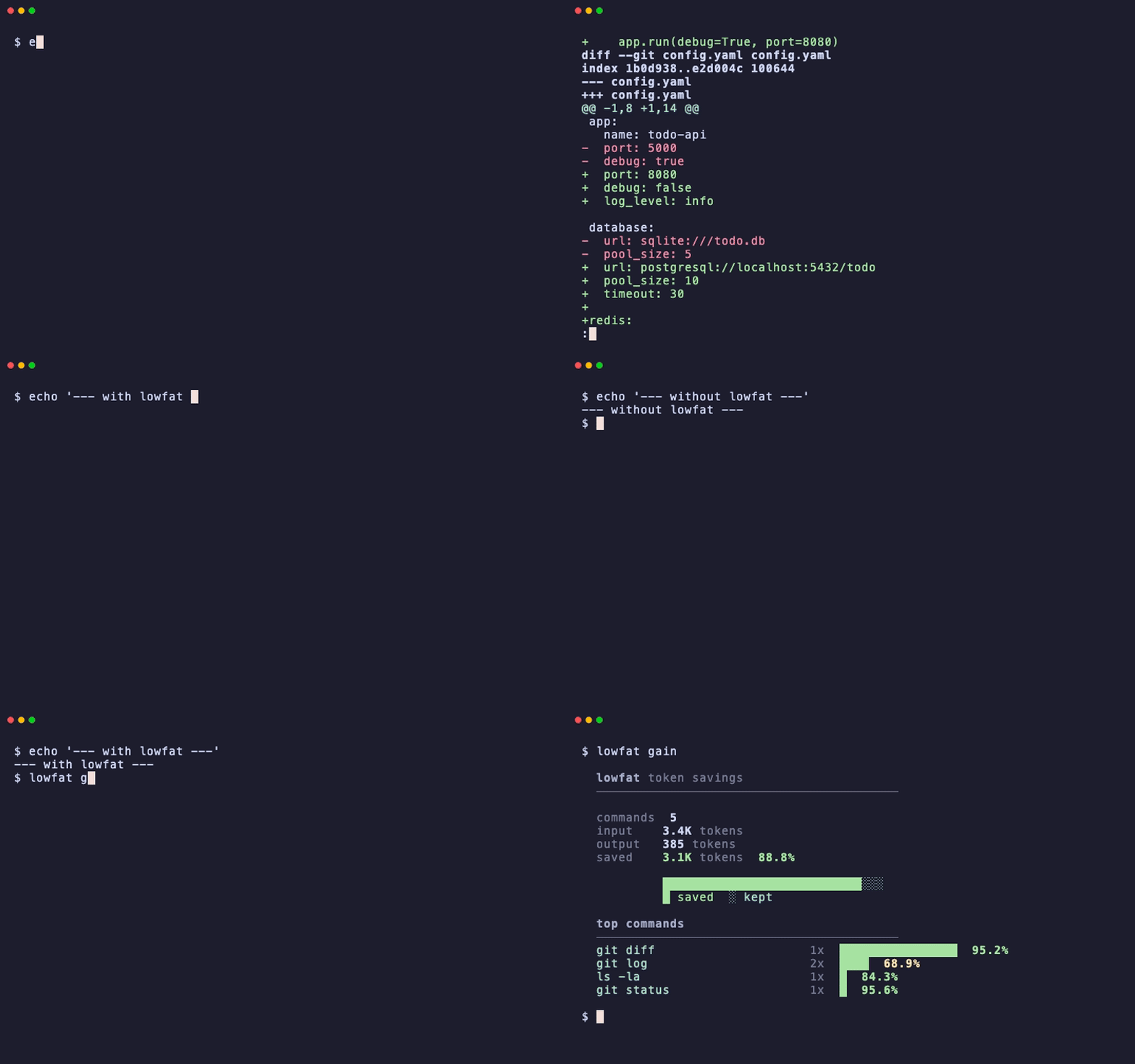
Core focus
- Lightweight - Small core single binary, extensible via plugins.
- Local-first - No telemetry; you should own your data.
- Composable - UNIX-style pipes, mix built-ins and your own custom filters.
- User-owned -
lowfat historyshows what you ran most and use it as token saving tuning per your usecase.
Before / after
git status at the full level - same signal, less noise.
Before - raw git status:
On branch main
Your branch is up to date with 'origin/main'.

Changes not staged for commit:
  (use "git add <file>..." to update what will be committed)
  (use "git restore <file>..." to discard changes in working directory)
	modified:   crates/lowfat-cli/src/commands/plugin.rs
	modified:   crates/lowfat-cli/src/main.rs

Untracked files:
  (use "git add <file>..." to include in what will be committed)
	plugins/git/git-compact/samples/

no changes added to commit (use "git add" and/or "git commit -a")
After - lowfat git status:
On branch main
Changes not staged for commit:
	modified:   crates/lowfat-cli/src/commands/plugin.rs
	modified:   crates/lowfat-cli/src/main.rs
Untracked files:
	plugins/git/git-compact/samples/
Reduction of raw command output, measured on the bundled samples
(crates/lowfat-plugin/embedded/*/samples/). Reproduce with
cat <sample> | lowfat filter <plugin>/filter.lf --sub=<sub> --level=<level>:
| command | lite |
full |
ultra |
|---|---|---|---|
git diff |
-16% | -38% | -96% |
git log |
-53% | -80% | -91% |
git status |
-62% | -62% | -74% |
docker ps |
-38% | -38% | -85% |
docker images |
-48% | -58% | -86% |
ls -la |
-2% | -75% | -87% |
These percentages are the reduction of a single command's output, not your end-to-end agent token usage. savings depend on how much of your context is command output and how lossy a level you pick - higher levels drop more, so verify your agent still has what it needs. treat the table as a ceiling on the output slice, not a promise on the total.
Install
cargo install lowfat
# or
brew install zdk/tools/lowfat
Pre-built binaries on GitHub Releases.
Setup
Pick one of:
Claude Code hook - add to .claude/settings.json:
{
  "hooks": {
    "PreToolUse": [
      {
        "matcher": "Bash",
        "hooks": [{ "type": "command", "command": "lowfat hook" }]
      }
    ],
    "PostToolUse": [
      {
        "matcher": "Read",
        "hooks": [{ "type": "command", "command": "lowfat post-read" }]
      }
    ]
  }
}
PreToolUse rewrites Bash commands through lowfat filters.
PostToolUse compresses file content after Read - strips comments, collapses function bodies, summarizes lock files.
The filtering pattern Anthropic recommends, but via lowfat.
Shell integration - auto-activates inside agent environments (CLAUDECODE=1, CODEX_ENV), or set LOWFAT_ENABLE=1 to force it on any shell:
echo 'eval "$(lowfat shell-init zsh)"' >> ~/.zshrc # or ~/.bashrc
OpenCode plugin - one command, no config editing:
lowfat opencode install # v1.x → plugins/lowfat.ts, v2.x → plugins/lowfat-v2/index.js
Installs the plugin matching your OpenCode version (detected via opencode --version); the v2 variant is required because 2.0.x changed the plugin API and the
v1 shape loads but silently does nothing there. Restart OpenCode; commands are
rewritten transparently before they run. Uninstall with lowfat opencode uninstall
(removes whichever variant(s) are present).
Direct usage - prefix any command:
lowfat git status
lowfat docker ps
lowfat ls -la
Pi agent - in ~/.pi/agent/settings.json:
{ "shellCommandPrefix": "eval \"$(lowfat shell-init zsh)\"; " }
Usage highlights
# See what's configured and how loud each filter is being
lowfat info                       # status badge + active filters
lowfat info git                   # pipeline for `git`
lowfat info --config              # full resolved config

# See what lowfat has saved you
lowfat stats                      # lifetime token savings
lowfat stats --audit              # recent plugin executions
lowfat history                    # rank commands by potential savings

# Dial the aggressiveness
lowfat level ultra                # max compression
LOWFAT_LEVEL=lite lowfat git log  # one-off override

# Write a plugin
lowfat plugin new terraform       # scaffold ~/.lowfat/plugins/terraform/
lowfat plugin doctor              # check plugins (and pre-install any Python deps)

# Test a plugin against a sample without installing it
cat samples/git-diff-full.txt | lowfat filter --explain ./filter.lf --sub=diff --level=ultra
File content compression (post-read)
When Claude reads files, lowfat post-read compresses the content before it enters the context:
| Content type | What it does |
|---|---|
| Source code (Rust, Python, Go, Elixir, JS/TS, Java, Ruby, C/C++, Shell) | Strip comments, normalize blanks; at ultra: collapse function bodies to signatures |
| Markdown | Strip badges, HTML comments; truncate code blocks and tables |
| HTML / Vue / Svelte | Strip <style>, <script>, class attributes; at ultra: text extraction only |
| JSON / JSONC | Truncate large arrays, collapse deep nesting |
| Lock files (Cargo.lock, package-lock.json, yarn.lock, ...) | Replace with summary: package count + top deps |
| Unknown | Head + tail with line count |
Compression level follows LOWFAT_LEVEL (lite/full/ultra). Files with <10% savings pass through unchanged.
Learn more
- docs/ARCHITECTURE.md - high-level diagram: CLI, Runner, Plugins, Builtins
- docs/CONFIG.md -
.lowfatfile, env vars, pipeline DSL, built-in processors, thehistoryranking - docs/PLUGINS.md - lf-filter (the
.lfplugin DSL), named rules, the JSON output guarantee, shell escape hatches, PEP 723 + uv, AI agent prompt
Alternatives
vs rtk
rtk is the closest tool but differ in philosophy: rtk is batteries-included; lowfat is a minimal core you extend yourself.
| lowfat | rtk | |
|---|---|---|
| Built-in commands | 6 curated (git, docker, grep, find, ls, tree) |
100+ across many ecosystems |
| Custom filters | .lf DSL + shell + Python (PEP 723/uv) |
TOML DSL |
| Levels | lite / full / ultra |
-l aggressive, --ultra-compact |
| File-content filtering | post-read hook (code, markdown, HTML, data, lock files) |
rtk read / smart (signatures, summaries) |
| Agent integrations | Claude Code, OpenCode, shell, Pi | 14 tools (Claude Code, Copilot, Gemini, Codex, …) |
| Telemetry | None - local-only | Opt-in, off by default (anonymous aggregate) |
| Savings analytics | lowfat stats / history (local) |
rtk gain / discover (local) |
Token savings, head-to-head
Same commands, same repo, same cwd, run through both tools. Output tokens
counted with tiktoken (cl100k_base); savings are vs the raw command output:
| command | raw tokens | lowfat full |
lowfat ultra |
rtk |
|---|---|---|---|---|
git status |
81 | -91% | -91% | -79% |
git diff |
1241 | -15% | -97% | -9% |
git log |
3350 | -93% | -97% | -56% |
ls -la |
153 | -77% | -89% | -86% |
find |
535 | -0% | -58% | -66% |
Honest read: lowfat compresses git harder; rtk edges out find; ls is close.
find only engages at lowfat's ultra level. rtk's --ultra-compact gave
near-identical numbers to its default here, so the default is shown. This is a
single small run on one repo - directional, not a benchmark; measure on your own
workload before trusting any of it.
AI notice
Multiple AI tools were used for this project
Star History
FAQ
Common questions
Discussion
Questions & comments · 0
Sign In Sign in to leave a comment.