
Render code-authored 3D scenes and VFX
Render code-authored 3D scenes and VFX with Vork, a headless GPU engine supporting scene JSON, programmable shaders and Python or TypeScript SDKs.
1.0.0Add to Favorites
Why it matters
Create and refine stills, animated scenes and visual effects from programmatic scene descriptions.
Outcomes
What it gets done
Author scene geometry, materials, cameras and lights
Render previews and refine a shot
Produce stills, video and control passes
Composite rendered geometry with real footage
Source
Get it from source
Spark does not host a copy of it.
Open sourceReports
Agent outcome reports
No reports yet
Overview
Vork is a headless 3D and VFX rendering engine with scene JSON, Python and TypeScript SDKs, and programmable GPU hooks. It supports stills, animation and compositing with real footage. Use it to author and iteratively render scenes through code. Check GPU requirements and rendering limits before relying on fog, dense transparency or demanding simulation shots.
What it does
Vork, the Voyager rendering kernel, is a headless 3D and VFX engine for scenes authored as code. It renders through Vulkan and Metal, with Rust and Slang underneath. Ordinary shots use scene data; programmable hooks cover unusual materials, camera rays, light propagation, simulation and compositing. The working loop is to write a scene, render a preview, inspect the image, and revise the camera, lighting or code without operating a graphical editor.
Default rendering combines raster visibility with hardware ray-traced lighting, while a separate path tracer handles path transport. Scenes and render plans remain installed, and frames reuse retained GPU resources. Slang programs execute on the GPU; parsing, planning, animation-track evaluation and input/output still use the CPU. Supported native paths can encode video directly from GPU resources, with a portable fallback that reads pixels back to the CPU.
When to use - and when NOT to
Use Vork for programmatically authored stills, animated shots and rendered effects composited with real footage. Available scenes include a million-bird flock driven by compute programs, a relit desk with a procedural seed, neon geometry reflected in a wet alley, scanned cake assets, an imported kitchen and GPU liquid simulation. The flock's million simulated birds do not flap; the camera and foreground birds are separately authored. The kitchen recipe uses material adaptation and a camera orbit, while the displayed render adds staging and animated lighting.
Check the rendering limits before committing to a shot. Fog and participating volumes are ignored with warnings. Large scenes and dense transparency can fail, including on Mac, and reducing resolution alone may not resolve them. Some heavy interiors work with the path profile when the default hybrid profile fails. Fine facades, hair, defocus and sparse or spectral highlights can lose detail or change at low sample counts. Increasing samples costs more rendering time.
The liquid simulation is a uniform-grid experiment with finite particle budgets, unresolved thin features and no two-way rigid-body coupling. Its quickstart is a closed-shutter diagnostic; the motion-blurred scene is substantially more expensive. It is not a general substitute for a mature simulation package. Camera solving and single-view relief in the VFX examples are estimates. The black-hole example supplies an approximate Schwarzschild light-propagation program rather than an exact relativistic solver: its metric is nonrotating, its disk is artistic, and it omits retarded animation and spectral frequency shifting. This scene requires std/path. Its launch-direction light sampling can be noisy for small emitters.
Inputs and outputs
Author scene JSON directly or use the Python and TypeScript SDKs. Scene nodes describe geometry, material inputs, lights and cameras; animation tracks make a static scene move. Importing glTF accepts a model alongside the scene, with its referenced textures and buffers kept together. The same scene can produce images, video and control passes. Frame ranges include both endpoints, so frames zero through forty-seven produce forty-eight frames.
Separate scene content from rendering quality. The preview profile supports iteration, draft uses scene-ray lighting, final is the default delivery profile, and path selects path transport. Draft and final normally use four and eight samples with bundled OIDN denoising. Without a fast NVIDIA or Apple GPU denoiser, they report the limitation and use sixteen and thirty-two samples without denoising; explicitly enabling denoising invokes the slower CPU path. Sample overrides range from one to 4096.
After saving the supplied first scene as shot.json, these commands render a preview and final image and open the relevant help:
vork render shot.json --profile std/previs --out preview.png
vork render shot.json --profile std/final --out final.png
vork help sdk
vork help programs --all
How to install
Use the platform archive from GitHub Releases and keep the entire installation folder together. Slang, OIDN, libraries, examples, SDKs and licence texts accompany the executable. The installers verify SHA256SUMS, run setup and add the installation to the user's PATH; a custom PREFIX or VORK_NO_MODIFY_PATH setting leaves shell startup files alone. Manual archive installation also requires checking the matching checksum and retaining all runtime companions.
Linux requires x64, glibc 2.35 or newer, and a recent NVIDIA GPU with a hardware-ray-tracing Vulkan driver. Windows requires x64 Windows 10/11 and the corresponding NVIDIA GPU and driver. Mac support is Apple Silicon with Metal; Intel Macs are unsupported. Linux MP4 needs ffmpeg for muxing even with NVENC. Windows MP4/MOV also needs ffmpeg and falls back to libx264 when hardware encoding is incompatible. Mac MP4 uses VideoToolbox; ffmpeg is needed for decoding or encoding fallbacks.
Setup and first renders can spend minutes compiling without output. Rerun setup after upgrades or GPU-driver changes; new scene programs may still compile afterward. Vulkan persists its pipeline cache when supported, while Metal warms the system driver cache. VORK_CACHE_DIR overrides the cache location.
Integrations
The archive includes Python 3.11+ and TypeScript SDK packages. Install them from the local Vork installation into the authoring environment or project; TypeScript requires Node 22.18+ and npm. The similarly named npm package is unrelated, and the PyPI package points back to the repository. Import the SDK as vork in Python or @usevoyager/vork in TypeScript, and keep the native executable on PATH. An optional Blender bridge supports scene preparation and carries its own GPL licence, separate from the renderer and SDK packages.
Performance and asset licences
Treat the supplied benchmarks as qualified timings, rather than equal-quality speedups. Default final measurements use an NVIDIA L4 with eight samples and OIDN; retained Blender baselines use different settings and timing boundaries. Setup, shader warmup, provisioning and transfers are excluded. Low-sample quality comparisons include softer edges, grainier defocus and changed highlights, and a million-stars scene ran out of GPU memory. Mac reliability was not revalidated in that Linux run. Carried-forward path-tracing measurements were slower than Cycles in the named cases. Preview timings use different lighting and shadows, and projected Blender flock times are extrapolations rather than measured full movies.
Consult LICENSE for renderer terms and NOTICE for third-party notices. Example assets retain their own licences and credits: the car, bird and cargo-ship adaptations carry CC BY 4.0, Poly Haven assets carry CC0, and the adapted Cozy Kitchen scene and renders retain CC BY-SA. Footage examples use the Pexels Licence. Keep the corresponding credits with distributed renders and retain the kitchen adaptation's changes and export report.
Source README
<!-- Logo goes above the introduction when available. --> vork, the Voyager rendering kernel, is a headless 3D and VFX engine built for agents.
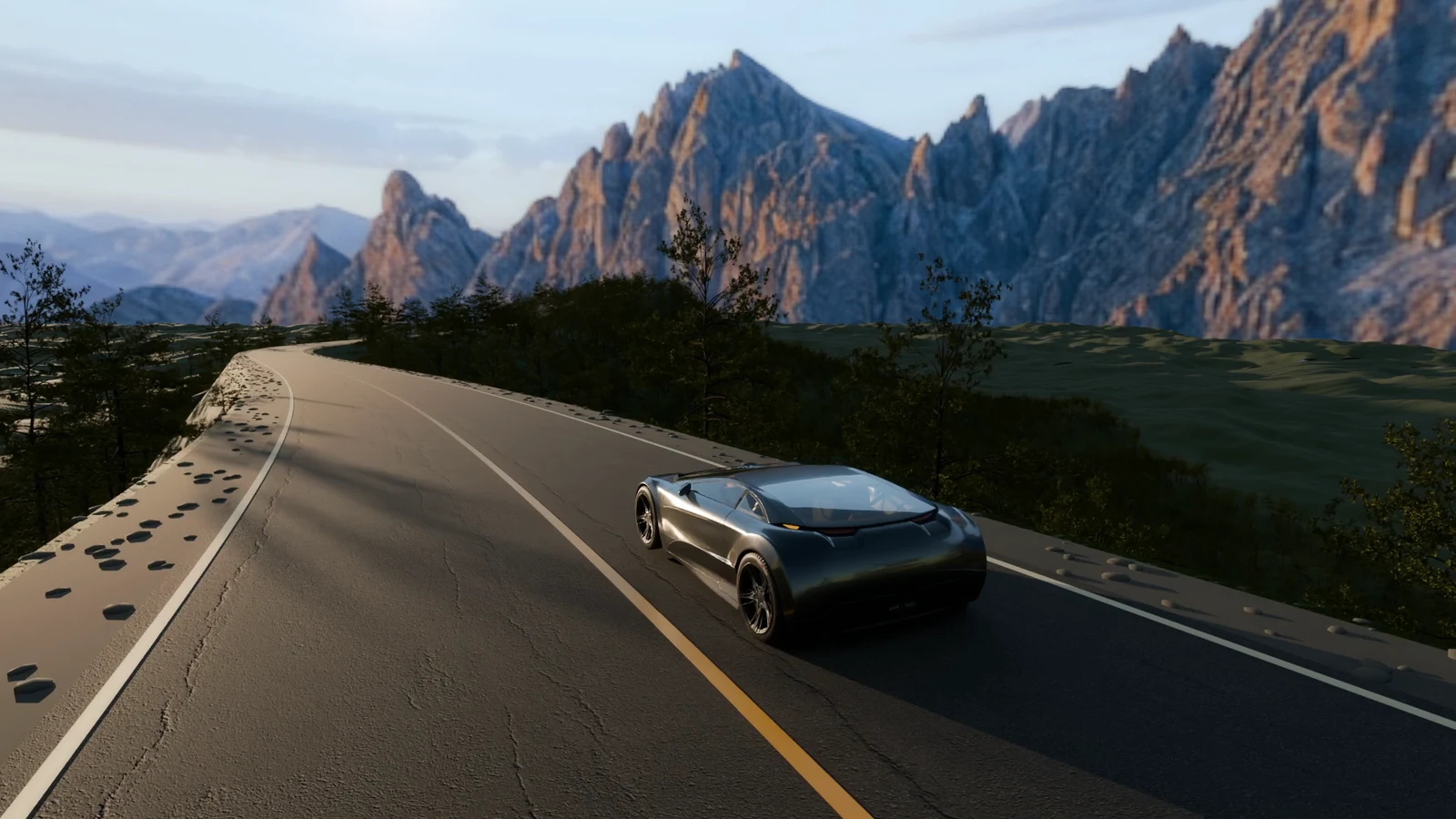
Watch the film: a car drives into the night as the forest turns into glowing cyan wireframe, drawn from real triangle edges by a scene shader.
Credit: “Car Concept” by Unity Fan, glTF adaptation by Eric Chadwick / Darmstadt Graphics Group, CC BY 4.0. Changes: scaled, animated, brighter head and tail lights, wheel pose. Trees, ground and asphalt from Poly Haven (CC0). The far mountains and sky are an image-model painting on a curved 3D card; everything else that moves is rendered.
Paste this to your agent
Install vork, then paste:
Read
vork help. Make a small scene, render a preview and inspect the image. Refine the camera and lighting before rendering at final quality. Read the relevant help topic when you need a feature the first page doesn't explain.
A million birds, each steering itself over a lagoon. A black hole that bends light. A glowing seed placed on a real desk, lighting the room around it. These are scenes written as code and rendered on a GPU. No video model required.
vork is written in Rust and Slang, with GPU rendering through Vulkan and Metal. An agent writes a scene, renders it, looks at the result and revises the code. There is no editor to drive.
Most creative tools expose controls that a person can operate. An agent can also write a shader in the middle of a shot. vork gives it geometry, ray queries and GPU execution, then lets scene programs define materials, cameras, light propagation, simulation and compositing. Ordinary shots need only scene data; the programming hooks are there when the shot needs something unusual.
Source-available and free during the research preview.
What you can make
The examples include code, preparation commands and credits. Large downloaded assets and footage stay outside Git; the recipes fetch them or accept a local path. The images here are stills from these shots. Keep each credit with its image.
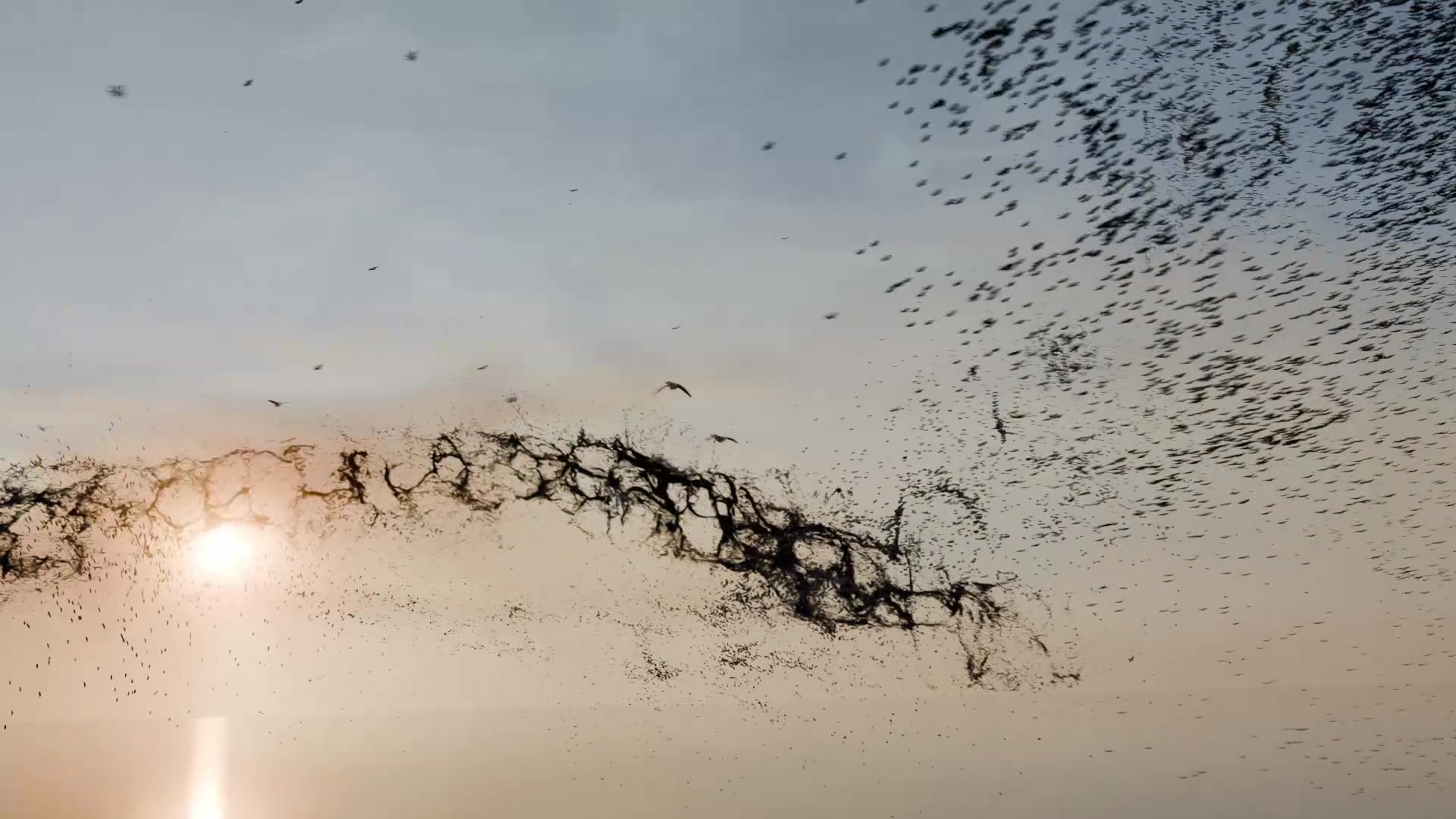
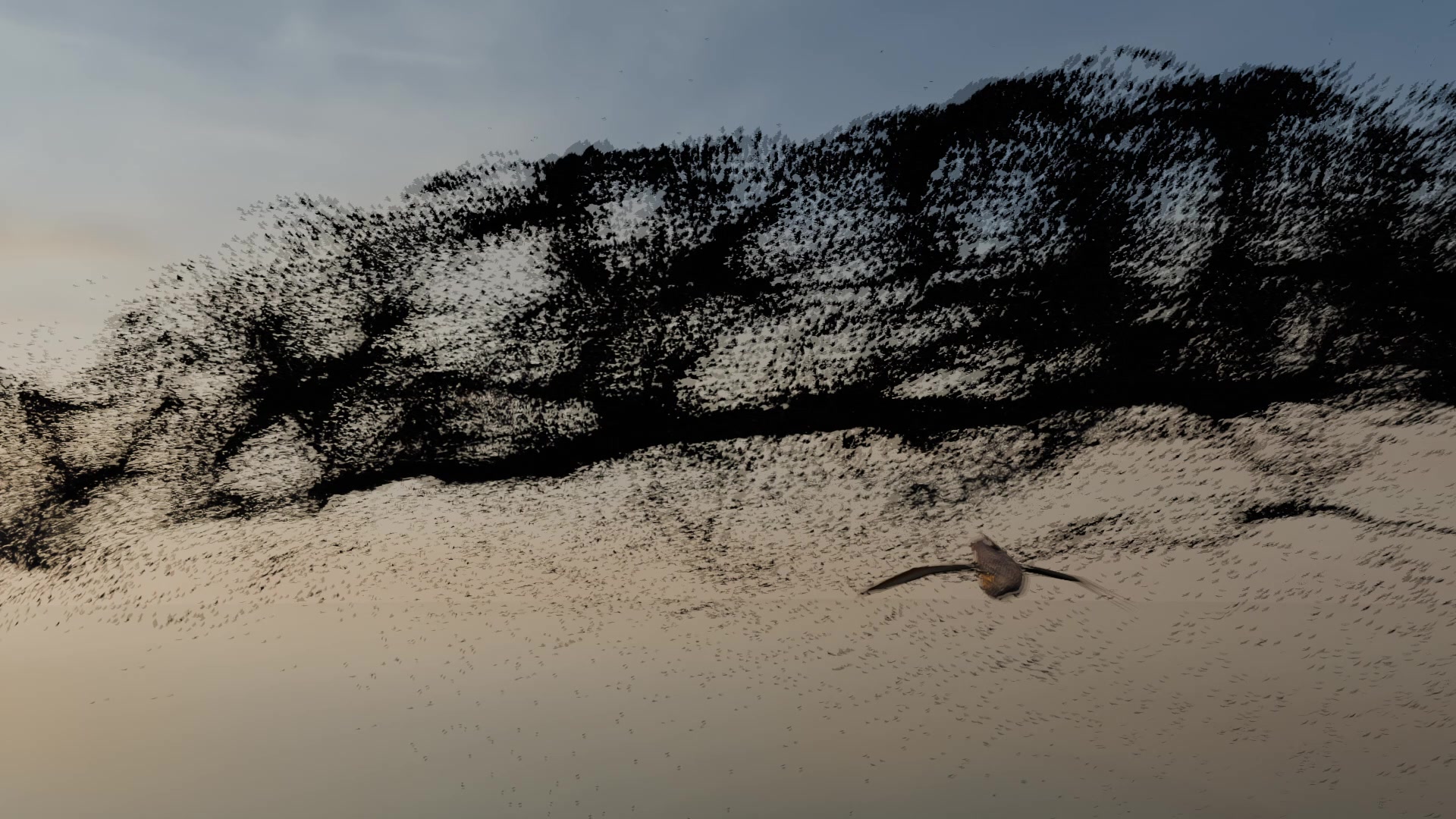
Million birds
 |
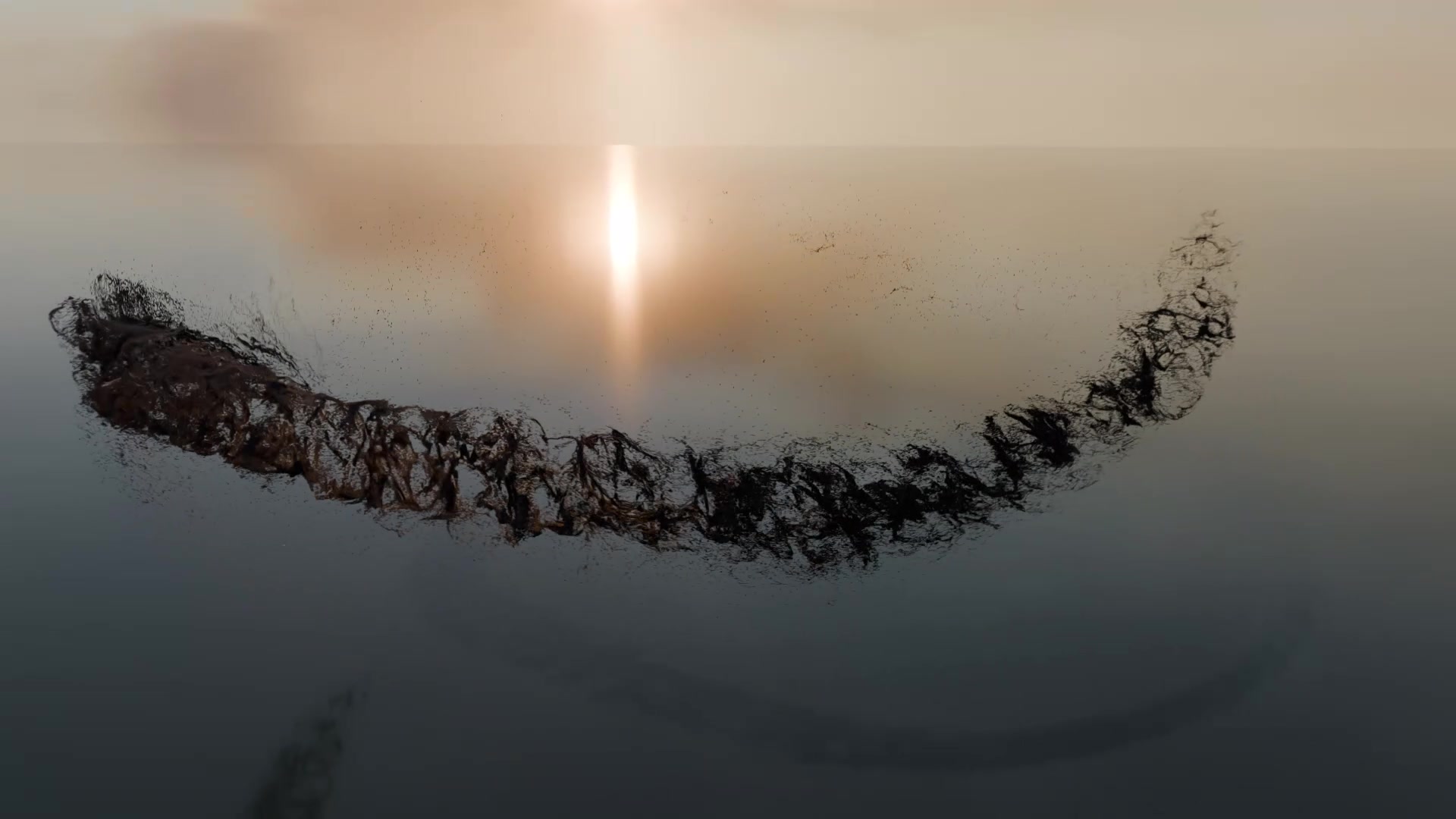 |
A million simulated agents steered by Slang compute programs, with a camera skimming through the flock. The camera and nine foreground birds are authored; the simulated million do not flap. The bird stills above come from the measured four-sample, denoised skim and reveal movies.
Credit: based on "Crow" by Alexei Ostapenko, CC BY 4.0. Changes: sampled flight pose, reduced distant mesh, rescaled, articulated flight wings, extracted wings for the starling body, resized textures. All bird and environment credits.
VFX on real footage
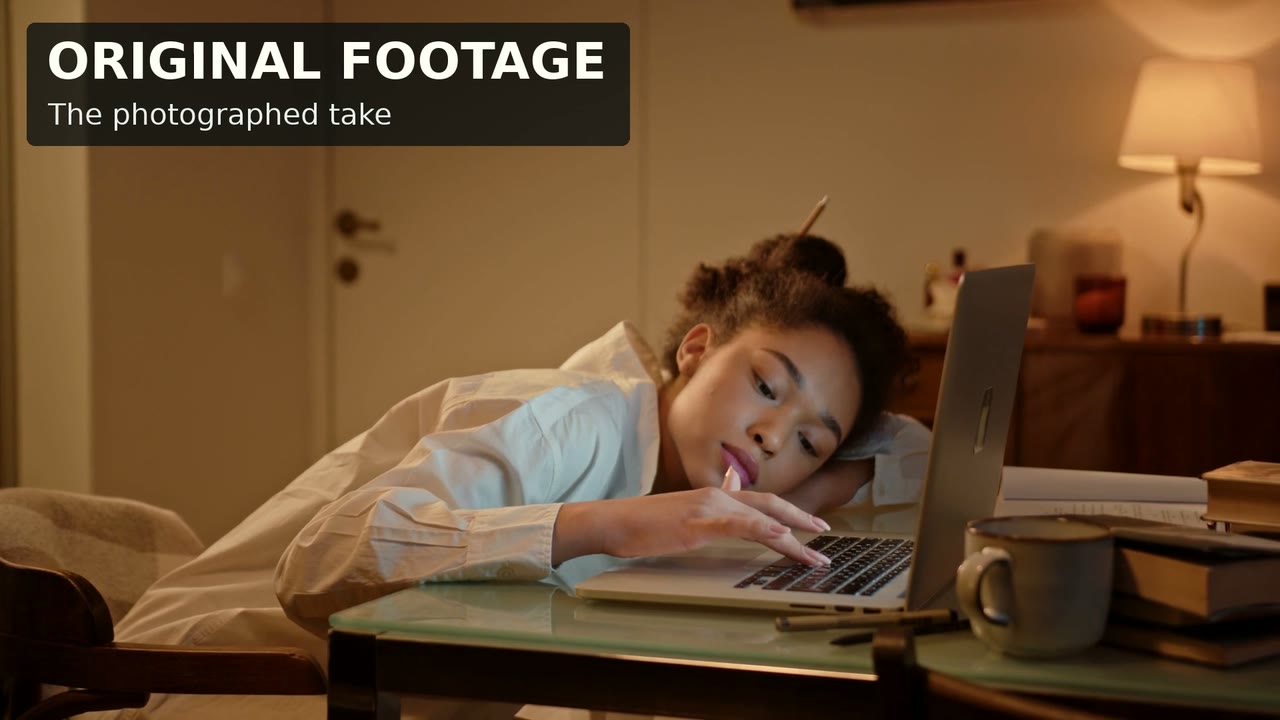
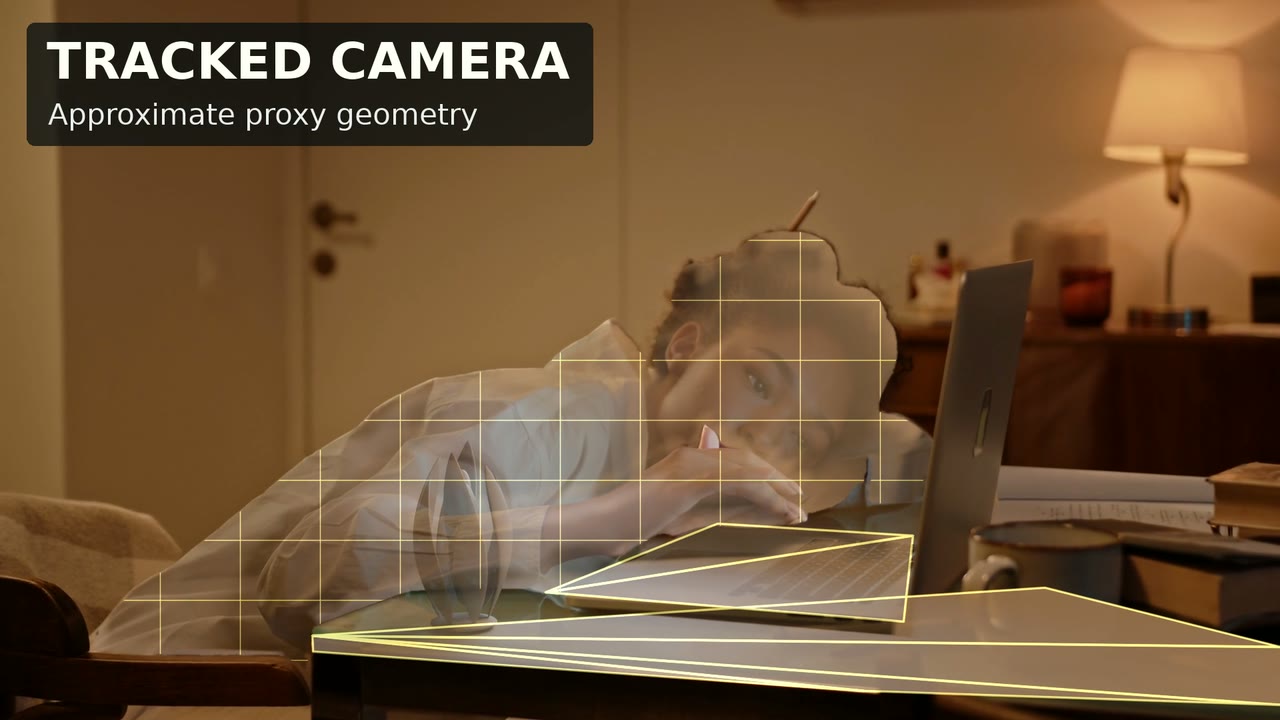
| Original footage | Tracked camera and proxy geometry | Final look |
|---|---|---|
 |
 |
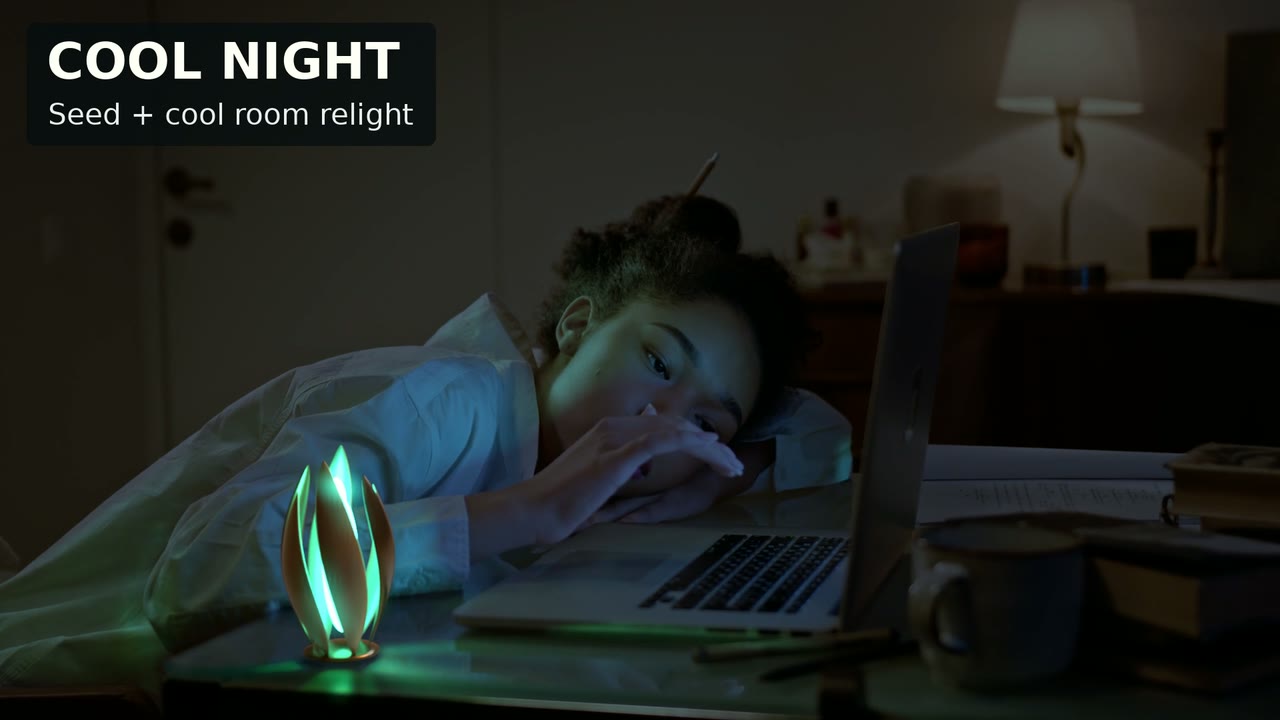 |
A procedural ceramic-and-bronze seed, a tracked camera, occlusion mattes and proxy geometry for relighting. The example teaches the base composite; the final look adds later relighting and wipes. Real footage + rendered 3D; no generative video.
Credit: footage by Ron Lach / Pexels, modified under the Pexels Licence. Original performer; no endorsement implied. Source and preparation.
After Rain
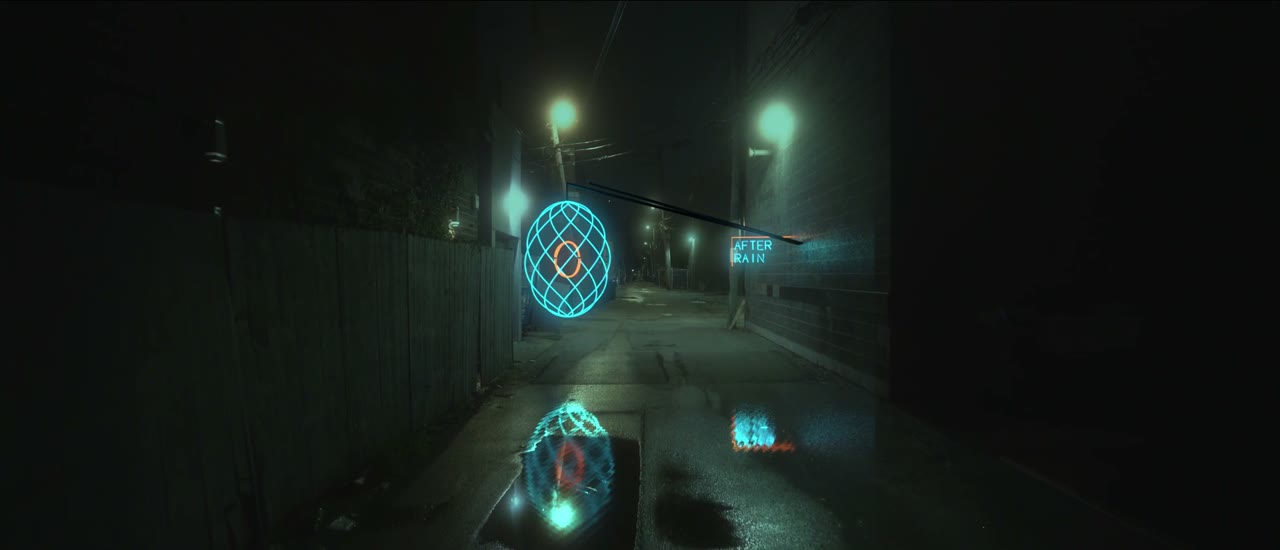
A suspended neon seed and blade sign added to a moving shot of an empty alley at night, with spill on the wall and reflections in the wet street. Real footage + rendered 3D; no generative video.
Credit: footage is "Ally" by Rafael Fernanz / Pexels, modified under the Pexels Licence. Source and preparation.
Black hole
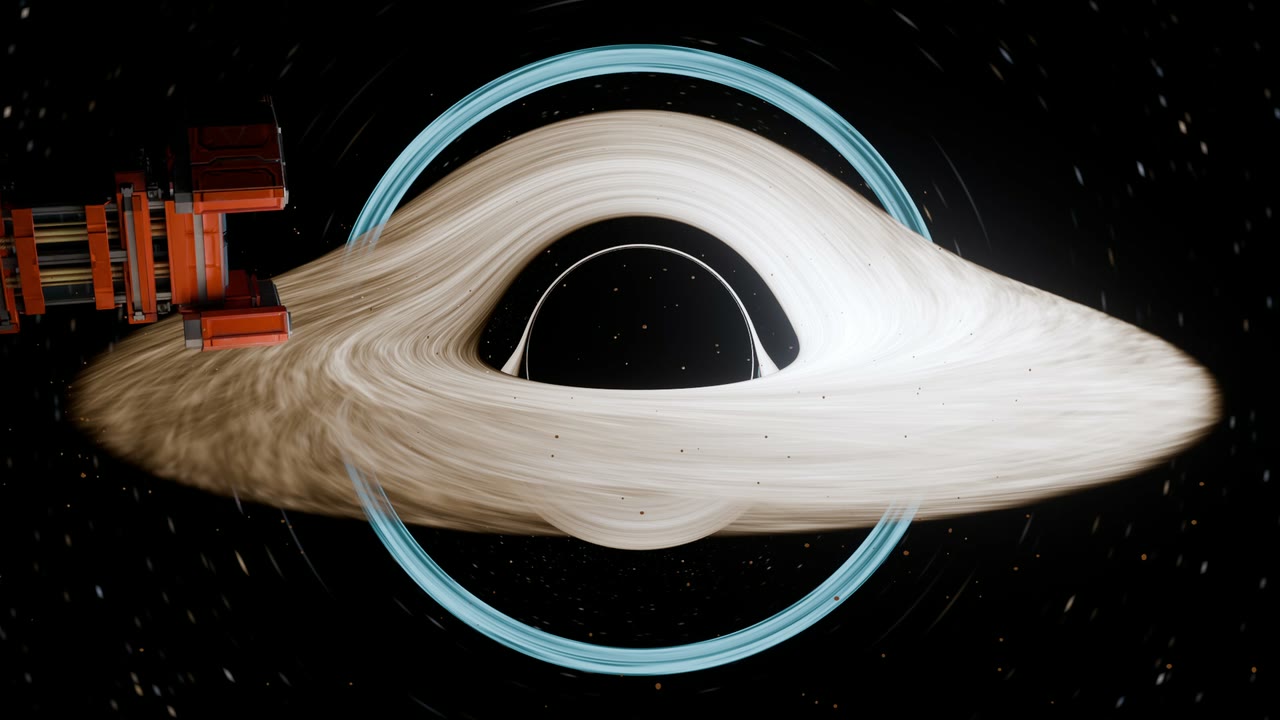
The scene supplies a Schwarzschild light-propagation program through vork's public hook. Curved paths, capture and the disk's appearance live in the example. It is a numerical approximation, not an exact relativistic solver.
Credit: based on "Corinth Cargo Transporter" by Yvo Pors, CC BY 4.0. Changes: decimated geometry, resized, compressed and exposure-adjusted textures, adjusted material roughness and metallic weight, placement and scale. Ship credit.
Cake
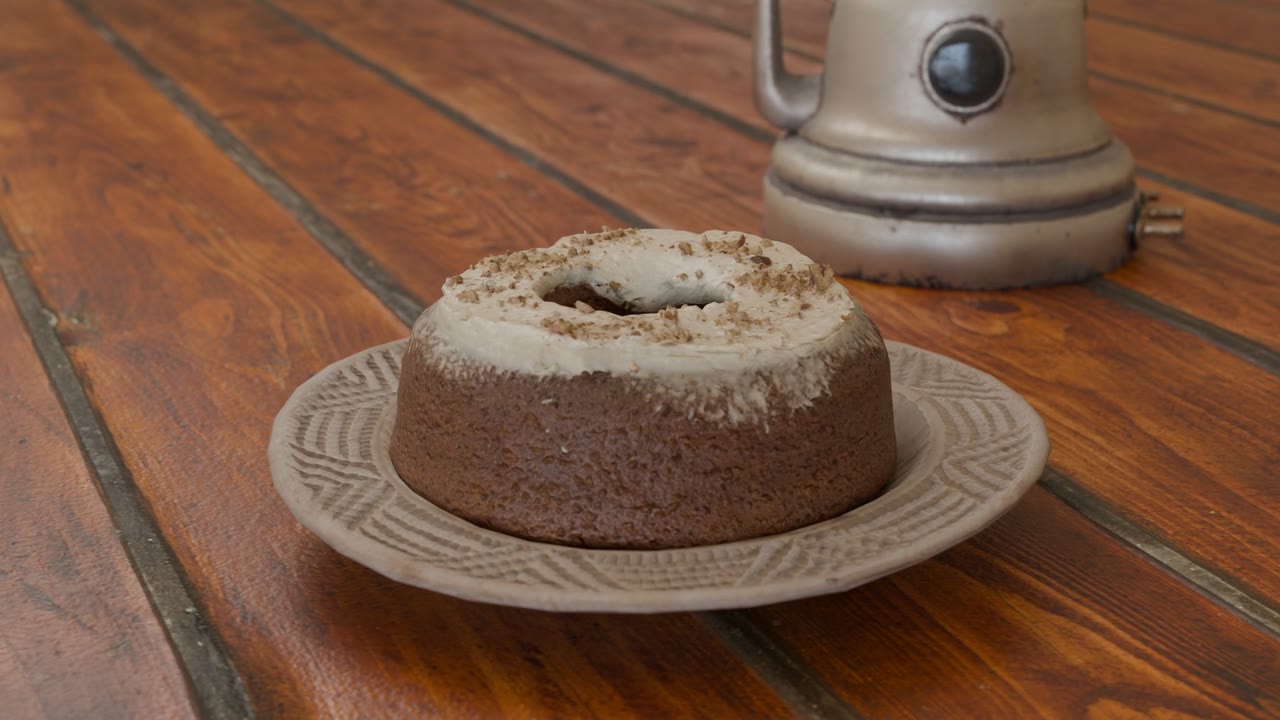
A moving camera, depth of field and daylight on detailed scanned assets. This shot is rendered 3D, using Poly Haven assets; it isn't a photographed take.
Credit: Poly Haven CC0 assets; carrot cake photography by Greg Zaal, processing by James Ray Cock. Full cake credits.
Cozy Kitchen
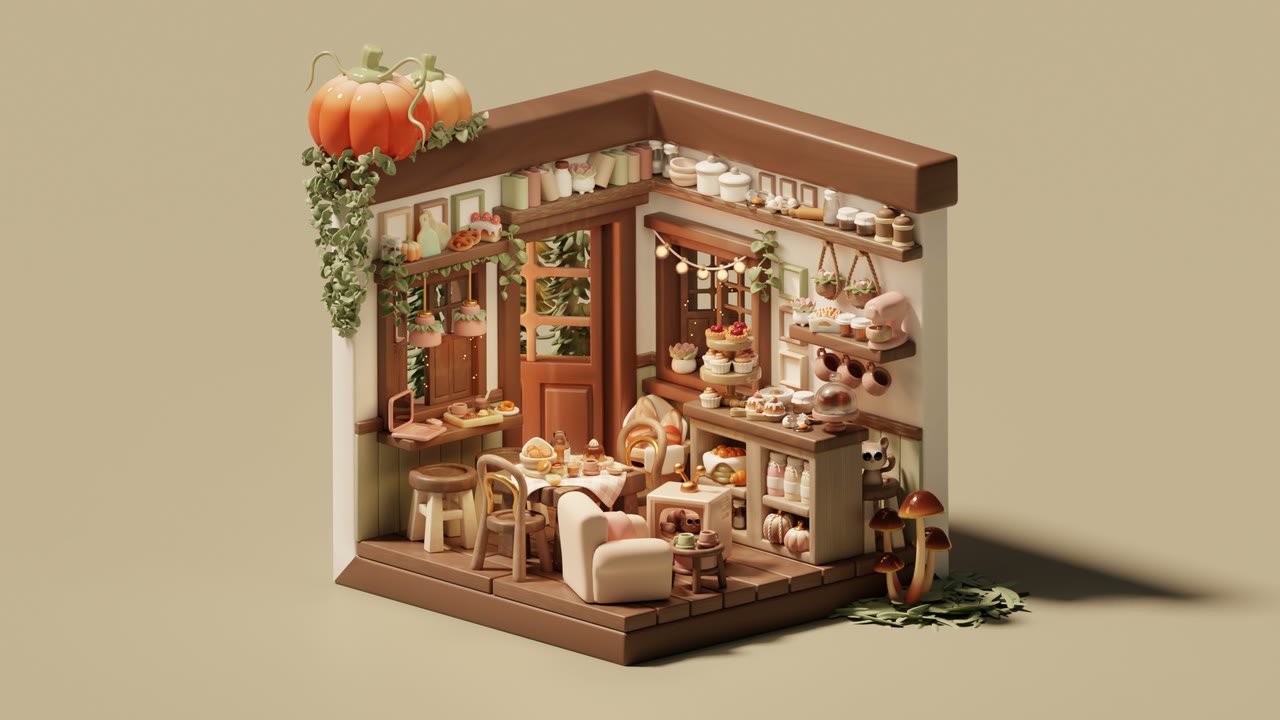
Nicole Morena's Blender 3.5 splash scene, imported into vork. The recipe uses a shared material adaptation and a camera orbit; the pictured render has additional staging and animated lighting.
Credit: Cozy Kitchen by Nicole Morena, source .blend, CC BY-SA (version unspecified by source). Adapted and rendered in vork: camera orbit, animated lighting, widescreen framing, material translation and staging changes. This still and the adapted animation are shared under CC BY-SA. No artist endorsement implied. Changes and share-alike notice.
Water
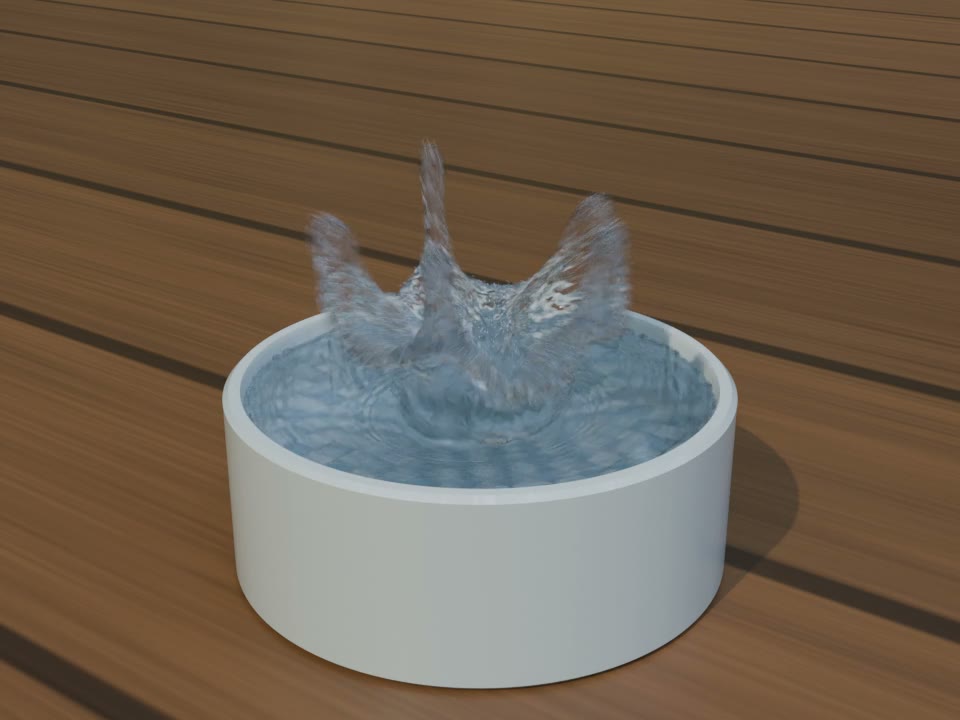
A GPU liquid simulation implemented as Slang compute programs in vork's fluid library. It uses published APIC/FLIP and surface-reconstruction methods, with an authored initial impulse and limited secondary spray.
Give it to an agent
Start with vork help. The getting-started help is about 2,500 tokens,
including a complete first scene. The full help is about 19,400 tokens.
Those are help-text counts, not a claim that every advanced API fits on one page.
Use the prompt above to start.
Python and TypeScript can author ordinary scene JSON through the SDKs. You can
also write JSON directly. Save this as shot.json (also available as
examples/first-scene.json):
{"version":2,"nodes":[
  {"type":"mesh","geometry":{"std":"sphere","radius":1},
   "materials":[{"inputs":{"base_color":[0.12,0.35,0.65],"specular_roughness":0.3}}]},
  {"type":"mesh","translation":[0,-1,0],"geometry":{"std":"grid","size":[10,10]},
   "materials":[{"inputs":{"base_color":[0.35,0.35,0.35]}}]},
  {"type":"light","shape":"rectangle","translation":[-3,5,4],"target":[0,0,0],
   "energy":700,"size":4,"color":[1,0.92,0.8]},
  {"type":"camera","translation":[3,2,5],"target":[0,0,0]}
],"render":{"resolution":[640,480]}}
vork render shot.json --profile std/previs --out preview.png
vork render shot.json --profile std/final --out final.png
vork help sdk
vork help programs --all
Scene content and render quality are separate. Use std/previs to iterate,
std/draft for scene-ray lighting at 4 samples,
std/final for the default delivery profile, and std/path for path transport.
Draft and final use 4 and 8 samples with bundled OIDN denoising by default; use --set denoise=false to turn it
off. --set samples=N overrides the profile budget (1..4096); more samples means cleaner and slower.
Without a fast GPU denoiser (NVIDIA or Apple GPU), draft and final say so and use 16 and 32 samples undenoised;
--set denoise=true runs the slow CPU denoiser anyway.
For a particular field, ask vork help field node.target. Help topics include
exact fields with --all. Images, video and control passes come from the same
scene; see vork help outputs.
Under the hood
Default rendering combines raster visibility with hardware ray-traced lighting; a path tracer is also available. The scene and render plan stay installed. Frames use retained GPU resources, with GPU-to-hardware-video encoding on supported native paths. A portable encoding fallback reads pixels back to the CPU.
Slang programs run on the GPU. Host parsing, planning, animation-track evaluation
and IO still use the CPU. The public program hooks let a scene author change
camera rays, material response, light propagation and film response without
editing the renderer. vork help programs --all describes their scope.
Validation includes furnace tests and analytic oracles, alongside render tests. That is a way to catch errors, not a guarantee that every scene is physically exact.
Speed, with the qualifications
These are timings, not equal-quality speedups. The draft/final results
come from the frozen 81ae2b075 build on an NVIDIA L4: final uses eight samples
and OIDN, draft four and OIDN. All 152 planned jobs were accounted for. The broader
sweep delivered 583 of 585 images; the million-stars stress scene ran out of GPU
memory in both profiles. Visual review found softer edges, grainier defocus,
wall mottling and changed sparse or spectral highlights at these budgets.
Nineteen earlier quality comparisons failed their declared no-worse FLIP
condition; that experiment was not repeated for this build.
vork times below are complete command wall times, including startup, scene loading, output writes and encoding. Setup, shader warmup, provisioning and transfers are excluded. Stills use five warm repetitions, movies three. Driver caches and clocks were not controlled. Blender 5.2.1 times are retained measured baselines, not fresh runs: EEVEE uses different settings, and its movie times exclude startup/loading after a still prime. Both movie timings include encoding. The car is a proxy. Benchmark method and recorded results explain the boundaries and carried-forward numbers.
Default final: stills
1080p PNG, seconds. EEVEE uses 64 samples without denoising; vork uses eight with OIDN. Missing Blender results are unmeasured, not wins.
| Scene input | EEVEE (s) | vork final (s) | Comparison |
|---|---|---|---|
| B-push-in.json | 2.912 | 1.993 | 1.46× faster |
| B-turntable.json | 3.148 | 2.247 | 1.40× faster |
| B-walking.json | 2.612 | 1.890 | 1.38× faster |
| B-interior.json | 2.892 | 1.738 | 1.66× faster |
| B-street.json | unmeasured | 2.043 | unmeasured |
| B-rack-focus.json | unmeasured | 1.787 | unmeasured |
| B-car-pan.json | 2.458 | 1.691 | 1.45× faster |
| B-crowd.json | unmeasured | 2.046 | unmeasured |
| B-night.json | 2.963 | 1.937 | 1.53× faster |
Default final: complete movies
240 frames, 1920×1080, 24 fps. These four public B-scene clips are part of the seven-scene comparison; the full seven measured 1.14-2.32× against EEVEE. Different quality and timing boundaries still apply.
| Scene input | EEVEE (s) | vork final (s) | Comparison |
|---|---|---|---|
| B-blocking.json | 88.072 | 47.082 | 1.87× faster |
| B-interior.json | 107.026 | 59.231 | 1.81× faster |
| B-car-pan.json | 93.489 | 81.740 | 1.14× faster |
| B-night.json | 213.477 | 92.201 | 2.32× faster |
Path tracing: carried-forward measurements
These 1080p still timings were measured in an earlier freeze, not on that build. Adaptive sampling up to 4,096, threshold 0.01, minimum 64; stopping implementations differ. vork is slower in all three named cases.
| Scene input | Cycles (s) | vork path (s) | Comparison |
|---|---|---|---|
| B-car-pan.json | 4.632 | 26.901 | 5.81× slower |
| B-night.json | 16.041 | 31.860 | 1.99× slower |
Setup and first use
On B-blocking.json, the final-profile setup took 250.792 s, the first still after setup 2.298 s, and the warm median 2.094 s. The retained EEVEE cold still was 20.633 s and warm median 2.405 s. Other scenes can still spend substantial time compiling new programs after setup: rack-focus's first final still took 82.057 s, versus its 1.787 s warm median.
Previews: carried-forward measurements
These are prior-freeze std/previs results, not measured on 81ae2b075. Previews
use different lighting and shadows; these are not final-quality comparisons.
Complete 240-frame, 1080p24 movies, median of three warm commands:
| Scene input | Preview movie (s) |
|---|---|
| B-blocking.json | 3.496 |
| B-interior.json | 4.565 |
| B-car-pan.json | 6.391 |
| B-night.json | 5.864 |
| B-crowd.json | 4.097 |
| B-push-in.json | 3.705 |
| B-rack-focus.json | 3.902 |
| B-street.json | 3.964 |
| B-turntable.json | 4.612 |
| B-walking.json | 2.190 |
Across the seven simple preview clips in that prior freeze, EEVEE/vork was 14.63-36.40× and Workbench/vork 3.99-11.24×. Those ranges use retained Blender baselines and different rendering settings and timing boundaries. They do not describe default final rendering.
Million birds: measured movies, projected Blender times
The bird inputs include the compute programs and
all three cameras. These std/draft movies use four samples and OIDN at
1080p24; each number is the median of three full commands. The first full movie
is included in that three-command median, after a separate 320×180 still warmup.
Setup and warmup are excluded from the movie times below.
| Camera input | Frames | vork movie (s) | Setup (s) | Warmup (s) | EEVEE 16-sample projection (s), both retained runs |
|---|---|---|---|---|---|
| skim.json.in | 192 | 96.942 | 243.809 | 166.030 | 1511.108 / 1817.625 |
| dive.json.in | 240 | 124.718 | 167.376 | 112.994 | 2517.891 / 2417.831 |
| reveal.json.in | 288 | 153.411 | 163.218 | 113.910 | 2916.237 / 2889.758 |
The EEVEE values extrapolate eight warm frames; they are projections, not measured movies. They omit simulation, startup and video encoding, and receive the finished flock as geometry. They use 16 samples against vork's four, so this table is not a like-for-like speed comparison.
The matching four-sample EEVEE projection exists only for skim: 773.7-1,082.5 s across the retained runs, with ray tracing on or off, about 8-11× the 96.9 s vork movie. Dive and reveal have no four-sample EEVEE projection. Quality, material translation and motion differ.
Rerun
python3 benchmarks/fetch.py
python3 benchmarks/run.py --vork vork --out /tmp/vork-benchmark
python3 integrations/blender/benchmark.py --blender blender --out /tmp/blender-benchmark
These recipes use the current shipped profiles and their own documented timing boundaries; they are not the exact harness behind the numbers above. Compare results only with recorded builds, settings and cache state. See the method.
Research-preview limits
Fog and participating volumes are ignored with warnings in this release. Large scenes
and dense transparency can fail, including on Mac; reducing image resolution
alone does not necessarily fix them. Some heavy interiors work with std/path
when the default hybrid profile fails. First use of a new program can involve
substantial compilation, even after vork setup.
At four/eight samples, fine facades and hair can lose detail, defocus can show
stepped or grainy edges, and sparse sparks or spectral highlights can change
brightness and colour. Try --set samples=32 for these shots; more samples cost
more time. The frozen sweep retained a million-stars allocation failure in both
profiles. Mac reliability was not revalidated in that Linux run.
The water quickstart is a closed-shutter diagnostic. The full motion-blurred scene is much more expensive. It is a uniform-grid experiment with finite particle budgets, unresolved thin features and no two-way rigid-body coupling. It is not a general replacement for a mature simulation package. The VFX camera solve and single-view relief are estimates, with limitations documented beside the example.
The next direction is fog and volumes, broader simulation, and better reliability
and performance on demanding scenes. There is no release date promised for those
features. Read vork help limits before committing to a shot.
Install
Binary packages are available from GitHub Releases once a release is published. Keep the entire install folder together: Slang, OIDN, libraries, examples, SDKs and licence texts are runtime companions to the binary.
- Linux: x64, glibc 2.35+ (Ubuntu 22.04+), a recent NVIDIA GPU and its hardware-ray-tracing Vulkan driver.
- Windows: x64 Windows 10/11, a recent NVIDIA GPU and its hardware-ray-tracing Vulkan driver.
- Mac: Apple Silicon with Metal. Intel Macs are unsupported. H.264 uses system VideoToolbox.
Linux
Install the NVIDIA driver for your GPU first. On Ubuntu 22.04+:
sudo apt-get update
sudo apt-get install -y ca-certificates curl tar libvulkan1 libgomp1 ffmpeg
curl -fL https://github.com/voyager-so/vork/releases/latest/download/install.sh -o /tmp/vork-install.sh
sh /tmp/vork-install.sh
export PATH="$HOME/.local/bin:$PATH"
vork --version
vork help
The installer verifies SHA256SUMS, installs under $HOME/.local/lib/vork, links
$HOME/.local/bin/vork, runs vork setup, and adds the PATH line to your shell's
startup files, including the one login shells read. The export above covers the
current shell, and any shell that reads no startup file, such as plain bash -c.
VORK_NO_MODIFY_PATH=1 or a custom PREFIX leaves startup files alone. Linux MP4 needs ffmpeg even when NVENC encodes frames, because ffmpeg
muxes the stream. Native NVENC is attempted on NVIDIA; otherwise encoding uses a
readback fallback. Older GPUs and software Vulkan adapters are unsupported.
Mac
In Terminal:
curl -fL https://github.com/voyager-so/vork/releases/latest/download/install.sh -o /tmp/vork-install.sh
sh /tmp/vork-install.sh
export PATH="$HOME/.local/bin:$PATH"
vork --version
vork help
The same installer verifies and installs the complete Apple Silicon archive under
$HOME/.local/lib/vork, runs setup, and adds the PATH line to your shell's startup
files (.zshenv for zsh). Mac packages are signed with Apple Developer ID and notarised.
MP4 uses VideoToolbox without ffmpeg. Install ffmpeg only for video decoding or
encoding fallbacks, including MOV/ProRes fallback (brew install ffmpeg).
Windows
Install the NVIDIA driver for your GPU and ffmpeg (winget install Gyan.FFmpeg).
Without winget (including Windows Server 2022), download ffmpeg-release-essentials.zip from
Gyan, extract it, and add its bin folder
to your user PATH.
Open a new PowerShell window so ffmpeg is on PATH, then:
$installer = Join-Path $env:TEMP 'vork-install.ps1'
Invoke-WebRequest -UseBasicParsing https://github.com/voyager-so/vork/releases/latest/download/install.ps1 -OutFile $installer
powershell -NoProfile -ExecutionPolicy Bypass -File $installer
$env:Path = "$env:LOCALAPPDATA\Programs\vork;$env:Path"
vork --version
vork help
The installer verifies SHA256SUMS, installs under %LOCALAPPDATA%\Programs\vork,
runs vork setup, and adds that folder to your user PATH so new windows find vork;
the $env:Path line above covers the current one. VORK_NO_MODIFY_PATH=1 or a custom
PREFIX leaves it alone.
Windows MP4/MOV needs ffmpeg; MP4 uses its NVENC encoder when compatible, otherwise
libx264. FFmpeg 9.0.2 requires NVENC API 13.1 (NVIDIA driver 610+) for
hardware encoding; older drivers fall back to libx264. The cache is under %LOCALAPPDATA%\vork.
Manual archive install (Windows)
Download the Windows .zip and SHA256SUMS from the release page. Compare
Get-FileHash .\vork-*-windows-x64.zip -Algorithm SHA256 with its entry in
SHA256SUMS, then unzip the entire contents into %LOCALAPPDATA%\Programs\vork.
Add that folder to your user PATH, open a new PowerShell window, and run
vork setup. It prints its report right away, then compiles for up to about 3 minutes
with no output until Shader setup completed; that isn't a hang. Keep all bundled
runtime companions beside the executable.
install.sh downloads the release from GitHub; to install an archive you already
have without downloading again, use the manual steps below.
Manual archive install (Linux or Mac)
Download your platform's .tar.gz and SHA256SUMS from the release page into a
new empty folder. In that folder, verify and install the entire archive:
set -- vork-*.tar.gz
test "$#" -eq 1 || exit 1
archive=$1
awk -v name="$archive" '$2 == name || $2 == "*" name' SHA256SUMS > selected.sha256
test "$(wc -l < selected.sha256 | tr -d ' ')" = 1 || exit 1
if command -v sha256sum >/dev/null 2>&1; then
  sha256sum -c selected.sha256 || exit 1
else
  shasum -a 256 -c selected.sha256 || exit 1
fi
PREFIX="$HOME/.local"
mkdir tree
tar -xzf "$archive" -C tree
mkdir -p "$PREFIX/bin" "$PREFIX/lib/vork"
cp -R tree/. "$PREFIX/lib/vork/"
ln -sf "$PREFIX/lib/vork/vork" "$PREFIX/bin/vork"
export PATH="$PREFIX/bin:$PATH"
vork --version
vork setup
vork setup prints its report right away, then compiles for up to about 3 minutes
with no output until Shader setup completed; that isn't a hang.
First render and SDKs
Save the first scene above as shot.json, then:
vork render shot.json --profile std/previs --out preview.png
vork render shot.json --profile std/final --out final.png
vork render shot.json --profile std/final --frame-start 0 --frame-end 47 --out clip.mp4
vork help animation
vork help outputs
The first render of a scene with new programs can compile for several minutes and prints nothing while it does (about 3-4 minutes with custom programs on NVIDIA in our tests, under 20 seconds on a Mac). It isn't hung, so don't kill it or give it a short timeout. Later renders of the same programs take seconds.
Frame ranges include both endpoints: 0 through 47 writes 48 frames. The simple scene
is static; animation tracks make a moving clip. To try glTF import, save a model
as model.glb beside this scene as model.json:
{"version":2,"nodes":[
  {"type":"asset","file":"model.glb"},
  {"type":"light","shape":"rectangle","translation":[-3,5,4],"target":[0,0,0],"energy":700,"size":4},
  {"type":"camera","translation":[3,2,5],"target":[0,0,0]}
],"render":{"resolution":[640,480]}}
vork render model.json --profile std/final --out model.png
Adjust the camera and light for your model's scale. glTF files can refer to textures and buffers beside them; keep those files together.
Run vork setup again after upgrading or changing GPU drivers. It prints its report
right away, then compiles for up to about 3 minutes with no output until
Shader setup completed; that isn't a hang. Vulkan persists
its pipeline cache when supported; Metal warms the system driver cache. New scene
programs can still require compilation on their first render. VORK_CACHE_DIR
overrides the cache location.
The archive includes Python 3.11+ and TypeScript SDK source/packages. Install the Python SDK into your authoring virtual environment, and the TypeScript SDK into your project (Node 22.18+ and npm):
python3 -m pip install "$HOME/.local/lib/vork/python"
npm install "$HOME/.local/lib/vork/sdk"
The SDKs install from your vork folder, not from npm or PyPI. The npm package named
vork is unrelated, and the PyPI package only points back here.
On Windows use py -m pip install "$env:LOCALAPPDATA\Programs\vork\python" and
npm install "$env:LOCALAPPDATA\Programs\vork\sdk". Import as vork in Python or
@usevoyager/vork in TypeScript; keep the native executable on PATH.
For source builds, see vork help build.
examples/black-hole/README.md
Authored Schwarzschild propagation
From the checkout root, generate the disk and debris buffers, then try a small still:
python3 examples/black-hole/generate.py
vork render examples/black-hole/scene.json --profile std/path --at 6 --set resolution=320x180 --out /tmp/black-hole.png
vork render examples/black-hole/scene.json --profile std/path --out /tmp/black-hole.mp4
The shot is twelve seconds at 1080p; std/path is required. The generated disk
and debris buffers stay outside Git. For source builds, retain the pinned
VORK_SLANGC environment described in the build instructions.
propagation.slang owns the Schwarzschild optical metric in isotropic
coordinates (G=c=M=1), polygonal integration, capture and bolometric redshift.
The renderer traces ordinary straight segments. The disk, moon, ship and dust
are geometry, and the sky uses the escaping direction.
This is a nonrotating metric and artistic disk, without retarded animation or spectral frequency shifting. Step size is an authored accuracy/cost choice. Launch-direction light sampling can be noisy for small emitters.
Ship credit
Corinth Cargo Transporter, by Yvo Pors, licensed CC BY 4.0.
Original model,
license.
The decimated glTF and resized textures are under assets/corinth, with the
original license and a description of the modifications. The complete ship is
about 2.3 MB. This scene changes its roughness, scale, orientation and placement.
examples/cake/CREDITS.md
Cake credits
Poly Haven CC0 assets: carrot cake, carved wooden plate, vintage electric kettle, wood floor deck and Lebombo environment. Carrot cake photography by Greg Zaal, processing by James Ray Cock. Scene composition, camera animation and render in vork. The shot is rendered 3D; the source assets include photography. Downloads and SHA-256 hashes are in assets.lock.json. The original assets are unchanged.
examples/kitchen/CREDITS.md
Cozy Kitchen
“Cozy Kitchen” (Blender 3.5 splash scene) by Nicole Morena, source .blend, CC BY-SA (version unspecified by source). No artist endorsement implied. The source scene and adaptations, including rendered images and animations, retain CC BY-SA; the example code's licence does not replace the asset licence.
This preparation changes the camera to a seven-second orbit, the framing to
widescreen, and exports geometry through the Blender bridge. It reuses a
shared procedural material program, source colour palettes and wood
colour-chain restoration. Noise differs and some bump/normal detail and complex
closure mixtures are omitted. Retain these changes and the export report with
distribution. The look/ presets, palettes and material program form part of this
CC BY-SA scene adaptation, independently of the repository's code licence.
The animation behind the README image also used animated lighting, staging changes, a larger backdrop, reduced visibility of offstage plants and stand/trunk meshes, and a smaller fill-light radius. Its material translation omitted some bump detail and used different noise. Those further staging and animated-light changes are not reproduced by this recipe. That adapted animation is shared under CC BY-SA.
examples/first-scene.json
{"version":2,"nodes":[
  {"type":"mesh","geometry":{"std":"sphere","radius":1},
   "materials":[{"inputs":{"base_color":[0.12,0.35,0.65],"specular_roughness":0.3}}]},
  {"type":"mesh","translation":[0,-1,0],"geometry":{"std":"grid","size":[10,10]},
   "materials":[{"inputs":{"base_color":[0.35,0.35,0.35]}}]},
  {"type":"light","shape":"rectangle","translation":[-3,5,4],"target":[0,0,0],
   "energy":700,"size":4,"color":[1,0.92,0.8]},
  {"type":"camera","translation":[3,2,5],"target":[0,0,0]}
],"render":{"resolution":[640,480]}}
Discussion
Questions & comments · 0
Sign In Sign in to leave a comment.