
Separate audio tracks into isolated instrument stems locally
Free local stem separation: splits audio into up to six stems with Demucs and mixes them in a DAW-style multitrack editor, no upload.
0.20.0Add to Favorites
Why it matters
Split any audio file (MP3, WAV, FLAC, OGG, MP4, M4A) or YouTube URL into up to six isolated stems-vocals, drums, bass, guitar, piano, and other-entirely on your local machine without uploads, accounts, or subscriptions.
Outcomes
What it gets done
Import audio from local files or YouTube URLs and process them into separate instrument tracks
Preview and mix stems in a DAW-style waveform editor with mute, solo, volume, and looping controls
Select specific stems to keep and automatically generate a complementary backing track of the remainder
Export individual stems or a custom mix of selected tracks as downloadable WAV files
Source
Get it from source
Spark does not host a copy of it.
Open sourceReports
Agent outcome reports
No reports yet
Overview
StemDeck is a free, local stem separation tool that splits audio into up to six stems using Demucs and plays them back in a DAW-style multitrack mixer with looping, VU meters and BPM/key analysis. Everything runs on the user's own machine with no account, upload or subscription. Use it to separate owned or YouTube audio into stems locally and privately for personal study, remixing or karaoke, without a cloud stem-splitting subscription.
What it does
StemDeck is free, local stem separation with no account, no upload and no subscription. Dropping in an MP3, WAV, FLAC, OGG/Opus, MP4 or M4A file, or pasting a YouTube URL, splits the audio into up to six stems (vocals, drums, bass, guitar, piano, other) via Demucs htdemucs_6s, with auto-detection of the best Torch device (CUDA on NVIDIA, MPS on Apple Silicon, CPU fallback). Everything runs locally; StemDeck does not store, cache or redistribute downloaded content, and its main job is processing audio the user already owns - YouTube support is a convenience, not the point of the tool.
Its DAW-style waveform editor renders min/max sample waveforms across all stems with shared normalization, zoom in/out/Fit, ruler-drag loop regions, a gold playhead overlay, and stem-aligned lanes. Clicking stem chips selects which stems to keep, snapping to "only this one" from an all-selected state; when a subset is chosen, a seventh "Original" lane holds the complement (the full song minus the selection) for A/B reference without doubling files. A per-stem mixer offers volume fader, mute, solo and a "monitor" (solo-only) mode with live post-gain RMS VU meters (peak hold, slow falloff) via Web Audio analysers, and a single mix.wav of the selected stems, summed via ffmpeg amix, can be downloaded. Song analysis reports BPM (librosa beat tracking), key, scale and confidence (Albrecht-Shanahan profiles), integrated loudness (LUFS, BS.1770) and sample peak in dBFS. Jobs are cancellable mid-pipeline, terminating the active subprocess and deleting the partial job directory immediately. A library panel organizes tracks into folders with drag-and-drop, search and trash.
StemDeck is free with no account, and audio never leaves the machine: it stays under the user's control and can be deleted at any time. Internet is needed only for YouTube download and the first fetch of the ~170MB Demucs model, which is cached afterward. The stem model is open-source Demucs htdemucs_6s from Meta AI, and StemDeck itself is open source, forkable and self-hostable.
Desktop installers ship for macOS (Apple Silicon MPS or Intel CPU-only DMGs) and Windows (CPU-only or NVIDIA CUDA zips), downloading their Python runtime, FFmpeg and the Demucs model on first launch and starting in seconds afterward, with all data self-contained next to the executable on Windows. It also runs as a self-hosted web server (./run.sh setup && ./run.sh start on macOS/Linux, or a PowerShell equivalent on Windows), via Docker (ghcr.io/stemdeckapp/stemdeck, with edge/latest/pinned-version tags and optional NVIDIA runtime passthrough on Linux), or as an Unraid Community Application.
Serving StemDeck to other devices on the LAN requires HTTPS, not by policy but because the pitch-transpose feature is built on AudioWorklet, which browsers only expose in a secure context (https:// or localhost); a client reaching StemDeck over plain http://192.168.x.x gets working playback but a transpose control that silently cannot function, and there is no fallback since a ScriptProcessorNode alternative measured about 5% of audio dropped. A plaintext non-local request is refused with an explanatory 403 rather than served half-broken. Three ways to get a secure context: a reverse proxy that sets X-Forwarded-Proto, StemDeck's own STEMDECK_SSL_CERT/STEMDECK_SSL_KEY served directly by uvicorn, or a private overlay network like Tailscale. The desktop app runs two listeners simultaneously - plain HTTP on 127.0.0.1 for its own window, and a self-signed HTTPS listener on the LAN (port 8443 by default) for phones and other devices, generated locally and regenerated as the machine's addresses change.
Its REST/SSE API covers job creation from a URL or uploaded file, job listing and state (including an SSE event stream), cancellation, per-stem WAV or transcoded MP3 streaming, muxing the current mix back into the source video, and job deletion. Configuration is via environment variables covering the Torch device, model name, job/cache/download/model/log directories, max audio duration, job TTL, pending-job cap, and per-stage subprocess timeouts.
When to use - and when NOT to
Use it to separate owned audio (or YouTube audio one has the right to process) into stems locally, privately and for free, with a multitrack mixer for playback and mixing. Prefer a commercial cloud service instead when speed regardless of hardware, higher stem-model quality, more than six stems (cloud services offer up to ten), a mobile app, batch processing (StemDeck runs one job at a time), a production-grade UI (StemDeck's is functional and hobby-grade), or extra musician tooling (chord detection, lyrics, click track, BPM tap) matters more than running locally for free.
Integrations
It uses Demucs (htdemucs_6s) for stem separation, optionally UVR-MDX-NET Karaoke 2 via audio-separator for lead/backing vocal splitting, yt-dlp for YouTube audio, FFmpeg for transcoding and mixing, librosa for BPM/key detection, and pyloudnorm for loudness measurement, packaged as a Tauri desktop app or a self-hosted FastAPI server/Docker image. Building the web server from source needs Python 3.12+, ffmpeg on PATH and uv, plus about 170MB of free disk for the Demucs model, which downloads automatically on first run.
YouTube support is a convenience built on yt-dlp, and automated downloading may violate YouTube's Terms of Service; the user is responsible for their right to process any audio they submit and for the licenses of the underlying tools (yt-dlp, Demucs, FFmpeg, PyTorch and others). StemDeck itself does not store, cache or redistribute any audio.
StemDeck is Apache 2.0 licensed. FFmpeg is a GPL build; StemDeck downloads it and runs it as a separate executable, so it does not change StemDeck's own license, and THIRD_PARTY_NOTICES.txt carries the written offer of source for the exact build each platform receives. Every download also ships a licenses/ folder whose INDEX.txt lists each packaged Python dependency with its version and license.
Source README












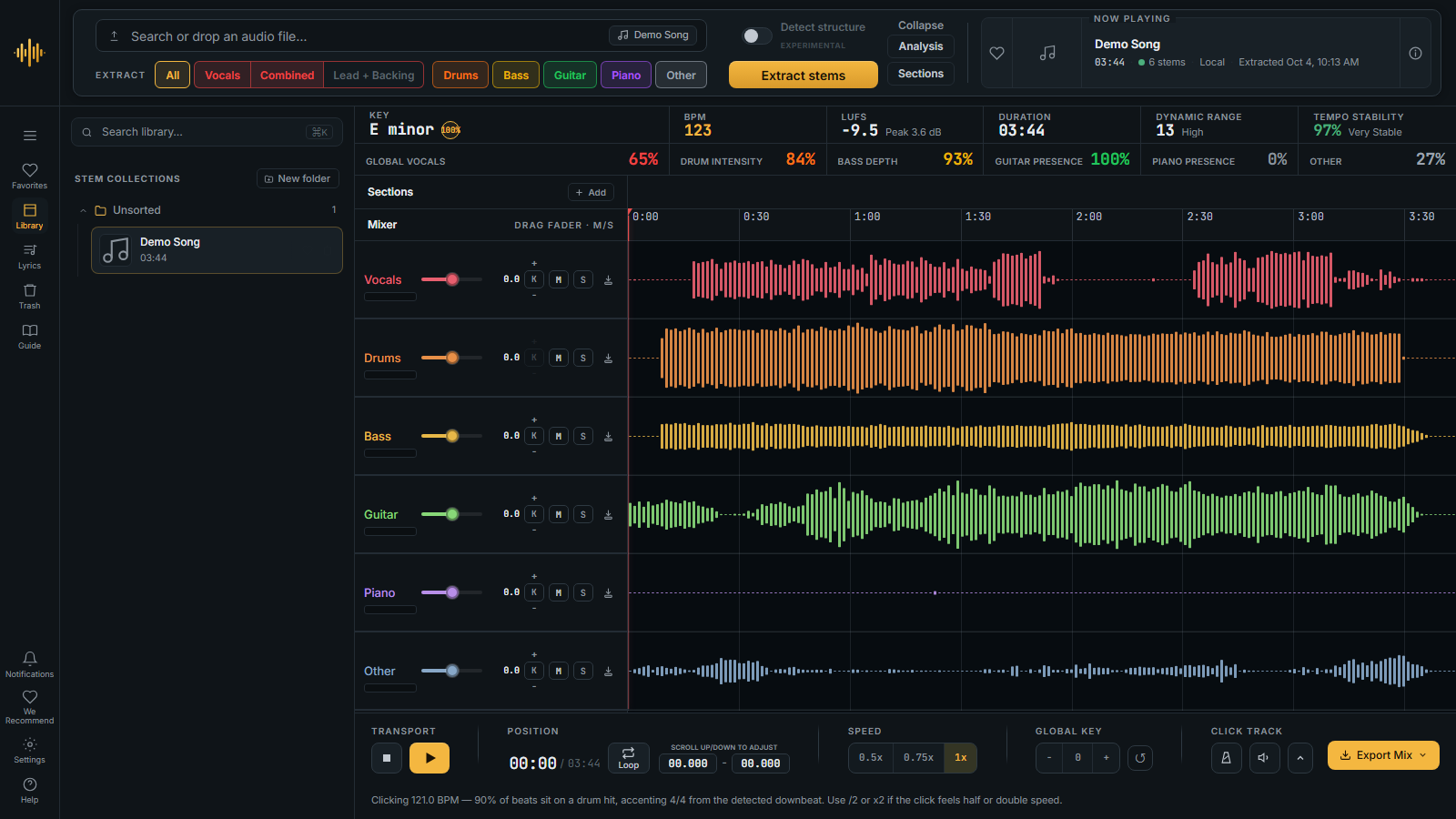
StemDeck splits a song into up to six stems, vocals, drums, bass, guitar, piano and other, and opens them in a studio where you can mute, solo, slow down, loop, change the key and play along with a click. Drop in an audio file or paste a YouTube or SoundCloud link. Separation runs on your own machine, and StemDeck does not upload your audio.
A separation tool, not a downloader. StemDeck is for processing audio you have the right to use. What you import, and the stems made from it, are saved in your library folder on the machine that runs StemDeck; StemDeck does not upload or share them. See the Disclaimer.
 Download
Each link downloads the latest release. Release notes · Every version
| Platform | NVIDIA or Apple Silicon | Everything else |
|---|---|---|
 Windows |
NVIDIA GPU | No NVIDIA GPU |
 macOS |
Apple Silicon (M1 and later) | Intel Mac |
 Linux |
NVIDIA GPU | No NVIDIA GPU |
 Docker / Unraid:
ghcr.io/stemdeckapp/stemdeck:latest. It runs on the CPU as it is; add --runtime=nvidia to use an NVIDIA GPU. On Unraid, search "StemDeck" in Apps.
- Guide. A new button in the left rail turns the studio into its own manual: point at anything to see what it does, and every number in the song facts says what it measures.
- The Trash. A count on its icon, hold a song for a second to bring it back, and pick several at once with Ctrl or Shift.
- Deleting a song while it extracts stops it, and keeps its files until you empty the Trash.
- Imports stay in the background: the song you have open stays open.
- We Recommend welcomes Adrianna Claro, and cards can now link to Spotify and Apple Music.
- Portable Windows installs in a folder they cannot write to now say so clearly.
All of it, with credits to the people who reported each problem, is in the release notes.
Windows and Linux. Unzip, then run StemDeck.exe (Windows) or StemDeck (Linux). No installer and nothing else to install. Put the folder somewhere you can write to, such as C:\StemDeck: a portable StemDeck keeps its runtime, models and settings in a data folder beside it, so it cannot run from Program Files. The first launch downloads FFmpeg and the separation model, and on an NVIDIA card sets up GPU support; later launches start in seconds.
macOS. Open the DMG and drag StemDeck to Applications. StemDeck is not code-signed yet, so clear the quarantine flag once, or macOS will say the app is damaged:
xattr -dr com.apple.quarantine /Applications/StemDeck.app
The first launch downloads the runtime and the model. Apple Silicon separates on its built-in GPU.
Docker and Unraid. See Build from source for the docker run line, GPU passthrough and the Unraid volume mapping.
Updates. The desktop app tells you when a new version is out and installs it for you.
 What you can do
 Split any song
- Up to six stems with Meta's open Demucs model: vocals, drums, bass, guitar, piano and other.
- Lead and backing vocals as separate lanes, on demand (not on Intel Macs).
- Files or links: MP3, WAV, FLAC, OGG, Opus, M4A and MP4, or a YouTube or SoundCloud link.
- Search without leaving the app: YouTube songs and playlists, and SoundCloud, with a preview.
- Pick only what you need before you extract.
- Whole YouTube playlists go into an import queue and run one after another.
 Practice with it
- Mute or solo any part, and set each one's volume.
- Slow it down to half speed, or anywhere from 0.50x to 0.99x, without changing the pitch.
- Loop the hard part, by dragging across the waveform.
- Change the key, of the whole song or of one part.
- Play with a click that follows the song, with a count-in, any beats per bar and groupings such as 3+2+2.
- Fix the beat grid when the click drifts: move, add or remove beats and mark the bar lines.
 Know the song
- Key, tempo and loudness, found for you.
- Sections such as verse, chorus and solo, detected for you (experimental) or marked by hand.
- Synced lyrics from LRCLIB, with timing you can fix by tapping along. With an NVIDIA GPU, StemDeck can also write them down from the vocals when none are found.
- Song and artist details from MusicBrainz, Wikipedia and, optionally, Discogs.
 Keep and share
- Export what you hear as one file, every part as a
.zip, only the looped part, or, when the song came with a video, a video with the original picture. Add the click or a count-in if you like. - Drag a stem or a loop from the desktop app straight into your other music software.
- A library with colored folders, tags you can search by (
#tag), favorites, and a Trash that only deletes when you empty it.
 It explains itself
Click Guide in the left rail and point at anything. Every button, lane control and number says what it does, in plain words. While Guide is on, clicks explain instead of acting, so nothing happens by accident.
 On your phone too
Turn on Make StemDeck available on your network in Settings and scan the QR code. Your phone opens your library and mixer over your own Wi-Fi, with speed and key controls. No app store, no cloud.
 Honest comparison
StemDeck is not trying to beat the commercial stem-separation services. It covers the core well and stops there. This table is here so you can choose knowingly rather than find the gaps later.
| StemDeck | Moises, LALAL.AI and similar | |
|---|---|---|
| Price | Free and open source | Usually freemium, with credits or a subscription for regular use |
| Where it runs | On your own machine | Usually in the cloud, so your audio is uploaded |
| Account | None | Usually required |
| Internet | For links, the first model download, update checks, and song details and lyrics | Usually needed to process audio |
| Privacy | Your audio is not uploaded; song names are looked up for details and lyrics | Processed on their servers, under their own retention policy |
| Separation model | Demucs htdemucs_6s, open source from Meta |
Their own models, which may give better results |
| Stems | 6, plus lead and backing vocals | Varies; some offer more instruments |
| Speed | Depends on your hardware: fast on a GPU, slow on a CPU | Fast on any hardware |
| Many songs at once | An import queue and whole playlists, run one after another | Varies by service and plan |
| Phone | Your phone opens StemDeck over your own Wi-Fi; no app store app | Some offer mobile apps |
| Practice tools | Speed, key change, loops, click track with count-in, synced lyrics; no chord detection | Varies by product; often chords and more |
| Polish | A one-person open-source project | Polished, production-grade apps |
| Source code | Open source, forkable, self-hostable | Closed |
If you need the best quality, speed on any machine, or a store-bought phone app, the commercial products are worth the money. If you want stems for practice and study, keep your audio private, and like software with no strings attached, StemDeck is enough.
 We Recommend
StemDeck is free and does not accept any money, sponsorship, or funding from anyone listed below. I share these makers and artists and communities purely for the joy of pointing you toward wonderful people doing beautiful work. Go meet them ❤️
| Category | Name | What they do | Link |
|---|---|---|---|
| Artists & Creators | Adrianna Claro | Soul and Contemporary R&B Singer, Songwriter and Composer | Spotify · Apple Music |
| Artists & Creators | Analog4Lyfe | Analog gear specialist | @analog4lyfe |
| Artists & Creators | Dead röses | Cork-based punk rock band | @dead_rosesband |
| Artists & Creators | Joao Gaspar | Producer, film scorer, touring/session musician | @jay_glaspar |
| Artists & Creators | Killah Trakz | Industry Secret Villain and Media Influencer | @killahtrakz · Spotify · Apple Music |
| Artists & Creators | More Notes Less Talk | Gear-focused creative project with a raw, tape-recorded identity | @morenoteslesstalk |
| Artists & Creators | NIHIL | Modern alternative metal from Argentina. Fueled by emotionally charged vocals, anger and emptiness | @somosnihil · Spotify |
| Instrument Builders & Repair | Dlima Guitars | Custom guitars and basses | @dlimaguitars |
| Instrument Builders & Repair | Kris Luthier | Instrument repair and restoration | @krisluthier |
| Instrument Builders & Repair | Lisbon Guitar Works | Handmade guitars in Lisbon | dlimaguitars.com |
| Media & Community | Not Another Audio Podcast | Audio, music and tech industry podcast by working professionals | Libsyn |
| Media & Community | r/bass | Bass-player community | r/Bass |
| Media & Community | slashCAM | Camera, video, and post-production media | @slashcam.de |
| Music & Karaoke Technology | Beltr | Local, subscription-free karaoke software | beltr.app |
| Music & Karaoke Technology | Seratone | TV-based karaoke system | seratone.audio |
| Music Gear | Empress Effects | Boutique effects pedals | empresseffects.com |
| Music Gear | Thomann | Large music-equipment retailer | @thomann.music |
| Writers & Storytellers | Alexandre Borges | Portuguese writer, screenwriter, and cultural commentator | Books & author profile |
 Star history
 For developers
| Page | What it covers |
|---|---|
| Build from source | The macOS app, a web server on any platform, Docker and Unraid |
| Configuration | Environment variables, and serving other devices over https |
| HTTP API | The endpoints the web app uses |
| Troubleshooting | Common problems, and what lives where on disk |
| Model licenses | Where each machine-learning model's license comes from |
StemDeck is built on Python 3.12 managed via uv, with a FastAPI backend serving REST and Server-Sent Events. Stem separation uses Demucs (htdemucs_6s), Meta AI's open-source 6-stem neural network. The optional on-demand lead/backing vocal split runs the UVR-MDX-NET Karaoke 2 model via audio-separator, trained as part of the Ultimate Vocal Remover project by Anjok07. YouTube audio is fetched via yt-dlp; transcoding and mixing use FFmpeg. BPM detection and key analysis run on librosa; loudness measurement uses pyloudnorm (ITU-R BS.1770). The macOS and Windows desktop shells are Tauri v2 (Rust/WKWebView on macOS, Rust/WebView2 on Windows). The frontend is vanilla JS with the Web Audio API, no framework and no build step; waveforms are rendered on <canvas> using min/max sample rendering.
Thanks to the creators and maintainers of all the open-source libraries that make StemDeck possible.
 Disclaimer
StemDeck is a local audio stem separation tool intended for personal study, research, and experimentation. It is not a downloading service. Audio you import, and the stems made from it, are saved only in the library folder on the machine that runs StemDeck, and StemDeck does not upload, share or redistribute them. To find song details and lyrics it sends the song's name to the services named in its Settings and, only if you add an AcoustID key, an audio fingerprint; it does not send the audio itself.
YouTube and SoundCloud link support is provided via yt-dlp as a convenience. Automated downloading may violate YouTube's Terms of Service. You, the user, are solely responsible for ensuring you have the right to process any audio you submit, complying with the terms of service of any site you download from, and respecting the copyright of the material you work with.
You are also responsible for following the licenses of the underlying tools this project depends on (yt-dlp, Demucs, FFmpeg, PyTorch, and others listed in pyproject.toml).
The author(s) of StemDeck provide this software "as is", without warranty of any kind, and accept no responsibility or liability for how it is used.
 License
StemDeck is Apache-2.0.
Every download ships a THIRD_PARTY_NOTICES.txt and a licenses/ folder. licenses/INDEX.txt lists each packaged Python dependency with its version and license, and each one's full license text sits beside it. That inventory is generated from the packaged interpreter at build time, so it describes what actually shipped rather than what was expected to.
FFmpeg is a GPL build. StemDeck downloads it and runs it as a separate executable, so it does not change StemDeck's own license, and THIRD_PARTY_NOTICES.txt carries the written offer of source for the exact build your platform receives.
 Community
Questions, ideas and show-and-tell are all welcome.
 Contributing
Issues, feature suggestions and pull requests are welcome. See the open issues for what is planned, and Build from source to run it yourself.
FAQ
Common questions
Discussion
Questions & comments · 0
Sign In Sign in to leave a comment.