
Run LLM inference with multimodal support and API serving
Rust LLM inference engine with OpenAI- and Anthropic-compatible serving, multimodal support, and built-in agentic tool execution, web UI, and MCP.
0.9.4Add to Favorites
Why it matters
Deploy and serve large language models locally or in production with automatic model detection, quantization, and OpenAI/Anthropic-compatible APIs for chat, code generation, vision, video, audio, and agentic workflows.
Outcomes
What it gets done
Serve any Hugging Face model with zero configuration and auto-detected architecture
Expose OpenAI and Anthropic compatible API endpoints with Prometheus metrics
Execute agentic workflows with web search, Python code execution, and tool calling
Process multimodal inputs including text, images, video, and audio in one engine
Source
Get it from source
Spark does not host a copy of it.
Open sourceReports
Agent outcome reports
No reports yet
Overview
mistral.rs is a Rust LLM inference engine (built on Hugging Face's Candle) supporting text, vision, video, audio, speech, image generation, and embeddings across 45+ architectures. The same mistralrs serve process exposes both OpenAI-compatible and Anthropic-compatible Messages APIs, with a built-in web UI, Prometheus metrics, and native agentic features (tool calling, sandboxed Python/shell execution, MCP client, web search). Use it when one engine needs to cover multiple model types, quantization formats, and both OpenAI- and Anthropic-shaped clients; its own benchmarks show it ahead of llama.cpp on some Q8 workloads and behind vLLM on some BF16 workloads, so check the published comparison tables for your specific model and hardware.
What it does
mistral.rs is a Rust-built LLM inference engine (on top of Hugging Face's Candle) supporting text, vision, video, audio, speech generation, image generation, and embeddings in one binary. It auto-detects a supported model's architecture, weight format, and chat template from Hugging Face repos or local GGUF files, and the same mistralrs serve process exposes both OpenAI-compatible /v1 endpoints and Anthropic-compatible Messages endpoints (/v1/messages, /v1/messages/count_tokens), with a built-in web UI at /ui by default.
When to use - and when NOT to
Use it when a single engine needs to cover multiple model types and serving styles - text plus multimodal plus speech/image generation, OpenAI- and Anthropic-shaped clients, and CLI/Python/Rust access - without stitching together separate tools. Its own v0.8.2 CUDA benchmarks show it ahead of llama.cpp on Q8 quantized throughput (for example, Gemma 4 E4B prefill on a B200: 27,705.6 tokens/sec for mistral.rs versus 11,992.4 for llama.cpp GGUF Q8_0) but behind vLLM on some BF16 workloads (Gemma 4 26B-A4B prefill on GB10: 592.2 tokens/sec for mistral.rs versus 3,878.6 for vLLM) - so the right engine depends on the specific model, quantization, and hardware, and the project publishes its full comparison tables rather than a single headline number. Its agentic features (a server-side tool-execution loop, sandboxed Python/shell sessions, MCP client, Skills, web search) matter specifically for building agents against the inference server itself, not just chatting with a model.
Inputs and outputs
Input is a model reference (a Hugging Face repo id, a local directory, or a GGUF file/artifact) plus a prompt - text, an image, or, for supported models like Gemma 4 or Muse Glimmer, video and audio. Output is generated text, speech, images, or embeddings depending on the model and mode, served either through an interactive CLI session (mistralrs run), a one-shot prompt, an OpenAI/Anthropic-compatible HTTP API (mistralrs serve), or in-process through the Python or Rust SDKs with no server at all. mistralrs tune inspects a model config and the detected hardware to recommend quantization and device mapping, emitting a config file that mistralrs from-config can run directly.
Integrations
curl -fsSL https://mistralrs.dev/install.sh | sh
mistralrs run -m Qwen/Qwen3-4B
The installer downloads a self-contained prebuilt binary per platform (Metal on Apple Silicon, per-GPU CUDA or CPU on Linux, CPU on Windows), falling back to a source build if none matches; standard acceleration needs no separate Rust or CUDA toolkit install. Beyond the CLI, it ships as a Python package (pip install mistralrs) for in-process inference and a Rust crate (cargo add mistralrs) for embedding the engine directly, plus prebuilt CPU and CUDA Docker images on GHCR. Quantization support spans ISQ (in-situ, for Hugging Face models), GGUF, GPTQ, AWQ, HQQ, FP8, and BNB, with per-layer topology control and auto-selection of the fastest method for the detected hardware; agentic features connect to external tools via an MCP client (Process, HTTP, or WebSocket) or a configurable tool-dispatch URL.
Who it's for
Teams that need one inference engine covering multiple model types, quantization formats, and both OpenAI- and Anthropic-shaped APIs - from local chat and one-off Python inference up through a production server with agentic tool execution - rather than assembling llama.cpp, vLLM, and a separate agent framework. mistral.rs is an independent project and is not affiliated with Mistral AI. It also supports continuous batching, FlashAttention V2/V3, multi-GPU/distributed inference, and prefix caching for performance, AnyMoE for building a mixture-of-experts from any base model, hot-swapping multiple loaded models at runtime, and a Prometheus-format /metrics endpoint for request-level observability.
Source code

| Documentation | Quickstart | Supported models | Rust SDK | Python SDK | Discord |

Latest
- Muse Glimmer 30B: native text, image, and video inference with ATEM tool calling, reasoning controls, LoRA, ISQ/UQFF, and companion-projector GGUF loading. Model notes
- GGUF loading: load a local file with
-f, or select a published artifact with--quant. Tokenizer, configuration, and multimodal projector files are discovered when the available metadata identifies them unambiguously. Guide - OpenAI-compatible Skills: upload
/v1/skillsbundles and reference them from Responses requests for reusable procedures, helper scripts, and local data. Guide - OpenAI-compatible file inputs: upload
/v1/files, attach Responsesinput_fileor Chatfileparts, and mount request files into shell/code sessions. Guide - DiffusionGemma: block-diffusion text generation. Fully integrated: paged attention, prefix caching, ISQ, multimodal, and tool calling. Guide
- Anthropic Messages API:
mistralrs servenow exposes Anthropic-compatible/v1/messagesand/v1/messages/count_tokensendpoints alongside the OpenAI-compatible/v1API. Guide - v0.8.2 CUDA performance: paged-attention and MoE optimizations deliver strong results on GB10, B200, and H100 SXM. Benchmarks
- Agentic runtime: web search, local Python code execution, shell execution, OpenAI-compatible Skills, session management, and custom tool hooks. Guide
- Gemma 4: full multimodal: text, image, video, and audio input. Supported models | Video setup
Benchmarks
v0.8.2 CUDA benchmarks
Mean tokens per second across prompt lengths and decode depths from 128 to 16384 tokens. Decode uses 256 generated tokens. See the full v0.8.2 report for commands, model revisions, host metadata, and appendix tables.
Q8 prefill TPS: mistral.rs UQFF q8 vs llama.cpp GGUF Q8_0
| Model | Hardware | mistral.rs | llama.cpp |
|---|---|---|---|
| Gemma 4 E4B | GB10 | 7395.7 | 3973.7 |
| Gemma 4 E4B | B200 | 27705.6 | 11992.4 |
| Gemma 4 E4B | H100 SXM | 26220.6 | 11702.1 |
| Gemma 4 26B-A4B | GB10 | 2947.0 | 2178.5 |
| Gemma 4 26B-A4B | B200 | 12725.3 | 8503.4 |
| Gemma 4 26B-A4B | H100 SXM | 12362.3 | 8055.1 |
Q8 decode TPS: mistral.rs UQFF q8 vs llama.cpp GGUF Q8_0
| Model | Hardware | mistral.rs | llama.cpp |
|---|---|---|---|
| Gemma 4 E4B | GB10 | 44.1 | 40.5 |
| Gemma 4 E4B | B200 | 241.4 | 194.4 |
| Gemma 4 E4B | H100 SXM | 223.1 | 183.0 |
| Gemma 4 26B-A4B | GB10 | 46.8 | 46.4 |
| Gemma 4 26B-A4B | B200 | 210.9 | 192.2 |
| Gemma 4 26B-A4B | H100 SXM | 199.8 | 183.9 |
BF16 prefill TPS: mistral.rs BF16 vs vLLM BF16
| Model | Hardware | mistral.rs | vLLM |
|---|---|---|---|
| Gemma 4 E4B | GB10 | 5838.9 | 5812.9 |
| Gemma 4 E4B | B200 | 43547.8 | 39431.2 |
| Gemma 4 E4B | H100 SXM | 35852.2 | 39293.7 |
| Gemma 4 26B-A4B | GB10 | 592.2 | 3878.6 |
| Gemma 4 26B-A4B | B200 | 3467.3 | 28532.8 |
| Gemma 4 26B-A4B | H100 SXM | 2766.0 | 26295.9 |
BF16 decode TPS: mistral.rs BF16 vs vLLM BF16
| Model | Hardware | mistral.rs | vLLM |
|---|---|---|---|
| Gemma 4 E4B | GB10 | 25.1 | 18.8 |
| Gemma 4 E4B | B200 | 202.6 | 196.2 |
| Gemma 4 E4B | H100 SXM | 174.4 | 153.0 |
| Gemma 4 26B-A4B | GB10 | 26.9 | 23.2 |
| Gemma 4 26B-A4B | B200 | 159.6 | 220.2 |
| Gemma 4 26B-A4B | H100 SXM | 138.7 | 148.0 |
Why mistral.rs?
- Automatic model loading: Architecture, weight format, and chat template are detected for supported Hugging Face models and GGUF files, with flags available for explicit selection.
- True multimodality: Text, vision, video, and audio, speech generation, image generation, and embeddings in one engine.
- Quantization selection:
--quantselects a matching artifact from GGUF repositories. For other Hugging Face repositories, it uses a prebuilt UQFF when available and otherwise applies ISQ. Docs - OpenAI + Anthropic compatible serving: The same
mistralrs serveprocess exposes OpenAI-compatible/v1endpoints and Anthropic-compatible Messages endpoints. - Prometheus metrics:
mistralrs serveexposes a/metricsendpoint in Prometheus format, recording per-request counts and latency labeled by method, route, and status. Docs - Built-in web UI: Served at
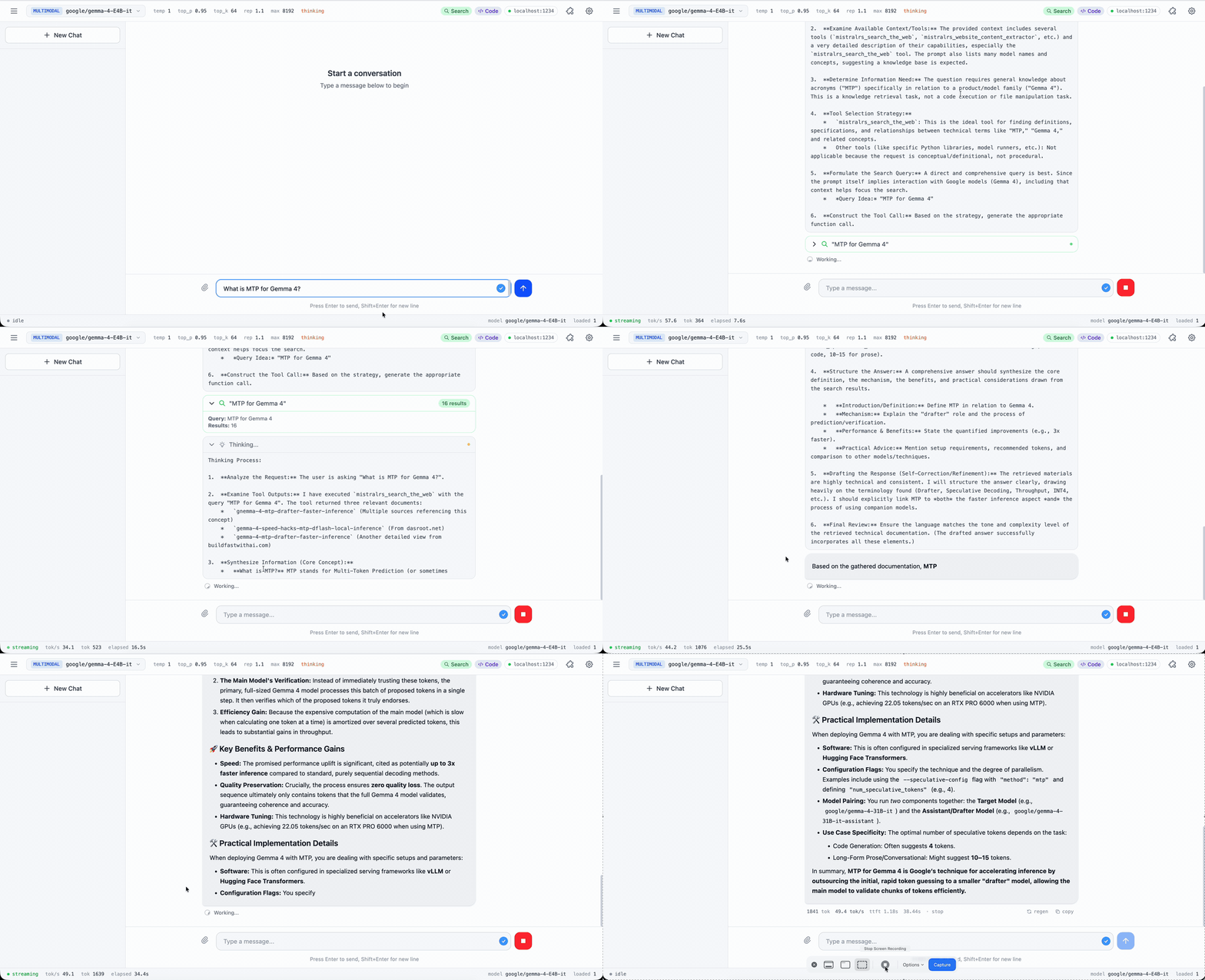
/uiby default. Shows reasoning, code execution, plots, and files inline. Edit any message and the new branch runs with its own Python state. Pass--no-uito disable. - Hardware-aware:
mistralrs tunerecommends quantization and device mapping from the model config and your detected hardware. - Flexible SDKs: Python package and Rust crate to build your projects.
- Native agentic support: built-in agentic loop with web search, local Python code execution, shell execution, OpenAI-compatible Skills, session management, and custom tool hooks.
Quick Start
Install
Linux/macOS:
curl -fsSL https://mistralrs.dev/install.sh | sh
Windows (PowerShell):
irm https://mistralrs.dev/install.ps1 | iex
Downloads a self-contained prebuilt binary for your platform (Metal on Apple Silicon; per-GPU CUDA or CPU on Linux; CPU on Windows), falling back to a source build if none matches. Standard acceleration needs no Rust or CUDA toolkit. Optional cuTile acceleration requires NVIDIA's separately installed tileiras tool.
Manual installation, accelerator details & other platforms
Run Your First Model
# Interactive chat
mistralrs run -m Qwen/Qwen3-4B

# One-shot prompt (no interactive session)
mistralrs run -m Qwen/Qwen3-4B -i "What is the capital of France?"

# One-shot with an image
mistralrs run -m google/gemma-4-E4B-it --image photo.jpg -i "Describe this image"

# Run a local GGUF or select a published 4-bit GGUF
mistralrs run -f /path/to/model.gguf
mistralrs run -m unsloth/Qwen3.5-4B-GGUF --quant 4

# Agentic REPL: search + code execution + shell from the terminal
mistralrs run --agent -m Qwen/Qwen3-4B

# Start an API server with the built-in web UI
mistralrs serve -m google/gemma-4-E4B-it
For the server command, visit http://localhost:1234/ui for the web chat interface. OpenAI-compatible clients use http://localhost:1234/v1; Anthropic-compatible clients use http://localhost:1234.
The mistralrs CLI
The CLI uses the same run, serve, and bench commands for model repositories, local directories, and GGUF files.
- Auto-detection: Automatically detects model architecture, quantization format, and chat template
- All-in-one: Single binary for chat, server, benchmarks, and web UI (
run,serve,bench) - Hardware-aware tuning:
mistralrs tunerecommends quantization and device mapping for your model and hardware - Model formats: Hugging Face checkpoints, GGUF files, and UQFF quantizations
# Recommend settings for your hardware and emit a config file
mistralrs tune -m Qwen/Qwen3-4B --emit-config config.toml

# Run using the generated config
mistralrs from-config -f config.toml

# Diagnose system issues (CUDA, Metal, Hugging Face connectivity)
mistralrs doctor
UI Demo
What Makes It Fast
Performance
- Continuous batching support by default on all devices.
- CUDA with FlashAttention V2/V3, Metal, and multi-GPU/distributed inference
- PagedAttention for high throughput continuous batching on CUDA or Apple Silicon, prefix caching (including multimodal)
Quantization (full docs)
- In-situ quantization (ISQ) for Hugging Face models
- GGUF (2-8 bit), GPTQ, AWQ, HQQ, FP8, BNB support
- ⭐ Per-layer topology: Fine-tune quantization per layer for optimal quality/speed
- ⭐ Auto-select fastest quant method for your hardware
Flexibility
- LoRA & X-LoRA with per-request LoRA selection and X-LoRA adapter mixing
- AnyMoE: Create mixture-of-experts on any base model
- Multiple models: Load/unload at runtime
Agentic Features
- Integrated tool calling with grammar enforcement and strict schema mode
- ⭐ Server-side agentic loop: auto-execute tools and feed results back
- ⭐ Python code execution: persistent Jupyter-like sessions with matplotlib capture and multimodal feedback
- ⭐ Shell execution: persistent command-line sessions with sandboxing and approval controls
- ⭐ OpenAI-compatible Skills: uploaded skill bundles for Responses API agents
- ⭐ OpenAI-compatible file inputs:
/v1/files, Responsesinput_file, Chatfile, and workdir mounts - ⭐ Web search integration with embedding-based ranking
- ⭐ Tool dispatch URL: POST tool calls to your own endpoint
- ⭐ MCP client: Connect to external tools via Process, HTTP, or WebSocket
- Python/Rust tool callbacks for custom execution
Supported Models
Text, multimodal, speech, image generation, and embedding models across 45+ architectures. The supported models reference is the single source of truth: it explains how to check whether your model's config.json is supported, lists every architecture with copy-paste run commands, and is generated directly from the engine's loader registry so it never drifts.
Supported models reference | Request a new model
Python SDK
pip install mistralrs
In-process inference from Python: load a model with Runner and send OpenAI-shaped requests, no server required. Accelerator-specific wheels (CUDA, Metal, MKL, Accelerate) are listed in the getting-started guide.
Get started | API reference | Examples
Rust SDK
cargo add mistralrs
Embed the engine in a Rust application with the high-level mistralrs crate.
Get started | docs.rs | Crate | Examples
Docker
Prebuilt CPU and CUDA images are published to GHCR. Pull commands, tags, and Kubernetes notes are in the Docker guide.
Documentation
For complete documentation, see the Documentation.
Quick Links:
- Quickstart - Install, first run, first serve
- CLI Reference - All commands and options
- Anthropic Messages API - Anthropic-compatible Messages, streaming, tool use, and token counting
- HTTP API - OpenAI-compatible and Anthropic-compatible endpoints
- Quantization - ISQ, GGUF, GPTQ, and more
- Multi-GPU and Distributed - NCCL TP, P2P layer mapping, multi-node, and ring
- MCP Integration - MCP integration documentation
- Troubleshooting - Common issues and solutions
- Environment variables - Environment variables for configuration
Citation
If you use mistral.rs in your research, please cite:
@misc{mistralrs,
  author = {Buehler, Eric},
  title = {{mistral.rs}: Fast, flexible {LLM} inference},
  year = {2024},
  url = {https://github.com/EricLBuehler/mistral.rs}
}
Citation metadata is available in CITATION.cff.
Contributing
Contributions welcome! Please open an issue to discuss new features or report bugs. If you want to add a new model, please contact us via an issue and we can coordinate.
Credits
This project would not be possible without the excellent work at Candle. Thank you to all contributors!
mistral.rs is not affiliated with Mistral AI.
FAQ
Common questions
Discussion
Questions & comments · 0
Sign In Sign in to leave a comment.