
Detect objects and segment images in real-time
Real-time detection, instance, and semantic segmentation in one framework and config flag, with multi-backend export (TensorRT, OpenVINO, CoreML).
0.4.1Add to Favorites
Why it matters
Deploy production-ready computer vision models that simultaneously detect objects, segment instances, and perform semantic segmentation across images and video streams with multi-backend export support for edge and cloud deployment.
Outcomes
What it gets done
Train detection, instance segmentation, or semantic segmentation models on custom datasets with YOLO or COCO annotations
Export trained models to ONNX, TensorRT, OpenVINO, CoreML, or LiteRT for deployment across different hardware platforms
Process multi-channel inputs including RGB plus thermal, depth, or NIR imagery for specialized computer vision tasks
Run real-time inference with ByteTrack tracking integration and benchmark performance across multiple backend engines
Source
Get it from source
Spark does not host a copy of it.
Open sourceReports
Agent outcome reports
No reports yet
Overview
D-FINE-seg
D-FINE-seg is a single framework for real-time object detection, instance segmentation, and semantic segmentation, switched with one config flag and available in five model sizes. It extends the D-FINE detection core with from-scratch segmentation heads and training, ships COCO-pretrained weights for both detection and instance segmentation, and exports to ONNX, TensorRT, OpenVINO, CoreML, and LiteRT with a built-in cross-backend parity check. Use it when one model needs to handle detection and/or segmentation deployed across multiple hardware backends, including multi-channel sensor input like thermal or depth; run TensorRT engines strictly at batch size 1, since the project found batched TensorRT inference produces inconsistent per-image scores.
What it does
D-FINE-seg is a single framework for real-time object detection, instance segmentation, and semantic segmentation - one codebase, one config flag (task: detect | segment | sem_seg), five model sizes (N through X). It follows the D-FINE paper's detection core, but its segmentation heads, training, export, and inference are implemented from scratch rather than forked. On Cityscapes the project reports it beats YOLO26 and RF-DETR on detection and instance-segmentation F1 and leads on mIoU for semantic segmentation, at real-time latency with 2-3x fewer parameters, and also reports higher F1 than YOLO26 on TACO and VisDrone (measured end-to-end with TensorRT FP16).
When to use - and when NOT to
Use it when a single model needs to do detection, instance segmentation, or semantic segmentation - or several of these across a project - and needs to run in real time across multiple deployment backends (ONNX, TensorRT, OpenVINO, CoreML, LiteRT). It ships COCO-pretrained weights for both detection and instance segmentation, auto-downloaded on first use, so fine-tuning starts from a trained mask decoder rather than from scratch. It also supports multi-channel input beyond RGB (thermal, depth, NIR as 4-channel .npy stacks) for sensor-fusion work. One hard deployment caveat: TensorRT engines must be run at batch size 1 - the project found that on TensorRT 10.13.3.9 a batched engine does not compute batch elements independently, so four identical images through one batched call returned four different scores (a spread up to 0.20) and sometimes different labels, while batch-1 inference, and Torch/ONNX Runtime at any batch size, stayed exact and reproducible.
Inputs and outputs
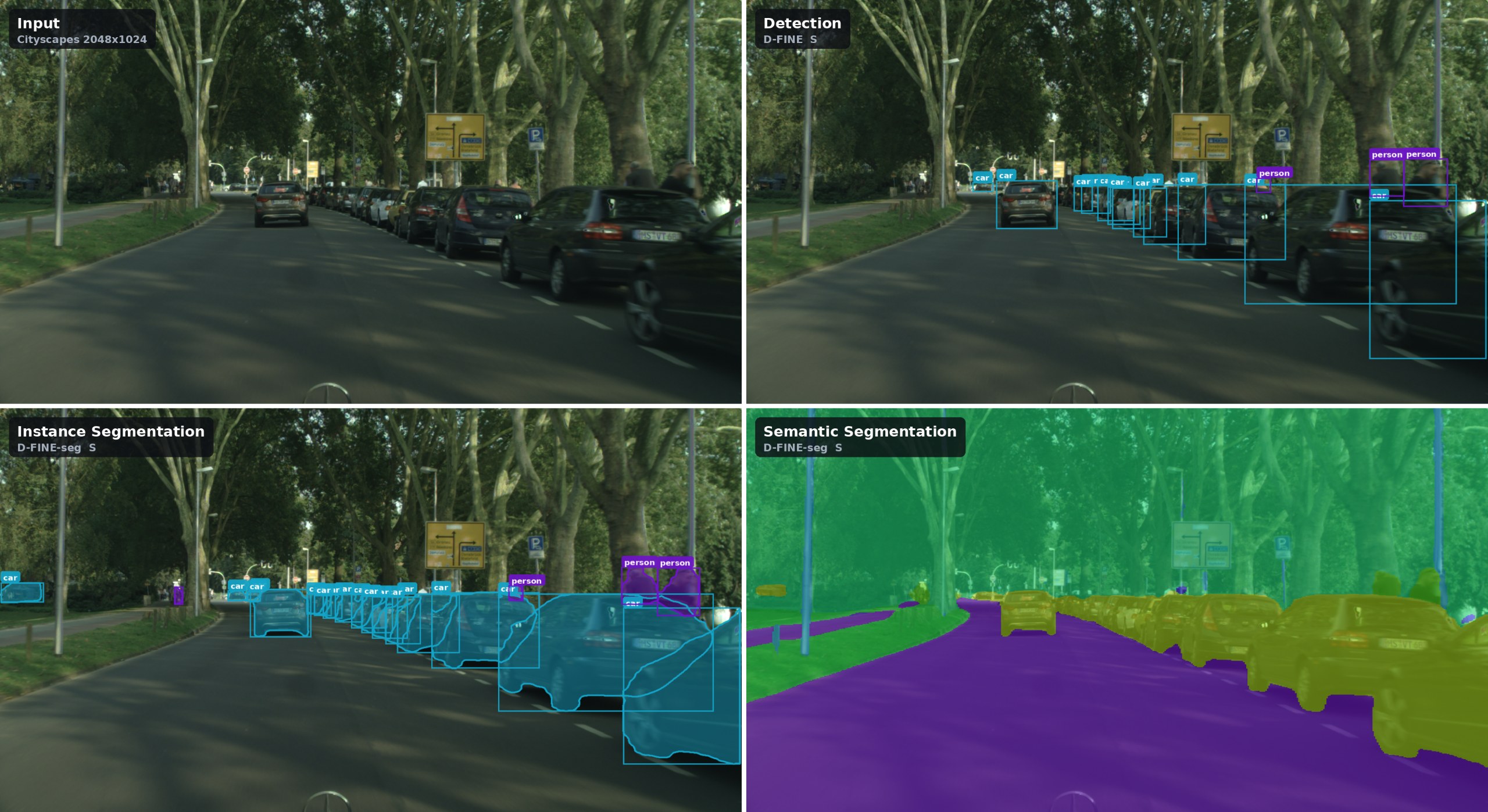
Input is an image (JPG/PNG, or .npy for 3- or 4-channel multi-modal stacks) plus, for training, YOLO-format labels, COCO JSON annotations, or single-channel PNG class masks for semantic segmentation. Output depends on the task: bounding boxes and scores for detection, per-instance masks for instance segmentation (via a dot-product between per-query mask embeddings and shared mask features), or a dense label map for semantic segmentation via a fused-argmax graph with no queries or NMS. A built-in Visualizer reads the class count and names off whichever model produced the output and draws boxes, instance masks, or a semantic-segmentation overlay accordingly.
Integrations
pip install dfine-seg           # inference + training
pip install 'dfine-seg[all]'    # + every export backend, SAM3, Gradio demo
A two-line Python API (load_model, read_image) auto-detects a checkpoint's size, task, classes, and input size across .pt, .engine, .onnx, and .xml formats. A dfine CLI covers the full workflow - init, split, train (with optional multi-GPU DDP via torchrun), export, bench, infer, INT8 quantization for OpenVINO/TensorRT, and a Gradio demo - plus ByteTrack tracking and SAM3-based auto-labeling beyond the core model. Training supports DDP, EMA, AMP, mosaic augmentation, a Muon optimizer option, and WandB tracking; every export backend gets a parity self-check against Torch, written to parity.csv.
Who it's for
Computer-vision teams that need real-time detection and/or segmentation deployed across multiple hardware backends (server GPU, Apple Silicon, mobile/edge) from a single trained model, especially ones working with multi-channel sensor data (thermal, depth, NIR) or needing instance and semantic segmentation from the same codebase rather than separate models. It's released under the Apache 2.0 license.
Source README
D-FINE-seg
Real-Time Object Detection, Instance and Semantic Segmentation
Quick Start • Usage • Export • Inference • Benchmarks • Video Tutorial • Colab






D-FINE-seg is a framework for real-time object detection, instance segmentation, and semantic segmentation - one codebase, one config flag (task: detect | segment | sem_seg), five model sizes (N -> X).
- End-to-end workflow - dataset prep -> training (DDP, EMA, AMP, mosaic) -> export (ONNX, TensorRT, OpenVINO, CoreML, LiteRT) -> benchmarked multi-backend inference
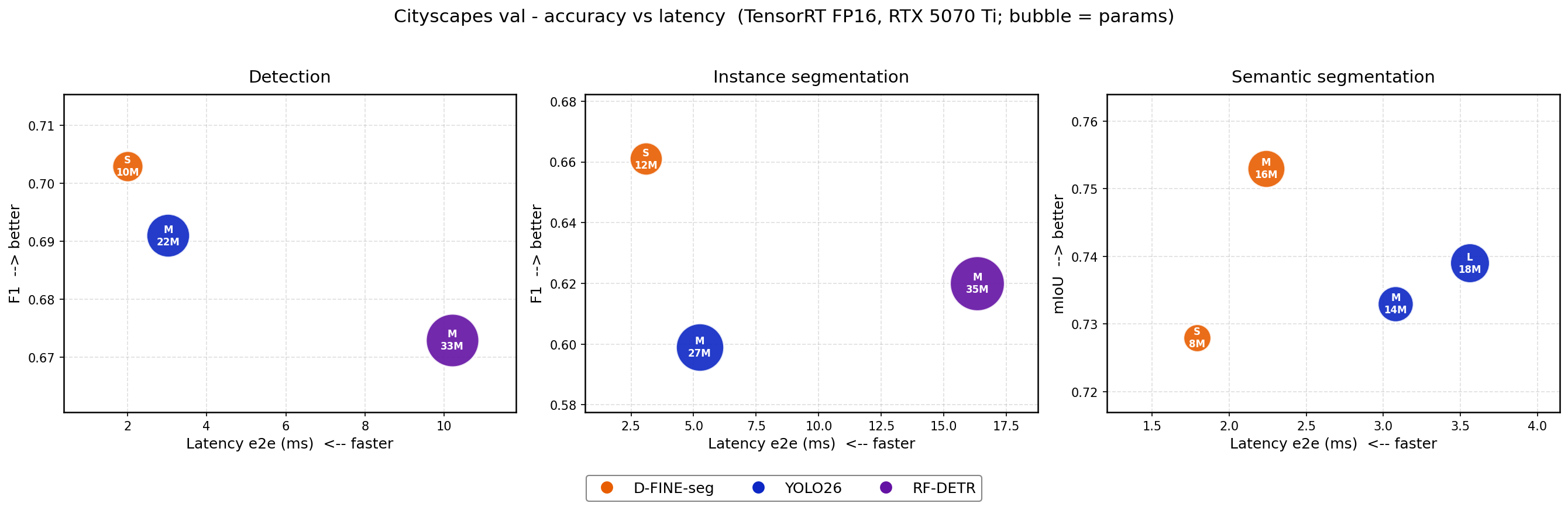
- Accuracy - on Cityscapes, beats YOLO26 and RF-DETR on detection & instance-seg F1 and leads mIoU on semantic segmentation, at real-time latency with 2-3x fewer params; also higher F1 than YOLO26 on TACO and VisDrone (TensorRT FP16, end-to-end protocol)
- Paper - D-FINE-seg: Object Detection and Instance Segmentation Framework with Multi-Backend Deployment
- Not a fork: the detection core follows the D-FINE paper; segmentation heads, training, export and inference are implemented from scratch.
One frame, three tasks, one config flag:
Highlights
- Instance segmentation head (
task: segment) - lightweight mask head on top of D-FINE's HybridEncoder PAN outputs: stride 8/16/32 features fused to 1/4 resolution, then a dot-product between per-query mask embeddings (3-layer MLP) and the shared mask features yields per-instance masks - Semantic segmentation head (
task: sem_seg) - reuses the pretrained instance-seg mask fuser on full-frame features, followed by a small conv neck and 1x1 classifier: no queries, no NMS - Mask-aware training - box-cropped BCE + Dice mask losses (instance seg) and CE + multi-class soft Dice with
ignore_index(semantic seg), mask supervision inside contrastive denoising, and Dice + sigmoid-focal mask costs in the Hungarian matcher - all train-time only, zero inference cost - COCO-pretrained weights for detection and instance segmentation, auto-downloaded on first use - fine-tuning starts from a trained mask decoder, not from scratch
- Multi-channel inputs - train on RGB + thermal / depth / NIR stacks (4-channel
.npy), not just RGB - Modern training stack - Muon optimizer, DDP, EMA, mosaic + affine augs, OneCycle, early stopping, WandB
- Beyond the model - ByteTrack tracking, SAM3 auto-labeling, Gradio demo, INT8 quantization (OpenVINO / CoreML / LiteRT)
Quick Start
Installation
pip install dfine-seg           # inference + training
pip install 'dfine-seg[all]'    # + every export backend, SAM3, Gradio demo
COCO-pretrained weights (detection and instance segmentation) auto-download from Hugging Face on first use - no manual download needed.
Extras, if you need them (backends are large and platform-specific)
| Install | Adds | For |
|---|---|---|
pip install dfine-seg |
torch, torchvision, opencv, hydra, wandb, albumentations, … | inference + training |
pip install 'dfine-seg[export]' |
onnx, onnxruntime, openvino, nncf, coremltools | dfine export |
pip install 'dfine-seg[trt]' |
tensorrt (Linux) | TensorRT engines - build on the target GPU |
pip install 'dfine-seg[label]' |
transformers | SAM3 auto-labeling |
pip install 'dfine-seg[demo]' |
gradio | the Gradio UI |
pip install 'dfine-seg[all]' |
everything above | full setup |
Two-line predict:
from dfine_seg import load_model, read_image, Visualizer

model = load_model("s")                              # COCO detection, weights auto-downloaded
model = load_model("s", task="segment")              # COCO instance segmentation
model = load_model("output/models/exp/model.pt")     # your checkpoint - size/task/classes/input size auto-detected, supports: .pt | .engine | .onnx | .xml

img = read_image("path/to/image.jpg")
out = model(img)[0]
print(out["boxes"], out["scores"], [model.names[int(i)] for i in out["labels"]])

drawn = Visualizer(model)(img, out)                  # annotated BGR copy - boxes, masks or a sem_seg overlay
load_model returns the very same wrapper you would construct by hand (dfine_seg/infer/) - it resolves the weights and picks the backend, then gets out of the way. Extra keyword arguments pass straight through (load_model("s", conf_thresh=0.3)), output tensors stay on the device the model ran on, and those wrapper files remain self-contained enough to copy into your own app. Visualizer reads the class count and names off the model it is given, then draws whatever that model returned - boxes, instance masks or a dense label map - so one call covers every task (BGR uint8 in, BGR uint8 out).
To train from a pip install, materialize a config and go:
dfine init          # writes ./config.yaml - edit train.root and train.label_to_name
dfine split
dfine train         # Hydra overrides work: dfine train model_name=m train.epochs=100
From source (contributors)
git clone https://github.com/ArgoHA/D-FINE-seg.git
cd D-FINE-seg
uv sync
This creates a .venv/ with the package installed editable and every extra present, pinned by uv.lock. Activate it with source .venv/bin/activate, or run anything via uv run ... (the Makefile already does this).
Pretrained weights are auto-downloaded from Hugging Face on first use, so no manual setup is needed - into pretrained/ for the config-driven commands, and into the shared Hugging Face cache for load_model("s") when there is no pretrained/ copy to reuse. To download manually instead, grab dfine_<size>_<dataset>.pt (size ∈ {n, s, m, l, x}, dataset ∈ {coco, obj2coco}) and place it in pretrained/. Segmentation weights are also available in the Hugging Face model card.
Prepare Your Data
Two annotation formats are supported: YOLO (default) and COCO JSON. Semantic segmentation uses PNG masks instead (see below).
YOLO format (default)
data/dataset/
├── images/    # all images: .jpg, .png, etc. (.npy for multi-channel - see below)
└── labels/    # all labels: one .txt per image (same filename stem)
Detection labels: class_id xc yc w h (normalized)
Segmentation labels: class_id x1 y1 x2 y2 ... xN yN (normalized polygon coordinates)
Input types & channel order: 3-channel .jpg/.png (BGR, read via cv2.imread), 3-channel .npy (RGB, read via np.load), or 4-channel .npy (RGB+extras, e.g. RGB+thermal).
Semantic segmentation masks (task: sem_seg)
data/dataset/
├── images/    # same as YOLO layout
└── labels/    # one single-channel uint8 .png per image (same stem), pixel value = class id
Every pixel gets a class from label_to_name (background included). Pixels with value train.sem_seg.ignore_index (default 255) are excluded from loss and metrics and during inference 255 is the "background" or "ignored" class. dfine split works unchanged; keep_ratio: True is supported (letterbox pad is filled with ignore_index, so pad pixels don't supervise); coco_dataset: True is not supported for this task.
Multi-channel inputs (RGB + thermal / depth / NIR / …)
Set train.in_channels: 4 (3 or 4 supported) to train on RGB + one extra modality
(thermal / depth / NIR). Stacks are .npy uint8 HWC arrays in images/ (RGB in planes
0-2, extras after) with YOLO labels as usual; a mismatched channel count is skipped with
a warning. See dfine_seg/etl/m3fd_to_yolo.py for a ready-made RGB+thermal converter.
COCO JSON format
Place standard COCO JSON annotation files alongside your images folder. Splits are detected automatically by filename:
data/dataset/
├── images/       # all images
├── train.json    # COCO-format annotations for train split
├── val.json      # COCO-format annotations for val split
└── test.json     # (optional) COCO-format annotations for test split
Enable COCO mode by setting coco_dataset: True in your config (see below). No CSV split generation step is needed - the splits are read directly from the JSON files.
If you only have a single coco.json, run dfine split to produce train.json / val.json (and test.json when the ratios leave room) from it. It splits by image using the same split: ratios, seed and ignore_negatives as the YOLO path, keeps each image's annotations with it, and copies categories / info / licenses into every output.
Configure
Edit config.yaml - key settings:
task: detect  # detect | segment | sem_seg
exp_name: my_exp  # experiment name (used in output paths)
model_name: s  # n / s / m / l / x

train:
  root: /path/to/project  # project root, will be used for outputs
  data_path: /path/to/dataset  # folder with images/ and labels/ (YOLO) or *.json files (COCO)
  coco_dataset: False  # set True to use COCO JSON annotations (train.json / val.json / test.json)
  label_to_name:
    0: class_a
    1: class_b
  epochs: 75
  batch_size: 8
  img_size: [640, 640]  # (h, w)
Usage
| Command | What it does |
|---|---|
dfine init |
write config.yaml from the packaged template (--task, --model, -d, --force) |
dfine split |
create train/val CSV splits (test split if configured) |
dfine train |
train the model |
dfine export |
export to ONNX, TensorRT, OpenVINO, CoreML (+ LiteRT when named) |
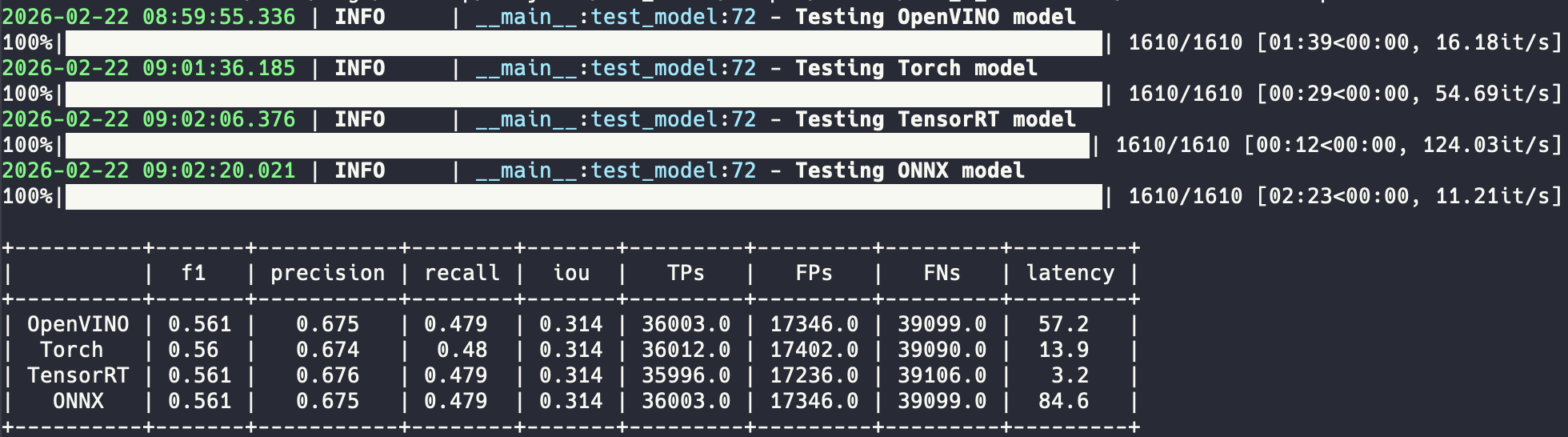
dfine bench |
benchmark all exported models on the val set |
dfine infer |
run on test folder, save visualizations + YOLO txt predictions |
dfine check-errors |
compare predictions against GT, save only mismatches (FP/FN) |
dfine test-batching |
find optimal batch size for your GPU |
dfine ov-int8 |
INT8 accuracy-aware quantization for OpenVINO (can take hours) |
dfine trt-int8 |
TensorRT INT8 calibration |
dfine main |
train -> export -> bench in sequence (same as the bare make target) |
dfine demo |
launch the Gradio UI (needs pip install 'dfine-seg[demo]') |
dfine predict |
run a model on an image or folder, no config needed |
dfine hw_bench |
measure Torch inference throughput on this device (cuda/mps/cpu); --batch to saturate a GPU |
dfine version |
print the installed version |
Notes:
- Most commands read
config.yamland work off your trained run; exceptions -init(writes the config),predict,hw_bench,demo,version(no config needed). Every command's flags, defaults and examples:dfine <command> -h. - YOLO format:
dfine trainrequirestrain.csvandval.csvintrain.data_path(generated bydfine split). - COCO format: set
coco_dataset: True-train.jsonandval.jsonare loaded directly;dfine splitis only needed if you have a singlecoco.jsonto split. dfine inferruns Torch inference ontrain.path_to_test_dataand writes totrain.infer_path.infer/export/benchauto-pick the latest<exp_name>_<date>run undertrain.path_to_save.
Every dfine command also has a make alias (make train == dfine train), and any config key can be overridden inline:
dfine train exp_name=my_exp model_name=m train.epochs=100
Enable DDP (multi-GPU) by setting train.ddp.enabled: True and train.ddp.n_gpus: N in config. Then just run dfine train - it auto-launches with torchrun.
Training Features
| Feature | Description |
|---|---|
| Muon optimizer | Optional Newton-Schulz optimizer for encoder/decoder attention+MLP matrices |
| DDP | Multi-GPU distributed training with SyncBatchNorm |
| AMP | Automatic mixed precision (~40% less VRAM, ~15% faster) |
| EMA | Exponential moving average of weights |
| Gradient accumulation | Effective batch size = batch_size x b_accum_steps |
| Gradient clipping | Configurable max norm |
| Mosaic augmentation | 4-image mosaic with affine transforms (recommended for detection) |
| Albumentations | Rotation, flip, blur, noise, gamma, grayscale, coarse dropout, multiscale |
| OneCycleLR scheduler | Separate learning rates for backbone and head |
| Early stopping | Configurable patience |
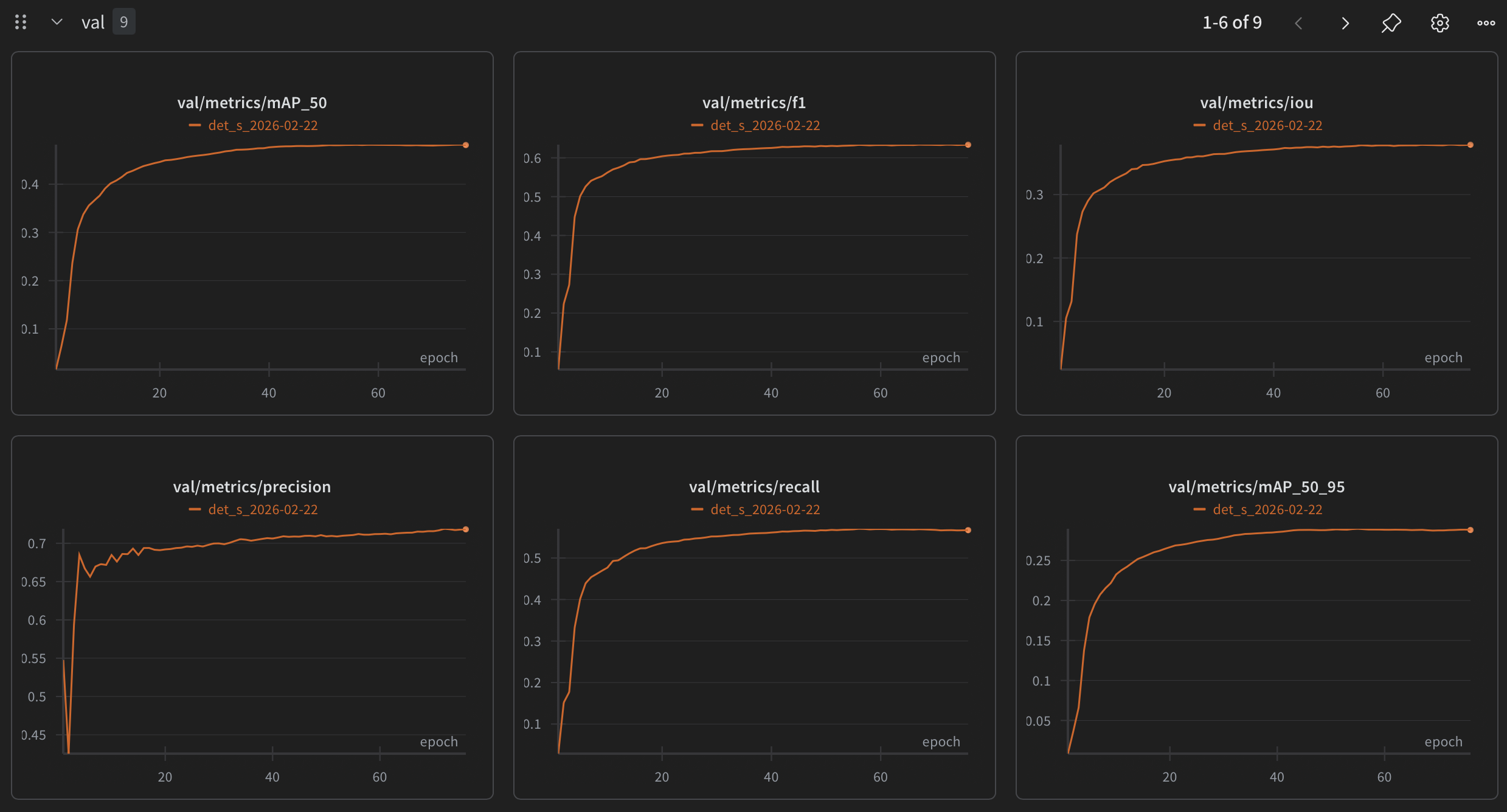
| WandB integration | Automatic experiment tracking |
| Optimal threshold search | Auto-finds best confidence threshold after training |
| Background warm-up | Ignore background-only images for N initial epochs |
| Autoresearch harness | Tooling to run agent in autoresearch format, leaves under experiments/ |
Export
| Format | Half Precision | Notes |
|---|---|---|
| ONNX | - | With optional fused postprocessor |
| TensorRT | FP16 | Must be exported on the target GPU. Static input shape only |
| OpenVINO | FP16, INT8 | Single export for FP32 or FP16 (pick during inference) and separate INT8 quantization script |
| CoreML | FP16, INT8 | Cross-platform export, inference on macOS / iOS. FP32 and INT8 exported by default |
| LiteRT | INT8 | On-device TFLite (mobile / edge). FP32 and INT8 exported by default |
Tip: FP16 is the best latency/accuracy trade-off for GPU (TensorRT) and CPU (OpenVINO). For Apple Silicon (CoreML), FP32 is faster.
Warning: run TensorRT engines at batch 1. On TRT 10.13.3.9 a batched engine does not compute batch elements independently - feeding four identical images through a single
execute_async_v3call returns four different results (score spread up to 0.20, and different labels), so a detection's score depends on what it happened to be batched with. Batch 1 is exact, and reproduces in raw TensorRT for FP16 and FP32 and for every optimization-profile shape, while torch and ONNX Runtime stay identical across slots (NVIDIA/TensorRT#4813).
After export, a parity self-check (export.parity, on by default) runs each backend on a shared input and writes one cosine per backend - over the sorted top-K detection scores vs torch - to parity.csv next to the weights.
For task: sem_seg every backend gets the same fused-argmax graph: a single int32 sem_seg output [B, H, W] (label map at input resolution, no detection postprocessor), and parity compares per-pixel argmax agreement instead of score cosine.
Inference
Backends
Six inference backends in dfine_seg/infer/:
| Backend | Format | Devices |
|---|---|---|
| Torch | .pt |
CUDA, MPS, CPU |
| TensorRT | .engine |
CUDA |
| OpenVINO | .xml |
CPU, iGPU |
| ONNX Runtime | .onnx |
CUDA, CPU |
| CoreML | .mlpackage |
macOS (GPU), iOS |
| LiteRT | .tflite |
CPU, mobile / edge (Android) |
Output contract: detection / instance segmentation wrappers return labels, boxes, scores (+ masks [N, H, W] for segment); sem_seg wrappers return a single sem_seg [H, W] label map at original image resolution. For sem_seg, dfine infer writes palette overlays + GT-style grayscale PNG label maps (crops and tracking are box-based and skipped).
Also provided:
Bytetrack- simple implementation of object trackerSAM3- text-promptable zero-shot segmentation for auto-labeling (multi-class: repeat--promptor pass"car, person")
Multi-Object Tracking
A simplified ByteTrack (Zhang et al., ECCV 2022) is included for persistent object tracking across video frames - uses constant-velocity motion prediction with EMA-smoothed velocity instead of a Kalman filter, blends IoU with centroid distance in the match cost, and does per-class matching by default.
Gradio Demo
dfine demo # == make demo (pip: pip install 'dfine-seg[demo]')
A web UI for running inference on uploaded images and videos (or a webcam snapshot). It starts on COCO detection s - no configuration, weights download on first use. The Model panel then swaps in any other model at runtime: a size preset, or a path/upload of your own .pt / .onnx / .engine / .xml, with a box for the class names. detect, segment and sem_seg checkpoints all render, and SAM3 is selectable as a second backend for text-promptable segmentation (prompts are comma- or newline-separated - each one becomes a class).
It serves on 0.0.0.0:7860 (LAN-reachable) and prints a warning on startup: the Model panel loads any path the browser sends, so anyone who can reach the port can load files off this machine. dfine demo --host 127.0.0.1 restores local-only.
Benchmarks
Metrics
Detection / instance segmentation - GT objects and predictions are matched one-to-one: a prediction is a TP if IoU > 0.5 (box for detect, mask for segment) and the class matches; only the highest-IoU prediction per GT counts, extra overlapping ones are FPs; a class mismatch is one FP + one FN.
- F1 / Precision / Recall - computed from those TP/FP/FN counts at
train.conf_thresh. - IoU (penalized) - mean IoU over all outcomes: TPs contribute their IoU, FPs and FNs contribute 0 (= sum of TP IoUs / (TPs + FPs + FNs)).
- mAP_50 / mAP_50_95 - COCO-style average precision (mask versions for
segment).
Semantic segmentation - all metrics come from one pixel confusion matrix accumulated over the whole eval set at original image resolution (ignore_index pixels excluded). A pixel of class i predicted as j counts as an FN for i and an FP for j - each confused pixel penalizes both classes.
- mIoU (decision metric) - macro-averaged: per-class pixel IoU = TP / (TP + FP + FN), averaged over classes present in GT, so every class has equal weight regardless of pixel count.
- pixel_acc - micro: fraction of all valid pixels classified correctly, so it is dominated by large classes.
Cityscapes - vs YOLO26 and RF-DETR (fine-tuning)
This is the main dataset where numbers are being updated. Other benchmarks are older and are not updated with every latency/accuracy improvement in this repo.
500 Cityscapes val images at original 2048x1024, TensorRT 10.13 FP16, batch 1, RTX 5070 Ti. Every framework runs its own shipped inference code, scored by one validator against the same GT. Confidence thresholds were calculated for each framework separately to maximixe the F1. Two latency columns - e2e (end-to-end, including each framework's CPU preprocessing) and engine (pure TensorRT execute) - because they can disagree. Full protocol and every known asymmetry: cityscapes-benchmark.
Detection
| model | params (M) | input | conf | F1 | precision | recall | IoU | e2e ms | engine ms |
|---|---|---|---|---|---|---|---|---|---|
| D-FINE-seg S | 10.29 | 640x640 | 0.5 | 0.703 | 0.817 | 0.617 | 0.446 | 2.0 | 1.38 |
| YOLO26-M | 21.79 | 640x640 | 0.25 | 0.691 | 0.792 | 0.613 | 0.432 | 3.03 | 1.59 |
| RF-DETR-medium | 33.39 | 576x576 | 0.35 | 0.673 | 0.769 | 0.599 | 0.409 | 10.2 | 1.45 |
Instance segmentation
| model | params (M) | input | conf | F1 | precision | recall | IoU | e2e ms | engine ms |
|---|---|---|---|---|---|---|---|---|---|
| D-FINE-seg S | 11.87 | 640x640 | 0.5 | 0.661 | 0.748 | 0.592 | 0.375 | 3.09 | 1.9 |
| YOLO26-M | 26.98 | 640x640 | 0.25 | 0.599 | 0.688 | 0.53 | 0.312 | 5.24 | 2.08 |
| RF-DETR-seg-medium | 35.4 | 432x432 | 0.35 | 0.62 | 0.789 | 0.51 | 0.346 | 16.33 | 1.8 |
Semantic segmentation
RF-DETR has no semantic segmentation task, so this one is D-FINE-seg vs YOLO26.
| model | params (M) | input | mIoU | pixel acc | e2e ms | engine ms |
|---|---|---|---|---|---|---|
| D-FINE-seg S | 8.02 | 640x640 | 0.728 | 0.95 | 1.79 | 1.5 |
| D-FINE-seg M | 16 | 640x640 | 0.753 | 0.954 | 2.24 | 2.06 |
| YOLO26-L | 17.87 | 640x640 | 0.739 | 0.949 | 3.56 | 1.63 |
| YOLO26-M | 14.32 | 640x640 | 0.733 | 0.947 | 3.08 | 1.16 |
Other datasets
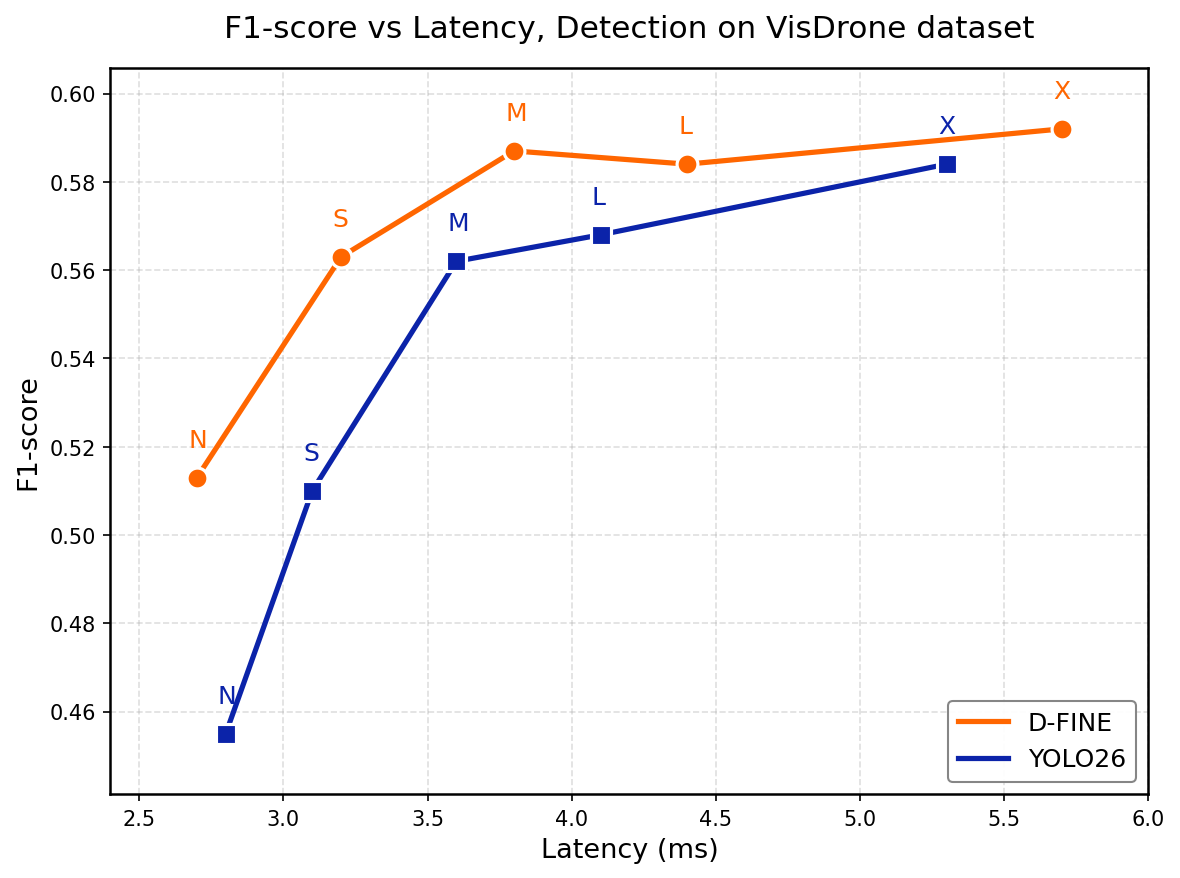
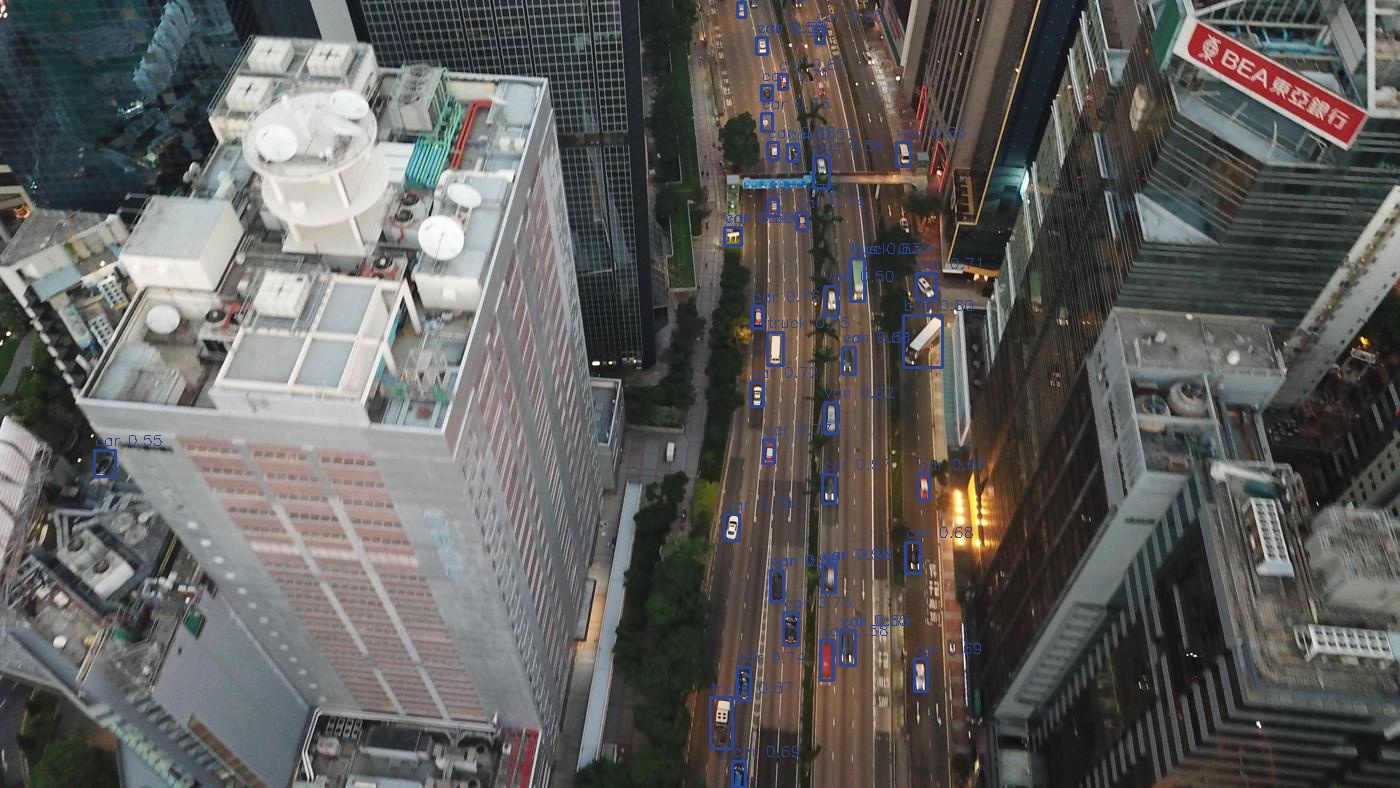
VisDrone - object detection
VisDrone dataset - a large-scale drone-captured benchmark with 10 categories across diverse urban and rural scenes (~6500 train / ~550 val / ~1600 test-dev images).
YOLO26 trained for 100 epochs, D-FINE for 75. YOLO26 confidence threshold - 0.25, D-FINE - 0.5. F1-score measured with IoU threshold 0.5. Preserved original dataset split (VisDrone2019-DET-train, VisDrone2019-DET-val, VisDrone2019-DET-test-dev). Metrics are reported on test-dev set. Latency measured end-to-end (preprocessing + forward pass + postprocessing) on RTX 5070 Ti with TensorRT FP16 at 640x640, batch size 1.
| Model | F1-score | IoU | Precision | Recall | Latency (ms) |
|---|---|---|---|---|---|
| D-FINE N | 0.531 | 0.288 | 0.724 | 0.42 | 1.6 |
| YOLO26 N | 0.455 | 0.226 | 0.631 | 0.356 | 2.8 |
| D-FINE S | 0.584 | 0.332 | 0.73 | 0.486 | 2.1 |
| YOLO26 S | 0.510 | 0.264 | 0.652 | 0.419 | 3.1 |
| D-FINE M | 0.605 | 0.351 | 0.732 | 0.516 | 2.7 |
| YOLO26 M | 0.562 | 0.301 | 0.667 | 0.485 | 3.6 |
| D-FINE L | 0.606 | 0.351 | 0.722 | 0.523 | 3.3 |
| YOLO26 L | 0.568 | 0.308 | 0.676 | 0.490 | 4.1 |
| D-FINE X | 0.611 | 0.354 | 0.718 | 0.532 | 4.5 |
| YOLO26 X | 0.584 | 0.319 | 0.682 | 0.510 | 5.3 |
D-FINE outperforms YOLO26 in fine-tuning setting on VisDrone dataset in F1-score across every model size. D-FINE achieves ~7% higher mean relative F1-score with ~28% latency reduction. Notably, IoU is ~15% higher (mean relative improvement across all models).
TACO - object detection and instance segmentation
TACO dataset (1500 images, 59 effective classes of waste in diverse environments, 86/14 train/val split by batch ID). The benchmarking environment is the same as for VisDrone.
Instance Segmentation
| Model | Params (M) | F1-score | IoU | Precision | Recall | Latency (ms) |
|---|---|---|---|---|---|---|
| D-FINE-seg N | 5.1 | 0.231 | 0.106 | 0.307 | 0.185 | 3.2 |
| YOLO26-seg N | 2.7 | 0.062 | 0.027 | 0.272 | 0.035 | 3.8 |
| D-FINE-seg S | 11.9 | 0.281 | 0.134 | 0.405 | 0.215 | 3.7 |
| YOLO26-seg S | 10.4 | 0.177 | 0.080 | 0.278 | 0.130 | 4.3 |
| D-FINE-seg M | 21.2 | 0.296 | 0.14 | 0.355 | 0.254 | 4.5 |
| YOLO26-seg M | 23.6 | 0.267 | 0.128 | 0.365 | 0.210 | 5.3 |
| D-FINE-seg L | 32.8 | 0.342 | 0.167 | 0.439 | 0.279 | 5.0 |
| YOLO26-seg L | 28.0 | 0.287 | 0.137 | 0.394 | 0.226 | 5.8 |
| D-FINE-seg X | 64.3 | 0.380 | 0.19 | 0.46 | 0.324 | 6.3 |
| YOLO26-seg X | 62.8 | 0.300 | 0.146 | 0.408 | 0.238 | 7.6 |
Object Detection
| Model | Params (M) | F1-score | IoU | Precision | Recall | Latency (ms) |
|---|---|---|---|---|---|---|
| D-FINE N | 3.8 | 0.237 | 0.115 | 0.34 | 0.181 | 1.9 |
| YOLO26 N | 2.4 | 0.072 | 0.033 | 0.274 | 0.042 | 3.4 |
| D-FINE S | 10.3 | 0.300 | 0.155 | 0.416 | 0.234 | 2.4 |
| YOLO26 S | 9.5 | 0.170 | 0.081 | 0.279 | 0.122 | 3.5 |
| D-FINE M | 19.6 | 0.299 | 0.157 | 0.391 | 0.242 | 2.9 |
| YOLO26 M | 20.4 | 0.232 | 0.115 | 0.303 | 0.188 | 4.2 |
| D-FINE L | 31.2 | 0.355 | 0.188 | 0.452 | 0.292 | 3.5 |
| YOLO26 L | 24.8 | 0.250 | 0.128 | 0.356 | 0.193 | 4.7 |
| D-FINE X | 62.6 | 0.391 | 0.212 | 0.454 | 0.343 | 4.7 |
| YOLO26 X | 55.7 | 0.303 | 0.158 | 0.412 | 0.239 | 6.1 |
D-FINE-seg outperforms YOLO26 in fine-tuning setting on TACO dataset in F1-score across every model size (N/S/M/L/X). In segmentation task - ~75% higher mean relative F1-score and ~16% latency reduction. In detection task - ~80% higher F1-score and ~28% latency reduction.
Note: although D-FINE does not require NMS, it still provides a small accuracy boost, so NMS is enabled by default in the current version. This is included in the reported latency.
COCO-style APs
Mask AP (Segmentation)
| Model | Mask mAP@50-95 | Mask mAP@50 |
|---|---|---|
| D-FINE-seg N | 0.094 | 0.141 |
| YOLO26-seg N | 0.041 | 0.058 |
| D-FINE-seg S | 0.177 | 0.250 |
| YOLO26-seg S | 0.111 | 0.165 |
| D-FINE-seg M | 0.157 | 0.229 |
| YOLO26-seg M | 0.195 | 0.270 |
| D-FINE-seg L | 0.212 | 0.310 |
| YOLO26-seg L | 0.174 | 0.242 |
| D-FINE-seg X | 0.242 | 0.340 |
| YOLO26-seg X | 0.210 | 0.291 |
Box AP (Detection)
| Model | Box mAP@50-95 | Box mAP@50 |
|---|---|---|
| D-FINE N | 0.123 | 0.169 |
| YOLO26 N | 0.060 | 0.075 |
| D-FINE S | 0.202 | 0.244 |
| YOLO26 S | 0.098 | 0.124 |
| D-FINE M | 0.204 | 0.246 |
| YOLO26 M | 0.172 | 0.214 |
| D-FINE L | 0.256 | 0.314 |
| YOLO26 L | 0.230 | 0.272 |
| D-FINE X | 0.269 | 0.336 |
| YOLO26 X | 0.256 | 0.300 |
AP computed with confidence threshold 0.01, max 100 detections per image. D-FINE-seg wins on 4 of 5 mask AP sizes (YOLO26 leads at M) and all 5 box AP sizes.
Format Comparisons
Measured on TACO with D-FINE-seg S / D-FINE S at 640x640. Latency = preprocessing + inference + postprocessing.
Desktop: Intel i5-12400F + RTX 5070 Ti
| Model | Format | F1-score | Latency (ms) |
|---|---|---|---|
| D-FINE-seg S | Torch FP32 | 0.263 | 20.4 |
| D-FINE-seg S | TensorRT FP32 | 0.264 | 6.5 |
| D-FINE-seg S | TensorRT FP16 | 0.263 | 5.0 |
| D-FINE S | Torch FP32 | 0.276 | 18.0 |
| D-FINE S | TensorRT FP32 | 0.272 | 4.5 |
| D-FINE S | TensorRT FP16 | 0.274 | 3.6 |
TensorRT FP16 -> ~4x faster than Torch FP32, no F1 drop
Edge: Intel N150 (OpenVINO)
| Model | Format | F1-score | Latency (ms) |
|---|---|---|---|
| D-FINE-seg S | FP32 | 0.264 | 431.2 |
| D-FINE-seg S | FP16 | 0.264 | 272.2 |
| D-FINE-seg S | INT8 | 0.243 | 205.0 |
| D-FINE S | FP32 | 0.272 | 188.4 |
| D-FINE S | FP16 | 0.271 | 120.8 |
| D-FINE S | INT8 | 0.250 | 76.3 |
FP16 -> ~60% faster than FP32, no F1 drop. INT8 -> ~2x faster than FP32 but noticeable F1 drop
Apple Silicon: MacBook Pro M1 Pro (CoreML)
| Model | Format | F1-score | Latency (ms) | Model size (mb) |
|---|---|---|---|---|
| D-FINE S Torch (mps) | FP32 | 0.278 | 45.2 | 41.6 |
| D-FINE S CoreML | FP32 | 0.278 | 20.0 | 41.8 |
| D-FINE S CoreML | FP16 | 0.270 | 32.5 | 21.1 |
| D-FINE S CoreML | INT8 | 0.268 | 19.8 | 11.2 |
| D-FINE-seg S Torch (mps) | FP32 | 0.261 | 72.3 | 48.3 |
| D-FINE-seg S CoreML | FP32 | 0.261 | 64.6 | 48.3 |
| D-FINE-seg S CoreML | FP16 | 0.259 | 79.1 | 24.3 |
| D-FINE-seg S CoreML | INT8 | 0.256 | 62.1 | 12.8 |
CoreML FP32 -> ~2x faster than Torch MPS, no F1 drop. FP16 is ~30% slower than FP32 on Apple Silicon - the Neural Engine prefers FP32 for this architecture. INT8 shows strong accuracy, same latency on this machine, but 4 times smaller weights size.
Outputs
| Output | Location | Description |
|---|---|---|
| Models + logs | output/models/{exp_name}_{date}/ |
Weights, training metrics, confusion matrix, F1 vs threshold plots, per-class metrics, bench metrics, calculated optimal threshold |
| Debug images | output/debug_images/ |
Preprocessed training images (with augmentations) |
| Eval predictions | output/eval_preds/ |
Val set predictions with GT (green) and preds (blue) |
| Bench images | output/bench_imgs/ |
Predictions from all exported models |
| Infer | output/infer/ |
Visualizations + YOLO txt annotations (sem_seg: overlays + PNG label maps) |
| Check errors | output/check_errors/ |
FP and FN only - for finding mislabeled samples |
Result examples
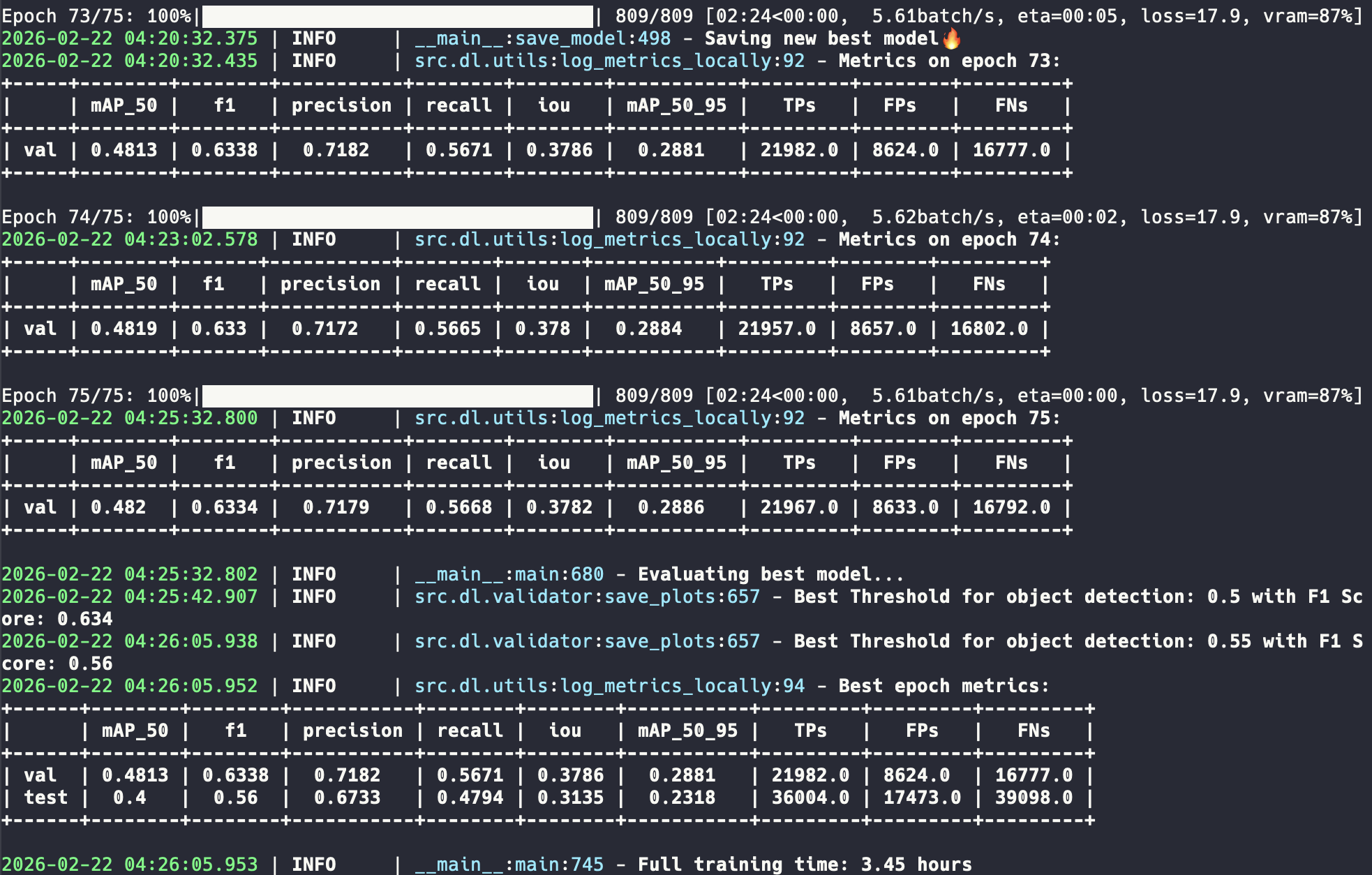
Training
Benchmarking
WandB dashboard
Inference
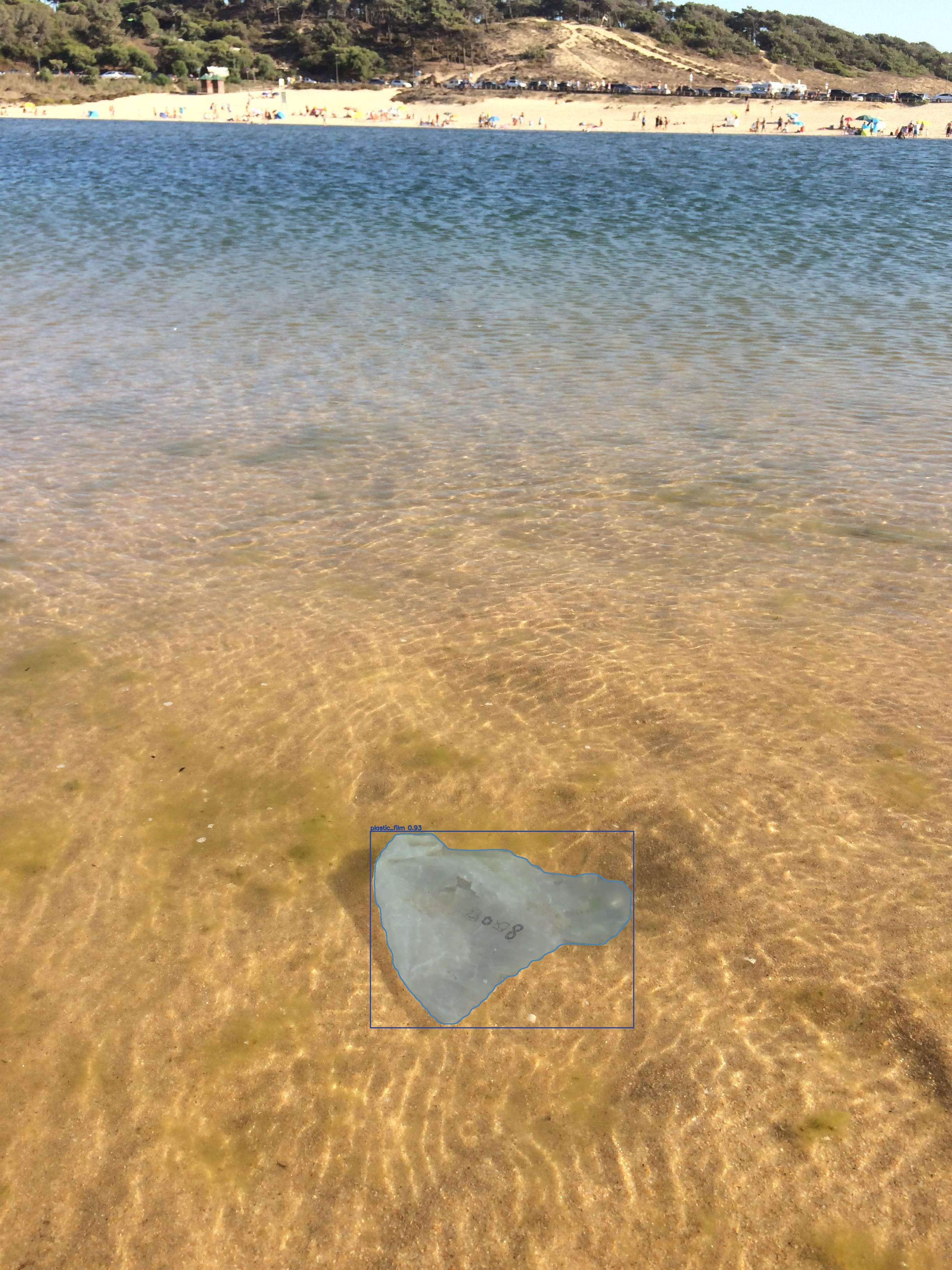
Citation
If you use D-FINE-seg in your research, please cite:
@article{saakyan2026dfineseg,
  title={D-FINE-seg: Object Detection and Instance Segmentation Framework with multi-backend deployment},
  author={Saakyan Argo and Solntsev Dmitry},
  eprint={2602.23043},
  journal={arXiv preprint arXiv:2602.23043},
  year={2026}
}
And the original D-FINE paper:
@misc{peng2024dfine,
      title={D-FINE: Redefine Regression Task in DETRs as Fine-grained Distribution Refinement},
      author={Yansong Peng and Hebei Li and Peixi Wu and Yueyi Zhang and Xiaoyan Sun and Feng Wu},
      year={2024},
      eprint={2410.13842},
      archivePrefix={arXiv},
      primaryClass={cs.CV}
}
Acknowledgement
The detection core is based on the D-FINE paper and architecture. The mask head design follows the Mask DINO paradigm. Thank you to both teams for their excellent work.
Benchmarks in this project use the VisDrone and TACO datasets. We thank the authors for making these datasets publicly available.
FAQ
Common questions
Discussion
Questions & comments · 0
Sign In Sign in to leave a comment.