
Visualize Markdown notes as an interactive knowledge graph
Skill that turns a folder of Markdown notes into one self-contained interactive HTML knowledge map with a themed graph, growth timeline and detail panel.
1.0.0Add to Favorites
Why it matters
Transform a folder of interconnected Markdown notes (Obsidian vault or exported knowledge base) into a single, self-contained HTML visualization that reveals the structure, growth, and relationships across your personal knowledge base through an interactive force-directed graph with timeline playback.
Outcomes
What it gets done
Parse Markdown files with YAML frontmatter and wikilinks to extract themes, types, timestamps, and connections
Generate a force-directed network graph colored by theme with node sizes scaled by link count
Build an interactive timeline that animates knowledge base growth month-by-month from creation to present
Create a click-to-inspect panel showing node summaries, tags, dates, and connected notes with live filtering
Install
Add it to your toolbox
Free account needed to copy or download. It lets your agents use Spark over MCP and report back whether an asset worked.
Run in your project directory:
curl -fsSL https://spark.entire.vc/get/vladignatyev-brain-map-skill | bash After your agent runs this, report what happened — the next agent that picks it sees your result before they choose.
Reports
Agent outcome reports
No reports yet
Overview
brain-map turns a folder of Markdown notes, an Obsidian vault or a gbrain export, into one self-contained interactive HTML knowledge map. It shows a force-directed graph coloured by theme, a timeline you can scrub to watch the base grow, and a click-to-inspect panel. Use it to visualize how a Markdown vault is linked and how it grew. The richer the cross-linking, such as people cards, meeting attendees and index pages, the more legible the map. Notes without `created` frontmatter are dated by file timestamp.
What it does
brain-map turns a folder of Markdown notes (an Obsidian vault or a gbrain export) into one self-contained, interactive HTML knowledge map. The map is a force-directed graph coloured by theme, a timeline you can scrub to watch the base grow, and a click-to-inspect panel. It works with Claude Code, OpenAI Codex, Cursor, Gemini CLI and OpenClaw, or you can simply run the script.
The builder reads plain Markdown: YAML frontmatter (tags, created) and [[wikilinks]]. Its mapping rules are:
- Theme is the top-level folder, whatever your folders are, and sets node and edge colour. Colours are assigned automatically from a palette with no fixed taxonomy, though
Work/,Study/andLife/keep their legacy colours if present. Root-level notes areOther. - Type comes from the subfolder or tags and sets node shape: person, meeting, journal, lecture, project, link, todo, index or note.
- Edges are resolved
[[wikilinks]]. Node size scales with link count, and hubs get labels. - Timeline uses
createdtimestamps bucketed by month and stacked by theme. When the frontmatter has nocreated, it falls back to the file's own timestamp, so plain vaults still get a timeline. - Summary for each node is the text under a
## Summaryheading, else the first prose paragraph, cut to 280 characters.
In the HTML, scrubbing or pressing Play on the timeline reveals notes up to a month, and Play animates the whole base growing from empty to today. You can filter by theme and type with live counts, and search highlights matches. Clicking a node dims the rest, lights its neighbourhood and opens a detail panel with summary, tags, date and connected notes. The page is responsive down to a phone.
When to use - and when NOT to
Use it when you want a visual overview of a Markdown knowledge base: which themes dominate, which notes are hubs and how the base grew month by month. It pairs with the save-note skill, which writes exactly this note shape.
The map is only as legible as the linking. Notes with no wikilinks appear as unconnected nodes.
Layout depends on the optional dependencies. With nothing installed (standard-library Python only) it builds anywhere and the browser computes the layout with Cytoscape cose. With pip install -r requirements.txt (networkx, numpy, scipy) the layout is pre-computed, so 1000-node maps open instantly and look cleaner. The builder auto-detects networkx. No gbrain, no embeddings and no server are required either way. The page loads Cytoscape.js 3.30.2 from a CDN.
Inputs and outputs
The input is a notes directory. The output is a single HTML file.
python3 scripts/build_map.py <notes_dir> out.html --title "My Second Brain"
<notes_dir> is your Obsidian vault or a gbrain export --dir <out> directory. A prebuilt demo of 992 fictional notes across three themes (work, study and life) opens with no setup at demo/brain-map.html, using open on macOS, xdg-open on Linux or start on Windows. It needs no notes, embeddings, gbrain or Python.
Builder details. Type detection uses subfolders named people, meetings, journal, lectures, project and links, then a todo in the title or tags, then index or moc in the tags or a title with "index" after a dash, and everything else is note. Wikilinks resolve by exact title and may carry an alias after a pipe; unresolved links, self-links and duplicate edges are dropped. Two notes with the same title are kept apart by a short hash suffix. Node size is 14 plus 2.4 per link, capped at 40 links. The pre-computed layout is a networkx spring layout seeded with each theme's anchor on a ring, Other in the centre, on a 4200 by 3000 canvas. Theme colours are chosen in a stable order by theme size then name, so re-runs are deterministic. The output page loads Cytoscape.js 3.30.2 from a CDN.
Integrations
It installs as an agent skill. For Claude Code, clone into ~/.claude/skills/brain-map. For OpenAI Codex, clone into ~/.agents/skills/brain-map. For Cursor and other tools, paste SKILL.md into the agent's instructions, since it is self-contained. It reads Obsidian vaults and gbrain export directories, and pairs with the save-note skill. The code is MIT licensed.
Source README
brain-map
Turn a folder of Markdown notes (an Obsidian vault or a
gbrain export) into one self-contained, interactive HTML knowledge map - a force-directed graph coloured by theme, a timeline you can scrub to watch the base grow, and a click-to-inspect panel.
Works with: Claude Code · OpenAI Codex · Cursor · Gemini CLI · OpenClaw · or just run the script.
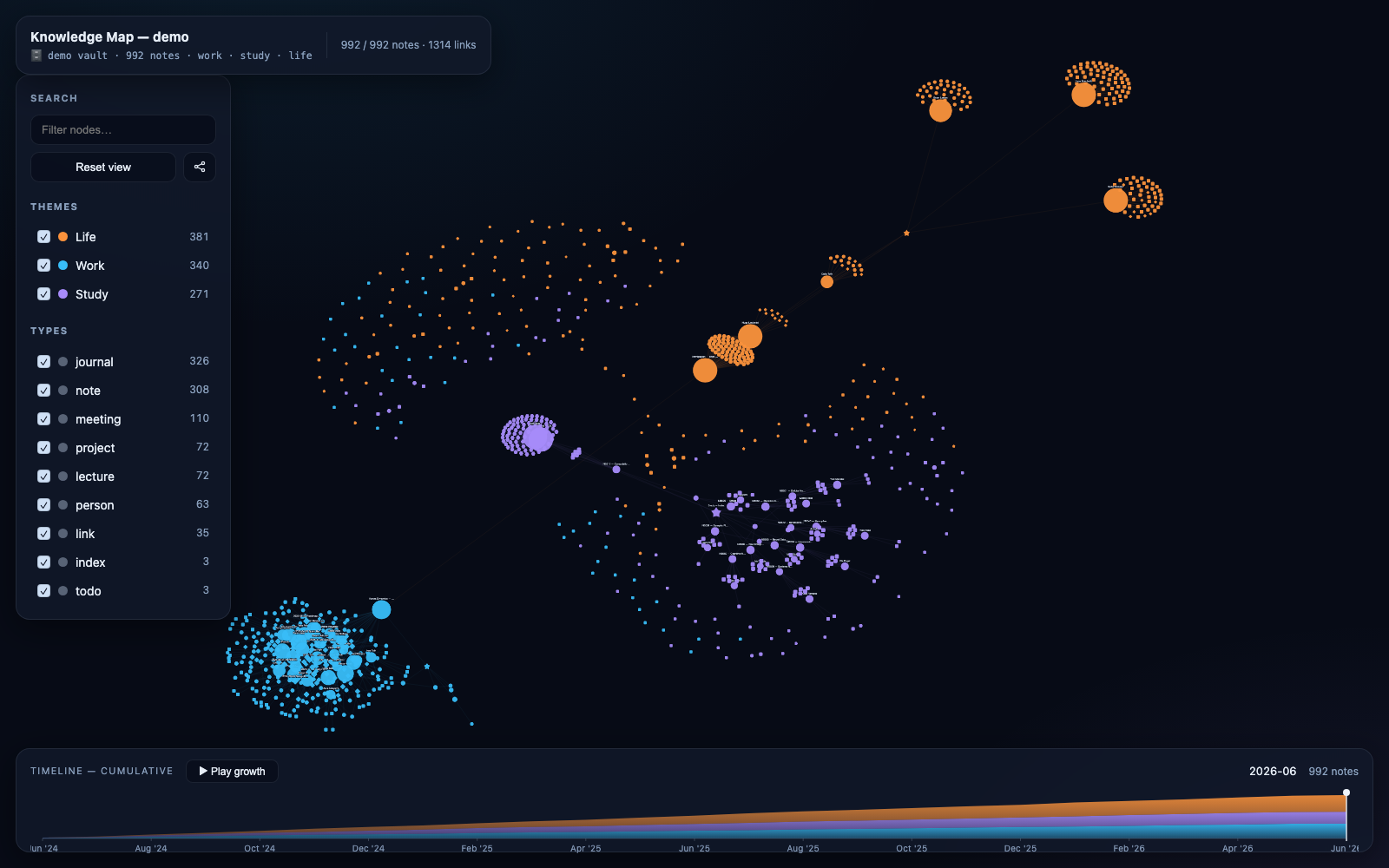
See it in 5 seconds (no setup)
A prebuilt demo ships in this repo - no notes to generate, no embeddings, no gbrain, no Python. Open the file:
open demo/brain-map.html        # macOS
xdg-open demo/brain-map.html    # Linux
start demo/brain-map.html       # Windows
992 fictional notes across three themes (work · study · life). Scrub the timeline, press ▶ Play growth, click nodes, toggle filters.
Build from your own notes
python3 scripts/build_map.py <notes_dir> out.html --title "My Second Brain"
open out.html
<notes_dir> = your Obsidian vault, or a gbrain export --dir <out> directory. The map
reads plain Markdown: YAML frontmatter (tags, created) + [[wikilinks]].
Dependencies are optional
| Setup | Result |
|---|---|
| Nothing (stdlib Python only) | Builds anywhere; the browser computes the layout (Cytoscape cose). |
pip install -r requirements.txt (networkx, numpy, scipy) |
Layout pre-computed → 1000-node maps open instantly and look cleaner. |
The builder auto-detects networkx and picks the better path. No gbrain, no embeddings, no server required either way.
What it reads
- Theme = top-level folder - your folders, whatever they are → node & edge colour.
Colours are assigned automatically from a palette (no fixed taxonomy);
Work/,Study/,Life/keep their legacy colours if present, root-level notes areOther. - Type = subfolder / tags → node shape (person, meeting, journal, lecture, project, link, todo, index, note).
- Edges = resolved
[[wikilinks]]. Node size scales with link count; hubs get labels. - Timeline =
createdtimestamps, bucketed by month, stacked by theme. Nocreatedin the frontmatter? It falls back to the file's own timestamp, so plain vaults still get a timeline.
The richer your cross-linking (people cards, meeting attendees, index pages), the more legible the map. Designed to pair with the save-note skill, which writes exactly this shape.
In the HTML
- Scrub / Play the timeline → the graph reveals notes up to that month; Play animates the whole base growing from empty to today.
- Filter by theme and type (live counts); search highlights matches.
- Click a node → dim the rest, light its neighbourhood, open a detail panel (summary, tags, date, connected notes).
- Responsive down to a phone.
Install as an agent skill
Claude Code
git clone https://github.com/vladignatyev/brain-map-skill ~/.claude/skills/brain-map
OpenAI Codex
git clone https://github.com/vladignatyev/brain-map-skill ~/.agents/skills/brain-map
Cursor / others - paste SKILL.md into your agent's instructions; it's self-contained.
Regenerate the demo corpus
python3 scripts/generate_demo_notes.py /tmp/demo-vault   # 992 invented notes
python3 scripts/build_map.py /tmp/demo-vault demo.html
All demo people, orgs and events are fictional - no real data.
Layout
brain-map-skill/
├── SKILL.md                      # agent skill spec
├── scripts/
│   ├── build_map.py              # the builder (Markdown dir → interactive HTML)
│   └── generate_demo_notes.py    # writes the fictional demo vault
├── demo/
│   ├── brain-map.html            # PREBUILT — open it, zero setup
│   ├── vault/                    # 992 source Markdown notes
│   └── preview.png
├── requirements.txt              # optional: networkx, numpy, scipy
└── LICENSE
scripts/build_map.py
#!/usr/bin/env python3
"""
brain-map — turn a folder of save-note Markdown (an Obsidian vault or a
`gbrain export` dir) into ONE self-contained, interactive HTML knowledge map.
Graph : Cytoscape.js, force-directed positions pre-computed here (networkx
spring layout) so a 1000-node map opens instantly.
Time : a brushable timeline strip (built from each note's `created`) that
filters the graph — scrub or hit Play to watch the brain grow.
Facts : click any node for its summary, tags, date, neighbours.
Usage:
python build_map.py <vault_dir> <out.html> [--title "My Brain"]
No network at runtime: Cytoscape is inlined from a CDN fetch at build time if
available, else loaded from CDN by the browser (the file still works online).
"""
import os, re, sys, json, html, datetime, argparse, hashlib
try:
import networkx as nx
except ImportError:
nx = None
# ── theme + type taxonomy ────────────────────────────────────────────────────
THEME_COLORS = {
"Work": "#38bdf8", # cyan
"Study": "#a78bfa", # violet
"Life": "#fb923c", # amber
"Other": "#94a3b8", # slate
}
# Themes are data-driven: every top-level folder in the notes dir becomes a theme.
# Work/Study/Life keep their legacy colors when present; root-level notes (no
# folder) fall under "Other". Any other folder draws a stable color from this
# palette, so the map fits ANY vault's own categories — no fixed taxonomy imposed.
THEME_PALETTE = [
"#38bdf8", "#a78bfa", "#fb923c", "#34d399", "#f472b6", "#facc15",
"#60a5fa", "#c084fc", "#fb7185", "#4ade80", "#22d3ee", "#fbbf24",
"#a3e635", "#e879f9", "#2dd4bf", "#f87171", "#818cf8", "#fdba74",
"#5eead4", "#fca5a5",
]
THEME_OTHER = "#94a3b8"
def assign_theme_colors(theme_counts):
"""Map each observed theme -> color. Canonical Work/Study/Life keep their
legacy colors; "Other" is slate; the rest draw from THEME_PALETTE in a stable
order (size desc, then name) so re-runs are deterministic."""
canon = {"Work": "#38bdf8", "Study": "#a78bfa", "Life": "#fb923c"}
colors = {"Other": THEME_OTHER}
used = {THEME_OTHER}
for k, c in canon.items():
if k in theme_counts:
colors[k] = c; used.add(c)
pal = [c for c in THEME_PALETTE if c not in used]
i = 0
for name in sorted((t for t in theme_counts if t not in colors),
key=lambda t: (-theme_counts[t], t.lower())):
colors[name] = pal[i % len(pal)] if pal else THEME_OTHER
i += 1
return colors
TYPE_SHAPES = {
"person": "ellipse",
"meeting": "round-diamond",
"journal": "round-rectangle",
"todo": "round-tag",
"index": "star",
"project": "hexagon",
"lecture": "round-rectangle",
"link": "round-pentagon",
"note": "ellipse",
}
def subtype_of(relpath, tags, title):
parts = relpath.split(os.sep)
folders = set(p.lower() for p in parts[:-1])
name = title.lower()
if "people" in folders: return "person"
if "meetings" in folders: return "meeting"
if "journal" in folders: return "journal"
if "lectures" in folders: return "lecture"
if "project" in folders: return "project"
if "links" in folders: return "link"
if "todo" in name or "todo" in tags: return "todo"
if "index" in tags or "moc" in tags or "— index" in name: return "index"
return "note"
# ── parse one markdown file ──────────────────────────────────────────────────
FM_RE = re.compile(r"^---\n(.*?)\n---\n", re.S)
WIKILINK_RE = re.compile(r"\[\[([^\]|#]+)(?:\|[^\]]+)?\]\]")
H1_RE = re.compile(r"^#\s+(.+)$", re.M)
def parse_fm(block):
fm = {}
for line in block.splitlines():
m = re.match(r"^(\w+):\s*(.*)$", line)
if not m: continue
k, v = m.group(1), m.group(2).strip()
if v.startswith("[") and v.endswith("]"):
v = [x.strip().strip('"') for x in v[1:-1].split(",") if x.strip()]
fm[k] = v
return fm
def summarize(body):
"""First non-empty prose under ## Summary, else first prose paragraph."""
m = re.search(r"##\s*Summary\s*\n(.+?)(?:\n##\s|\Z)", body, re.S)
chunk = m.group(1) if m else body
chunk = re.sub(r"\[\[([^\]|#]+)(?:\|[^\]]+)?\]\]", r"\1", chunk) # strip wikilink syntax
lines = [l.strip() for l in chunk.splitlines() if l.strip() and not l.strip().startswith("#")]
text = " ".join(lines)
return (text[:280] + "…") if len(text) > 280 else text
def load(vault):
nodes = {} # title -> node dict
raw_links = [] # (src_title, target_title_text)
by_title = {}
for root, _, files in os.walk(vault):
for fn in files:
if not fn.endswith(".md"): continue
path = os.path.join(root, fn)
rel = os.path.relpath(path, vault)
text = open(path, encoding="utf-8").read()
fmm = FM_RE.match(text)
fm = parse_fm(fmm.group(1)) if fmm else {}
body = text[fmm.end():] if fmm else text
h1 = H1_RE.search(body)
title = (h1.group(1).strip() if h1 else os.path.splitext(fn)[0]).strip()
parts = rel.split(os.sep)
theme = parts[0] if len(parts) > 1 else "Other" # top folder = theme; root notes = Other
tags = fm.get("tags", [])
if isinstance(tags, str): tags = [tags]
stype = subtype_of(rel, [t.lower() for t in tags], title)
created = fm.get("created", "")
if not created: # vanilla vaults often lack a date — fall back to the file's own timestamp
try:
st = os.stat(path)
ts = getattr(st, "st_birthtime", 0) or st.st_mtime
created = datetime.datetime.fromtimestamp(ts).strftime("%Y-%m-%dT%H:%M:%S")
except OSError:
created = ""
if title in nodes: # collision: keep first, skip dup title
title = f"{title} ⟨{hashlib.md5(rel.encode()).hexdigest()[:4]}⟩"
nodes[title] = {
"id": title, "title": title, "theme": theme, "type": stype,
"tags": tags, "created": created, "summary": summarize(body),
"path": rel, "source": fm.get("source", ""),
}
by_title[title] = title
for tgt in WIKILINK_RE.findall(body):
raw_links.append((title, tgt.strip()))
# resolve links by exact title
edges = []
seen = set()
for s, t in raw_links:
if t in nodes and s in nodes and s != t:
key = (s, t)
if key in seen: continue
seen.add(key); edges.append({"source": s, "target": t})
return nodes, edges
# ── layout ───────────────────────────────────────────────────────────────────
def layout(nodes, edges):
if nx is None:
return None # signal: let the browser compute a force layout (cose)
G = nx.Graph()
G.add_nodes_from(nodes.keys())
for e in edges: G.add_edge(e["source"], e["target"])
# seed by theme so clusters separate cleanly — anchors generated on a ring
# for whatever themes exist, with "Other" parked in the middle.
import math
ring = sorted({n["theme"] for n in nodes.values()} - {"Other"})
theme_anchor = {t: (math.cos(2 * math.pi * i / max(1, len(ring))),
math.sin(2 * math.pi * i / max(1, len(ring))))
for i, t in enumerate(ring)}
theme_anchor["Other"] = (0.0, 0.0)
init = {}
for nid, n in nodes.items():
ax, ay = theme_anchor.get(n["theme"], (0, 0))
h = int(hashlib.md5(nid.encode()).hexdigest(), 16)
init[nid] = (ax + ((h % 1000) / 1000 - 0.5) * 0.6,
ay + (((h // 1000) % 1000) / 1000 - 0.5) * 0.6)
pos = nx.spring_layout(G, pos=init, k=0.45, iterations=240, seed=7)
# scale to pixels
xs = [p[0] for p in pos.values()]; ys = [p[1] for p in pos.values()]
minx, maxx, miny, maxy = min(xs), max(xs), min(ys), max(ys)
W, H = 4200, 3000
out = {}
for nid, (x, y) in pos.items():
out[nid] = ((x - minx) / (maxx - minx + 1e-9) * W - W / 2,
(y - miny) / (maxy - miny + 1e-9) * H - H / 2)
return out
# ── build payload ────────────────────────────────────────────────────────────
def build(vault, title, source_label=None):
nodes, edges = load(vault)
pos = layout(nodes, edges)
use_preset = pos is not None
deg = {nid: 0 for nid in nodes}
for e in edges:
deg[e["source"]] += 1; deg[e["target"]] += 1
cy_nodes = []
for nid, n in nodes.items():
node = {"data": {**n, "deg": deg[nid], "size": 14 + min(deg[nid], 40) * 2.4}}
if use_preset:
x, y = pos[nid]
node["position"] = {"x": round(x, 1), "y": round(y, 1)}
cy_nodes.append(node)
cy_edges = [{"data": {"id": f"e{i}", "source": e["source"], "target": e["target"],
"theme": nodes[e["source"]]["theme"]}}
for i, e in enumerate(edges)]
# timeline buckets (month) — keyed by whatever themes exist
all_themes = sorted({n["theme"] for n in nodes.values()})
months = {}
for n in nodes.values():
c = n["created"][:7]
if re.match(r"\d{4}-\d{2}", c):
months.setdefault(c, {t: 0 for t in all_themes})
months[c][n["theme"]] += 1
timeline = [{"month": m, **months[m]} for m in sorted(months)]
themes = {}
types = {}
for n in nodes.values():
themes[n["theme"]] = themes.get(n["theme"], 0) + 1
types[n["type"]] = types.get(n["type"], 0) + 1
theme_colors = assign_theme_colors(themes)
theme_order = sorted(themes, key=lambda t: (t == "Other", -themes[t], t.lower()))
src_abs = os.path.abspath(vault)
parts = src_abs.split(os.sep)
short = (".../" + "/".join(parts[-3:])) if len(parts) > 4 else src_abs
return {
"title": title, "nodes": cy_nodes, "edges": cy_edges,
"source": source_label or short, "sourceFull": src_abs,
"layout": "preset" if use_preset else "cose",
"timeline": timeline, "themeColors": theme_colors, "themeOrder": theme_order,
"typeShapes": TYPE_SHAPES,
"stats": {"nodes": len(nodes), "edges": len(edges),
"themes": themes, "types": types,
"span": [min((n["created"][:10] for n in nodes.values() if n["created"]), default=""),
max((n["created"][:10] for n in nodes.values() if n["created"]), default="")]},
}
# ── HTML ─────────────────────────────────────────────────────────────────────
def render(payload):
data = json.dumps(payload, ensure_ascii=False)
return TEMPLATE.replace("/*__DATA__*/", data)
TEMPLATE = r"""<!DOCTYPE html>
<html lang="en"><head>
<meta charset="utf-8"><meta name="viewport" content="width=device-width,initial-scale=1">
<title>Knowledge Map</title>
<script src="https://cdnjs.cloudflare.com/ajax/libs/cytoscape/3.30.2/cytoscape.min.js"></script>
<style>
:root{
--bg:#070b16; --panel:rgba(17,24,42,.82); --line:rgba(148,163,184,.14);
--ink:#e6edf6; --muted:#8aa0bd; --work:#38bdf8; --study:#a78bfa; --life:#fb923c;
}
*{box-sizing:border-box}
html,body{margin:0;height:100%;background:
radial-gradient(1200px 800px at 20% -10%, rgba(56,189,248,.10), transparent 60%),
radial-gradient(1100px 700px at 100% 110%, rgba(167,139,250,.10), transparent 55%),
var(--bg); color:var(--ink);
font:14px/1.5 ui-sans-serif,system-ui,-apple-system,"Segoe UI",Roboto,Inter,sans-serif;
overflow:hidden}
#cy{position:fixed;inset:0}
.glass{background:var(--panel);backdrop-filter:blur(12px);
border:1px solid var(--line);border-radius:16px;
box-shadow:0 10px 40px rgba(0,0,0,.45)}
/* header */
#top{position:fixed;left:18px;top:18px;display:flex;gap:16px;align-items:center;
padding:12px 16px;z-index:7;max-width:calc(100vw - 36px)}
#top .grp{display:flex;flex-direction:column;gap:2px;min-width:0}
#top h1{font-size:15px;margin:0;letter-spacing:.3px;font-weight:650;white-space:nowrap}
#top .sub{color:var(--muted);font-size:12px;white-space:nowrap}
#top #src{display:flex;align-items:center;gap:6px;color:var(--muted);font-size:11.5px;
font-family:ui-monospace,SFMono-Regular,Menlo,monospace;max-width:46vw;overflow:hidden;
text-overflow:ellipsis;white-space:nowrap}
#top .vsep{width:1px;height:30px;background:var(--line)}
#top #counts{white-space:nowrap}
.chip{display:inline-flex;gap:6px;align-items:center;font-size:12px;color:var(--muted)}
.dot{width:9px;height:9px;border-radius:50%}
/* left controls */
#side{position:fixed;left:18px;top:86px;width:248px;padding:16px;z-index:6;
max-height:calc(100vh - 240px);display:flex;flex-direction:column;overflow:hidden}
.side-head{flex:0 0 auto}
.side-scroll{flex:1 1 auto;min-height:0;overflow-y:auto;overscroll-behavior:contain;
margin:2px -6px 0 0;padding-right:6px}
#side h2{font-size:11px;text-transform:uppercase;letter-spacing:.12em;color:var(--muted);
margin:2px 0 10px}
#search{width:100%;padding:9px 12px;border-radius:10px;border:1px solid var(--line);
background:rgba(2,6,18,.6);color:var(--ink);outline:none;font-size:13px}
#search:focus{border-color:rgba(56,189,248,.55)}
.filter{display:flex;align-items:center;gap:9px;padding:6px 8px;border-radius:9px;cursor:pointer;
user-select:none}
.filter:hover{background:rgba(148,163,184,.08)}
.filter .box{width:15px;height:15px;border-radius:4px;border:1px solid rgba(148,163,184,.5);
display:flex;align-items:center;justify-content:center;font-size:11px;color:#0b1020;
background:#cfe0f5;line-height:1}
.filter.off .box{background:transparent;color:transparent}
.filter.off{opacity:.5}
.filter .sw{width:11px;height:11px;border-radius:50%}
.filter .ct{margin-left:auto;color:var(--muted);font-variant-numeric:tabular-nums;font-size:12px}
.sec{margin-top:18px}
.btn{display:block;width:100%;margin-top:8px;padding:9px;border-radius:10px;border:1px solid var(--line);
background:rgba(2,6,18,.5);color:var(--ink);cursor:pointer;font-size:13px}
.btn:hover{border-color:rgba(167,139,250,.5)}
.btnrow{display:flex;gap:8px;margin-top:8px}
.btnrow .btn{flex:1;margin-top:0}
.iconbtn{flex:0 0 38px;width:38px;margin-top:0;padding:0;display:flex;align-items:center;justify-content:center;
border-radius:10px;border:1px solid var(--line);background:rgba(2,6,18,.5);color:var(--ink);cursor:pointer}
.iconbtn:hover{border-color:rgba(167,139,250,.5)}
.iconbtn.off{opacity:.4}
.iconbtn svg{width:16px;height:16px;display:block}
/* detail */
#detail{position:fixed;right:18px;top:86px;width:330px;padding:16px;z-index:6;display:none;
max-height:calc(100vh - 240px);overflow-y:auto;overscroll-behavior:contain}
.side-scroll::-webkit-scrollbar,#detail::-webkit-scrollbar{width:8px}
.side-scroll::-webkit-scrollbar-thumb,#detail::-webkit-scrollbar-thumb{
background:rgba(148,163,184,.28);border-radius:8px}
.side-scroll::-webkit-scrollbar-track,#detail::-webkit-scrollbar-track{background:transparent}
#detail .t{font-size:16px;font-weight:650;margin:0 0 4px;line-height:1.3}
#detail .meta{color:var(--muted);font-size:12px;margin-bottom:12px}
#detail .tags{display:flex;flex-wrap:wrap;gap:6px;margin:10px 0}
#detail .tag{font-size:11px;padding:3px 8px;border-radius:999px;background:rgba(148,163,184,.12);
color:#cbd6e6}
#detail .sum{font-size:13px;color:#d4deec}
#detail .nb{margin-top:14px}
#detail .nb a{display:block;color:#9fc7ff;text-decoration:none;font-size:12.5px;
padding:4px 0;cursor:pointer}
#detail .nb a:hover{color:#cfe6ff}
#detail .close{position:absolute;right:14px;top:12px;color:var(--muted);cursor:pointer;font-size:18px}
/* timeline — full-width strip along the bottom; panels reserve room above it */
#tl{position:fixed;left:18px;right:18px;bottom:18px;height:120px;padding:12px 16px 4px;z-index:4}
#tl .head{display:flex;align-items:center;gap:14px;margin-bottom:0}
#tl .head .lab{font-size:11px;text-transform:uppercase;letter-spacing:.12em;color:var(--muted)}
#tl .play{cursor:pointer;border:1px solid var(--line);background:rgba(2,6,18,.5);color:var(--ink);
border-radius:8px;padding:5px 14px;font-size:12px}
#tl .play:hover{border-color:rgba(167,139,250,.6)}
#tl .read{margin-left:auto;display:flex;gap:14px;align-items:baseline}
#tl .read .now{color:var(--ink);font-size:13px;font-variant-numeric:tabular-nums}
#tl .read .tot{color:var(--muted);font-size:12px;font-variant-numeric:tabular-nums}
#tlchart{position:relative;width:100%;height:84px;cursor:ew-resize}
#tlsvg{width:100%;height:100%;display:block;touch-action:none}
#tltip{position:absolute;top:-2px;transform:translateX(-50%);pointer-events:none;display:none;
background:rgba(2,6,18,.94);border:1px solid var(--line);border-radius:8px;padding:6px 9px;
font-size:11px;white-space:nowrap;z-index:6;color:var(--ink)}
.hint{position:fixed;left:50%;bottom:150px;transform:translateX(-50%);color:var(--muted);
font-size:12px;z-index:4;pointer-events:none;opacity:.0;transition:opacity .4s}
/* ── mobile / narrow ─────────────────────────────────────────────── */
@media (max-width: 860px){
#top{left:10px;right:10px;top:10px;padding:10px 12px;gap:12px}
#top h1{font-size:14px}
#top #src{max-width:42vw;font-size:10.5px}
#top .vsep,#top #counts{display:none}
#side{left:10px;top:66px;width:min(240px,56vw);padding:12px;max-height:40vh}
#detail{left:10px;right:10px;top:66px;width:auto;padding:12px;max-height:calc(100vh - 204px)}
#tl{left:10px;right:10px;bottom:10px;height:104px;padding:10px 12px 2px}
#tlchart{height:72px}
.hint{display:none}
}
@media (max-width: 520px){
#top #src{display:none}
#side{width:64vw}
#tl .head .lab{display:none}
}
</style></head>
<body>
<div id="cy"></div>
<div id="top" class="glass">
<div class="grp">
<h1 id="ttl">Knowledge Map</h1>
<div id="src"></div>
</div>
<span class="vsep"></span>
<span class="sub" id="counts"></span>
</div>
<div id="side" class="glass">
<div class="side-head">
<h2>Search</h2>
<input id="search" placeholder="Filter nodes…" autocomplete="off">
<div class="btnrow">
<button class="btn" id="fit">Reset view</button>
<button class="iconbtn" id="toggleEdges" title="Toggle links" aria-label="Toggle links">
<svg viewBox="0 0 24 24" fill="none" stroke="currentColor" stroke-width="2" stroke-linecap="round" stroke-linejoin="round"><circle cx="6" cy="12" r="2.4"/><circle cx="18" cy="6" r="2.4"/><circle cx="18" cy="18" r="2.4"/><line x1="8.2" y1="10.9" x2="15.8" y2="7.1"/><line x1="8.2" y1="13.1" x2="15.8" y2="16.9"/></svg>
</button>
</div>
</div>
<div class="side-scroll">
<div class="sec"><h2>Themes</h2><div id="themeFilters"></div></div>
<div class="sec"><h2>Types</h2><div id="typeFilters"></div></div>
</div>
</div>
<div id="detail" class="glass">
<span class="close" id="dClose">×</span>
<p class="t" id="dT"></p>
<div class="meta" id="dM"></div>
<div class="tags" id="dTags"></div>
<div class="sum" id="dS"></div>
<div class="nb" id="dNb"></div>
</div>
<div id="tl" class="glass">
<div class="head">
<span class="lab">Timeline — cumulative</span>
<button class="play" id="play">▶ Play growth</button>
<span class="read"><span class="now" id="now"></span><span class="tot" id="tot"></span></span>
</div>
<div id="tlchart"><svg id="tlsvg"></svg><div id="tltip"></div></div>
</div>
<div class="hint" id="hint">drag the timeline to travel through time · ▶ Play to watch it grow</div>
<script>
const DATA = /*__DATA__*/;
const TC = DATA.themeColors;
document.getElementById('ttl').textContent = DATA.title;
const srcEl = document.getElementById('src');
srcEl.innerHTML = `<span style="opacity:.7">🗄</span> ${DATA.source}`;
srcEl.title = DATA.sourceFull || DATA.source;
document.getElementById('counts').innerHTML =
`<span class="sub">${DATA.stats.nodes} notes · ${DATA.stats.edges} links · ${DATA.stats.span[0]} → ${DATA.stats.span[1]}</span>`;
// ---- Cytoscape ----
function layoutOpts(){
if(DATA.layout === 'cose'){
return { name:'cose', animate:false, randomize:true, fit:true, padding:70,
nodeRepulsion:9000, idealEdgeLength:62, edgeElasticity:0.4,
gravity:0.35, numIter:1200, coolingFactor:0.95, nodeDimensionsIncludeLabels:false };
}
return { name:'preset' };
}
const cy = cytoscape({
container: document.getElementById('cy'),
elements: { nodes: DATA.nodes, edges: DATA.edges },
layout: layoutOpts(),
wheelSensitivity: 0.22,
pixelRatio: Math.min(window.devicePixelRatio||1, 2),
style: [
{ selector:'node', style:{
'width':'data(size)','height':'data(size)',
'background-color': n => TC[n.data('theme')]||TC.Other,
'shape': n => DATA.typeShapes[n.data('type')] || 'ellipse',
'border-width':0, 'label':'', 'background-opacity':0.95,
'shadow-blur':14,'shadow-color': n => TC[n.data('theme')]||TC.Other,
'shadow-opacity':0.55,'shadow-offset-x':0,'shadow-offset-y':0,
'transition-property':'opacity,width,height','transition-duration':'140ms'
}},
{ selector:'node.hub', style:{ 'label':'data(title)','color':'#dfe9f6','font-size':11,
'text-outline-width':2,'text-outline-color':'#070b16','text-max-width':120,
'text-wrap':'ellipsis' } },
{ selector:'edge', style:{
'width':1,'curve-style':'straight','opacity':0.20,
'line-color': e => TC[e.data('theme')]||TC.Other }},
{ selector:'.dim', style:{ 'opacity':0.05 }},
{ selector:'.hl', style:{ 'opacity':1,'label':'data(title)','color':'#fff','font-size':12,
'text-outline-width':2,'text-outline-color':'#070b16','z-index':99 }},
{ selector:'edge.hl', style:{ 'opacity':0.9,'width':2 }},
{ selector:'.hidden', style:{ 'display':'none' }},
{ selector:'node.search', style:{ 'border-width':3,'border-color':'#fff' }},
]
});
// label only well-connected hubs
cy.nodes().forEach(n => { if (n.data('deg') >= 7) n.addClass('hub'); });
// ---- filters state ----
const themeOn = {}, typeOn = {};
Object.keys(DATA.stats.themes).forEach(t=>themeOn[t]=true);
Object.keys(DATA.stats.types).forEach(t=>typeOn[t]=true);
let cutoff = 1.0; // timeline fraction
let edgesVisible = true;
function buildFilters(el, counts, state, colorize){
const box = document.getElementById(el);
Object.entries(counts).sort((a,b)=>b[1]-a[1]).forEach(([k,v])=>{
const row=document.createElement('div'); row.className='filter';
const bx=document.createElement('span'); bx.className='box';
const sw=document.createElement('span'); sw.className='sw';
sw.style.background = colorize? (TC[k]||TC.Other) : 'rgba(148,163,184,.55)';
const tx=document.createElement('span'); tx.className='nm'; tx.textContent=k;
const ct=document.createElement('span'); ct.className='ct'; ct.textContent=v;
row.append(bx,sw,tx,ct); box.append(row);
const sync=()=>{ row.classList.toggle('off',!state[k]); bx.textContent=state[k]?'✓':''; };
row.onclick=()=>{ state[k]=!state[k]; sync(); apply(); };
sync();
});
}
buildFilters('themeFilters', DATA.stats.themes, themeOn, true);
buildFilters('typeFilters', DATA.stats.types, typeOn, false);
// ---- timeline (cumulative growth, SVG) ----
const months = DATA.timeline.map(m=>m.month);
function cutoffMonth(){ const idx=Math.max(0,Math.ceil(cutoff*months.length)-1); return months[idx]||months[months.length-1]; }
const TL_ORDER = DATA.themeOrder || Object.keys(DATA.themeColors);
const MN=['Jan','Feb','Mar','Apr','May','Jun','Jul','Aug','Sep','Oct','Nov','Dec'];
const chart=document.getElementById('tlchart');
const svg=document.getElementById('tlsvg');
const tip=document.getElementById('tltip');
let TLG=null;
function shortMonth(ym){ const [y,m]=ym.split('-'); return (MN[(+m)-1]||m)+" '"+y.slice(2); }
function buildTimeline(){
const PAD={l:14,r:14,t:14,b:20};
const w=chart.clientWidth||900, h=chart.clientHeight||98;
const iw=w-PAD.l-PAD.r, ih=h-PAD.t-PAD.b, n=DATA.timeline.length;
let cum={}; TL_ORDER.forEach(t=>cum[t]=0);
const pts=DATA.timeline.map(m=>{ TL_ORDER.forEach(t=>cum[t]+=m[t]||0); return Object.assign({},cum); });
const total=TL_ORDER.reduce((s,t)=>s+cum[t],0)||1;
const X=i=> PAD.l + (n>1? i/(n-1):0)*iw;
const Y=v=> PAD.t + ih - v/total*ih;
function areaPath(k){
const top=i=>{let s=0;for(let j=0;j<=k;j++)s+=pts[i][TL_ORDER[j]];return s;};
const bot=i=>{let s=0;for(let j=0;j<k;j++)s+=pts[i][TL_ORDER[j]];return s;};
let d='M'+X(0).toFixed(1)+','+Y(top(0)).toFixed(1);
for(let i=1;i<n;i++) d+=' L'+X(i).toFixed(1)+','+Y(top(i)).toFixed(1);
for(let i=n-1;i>=0;i--) d+=' L'+X(i).toFixed(1)+','+Y(bot(i)).toFixed(1);
return d+'Z';
}
let defs='<defs>';
TL_ORDER.forEach((t,k)=>{ const c=TC[t]||TC.Other; // id by index — theme names may hold spaces/non-ASCII
defs+='<linearGradient id="g_'+k+'" x1="0" y1="0" x2="0" y2="1">'+
'<stop offset="0" stop-color="'+c+'" stop-opacity="0.95"/>'+
'<stop offset="1" stop-color="'+c+'" stop-opacity="0.30"/></linearGradient>';});
defs+='<clipPath id="past"><rect id="pastrect" x="'+PAD.l+'" y="0" width="0" height="'+h+'"/></clipPath></defs>';
let dim='', bright='';
TL_ORDER.forEach((t,k)=>{ if(!cum[t]) return; const p=areaPath(k);
dim+='<path d="'+p+'" fill="url(#g_'+k+')" opacity="0.15"/>';
bright+='<path d="'+p+'" fill="url(#g_'+k+')" opacity="0.92"/>';});
let axis='<line x1="'+PAD.l+'" y1="'+(PAD.t+ih)+'" x2="'+(w-PAD.r)+'" y2="'+(PAD.t+ih)+'" stroke="rgba(148,163,184,.22)"/>';
const step=Math.max(1,Math.ceil(n/Math.max(3,Math.floor(iw/66))));
for(let i=0;i<n;i+=step){ axis+='<text x="'+X(i).toFixed(1)+'" y="'+(h-5)+'" fill="#7f93b0" font-size="10" text-anchor="middle">'+shortMonth(months[i])+'</text>';
axis+='<line x1="'+X(i).toFixed(1)+'" y1="'+(PAD.t+ih)+'" x2="'+X(i).toFixed(1)+'" y2="'+(PAD.t+ih+3)+'" stroke="rgba(148,163,184,.3)"/>';}
const ph='<g id="phead"><line y1="'+(PAD.t-3)+'" y2="'+(PAD.t+ih+3)+'" stroke="#eef4fb" stroke-width="1.5" opacity="0.9"/>'+
'<circle cy="'+(PAD.t-3)+'" r="4" fill="#eef4fb"/></g>';
svg.setAttribute('viewBox','0 0 '+w+' '+h);
svg.innerHTML=defs+'<g>'+dim+'</g><g clip-path="url(#past)">'+bright+'</g>'+axis+ph;
TLG={PAD,iw,n,pts};
renderPlayhead();
}
function renderPlayhead(){
if(!TLG) return; const {PAD,iw,n,pts}=TLG;
const x=PAD.l+cutoff*iw;
const rect=document.getElementById('pastrect'); if(rect) rect.setAttribute('width',Math.max(0,x-PAD.l).toFixed(1));
const g=document.getElementById('phead'); if(g) g.setAttribute('transform','translate('+x.toFixed(1)+',0)');
const i=Math.max(0,Math.ceil(cutoff*n)-1);
const upto=TL_ORDER.reduce((s,t)=>s+pts[i][t],0);
document.getElementById('now').textContent=cutoffMonth();
document.getElementById('tot').textContent=upto+' notes';
}
function tlSet(ev){ if(!TLG) return; const r=svg.getBoundingClientRect(); const {PAD,iw}=TLG;
setCutoff(((ev.clientX-r.left)-PAD.l)/iw); }
let tlDrag=false;
svg.addEventListener('pointerdown',e=>{tlDrag=true; svg.setPointerCapture(e.pointerId); tlSet(e);});
svg.addEventListener('pointermove',e=>{
if(tlDrag) tlSet(e);
if(!TLG) return; const r=svg.getBoundingClientRect(); const {PAD,iw,n}=TLG;
const i=Math.round(((e.clientX-r.left)-PAD.l)/iw*(n-1));
if(i>=0 && i<n){ const m=DATA.timeline[i];
tip.style.display='block'; tip.style.left=(e.clientX-r.left)+'px';
const tot=TL_ORDER.reduce((s,t)=>s+(m[t]||0),0);
tip.innerHTML='<b>'+shortMonth(months[i])+'</b> · +'+tot+' that month<br>'+
TL_ORDER.filter(t=>(m[t]||0)>0)
.map(t=>'<span style="color:'+(TC[t]||TC.Other)+'">'+t+' '+(m[t]||0)+'</span>')
.join(' · '); }
});
svg.addEventListener('pointerup',()=>{tlDrag=false;});
svg.addEventListener('pointerleave',()=>{tip.style.display='none';});
window.addEventListener('resize',buildTimeline);
function withinTime(n){
const c=(n.data('created')||'').slice(0,7);
if(!c) return true;
return c <= cutoffMonth();
}
function apply(){
const q=(document.getElementById('search').value||'').toLowerCase().trim();
cy.batch(()=>{
cy.nodes().forEach(n=>{
const ok = themeOn[n.data('theme')] && typeOn[n.data('type')] && withinTime(n);
n.toggleClass('hidden', !ok);
if(q){
const hit = ok && (n.data('title').toLowerCase().includes(q) ||
(n.data('tags')||[]).join(' ').toLowerCase().includes(q));
n.toggleClass('search', hit);
} else n.removeClass('search');
});
cy.edges().forEach(e=>{
const vis = edgesVisible && !e.source().hasClass('hidden') && !e.target().hasClass('hidden');
e.toggleClass('hidden', !vis);
});
});
document.getElementById('now').textContent = cutoffMonth();
const shown = cy.nodes().filter(n=>!n.hasClass('hidden')).length;
document.getElementById('counts').innerHTML =
`<span class="sub">${shown} / ${DATA.stats.nodes} notes · ${DATA.stats.edges} links</span>`;
}
function setCutoff(f){ cutoff=Math.min(1,Math.max(0,f)); renderPlayhead(); apply(); }
document.getElementById('search').oninput=apply;
// play growth
let playing=false, raf=null;
document.getElementById('play').onclick=function(){
playing=!playing; this.textContent=playing?'❚❚ Pause':'▶ Play growth';
if(playing){ if(cutoff>=1) setCutoff(0.02);
const step=()=>{ if(!playing) return;
setCutoff(cutoff+0.010);
if(cutoff>=1){ playing=false; document.getElementById('play').textContent='▶ Play growth'; return;}
raf=requestAnimationFrame(step); };
step();
} else cancelAnimationFrame(raf);
};
// ---- interaction ----
function focus(n){
cy.elements().addClass('dim');
const nb=n.closedNeighborhood();
nb.removeClass('dim').addClass('hl');
document.getElementById('detail').style.display='block';
document.getElementById('dT').textContent=n.data('title');
const created=(n.data('created')||'').replace('T',' ').slice(0,16);
document.getElementById('dM').innerHTML=
`<span class="chip"><span class="dot" style="background:${TC[n.data('theme')]||TC.Other}"></span>${n.data('theme')}</span>
· ${n.data('type')} · ${created} · ${n.data('deg')} links`;
const tg=document.getElementById('dTags'); tg.innerHTML='';
(n.data('tags')||[]).forEach(t=>{const s=document.createElement('span');s.className='tag';s.textContent=t;tg.append(s);});
document.getElementById('dS').textContent=n.data('summary')||'—';
const nbBox=document.getElementById('dNb'); nbBox.innerHTML='';
const others=nb.nodes().filter(x=>x.id()!==n.id());
if(others.length){
const h=document.createElement('div'); h.style.cssText='color:var(--muted);font-size:11px;text-transform:uppercase;letter-spacing:.1em;margin-bottom:4px';
h.textContent='Connected ('+others.length+')'; nbBox.append(h);
others.slice(0,18).forEach(x=>{const a=document.createElement('a');a.textContent='› '+x.data('title');
a.onclick=()=>{cy.animate({center:{eles:x},zoom:1.1},{duration:300}); focus(x);}; nbBox.append(a);});
}
}
cy.on('tap','node',e=>{ cy.animate({center:{eles:e.target},zoom:Math.max(cy.zoom(),0.9)},{duration:300}); focus(e.target); });
cy.on('tap',e=>{ if(e.target===cy){ cy.elements().removeClass('dim hl'); document.getElementById('detail').style.display='none'; }});
cy.on('mouseover','node',e=>{ if(document.getElementById('detail').style.display!=='block'){ e.target.addClass('hl'); }});
cy.on('mouseout','node',e=>{ if(document.getElementById('detail').style.display!=='block'){ e.target.removeClass('hl'); }});
document.getElementById('dClose').onclick=()=>{cy.elements().removeClass('dim hl');document.getElementById('detail').style.display='none';};
document.getElementById('fit').onclick=()=>cy.animate({fit:{padding:60}},{duration:400});
document.getElementById('toggleEdges').onclick=function(){edgesVisible=!edgesVisible;this.classList.toggle('off',!edgesVisible);apply();};
cy.ready(()=>{ cy.fit(undefined,70); buildTimeline(); apply();
const h=document.getElementById('hint'); h.style.opacity=1; setTimeout(()=>h.style.opacity=0,4200); });
</script>
</body></html>
"""
def main():
ap = argparse.ArgumentParser()
ap.add_argument("vault")
ap.add_argument("out")
ap.add_argument("--title", default="Knowledge Map")
ap.add_argument("--source-label", default=None,
help="storage label shown in the header (e.g. 'gbrain: demo'); defaults to the path")
a = ap.parse_args()
payload = build(a.vault, a.title, a.source_label)
open(a.out, "w", encoding="utf-8").write(render(payload))
s = payload["stats"]
print(f"map: {s['nodes']} nodes, {s['edges']} edges -> {a.out}")
print(f"themes: {s['themes']}")
print(f"types : {s['types']}")
if __name__ == "__main__":
main()
scripts/generate_demo_notes.py
#!/usr/bin/env python3
"""
Generate a ~1000-note fictional knowledge base in save-note format.

Three themes: Work (Aurora Dynamics, robotics co), Study (Vesalius University
neurobiology MSc), Life (immigration / routines / relationship-psychology).

Output = a folder of Markdown with YAML frontmatter, two-section bodies
(## Summary / ## Original), [[wikilinks]], People cards, Meetings, Journal,
TODO lists — exactly what the save-note skill writes, but in bulk. The same
tree feeds an Obsidian vault AND a gbrain import.

All people, orgs, events are invented. No real data.
"""
import os, random, datetime, re, textwrap, sys

random.seed(20260612)

VAULT = sys.argv[1] if len(sys.argv) > 1 else os.path.expanduser("~/Projects/brain-map-demo/vault")

START = datetime.date(2024, 6, 1)
END = datetime.date(2026, 6, 12)
SPAN = (END - START).days

def rdate(lo=0.0, hi=1.0):
    d = START + datetime.timedelta(days=int(random.uniform(lo, hi) * SPAN))
    h, m = random.randint(7, 22), random.randint(0, 59)
    return datetime.datetime(d.year, d.month, d.day, h, m)

def ts(dt):  # full ISO
    return dt.strftime("%Y-%m-%dT%H:%M:%S")

def tsmin(dt):
    return dt.strftime("%Y-%m-%d %H:%M")

def slugify(s):
    s = s.lower()
    s = re.sub(r"[^a-z0-9]+", "-", s).strip("-")
    return s[:80]

WRITTEN = {}  # path -> None, for collision avoidance
def safe_name(base):
    name = base
    i = 2
    while name in WRITTEN:
        name = f"{base} ({i})"; i += 1
    WRITTEN[name] = None
    return name

def write(folder, title, frontmatter, body):
    os.makedirs(os.path.join(VAULT, folder), exist_ok=True)
    fname = safe_name(re.sub(r'[\\/:*?"<>|]', "-", title))
    path = os.path.join(VAULT, folder, fname + ".md")
    fm = ["---"]
    for k, v in frontmatter.items():
        if isinstance(v, list):
            fm.append(f"{k}: [{', '.join(v)}]")
        else:
            fm.append(f"{k}: {v}")
    fm.append("---\n")
    with open(path, "w") as f:
        f.write("\n".join(fm) + body.rstrip() + "\n")
    return title

def note_body(summary, original):
    return f"# {title_cache}\n\n## Summary\n\n{summary}\n\n## Original\n\n> {original}\n"

# we set title_cache per write for the H1
title_cache = ""
def page(folder, title, tags, dt, summary, original, source=None, related=None):
    global title_cache
    title_cache = title
    fm = {"tags": tags, "created": ts(dt)}
    if source: fm["source"] = source
    body = f"# {title}\n\n## Summary\n\n{summary}\n\n## Original\n\n> {original}\n"
    write(folder, title, fm, body)
    return title

def simple_page(folder, title, tags, dt, body_md, source=None):
    fm = {"tags": tags, "created": ts(dt)}
    if source: fm["source"] = source
    write(folder, title, fm, f"# {title}\n\n{body_md}\n")
    return title

def link(name): return f"[[{name}]]"

count = {"work": 0, "study": 0, "life": 0}
def bump(t): count[t] += 1

# ─────────────────────────────────────────────────────────────────────────────
# NAME POOLS
# ─────────────────────────────────────────────────────────────────────────────
FIRST = ["Mara","Theo","Ines","Kofi","Lena","Diego","Priya","Sven","Yuki","Noor",
         "Caleb","Aisha","Marco","Hana","Owen","Zara","Felix","Ravi","Clara","Bram",
         "Sofia","Niko","Tariq","Elin","Joon","Petra","Amir","Mei","Lukas","Dalia",
         "Ola","Reza","Vera","Hugo","Sana","Emil","Nadia","Pablo","Iris","Kenji"]
LAST = ["Okafor","Voss","Mendez","Halloran","Sato","Bauer","Nakamura","Petrov","Costa",
        "Yilmaz","Bergstrom","Adeyemi","Rossi","Larsen","Khan","Novak","Ferraro","Dubois",
        "Haas","Maric","Solberg","Ibrahim","Lindqvist","Park","Romano","Kowalski","Hassan",
        "Engel","Vidal","Schmitt","Andersson","Farouk","Toth","Marchetti","Bjork"]
used_names = set()
def person_name():
    while True:
        n = f"{random.choice(FIRST)} {random.choice(LAST)}"
        if n not in used_names:
            used_names.add(n); return n

# ═════════════════════════════════════════════════════════════════════════════
# THEME 1 — WORK : Aurora Dynamics (robotics + embodied-AI company)
# ═════════════════════════════════════════════════════════════════════════════
W = "Work"
work_people = []  # (name, role, team)

ROLES = [
    ("Iris Solberg","CEO","Exec"),
    ("Marco Rossi","CTO","Exec"),
    ("Petra Novak","VP Engineering","Engineering"),
    ("Tariq Hassan","VP Product","Product"),
    ("Clara Dubois","Head of People","People"),
    ("Sven Bauer","Eng Manager — Perception","Perception"),
    ("Mei Park","Eng Manager — Motion","Motion"),
    ("Owen Halloran","Eng Manager — Platform","Platform"),
    ("Priya Khan","Staff Engineer — Perception","Perception"),
    ("Diego Mendez","Senior Engineer — Perception","Perception"),
    ("Hana Sato","Senior Engineer — Motion","Motion"),
    ("Felix Haas","Engineer — Motion","Motion"),
    ("Noor Ibrahim","Senior Engineer — Platform","Platform"),
    ("Caleb Voss","Engineer — Platform","Platform"),
    ("Zara Adeyemi","Product Manager — Fleet","Product"),
    ("Lukas Engel","Designer","Product"),
    ("Vera Petrov","QA Lead","Quality"),
    ("Amir Farouk","SRE","Platform"),
    ("Elin Bergstrom","Data Scientist","Perception"),
    ("Ravi Nair","Engineer — Perception","Perception"),
]
for nm, role, team in ROLES:
    used_names.add(nm); work_people.append((nm, role, team))
# extra ICs
for _ in range(10):
    nm = person_name(); team = random.choice(["Perception","Motion","Platform","Quality"])
    work_people.append((nm, "Engineer — "+team, team))

VALUES = ["Safety is the feature","Earn trust in small steps","Default to candor",
          "Ship, then sharpen","Customer reality over internal opinion","Leave the codebase kinder"]

mgr_of = {"Perception":"Sven Bauer","Motion":"Mei Park","Platform":"Owen Halloran","Quality":"Vera Petrov"}

# Org chart page
org_lines = ["**Aurora Dynamics** — embodied-AI / warehouse robotics. Fictional company.\n",
             "## Leadership",
             f"- {link('Iris Solberg')} — CEO",
             f"  - {link('Marco Rossi')} — CTO",
             f"    - {link('Petra Novak')} — VP Engineering",
             f"  - {link('Tariq Hassan')} — VP Product",
             f"  - {link('Clara Dubois')} — Head of People",
             "\n## Engineering"]
for team in ["Perception","Motion","Platform","Quality"]:
    org_lines.append(f"### {team} — managed by {link(mgr_of[team])}")
    for nm, role, t in work_people:
        if t == team and nm != mgr_of[team]:
            org_lines.append(f"- {link(nm)} — {role}")
simple_page(W, "Aurora Dynamics — Org Chart", ["work","org","reference"], rdate(0,0.05),
            "\n".join(org_lines)); bump("work")

# Values page
simple_page(W, "Aurora Dynamics — Values", ["work","values","culture"], rdate(0,0.05),
            "Our six operating values:\n\n" + "\n".join(f"{i+1}. **{v}**" for i,v in enumerate(VALUES))
            ); bump("work")

# Tool guides
simple_page(W, "Guide — Jira at Aurora", ["work","guide","jira","tools"], rdate(0,0.1),
    textwrap.dedent("""\
    How we use Jira. Project keys: **PERC** (Perception), **MOT** (Motion),
    **PLAT** (Platform), **QA** (Quality).

    - Ticket title = imperative, scoped: `PERC-1421: Debounce depth-camera dropouts`.
    - Every PR references its ticket; merge is blocked without one.
    - Statuses: Backlog → Ready → In Progress → In Review → Verify → Done.
    - Weekly grooming Thursdays; estimate in points (Fibonacci, cap at 8 — split bigger).
    - Incidents get an `INC-` linked ticket + a postmortem page in Confluence.
    See """ + link("Guide — Git & Code Review") + " and " + link("Guide — Confluence") + ".")); bump("work")

simple_page(W, "Guide — Git & Code Review", ["work","guide","git","tools","ethics"], rdate(0,0.1),
    textwrap.dedent("""\
    Branch = `<jira-id>-<slug>`. Commit subject `PERC-1421: Title` (≤50 chars), body explains *why*.

    **Review etiquette (the human part):**
    - Review the code, not the coder. No "you", prefer "this function".
    - Block only on correctness, security, or data-loss. Style → suggest, don't gate.
    - Approve with a nit ≠ block. Trust the author to take the nit.
    - First review within one working day; if you can't, say so.
    Reflects our value *""" + VALUES[5] + "*. See " + link("Guide — Jira at Aurora") + ".")); bump("work")

simple_page(W, "Guide — Confluence", ["work","guide","confluence","tools"], rdate(0,0.1),
    "Design docs, postmortems, team handbooks live in Confluence. One-pager template for "
    "every project ≥1 week. Decisions recorded as ADRs. Link the Jira epic at the top."); bump("work")

simple_page(W, "Guide — On-call & Incidents", ["work","guide","oncall","sre"], rdate(0,0.12),
    "Weekly rotation per team. Page = Sev1/Sev2 only. Ack in 5 min. "
    f"Incident commander coordinates, scribe logs timeline. {link('Amir Farouk')} owns the runbook. "
    "Blameless postmortem within 48h."); bump("work")

simple_page(W, "Team Working Agreement — Engineering", ["work","ethics","culture","team"], rdate(0,0.12),
    "How we treat each other:\n\n- Core hours 10:00–16:00; async otherwise.\n"
    "- Disagree-and-commit after a decision is logged.\n- No silent PRs older than 2 days.\n"
    "- Psychological safety: it's fine to say 'I don't know'.\n- Friday demo, no slides required.\n"
    f"Owned by {link('Petra Novak')}; reflects *{VALUES[1]}* and *{VALUES[2]}*."); bump("work")

# Onboarding
simple_page(W, "Onboarding — First Week Checklist", ["work","onboarding","guide"], rdate(0,0.15),
    "1. SSO + 2FA.\n2. Clone the monorepo, run `make bootstrap`.\n3. Read "
    + link("Aurora Dynamics — Values") + ", " + link("Team Working Agreement — Engineering") +
    ".\n4. Pick a 'good first issue' in Jira.\n5. 1:1 with your manager + buddy."); bump("work")

# People cards (work)
for nm, role, team in work_people:
    mgr = mgr_of.get(team, "Petra Novak") if "Manager" not in role and "VP" not in role and role!="CEO" else ""
    who = f"{role}, **{team}** team at Aurora Dynamics."
    if mgr and nm != mgr: who += f" Reports to {link(mgr)}."
    body = f"{who}\n\n## Mentions\n"
    simple_page(os.path.join(W,"People"), nm, ["person","work",slugify(team)], rdate(0,0.2), body)
    bump("work")

# Meetings (work) — standups, 1:1s, design reviews, retros
WORK_MEETINGS = []
mtypes = [("Design Review", "design"), ("1:1", "one-on-one"), ("Sprint Retro","retro"),
          ("Incident Review","incident"), ("Roadmap Sync","planning"), ("Architecture Review","design")]
topics = ["depth-camera calibration drift","grasp-planning latency","fleet telemetry schema",
          "motion-planner replan storms","sim-to-real gap on pallets","battery thermal cutoffs",
          "perception model rollback","gripper firmware OTA","warehouse map versioning",
          "PLAT API rate limits","QA flaky-test quarantine","data-labeling pipeline backlog"]
for i in range(82):
    mt, mtag = random.choice(mtypes)
    dt = rdate(0.1, 1.0)
    topic = random.choice(topics)
    atts = random.sample([p[0] for p in work_people], k=random.randint(2,5))
    title = f"{dt.date()} {mt} — {topic}"
    decisions = random.choice([
        "Agreed to ship behind a flag and A/B for a week.",
        "Reverted the change; root cause is upstream in PLAT.",
        "Owner assigned; revisit next sprint.",
        "Accepted the risk; documented in the ADR.",
        "Split into two tickets; QA to add a regression test."])
    fm = {"tags":["meeting","work",mtag],"date":str(dt.date()),
          "start":dt.strftime("%H:%M"),"end":"","attendees":['"'+a+'"' for a in atts],
          "location":random.choice(["Zoom","Room Helix","Room Cortex","Async thread"]),
          "gcal_event_id":'""',"created":ts(dt)}
    body = (f"# {title}\n\n**Attendees:** " + ", ".join(link(a) for a in atts) +
            f"\n\n## Agenda\n- {topic}\n\n## Notes\n- Discussed {topic}; tradeoffs weighed.\n"
            f"\n## Decision\n- {decisions}\n\n## Action items\n- [ ] Follow up on {topic} "
            f"_(added {tsmin(dt)})_")
    write(os.path.join(W,"Meetings"), title, fm, body)
    WORK_MEETINGS.append(title); bump("work")

# Work situation notes
SIT = [
 ("Postmortem — depth sensor brownout","Sev2: 40-minute partial fleet stall after a firmware OTA browned out depth sensors. Rollback fixed it. Action: stage OTA to 5% first.","perception","incident"),
 ("Decision — adopt RRT* for replanning","Motion team picks RRT* over lattice planner for tight-aisle replans; 18% fewer stalls in sim.","motion","decision"),
 ("Win — labeling backlog cleared","Cut the labeling backlog from 9k to 0 frames with an active-learning sampler. Model AP +3.1.","perception","win"),
 ("Risk — single point of failure in map service","Map service has no replica; if it dies the whole site halts. Filed PLAT epic.","platform","risk"),
 ("Customer escalation — Pallet site #7","Robots mis-grasp shrink-wrapped pallets at site 7. Hypothesis: specular reflections fool depth.","p...
FAQ
Common questions
Discussion
Questions & comments · 0
Sign In Sign in to leave a comment.