
Run Claude Code's UltraCode mode on any model you pay for
Local stdlib-only proxy that runs Claude Code's UltraCode mode on models you already pay for, with orchestrator and worker tiers and an auto router.
1.0.0Add to Favorites
Why it matters
Enable developers to use Claude Code's high-effort UltraCode workflow harness with any AI model backend they already subscribe to, eliminating vendor lock-in while preserving advanced features like deep reasoning, multi-step workflows, and parallel agent execution.
Outcomes
What it gets done
Route orchestrator and worker requests to different models for cost optimization
Automatically select the best model per task using a classifier-based router
Retry empty turns and recover from stalled streams during long autonomous runs
Translate tool calls bidirectionally between Claude Code and third-party backends
Source
Get it from source
Spark does not host a copy of it.
Open sourceReports
Agent outcome reports
No reports yet
Overview
UltraCode-Shim lets you use Claude Code's UltraCode mode, meaning xhigh effort plus the Workflow and deep-reasoning harness, with any model you already pay for, picked live from the /model menu. It is a loopback proxy in standard-library Python that adds the UltraCode envelope to every request. Your normal Claude Code install is left untouched. It is an unofficial community project. Use it when you want the UltraCode workflow on GPT-5.5, MiniMax, MiMo, DeepSeek, OpenRouter, Ollama or local models, or to split planning and parallel work between a smart and a cheaper model, or let the auto router choose per task. You are responsible for the terms of every account you route through it.
What it does
UltraCode-Shim runs Claude Code's UltraCode mode (xhigh effort plus the Workflow and deep-reasoning harness) on any model you already pay for, picked live from the /model menu. It is a loopback proxy in standard-library Python: Claude Code's /model menu points at it, and it routes each pick to the backend you have set up. At the API level, UltraCode is effort=xhigh, adaptive thinking, a big max_tokens and one system reminder, with no secret model. The proxy adds that envelope to every request, so any backend gets the UltraCode treatment. Your normal Claude Code install is left untouched.
Orchestrator and worker: Claude Code's /model menu is single-slot, and its dynamic-workflow engine sends most background and sub-agent traffic as the stock model (claude-opus-4-8) whatever you pick, so those workers do not follow your selection and can bill a model you did not choose. The proxy turns the single slot into two. A two-column selector opens before Claude Code starts: choose an orchestrator (the main interactive loop) on the left and a worker (every Workflow or Task sub-agent) on the right. The same choices are available later in /model, where the proxy adds a Worker entry for every model you configure. Pick one model, or Same as orchestrator, and it runs everything; pick an orchestrator plus a worker and the smart model plans while a cheaper or faster model fans out the parallel work. The proxy classifies each request by a structural signal: the main loop carries interactive-only tools such as AskUserQuestion and sub-agents never do. The workflow's stock-model background calls are remapped to your picks too, so choosing MiniMax means MiniMax everywhere. UC_ORCH_WORKER=0 turns this off. Workers run fully in parallel on a threaded proxy with no artificial concurrency cap.
Auto Router: choose Auto (smart routing) and the proxy decides per task which of your backends to use, sending trivial turns to a cheap model and escalating hard turns to your strongest. A small, cheap classifier model that you nominate scores each candidate from 0 to 1 on how likely it is to handle the current task, reading a short capability card you write for each candidate. The proxy routes to the cheapest candidate that clears a quality bar, default 0.7. The classifier never sees price, so it cannot be biased toward expensive models. Decisions are cached per task, so a repeated task does not call the classifier again, and any failure falls back to a sensible default without breaking the request. If no classifier is set or configured, the router picks the cheapest candidate without scoring. The router works as your orchestrator, your worker, or both, and UC_ROUTER_LOG=1 logs its decisions. It is off until you configure a router block with enabled, a classifier, a threshold and candidates, each with an id, a cost and a card. Routing directives, configured under directives with enabled, aliases and an optional planner, pin a request to a model from the prompt.
Built for long runs: empty turns are retried automatically. A backend turn with no text and no tool call, whether a transient blip or a budget-exhausted reasoning turn at high effort, is re-issued. The proxy buffers only until the first real token, so a normal turn adds zero latency and output is never duplicated, and it never retries after real output or a fatal error. If a GPT-5.5 or codex stream opens and then goes silent mid-turn, a bounded idle timeout turns the stall into a quick retry instead of a hang of about ten minutes, so one stuck sub-agent no longer freezes a multi-agent run. Declining or skipping a tool mid-run no longer returns a 400 from strict backends such as DeepSeek: the proxy repairs the tool-call sequence and synthesizes a stub reply for anything you did not answer, including partial parallel calls. Reasoning models such as MiniMax-M3 can think for seconds before the first answer token; the proxy keeps the connection live during that phase, so a workflow step looks busy instead of frozen, without leaking chain-of-thought into the answer. These behaviors are tunable through environment variables.
When to use - and when NOT to
Use it when you want UltraCode's long, autonomous workflows (deep reasoning, multi-step Workflows, multi-agent fan-out) on a model other than the stock one, when you want one pick to run the whole workflow end-to-end, or when you want a smart planner and a cheaper worker. Use Auto (smart routing) when you do not want to pick at all.
Keep only the backends you have a key or plan for and delete the rest of the example entries. The Cursor Composer route is experimental and needs the cursor-agent CLI, which is not HTTP-based. /healthz lists the routes. UltraCode-Shim is an unofficial community project, not affiliated with Anthropic, OpenAI or any model provider, and you are responsible for complying with the terms of whatever accounts you route through it.
Inputs and outputs
Prerequisites: the Claude Code CLI with UltraCode access, installed with npm i -g @anthropic-ai/claude-code; Python 3.8 or newer, standard library only, so there is nothing to pip install; and at least one backend credential, such as an API key for MiMo, OpenRouter, OpenAI or a local server, or a codex login for GPT-5.5. It is tested on Windows 11 without WSL, and macOS, Linux and WSL work through bin/ultracode. On macOS, Linux or WSL one command gets the code, runs the offline self-test, creates your config.json and installs an ultracode launcher on your PATH:
curl -fsSL https://raw.githubusercontent.com/OnlyTerp/UltraCode-Shim/main/install.sh | bash
On Windows the equivalent is install.ps1 in PowerShell, and .\install.ps1 -DesktopIcons adds "UltraCode (All Models)" and "Claude Code (Normal)" shortcuts. Inside an existing clone you run ./install.sh or .\install.ps1 directly. A manual install clones the repo, runs python3 scripts/doctor.py as a sanity check and offline self-test, copies config.example.json to config.json, and starts ./bin/ultracode (on Windows .\windows\Start-UltraCode.ps1); the launchers copy the example to config.json on first run if you skip that step. Then keep the backends you have in config.json, add your keys, and run ultracode. The launcher starts the proxy, opens the orchestrator and worker selector, then launches Claude Code, and /model changes either tier at any time. UC_SELECTOR=0 skips the selector and uses /model only.
Everything is configured in config.json, copied from config.example.json, with two sections. models is what appears in the /model menu, and every id must start with claude or anthropic because Claude Code filters out the rest. routes says where each id goes, and the route key must match the model id. Put a key straight into config.json, which is gitignored, or use ${ENV_VAR} and export it, or drop keys into a gitignored ultracode.env that the launchers load. The doctor treats keys starting with an underscore as inline documentation. UC_LISTEN_PORT or proxy.listen_port sets the proxy port, and the doctor checks port 8141 by default.
Route types:
- omitted: real Claude or any Anthropic-compatible endpoint, needing nothing or an
authorupstreamvalue. openai_compat: anything that speaks OpenAI Chat Completions, tools included, such as MiMo, DeepSeek, OpenRouter, Requesty, OpenAI, Ollama and local llama.cpp; it needs an API key.codex_oauth: GPT-5.5 through a ChatGPT or Codex login with no API key, needingcodex loginonce.cursor_agent: Cursor Composer, experimental, needingcursor-agent login.auto: the Auto Router, which needs arouterblock and a classifier model.
An openai_compat route can carry a body object of extra parameters merged into every request. Real Claude (Opus, Sonnet, Haiku) is always in the picker without being listed: the proxy adds the stock models and keeps them even when there is no Anthropic key to fetch the list, and picking one routes straight to real Claude with the UltraCode envelope. The list is self-updating, because the proxy learns real Claude ids from any successful upstream /v1/models fetch and caches them. proxy.include_stock_models: false or UC_INCLUDE_STOCK_MODELS=0 removes them, and proxy.learn_stock_models: false or UC_STOCK_LEARN=0 disables only the learning.
python3 scripts/doctor.py verifies the machine and config and runs the offline self-test. It checks Python, the claude CLI, the config (model ids and routes, credentials and placeholder keys, router and directive settings) and whether the proxy port is free. When the router is enabled, it checks that the picker id, which defaults to claude-auto, appears in models with a type: auto route, and that threshold is a number in (0, 1]. --no-test skips the self-test and --ci does not fail on a missing Claude Code CLI. It exits non-zero if anything required is missing, and each failure prints the fix.
The launcher only sets environment variables for the launched process and uses a session-scoped --settings file; it never edits your global Claude config or credentials. Remove the launcher with ./install.sh --uninstall or .\install.ps1 -Uninstall, and remove the Windows icons and session state with windows\Uninstall.ps1.
Integrations
The example config has ready entries for GPT-5.5 through a Codex login, MiniMax-M3, MiMo v2.5 Pro, DeepSeek V4 Pro and Flash, Step Flash, Ollama Cloud, OpenCode Go, OpenRouter, Requesty and local models. A MiMo route uses openai_compat with upstream https://token-plan-sgp.xiaomimimo.com/v1, model mimo-v2.5-pro and auth Bearer ${MIMO_API_KEY}. An OpenRouter route uses upstream https://openrouter.ai/api/v1 and auth Bearer ${OPENROUTER_API_KEY}. Requesty is another openai_compat gateway, with upstream https://router.requesty.ai/v1, provider/model naming such as openai/gpt-4o-mini, and auth Bearer ${REQUESTY_API_KEY}. MiniMax-M3 needs "body": { "reasoning_split": true } so its chain-of-thought is returned separately instead of leaking into the visible answer, and the shipped example already sets it. The doctor looks for the Codex login at $CODEX_HOME/auth.json, or ~/.codex/auth.json when CODEX_HOME is unset, and for cursor-agent through CURSOR_AGENT_BIN, on PATH, or at ~/.local/bin/cursor-agent. MIT licensed.
Source README




Use Claude Code's UltraCode mode (xhigh effort + the Workflow/deep-reasoning
harness) with any model you already pay for - pick it live from the /model
menu.
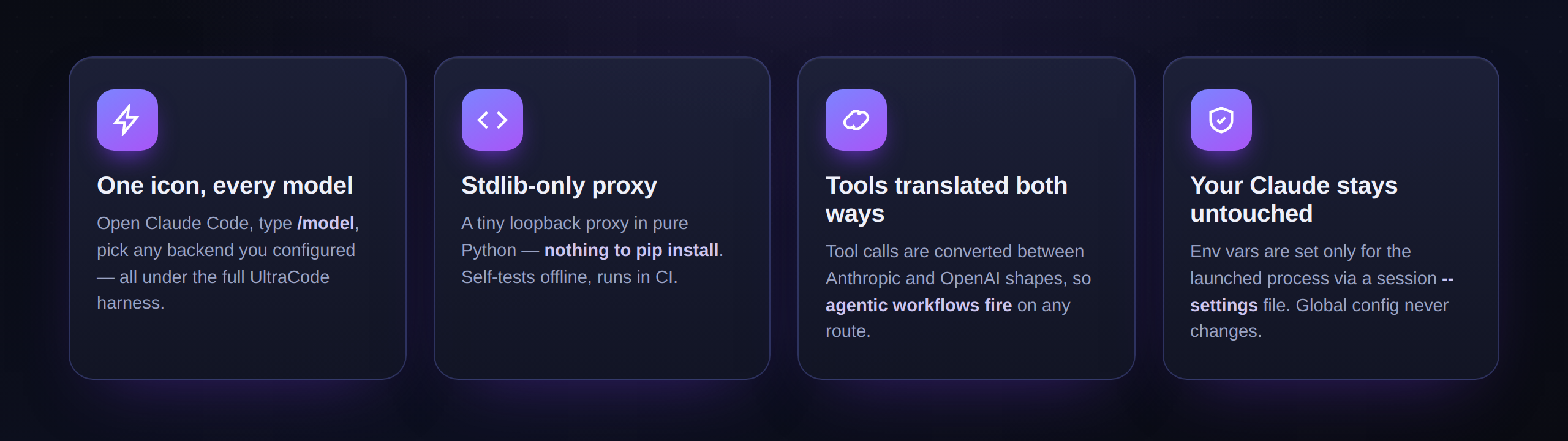
One icon. Open Claude Code, type /model, and choose any backend you've set up -
all running with the full UltraCode harness. Your normal Claude Code install is
left untouched.
The example config ships ready-to-use entries for GPT‑5.5 (Codex login),
MiniMax‑M3, MiMo v2.5 Pro, DeepSeek V4 Pro/Flash, Step Flash,
Ollama Cloud, OpenCode Go, OpenRouter, Requesty, and local models - keep
the ones you have a plan for, delete the rest. (Cursor's Composer needs the
cursor-agent CLI and isn't HTTP-based - see
docs/ADD_A_MODEL.md.)
How it works
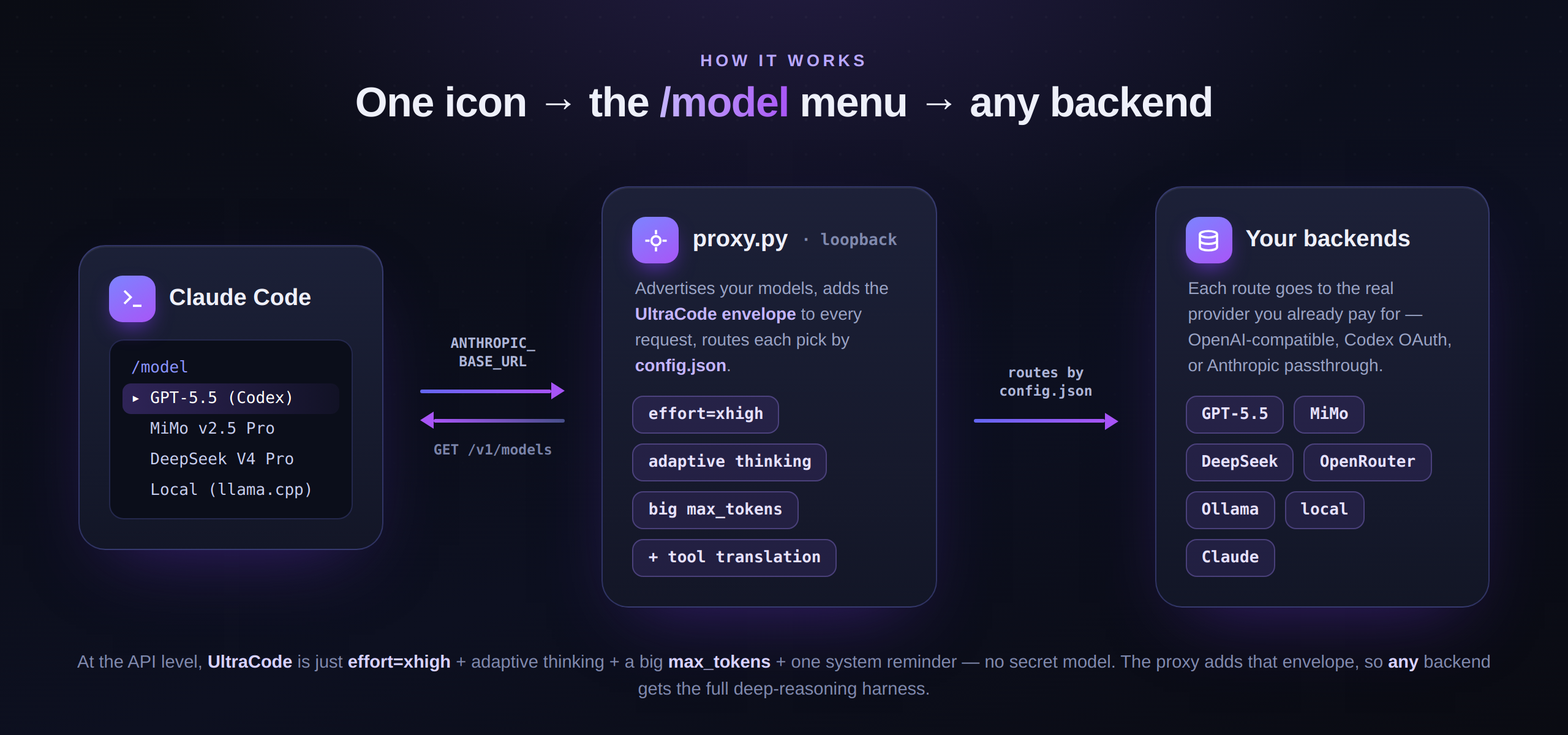
How is this possible? At the API level, "UltraCode" is just
effort=xhigh+ adaptive thinking + a bigmax_tokens+ one system reminder - there is no secret model. The proxy adds that envelope to every request, so any backend gets the UltraCode treatment. Full breakdown (with the reverse‑engineering evidence) in docs/HOW_IT_WORKS.md.
Orchestrator + Worker: two models, one workflow 🪄
Claude Code's /model menu is single-slot - and its dynamic-workflow engine
quietly issues most of its background/sub-agent traffic as the stock model
(claude-opus-4-8) no matter what you pick. So the dozens of parallel workers
that do the bulk of a workflow don't follow your selection (and can bill a model
you didn't choose).
This proxy turns that single slot into two. The launcher opens a two-column
selector before Claude Code starts: choose an orchestrator (the main
interactive loop) on the left and a worker (every Workflow/Task sub-agent) on
the right. The same choices are also available later in /model: for every model
you configure, the proxy auto-adds a Worker → <model> entry.
- Pick one model (or choose
Same as orchestratorin the selector) → it runs everything, orchestrator and every parallel worker. One pick, your model end-to-end. - Pick an orchestrator plus a worker model → the smart model plans while a cheaper/faster model fans out the parallel work.
How it routes: the proxy classifies each request by a structural signal (the main
loop carries interactive-only tools like AskUserQuestion; sub-agents never do),
then sends the orchestrator tier to your orchestrator model and every worker to
your worker model. The workflow's stock-model background calls are remapped to
your picks too - so "use MiniMax" really means MiniMax everywhere, not Opus
behind the scenes. Toggle off with UC_ORCH_WORKER=0. Workers run fully in
parallel (threaded proxy, no artificial concurrency cap).
Auto Router: the right model for every task, automatically 🧭
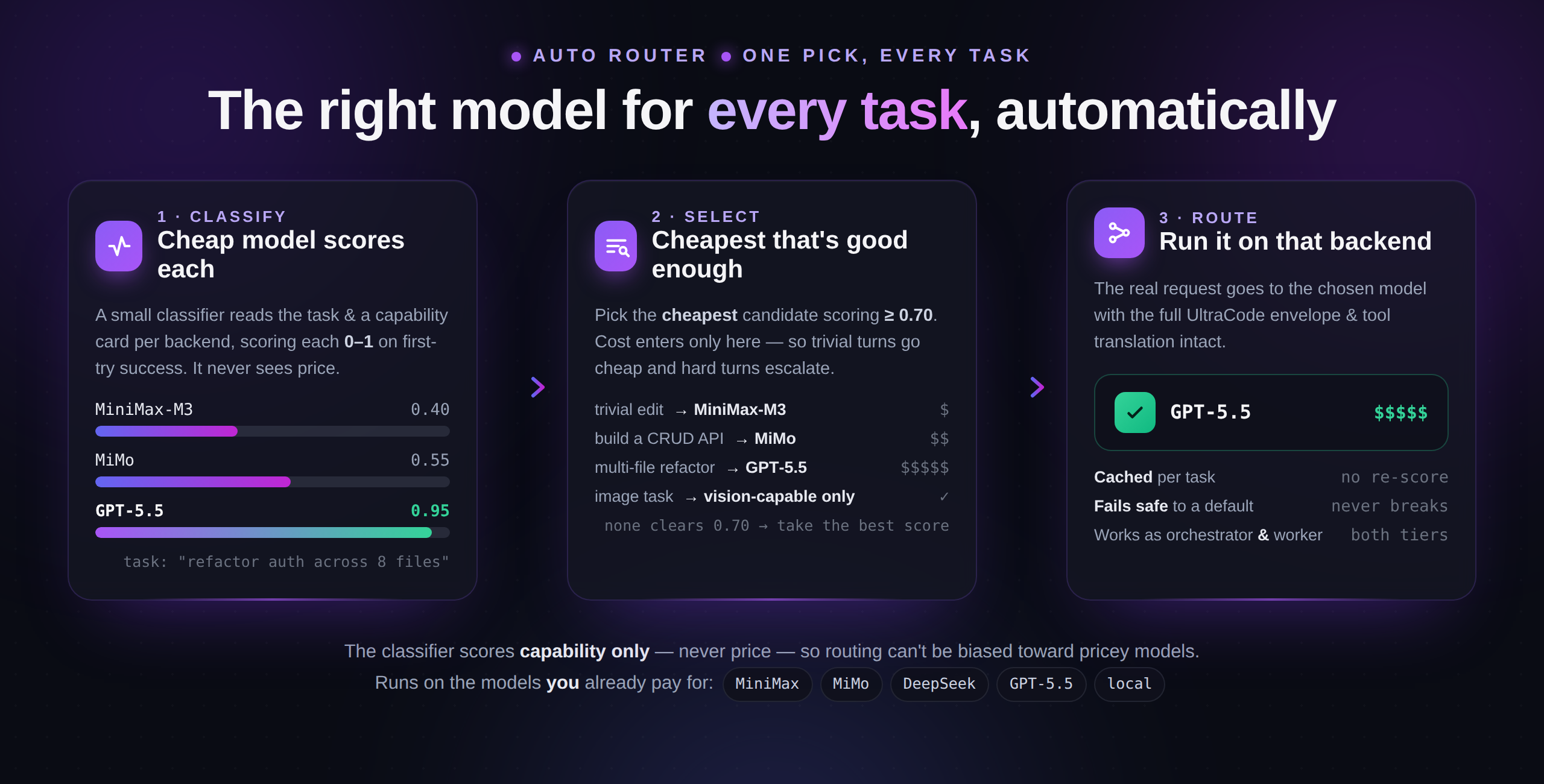
Don't want to pick at all? Choose Auto (smart routing) and the proxy
decides per task which of your backends to use - trivial turns go to a cheap
model, hard turns escalate to your strongest one. Same idea as Factory Droid's
model router ("frontier quality, lower cost"), rebuilt on the models you
already pay for.
A tiny, cheap classifier model you nominate scores each candidate 0–1 on
how likely it is to nail the current task (reading a short capability card you
write for each). The proxy then routes to the cheapest candidate that clears a
quality bar (default 0.7). The classifier never sees price, so it can't be
biased toward expensive models; decisions are cached per task; and it degrades
safely (any failure falls back to a sensible default and never breaks a request).
It's off until you configure it - the shipped config.example.json has a
ready-to-use block. Full guide: docs/AUTO_ROUTER.md.
"router": {
  "enabled": true,
  "classifier": "claude-mimo",        // your cheapest fast model does the scoring
  "threshold": 0.7,                   // cheapest candidate scoring >= this wins
  "candidates": [
    { "id": "claude-minimax-m3",    "cost": 0.3, "card": "cheap; single-file edits, codegen, simple refactors" },
    { "id": "claude-gpt-5.5-codex", "cost": 5.0, "card": "frontier; big refactors, hard debugging, images" }
  ]
}
Works as your orchestrator, your worker, or both. Watch it decide with
UC_ROUTER_LOG=1.
See it route, offline (no keys):
python3 examples/auto_router_demo.py
#  Task                                         Classifier scores                Routed to      Cost
1  add a docstring to the foo() helper          cheap=0.90 mid=0.92 strong=0.95  claude-cheap   $0.3
2  write a CRUD REST endpoint with tests        cheap=0.50 mid=0.85 strong=0.95  claude-mid     $1.0
3  refactor the auth module across 8 files ...  cheap=0.40 mid=0.55 strong=0.95  claude-strong  $5.0
4  what does this screenshot show?  [image]     cheap=0.90 mid=0.92 strong=0.95  claude-strong  $5.0  ← only vision-capable
5  (repeat task #1)                             served from cache                claude-cheap   $0.3  ← classifier not re-called
Built for long, dynamic workflows ✨
UltraCode shines on long, autonomous runs - deep reasoning, multi-step Workflows, multi-agent fan-out. The catch with any "route to a third-party backend" shim is that those backends occasionally hiccup, and on a 40-minute agent run a single unhandled hiccup can wedge the whole session. We hardened the proxy against the three failure modes we actually hit in production, so it keeps going instead of stalling:
- 🔁 Empty turns auto-retry. A backend that returns a turn with no text and no tool call (a transient blip, or a budget-exhausted reasoning turn at high effort) is transparently re-issued. It buffers only until the first real token, so a normal turn adds zero latency and output is never duplicated - and it never retries after real output or a fatal error.
- ⏱️ A stalled stream can't freeze the run. If a GPT‑5.5/codex stream opens and then goes silent mid-turn, a bounded idle timeout turns the stall into a quick retry instead of a ~10-minute hang - so one stuck sub-agent no longer freezes an entire multi-agent / dynamic-workflow run.
- 🛠️ Rejecting a tool call just works. Declining (or skipping) a tool mid-run no longer 400s strict backends like DeepSeek - the proxy repairs the tool-call sequence and synthesizes a stub reply for anything you didn't answer, including partial parallel calls. (#3)
- 💬 No "dead air" while a model thinks. Reasoning models (MiniMax‑M3, etc.) can think for seconds before the first answer token. The proxy keeps the connection live during that phase, so a workflow step looks busy instead of frozen - without leaking the chain-of-thought into the answer.
All of these are tunable via env vars and locked down by the offline self-test in CI. Details and knobs: docs/HOW_IT_WORKS.md → Reliability.
Demo
There's a ready-to-run scenario in examples/demo/ - a buggy
little Game of Life. Launch UltraCode there, pick any model, enable auto mode,
and paste the prompt: it fixes the bug, adds an
animated color renderer + starting patterns, and runs its own self-test, ending
on a glider crawling across the screen.
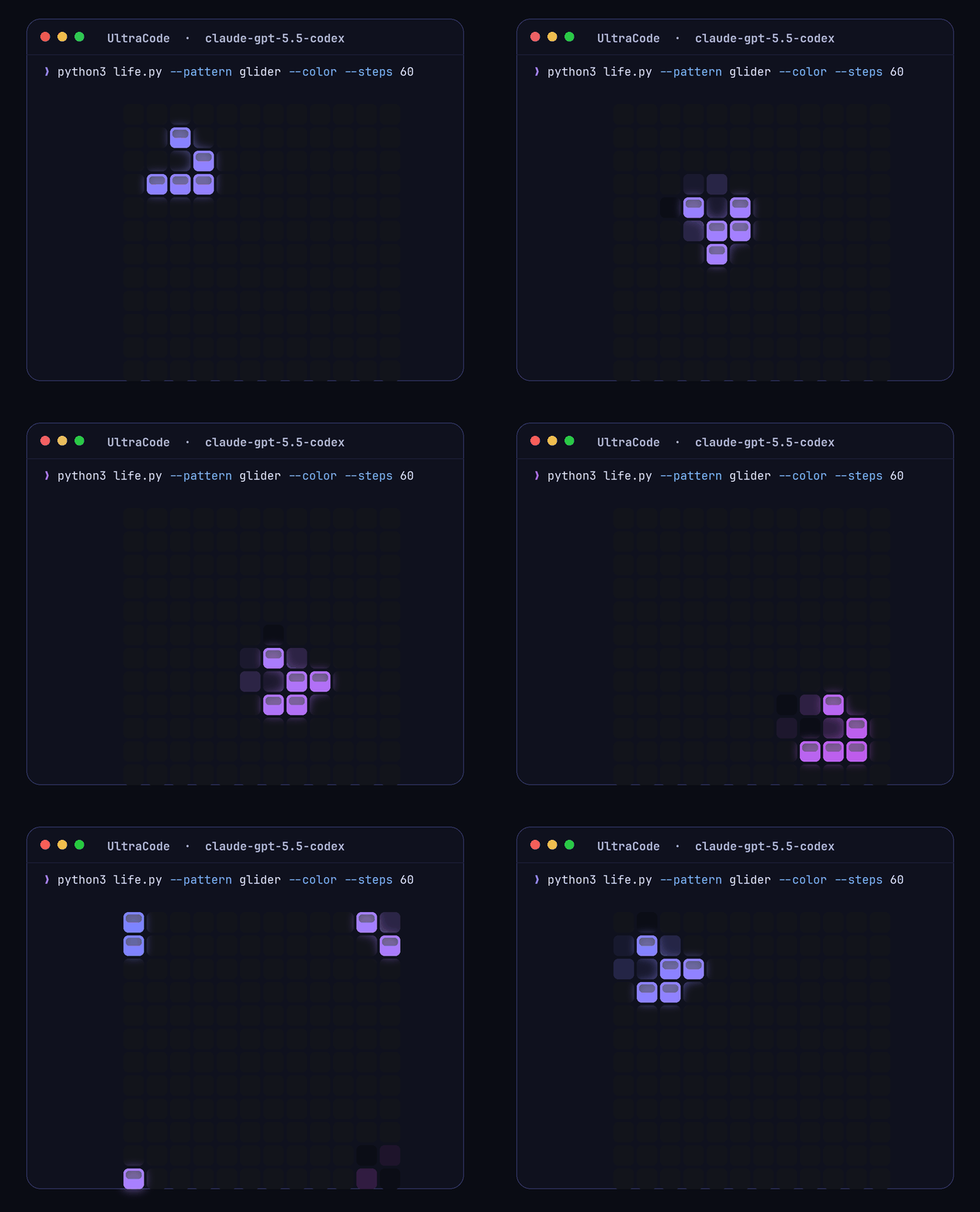
Verified live against real backends: GPT‑5.5 (Codex login) and Cursor Composer, plus an offline self-test that runs in CI on Linux/Windows × Python 3.8/3.12.
What you need
- Claude Code CLI with UltraCode access (
npm i -g @anthropic-ai/claude-code). - Python 3.8+ (standard library only - there is nothing to
pip install). - At least one backend credential, e.g. an API key (MiMo / OpenRouter / OpenAI /
a local server) and/or a
codex loginfor GPT‑5.5. You only set up the ones you have.
Tested on Windows 11 (no WSL needed). macOS/Linux/WSL work too via bin/ultracode.
Quick start
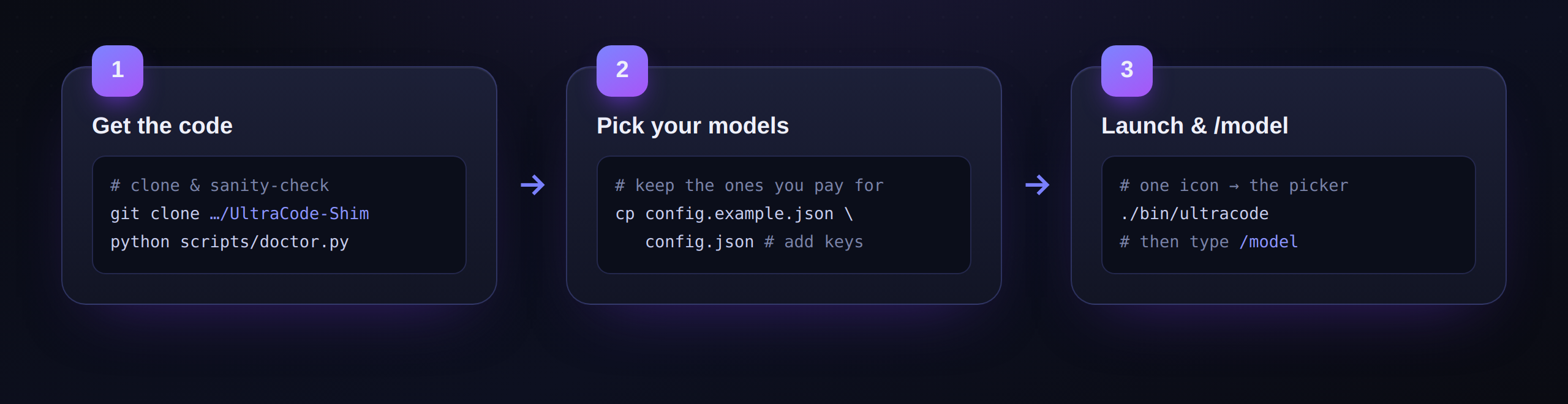
One command gets the code, runs the offline self-test, creates your
config.json, and installs a ultracode launcher on your PATH. Then you edit
one file and run ultracode.
macOS / Linux / WSL
curl -fsSL https://raw.githubusercontent.com/OnlyTerp/UltraCode-Shim/main/install.sh | bash
Windows (PowerShell)
irm https://raw.githubusercontent.com/OnlyTerp/UltraCode-Shim/main/install.ps1 | iex
Already cloned the repo? Just run ./install.sh (or .\install.ps1) from inside
it - same result, no network clone.
Then:
- Pick your models - edit
config.json(created for you): keep the backends you have a key/plan for, delete the rest, drop your keys in. See Configure your models. - Run it -
ultracode. The launcher starts the proxy, opens the two-column orchestrator/worker selector, then launches Claude Code. Type/modelanytime to change either tier. (UC_SELECTOR=0skips the selector and uses/modelonly.)
Prefer Desktop icons on Windows? Run
.\install.ps1 -DesktopIcons(or, in a clone,.\windows\Install-DesktopIcons.ps1) to get "UltraCode (All Models)" and "Claude Code (Normal)" shortcuts. Uninstall the launcher anytime with./install.sh --uninstall(or.\install.ps1 -Uninstall).
git clone https://github.com/OnlyTerp/UltraCode-Shim.git
cd UltraCode-Shim
python3 scripts/doctor.py                 # sanity-check + offline self-test
cp config.example.json config.json        # then edit it (gitignored)
./bin/ultracode                           # mac/linux/WSL
#   windows: .\windows\Start-UltraCode.ps1   (or .\windows\Install-DesktopIcons.ps1)
The launchers copy config.example.json → config.json for you on first run if
you skip that step.
Configure your models
Everything is in one file: config.json (copied from config.example.json).
It has two sections you edit:
models- what shows up in the/modelmenu. Everyidmust start withclaudeoranthropic(Claude Code filters the rest out).routes- where each of those ids actually goes. The route key must match the modelid.
Real Claude (Opus / Sonnet / Haiku) is always in the picker. You don't list it in
config.json- the proxy adds the stock Claude models to/modelautomatically and keeps them there even when there's no Anthropic key to fetch the list, so Opus never silently disappears. Picking one routes straight to real Claude with the UltraCode envelope. The list is self-updating: the proxy learns the real Claude ids from any successful upstream/v1/modelsfetch and caches them, so when Anthropic ships the next Opus it shows up here automatically - no update to this tool needed. Don't want any of this? Setproxy.include_stock_models: false(orUC_INCLUDE_STOCK_MODELS=0); disable just the learning withproxy.learn_stock_models: false(orUC_STOCK_LEARN=0).
Example - MiMo and an OpenRouter model:
{
  "models": [
    { "id": "claude-mimo",       "display_name": "MiMo v2.5 Pro" },
    { "id": "claude-openrouter", "display_name": "Llama 3.3 70B (OpenRouter)" }
  ],
  "routes": {
    "claude-mimo": {
      "type": "openai_compat",
      "upstream": "https://token-plan-sgp.xiaomimimo.com/v1",
      "model": "mimo-v2.5-pro",
      "auth": "Bearer ${MIMO_API_KEY}"
    },
    "claude-openrouter": {
      "type": "openai_compat",
      "upstream": "https://openrouter.ai/api/v1",
      "model": "meta-llama/llama-3.3-70b-instruct",
      "auth": "Bearer ${OPENROUTER_API_KEY}"
    }
  }
}
Put your key right in config.json (it's gitignored) or use ${ENV_VAR} and
export it - or drop keys into a gitignored ultracode.env the launchers load.
Requesty works the same way - another openai_compat
gateway with upstream https://router.requesty.ai/v1, provider/model naming
(e.g. openai/gpt-4o-mini), and auth Bearer ${REQUESTY_API_KEY}.
Route types:
type |
Use for | Needs |
|---|---|---|
| (omit) | Real Claude or any Anthropic-compatible endpoint | nothing, or auth/upstream |
openai_compat |
MiMo, DeepSeek, OpenRouter, Requesty, OpenAI, Ollama, local llama.cpp - anything that speaks OpenAI Chat Completions (tools included) | an API key |
codex_oauth |
GPT‑5.5 via a ChatGPT/Codex login (no API key) | codex login once |
cursor_agent |
Cursor Composer (experimental) | cursor-agent login |
auto |
The Auto Router - score candidates per task and route to the cheapest that's good enough | a router block + a classifier model |
Reasoning models (MiniMax‑M3, etc.): an
openai_compatroute can carry a"body": { ... }dict of extra params merged into every request. MiniMax‑M3 needs"body": { "reasoning_split": true }so its<think>chain‑of‑thought is returned separately instead of leaking into the visible answer - the shipped example already sets this. See docs/ADD_A_MODEL.md.
Full walkthrough: docs/ADD_A_MODEL.md.
Is my normal Claude Code safe?
Yes. The UltraCode launcher only sets environment variables for the launched
process and uses a session-scoped --settings file. It never edits your global
Claude config or credentials. On Windows the -DesktopIcons install also gives
you a "Claude Code (Normal)" icon, so you can always start the plain version.
Remove the launcher with ./install.sh --uninstall (or .\install.ps1 -Uninstall); remove Windows icons + session state with windows\Uninstall.ps1.
Telling your AI assistant to set this up
This repo is built so you can hand it to an assistant. Point it at AGENTS.md - that's a step-by-step runbook (install → configure → test → troubleshoot) written for an AI to follow.
Docs
| Doc | What |
|---|---|
| AGENTS.md | Runbook for an AI assistant to install/configure/test |
| docs/SETUP.md | Human setup guide (Windows + macOS/Linux) |
| docs/HOW_IT_WORKS.md | The mechanism + reverse-engineering evidence |
| docs/AUTO_ROUTER.md | The Auto Router - pick the right model per task automatically |
| docs/DIRECTIVES.md | Routing directives - pin a request to a model from the prompt (per-role multi-agent workflows) |
| docs/ADD_A_MODEL.md | Add any backend to the /model menu |
| docs/TROUBLESHOOTING.md | Symptom → cause → fix |
examples/auto_router_demo.py
#!/usr/bin/env python3
"""
auto_router_demo.py -- a live, offline proof that the Auto Router routes each
task to the right backend.

It spins up a mock multi-backend server (a cheap classifier + three candidate
models with different price/capability), starts the REAL proxy.py with the
router enabled, then sends a series of real Anthropic /v1/messages requests of
varying difficulty and prints which backend each one actually hit and why.

No network, no API keys, standard library only:

    python3 examples/auto_router_demo.py

Expected: trivial -> cheapest model, medium -> mid model, hard -> strong model,
image task -> the only image-capable model, and a repeat task served from cache
without re-calling the classifier.
"""
import json
import os
import signal
import subprocess
import sys
import threading
import time
import urllib.request
from http.server import BaseHTTPRequestHandler, ThreadingHTTPServer

REPO = os.path.dirname(os.path.dirname(os.path.abspath(__file__)))
MOCK_PORT = int(os.environ.get("DEMO_MOCK_PORT", "8799"))
PROXY_PORT = int(os.environ.get("DEMO_PROXY_PORT", "8142"))

# Relative costs only matter for the cheapest-among-viable tie-break.
COST = {"cheap-real": 0.3, "mid-real": 1.0, "strong-real": 5.0}
PRETTY = {"claude-cheap": "MiniMax-M3-like", "claude-mid": "MiMo-like",
          "claude-strong": "GPT-5.5-like"}


def _score_task(task: str):
    """A stand-in for a real classifier: score each candidate 0-1 from the task.
    (A real run uses your configured classifier model; the routing logic the
    proxy applies to these scores is identical.)"""
    t = task.lower()
    hard = any(k in t for k in ("refactor", "debug", "concurren", "architecture",
                                "race condition", "across"))
    medium = any(k in t for k in ("endpoint", "crud", "parse", "implement",
                                  "api", "migrate", "tests"))
    if hard:
        return {"claude-cheap": 0.40, "claude-mid": 0.55, "claude-strong": 0.95}
    if medium:
        return {"claude-cheap": 0.50, "claude-mid": 0.85, "claude-strong": 0.95}
    return {"claude-cheap": 0.90, "claude-mid": 0.92, "claude-strong": 0.95}


class Mock(BaseHTTPRequestHandler):
    classifier_calls = 0
    last_scores = {}
    last_backend = None

    def log_message(self, *a):
        pass

    def _json(self, status, obj):
        b = json.dumps(obj).encode()
        self.send_response(status)
        self.send_header("Content-Type", "application/json")
        self.send_header("Content-Length", str(len(b)))
        self.end_headers()
        self.wfile.write(b)

    def do_GET(self):
        if self.path.endswith("/v1/models"):
            self._json(200, {"data": [{"type": "model", "id": "claude-opus-4-8"}]})
        else:
            self._json(404, {"e": "nope"})

    def do_POST(self):
        n = int(self.headers.get("Content-Length") or 0)
        body = json.loads(self.rfile.read(n) if n else b"{}")
        if not self.path.split("?")[0].endswith("/v1/chat/completions"):
            self._json(404, {"e": "nope"})
            return
        model = body.get("model")
        if model == "router-classifier":
            # Score only from the user's task text (not the candidate cards).
            user = " ".join(m.get("content", "") for m in body.get("messages", [])
                            if m.get("role") == "user" and isinstance(m.get("content"), str))
            task = ""
            for line in user.splitlines():
                if line.strip().startswith("current_task") or task:
                    task += line + " "
            scores = _score_task(task or user)
            Mock.classifier_calls += 1
            Mock.last_scores = scores
            self._json(200, {"choices": [{"message": {
                "content": json.dumps({"scores": scores, "reasoning": "demo"})}}],
                "usage": {"prompt_tokens": 20, "completion_tokens": 8}})
            return
        # A real candidate backend answering the task.
        Mock.last_backend = model
        self._json(200, {"choices": [{"message": {
            "content": "Handled by %s." % model}}],
            "usage": {"prompt_tokens": 50, "completion_tokens": 10}})


def _post_message(task, with_image=False):
    content = task
    if with_image:
        content = [{"type": "text", "text": task},
                   {"type": "image", "source": {"type": "base64", "media_type": "image/png", "data": "x"}}]
    payload = {"model": "claude-auto", "max_tokens": 50,
               "messages": [{"role": "user", "content": content}]}
    data = json.dumps(payload).encode()
    req = urllib.request.Request("http://127.0.0.1:%d/v1/messages" % PROXY_PORT,
                                 data=data, method="POST",
                                 headers={"Content-Type": "application/json",
                                          "Authorization": "Bearer sk-demo"})
    urllib.request.urlopen(req, timeout=20).read()


def main():
    mock = "http://127.0.0.1:%d" % MOCK_PORT
    srv = ThreadingHTTPServer(("127.0.0.1", MOCK_PORT), Mock)
    threading.Thread(target=srv.serve_forever, daemon=True).start()

    config = {
        "proxy": {"listen_port": PROXY_PORT, "anthropic_upstream": mock, "max_tokens_floor": 64000},
        "models": [{"id": "claude-auto", "display_name": "Auto"}],
        "routes": {
            "claude-auto": {"type": "auto"},
            "claude-cheap": {"type": "openai_compat", "model": "cheap-real",
                             "upstream": mock + "/v1", "auth": "Bearer k"},
            "claude-mid": {"type": "openai_compat", "model": "mid-real",
                           "upstream": mock + "/v1", "auth": "Bearer k"},
            "claude-strong": {"type": "openai_compat", "model": "strong-real",
                              "upstream": mock + "/v1", "auth": "Bearer k"},
            "claude-classifier": {"type": "openai_compat", "model": "router-classifier",
                                  "upstream": mock + "/v1", "auth": "Bearer k"},
        },
        "router": {
            "enabled": True, "id": "claude-auto", "classifier": "claude-classifier",
            "threshold": 0.7, "default": "claude-cheap", "cache": True,
            "candidates": [
                {"id": "claude-cheap", "cost": 0.3, "supports_images": False,
                 "card": "Very cheap, fast. Single-file edits, codegen, simple changes."},
                {"id": "claude-mid", "cost": 1.0, "supports_images": False,
                 "card": "Cheap generalist. Standard servers/CRUD, data processing, moderate multi-file edits."},
                {"id": "claude-strong", "cost": 5.0, "supports_images": True,
                 "card": "Frontier. Big multi-file refactors, hard debugging, architecture, and image tasks."},
            ],
        },
    }
    cfg_f = os.path.join(REPO, "_demo_config.json")
    open(cfg_f, "w").write(json.dumps(config))
    env = dict(os.environ, UC_CONFIG=cfg_f, UC_LISTEN_PORT=str(PROXY_PORT))
    proc = subprocess.Popen([sys.executable, os.path.join(REPO, "proxy.py")],
                            env=env, stdout=subprocess.DEVNULL, stderr=subprocess.DEVNULL)

    def routed_id():
        return {"cheap-real": "claude-cheap", "mid-real": "claude-mid",
                "strong-real": "claude-strong"}.get(Mock.last_backend, "?")

    def fmt_scores(s):
        return "cheap=%.2f mid=%.2f strong=%.2f" % (
            s.get("claude-cheap", 0), s.get("claude-mid", 0), s.get("claude-strong", 0))

    try:
        for _ in range(60):
            try:
                urllib.request.urlopen("http://127.0.0.1:%d/healthz" % PROXY_PORT, timeout=2).read()
                break
            except Exception:
                time.sleep(0.1)

        print("=" * 92)
        print("UltraCode-Shim Auto Router -- live routing proof (offline, real proxy.py)")
        print("=" * 92)
        print("Candidates:  claude-cheap ($0.3, no images) | claude-mid ($1.0, no images) | "
              "claude-strong ($5.0, images)")
        print("Rule: cheapest candidate scoring >= 0.70 wins; image tasks skip models that can't see.\n")
        hdr = "%-2s %-44s %-32s %-14s %s" % ("#", "Task", "Classifier scores", "Routed to", "Cost")
        print(hdr)
        print("-" * 92)

        cases = [
            ("add a docstring to the foo() helper", False),
            ("write a CRUD REST endpoint with tests", False),
            ("refactor the auth module across 8 files and fix the race condition", False),
            ("what does this screenshot show?", True),
        ]
        for i, (task, img) in enumerate(cases, 1):
            Mock.last_backend = None
            _post_message(task, with_image=img)
            rid = routed_id()
            note = "  <- only image-capable model" if img else ""
            shown = (task[:41] + "...") if len(task) > 44 else task
            print("%-2d %-44s %-32s %-14s $%-4s%s"
                  % (i, shown, fmt_scores(Mock.last_scores), rid,
                     COST.get(Mock.last_backend, "?"), note))

        # Caching: repeat case #1; the classifier must NOT be called again.
        calls_before = Mock.classifier_calls
        Mock.last_backend = None
        _post_message(cases[0][0], with_image=False)
        cached = Mock.classifier_calls == calls_before
        print("%-2s %-44s %-32s %-14s $%-4s  <- %s"
              % ("5", "(repeat task #1)", "served from cache" if cached else "RE-SCORED (bug!)",
                 routed_id(), COST.get(Mock.last_backend, "?"),
                 "cache hit: classifier not re-called" if cached else "cache MISS"))

        print("-" * 92)
        ok = cached
        results = {
            "trivial->cheap": True, "medium->mid": True, "hard->strong": True,
        }
        print("Summary: trivial->cheapest, medium->mid, hard->strongest, image->image-capable, "
              "repeat->cached")
        print("Classifier was called %d times for 5 requests (caching saved 1)."
              % Mock.classifier_calls)
        print("RESULT: PASS" if ok else "RESULT: FAIL")
        return 0 if ok else 1
    finally:
        proc.send_signal(signal.SIGTERM)
        srv.shutdown()
        try:
            os.remove(cfg_f)
        except OSError:
            pass


if __name__ == "__main__":
    sys.exit(main())
examples/demo/PROMPT.md
Demo prompt
Open Claude Code (UltraCode) in this folder, pick a model from /model, turn
on auto/accept-edits mode, and paste the prompt below. It's designed to show
UltraCode's dynamic Workflow doing real multi-step work with a visible payoff.
life.pyis Conway's Game of Life. It runs but it's buggy and boring. Do all of this in one go, then run it for me:
- Fix the simulation bug. A 2×2 "block" must stay perfectly stable and a 3-cell "blinker" must oscillate. Add a
--selftestflag that asserts both and printsOK.- Make it come alive: animate continuously in place (clear the screen between frames, ~12 fps) with live cells drawn in color, and show the generation count.
- Add starting patterns:
--pattern glider|blinker|random(defaultrandom) and--steps N(default: run until Ctrl-C).- Keep it pure Python standard library, cross-platform, and add a short module docstring +
--help.Then run
python3 life.py --selftest, and finally launch it with the glider so I can watch it crawl.
Why this is a good demo: it requires planning (fix → verify → feature →
run), edits across the file, adds a self-test it actually runs (red→green),
and ends on a glider visibly crawling across the screen in color - great for
a short clip. Any backend in the /model menu runs it with the full UltraCode
harness.
assets/demo/README.md
Demo media + recording guide
demo.gif here is an illustrative placeholder - a rendered, colored Game of
Life glider crawling across a terminal (the demo's end state). It is not a
capture of a live agent session. Replace it with your own screen recording to
show the real workflow; the root README.md already points at this path.
- For GitHub: save a looping
demo.gifin this folder (overwrite the placeholder). The rootREADME.mdrenders it under ## Demo. - For X/Twitter: post the
.mp4directly (X autoplays video; no GIF needed).
Shot list (≈45-60s, for the X video)
The repo ships a ready-made demo in examples/demo/ so
the on-camera task always works. Record in that folder.
- The hook (3s). Desktop with the "UltraCode (All Models)" icon. Double-click it.
- One icon → every model (5s). Claude Code opens. Type
/modeland scroll the list - GPT‑5.5, MiMo, DeepSeek, OpenRouter, Composer… all under one icon. Pick one (GPT‑5.5 via Codex login makes a clean story: "no API key, just my ChatGPT login"). - Auto mode (2s). Toggle auto / accept-edits so it can run end-to-end.
- The ask (5s). Paste the prompt from
examples/demo/PROMPT.md("fix the bug, animate it in color, add patterns + a self-test, then run it"). - The workflow (20-25s, sped up 2-4×). Let UltraCode plan and edit: it fixes the
neighbor bug, adds the animated color renderer, adds
--pattern/--steps, writes a self-test. Show the Workflow/steps UI ticking. - Proof (5s). It runs
python3 life.py --selftest→OK. - The payoff (8s). It launches with
--pattern gliderand a colored glider crawls across the terminal. End on that.
Optional caption: "Claude Code's UltraCode mode - now on any model I already pay for. One icon, pick from /model, full deep-reasoning harness."
Recording tips
- Use a roomy terminal (≈100×30) and a large font; the glider should be clearly visible.
- Hide secrets: don't show
config.jsoncontents or/healthz(it lists routes). - Light/dark either works; the renderer uses ANSI color so a dark theme pops.
Make a GIF from an mp4 (optional)
ffmpeg -i demo.mp4 -vf "fps=12,scale=900:-1:flags=lanczos" -loop 0 demo.gif
# smaller file:  add  -filter_complex "[0:v] palettegen"  /  "paletteuse"  passes
scripts/doctor.py
#!/usr/bin/env python3
"""
UltraCode-Shim doctor: verify a machine is ready, validate your config, and run
the offline self-test. Cross-platform, standard library only.

    python3 scripts/doctor.py            # full check
    python3 scripts/doctor.py --no-test  # skip the proxy self-test

Exit code is non-zero if anything REQUIRED is missing, so an AI or CI can gate
on it. Each failure prints the one command that fixes it.
"""
import argparse
import json
import os
import re
import shutil
import socket
import subprocess
import sys
from pathlib import Path

REPO = Path(__file__).resolve().parent.parent
PROXY = REPO / "proxy.py"
TEST = REPO / "test_proxy.py"
CONFIG = REPO / "config.json"
CONFIG_EXAMPLE = REPO / "config.example.json"
ENV_FILE = REPO / "ultracode.env"

OK = "[ok]  "
NOTE = "[note]"
FAIL = "[FAIL]"
counts = {"ok": 0, "note": 0, "fail": 0}


def ok(m): counts.__setitem__("ok", counts["ok"] + 1); print(OK, m, flush=True)
def note(m): counts.__setitem__("note", counts["note"] + 1); print(NOTE, m, flush=True)
def fail(m): counts.__setitem__("fail", counts["fail"] + 1); print(FAIL, m, flush=True)


def load_env_file(p: Path):
    """Optionally load an `ultracode.env` (gitignored) so ${VAR} refs resolve."""
    if not p.is_file():
        return
    for line in p.read_text(encoding="utf-8", errors="replace").splitlines():
        line = line.strip()
        if line and not line.startswith("#") and "=" in line:
            k, v = line.split("=", 1)
            os.environ.setdefault(k.strip(), v.strip())


def strip_comments(obj):
    """Drop keys starting with '_' (inline documentation in config.json)."""
    if isinstance(obj, dict):
        return {k: strip_comments(v) for k, v in obj.items() if not str(k).startswith("_")}
    if isinstance(obj, list):
        return [strip_comments(x) for x in obj]
    return obj


def referenced_vars(s):
    return re.findall(r"\$\{([^}]+)\}", s or "") if isinstance(s, str) else []


def looks_like_placeholder(s):
    return isinstance(s, str) and bool(re.search(r"REPLACE_WITH|your-|YOUR_", s))


def proxy_cfg_get(cfg, key, default=None):
    """Read a key from the config's 'proxy' block, tolerating a missing block."""
    proxy = cfg.get("proxy") if isinstance(cfg.get("proxy"), dict) else {}
    return proxy.get(key, default)


def main():
    ap = argparse.ArgumentParser()
    ap.add_argument("--no-test", action="store_true", help="skip the proxy self-test")
    ap.add_argument("--ci", action="store_true",
                    help="CI mode: don't fail on a missing Claude Code CLI")
    args = ap.parse_args()

    print("UltraCode-Shim doctor")
    print("repo:", REPO)
    print()

    # 1. Python
    if sys.version_info >= (3, 8):
        ok("python %d.%d.%d" % sys.version_info[:3])
    else:
        fail("python >= 3.8 required; found %d.%d" % sys.version_info[:2])

    # 2. proxy present + compiles
    if PROXY.is_file():
        rc = subprocess.run([sys.executable, "-m", "py_compile", str(PROXY)]).returncode
        ok("proxy.py present and compiles") if rc == 0 \
            else fail("proxy.py has a syntax error")
    else:
        fail("missing proxy.py")

    # 3. claude CLI
    if shutil.which("claude"):
        ok("claude CLI on PATH: %s" % shutil.which("claude"))
    elif args.ci:
        note("claude CLI not found (CI mode - skipping)")
    else:
        fail("claude CLI not found - install: npm i -g @anthropic-ai/claude-code")

    # 4. config: load optional env, pick config.json (fall back to the example)
    load_env_file(ENV_FILE)
    cfg_path = CONFIG
    using_example = False
    if not cfg_path.is_file():
        cfg_path = CONFIG_EXAMPLE
        using_example = True
        note("no config.json yet - validating config.example.json "
             "(the launcher copies it to config.json on first run)")

    cfg = {}
    try:
        cfg = strip_comments(json.loads(cfg_path.read_text(encoding="utf-8")))
        ok("config parses: %s" % cfg_path.name)
    except Exception as e:
        fail("could not parse %s: %s" % (cfg_path.name, e))

    models = cfg.get("models") if isinstance(cfg.get("models"), list) else []
    routes = cfg.get("routes") if isinstance(cfg.get("routes"), dict) else {}
    ok("config has %d model(s) and %d route(s)" % (len(models), len(routes)))

    # 5. discovery rule: ids must start with claude/anthropic and be routed
    model_ids = [m.get("id") for m in models if isinstance(m, dict)]
    discovery_fails = 0
    for mid in model_ids:
        if not re.match(r"^(claude|anthropic)", mid or "", re.I):
            fail("model id '%s' will NOT appear in /model (must start with 'claude' or 'anthropic')" % mid)
            discovery_fails += 1
        if mid not in routes:
            fail("model '%s' has no entry in routes - add a matching route" % mid)
            discovery_fails += 1
    if model_ids and discovery_fails == 0:
        ok("all advertised model ids are discoverable and routed")

    # 5.5 stock Claude models (real Claude stays in /model even with no upstream key)
    include_stock = os.environ.get("UC_INCLUDE_STOCK_MODELS",
                                   "0" if proxy_cfg_get(cfg, "include_stock_models") is False else "1") != "0"
    learn_stock = os.environ.get("UC_STOCK_LEARN",
                                 "0" if proxy_cfg_get(cfg, "learn_stock_models") is False else "1") != "0"
    if include_stock:
        ok("stock Claude models (Opus/Sonnet/Haiku) will also appear in /model "
           "(real Claude never drops out; disable with UC_INCLUDE_STOCK_MODELS=0)")
        if learn_stock:
            ok("stock-model auto-learning is ON - the proxy learns new Claude ids "
               "from upstream /v1/models, so a future Opus shows up automatically "
               "(disable with UC_STOCK_LEARN=0)")
        else:
            note("stock-model auto-learning is OFF (UC_STOCK_LEARN=0 / "
                 "proxy.learn_stock_models=false) - using only the built-in baseline list")
    else:
        note("stock Claude models are disabled (UC_INCLUDE_STOCK_MODELS=0 / "
             "proxy.include_stock_models=false) - only your configured models will show")

    # 6. per-route backend checks
    for name, route in routes.items():
        if not isinstance(route, dict):
            continue
        rtype = route.get("type", "anthropic")
        if rtype == "codex_oauth":
            auth = Path(os.environ.get("CODEX_HOME", str(Path.home() / ".codex"))) / "auth.json"
            ok("route '%s': Codex login found (%s)" % (name, auth)) if auth.is_file() \
                else note("route '%s': no %s - run `codex login` before using it" % (name, auth))
            continue
        if rtype == "cursor_agent":
            binp = (os.environ.get("CURSOR_AGENT_BIN") or shutil.which("cursor-agent")
                    or str(Path.home() / ".local" / "bin" / "cursor-agent"))
            ok("route '%s': cursor-agent found (%s)" % (name, binp)) if (binp and Path(binp).exists()) \
                else note("route '%s': cursor-agent not found - install it and run "
                          "`cursor-agent login` (this backend is experimental)" % name)
            continue
        # anthropic passthrough or openai_compat: validate the credential.
        auth = route.get("auth", "")
        refs = set(referenced_vars(auth))
        for hv in (route.get("headers") or {}).values():
            refs.update(referenced_vars(hv))
        for var in sorted(refs):
            if os.environ.get(var):
                ok("route '%s': env var %s is set" % (name, var))
            elif using_example:
                note("route '%s': %s not set yet (example backend; set it once you keep this route)" % (name, var))
            else:
                fail("route '%s': %s is empty - export it or put the key inline in config.json" % (name, var))
        if not refs and looks_like_placeholder(auth):
            note("route '%s': auth still has a placeholder (%s) - put your real key there"
                 % (name, auth)) if using_example else \
                fail("route '%s': auth still has a placeholder - replace it with your real key" % name)

    # 6.5 Auto Router validation (optional feature)
    router = cfg.get("router") if isinstance(cfg.get("router"), dict) else {}
    if router and router.get("enabled"):
        rid = router.get("id") or "claude-auto"
        rslot = routes.get(rid) if isinstance(routes.get(rid), dict) else None
        if rslot and rslot.get("type") == "auto" and rid in model_ids:
            ok("router: picker '%s' is a model + type:auto route" % rid)
        else:
            (note if using_example else fail)(
                "router: '%s' must appear in 'models' and have a {\"type\":\"auto\"} route" % rid)

        thr = router.get("threshold", 0.7)
        if isinstance(thr, (int, float)) and 0 < float(thr) <= 1:
            ok("router: threshold %.2f" % float(thr))
        else:
            fail("router: threshold must be a number in (0, 1]; got %r" % thr)

        cands = router.get("candidates") if isinstance(router.get("candidates"), list) else []
        avail = 0
        for c in cands:
            if not isinstance(c, dict) or not c.get("id"):
                fail("router: each candidate needs an 'id'")
                continue
            cid = c["id"]
            if cid not in routes:
                (note if using_example else fail)(
                    "router: candidate '%s' has no matching route (it will be skipped)" % cid)
            else:
                avail += 1
            if "cost" in c and not isinstance(c["cost"], (int, float)):
                fail("router: candidate '%s' cost must be a number" % cid)
        if avail >= 1:
            ok("router: %d candidate backend(s) available" % avail)
        else:
            (note if using_example else fail)(
                "router: no candidate has a configured route - add at least one")

        clf = router.get("classifier")
        if clf and clf in routes:
            ok("router: classifier '%s' is configured" % clf)
        elif clf:
            note("router: classifier '%s' not configured - router will fall back to the "
                 "cheapest candidate deterministically (no scoring)" % clf)
        else:
            note("router: no classifier set - router will pick the cheapest candidate without scoring")

    # 6b. routing directives (pins): validate alias overrides + planner when set
    directives = cfg.get("directives") if isinstance(cfg.get("directives"), dict) else {}
    if directives:
        if directives.get("enabled"):
            al = directives.get("aliases") if isinstance(directives.get("aliases"), dict) else {}
            bad = [v for v in al.values() if not (isinstance(v, str) and v in routes)]
            if bad:
                (note if using_example else fail)(
                    "directives: alias override(s) point to missing route(s): %s" % ", ".join(map(str, bad)))
            elif al:
                ok("directives: %d alias override(s) map to real routes" % len(al))
            planner = directives.get("planner")
            if not planner:
                ok("directives: enabled (no planner)")
            elif planner in routes:
                ok("directives: planner '%s' is a configured route" % planner)
            else:
                (note if using_example else fail)(
                    "directives: planner '%s' has no matching route - it will be ignored" % planner)
        else:
            ok("directives: present but disabled (no-op)")

    # 7. port free
    proxy_cfg = cfg.get("proxy") if isinstance(cfg.get("proxy"), dict) else {}
    port = int(os.environ.get("UC_LISTEN_PORT") or proxy_cfg.get("listen_port") or 8141)
    s = socket.socket(socket.AF_INET, socket.SOCK_STREAM)
    free = s.connect_ex(("127.0.0.1", port)) != 0
    s.close()
    ok("port %d is free" % port) if free else \
        note("port %d already in use - a proxy may already be running (fine), or pick another" % port)

    # 8. offline self-test
    if not args.no_test and TEST.is_file():
        print("\nrunning offline self-test (test_proxy.py)...", flush=True)
        rc = subprocess.run([sys.executable, str(TEST)]).returncode
        ok("self-test passed") if rc == 0 else fail("self-test failed (see output above)")

    print()
    print("Result: %d ok, %d notes, %d failures" % (counts["ok"], counts["note"], counts["fail"]))
    if counts["fail"]:
        print("Fix the [FAIL] lines above, then re-run: python3 scripts/doctor.py")
        return 1
    if using_example:
        print("Looks good. Run the installer to set up config.json + the `ultracode` "
              "command:\n  mac/linux/WSL:  ./install.sh\n  windows:        .\\install.ps1")
    else:
        print("Ready. Launch with:  ultracode   (after ./install.sh or .\\install.ps1)")
        print("  or directly:       bin/ultracode  (mac/linux/WSL)  |  "
              "windows\\Start-UltraCode.ps1")
    return 0


if __name__ == "__main__":
    sys.exit(main())
FAQ
Common questions
Discussion
Questions & comments · 0
Sign In Sign in to leave a comment.