
Query AWS Athena with Natural Language
Athena Reader executes SQL queries with AWS Athena using SQLAlchemy and PyAthena, demonstrated with LlamaIndex query engines.
Why it matters
Leverage the power of natural language to query your AWS Athena data. This asset translates your questions into SQL, retrieves data, and integrates it into your research or development workflows.
Outcomes
What it gets done
Execute SQL queries against AWS Athena using natural language prompts.
Integrate with AWS IAM roles for secure data access.
Utilize SQLAlchemy and PyAthena for robust database connectivity.
Enable RAG indexing for enhanced data retrieval and analysis.
Install
Add it to your toolbox
Run in your project directory:
curl -fsSL https://spark.entire.vc/get/li-reader-readers-athena | bash Overview
Athena reader.
Athena Reader allows you to execute SQL with AWS Athena using SQLAlchemy and PyAthena.create_athena_engine() that can be used with LlamaIndex's SQLDatabase and NLSQLTableQueryEngine components. Use Athena Reader when you need to execute SQL queries with AWS Athena. The source material demonstrates usage with LlamaIndex components including SQLDatabase and NLSQLTableQueryEngine. The documentation highly recommends using this loader with AWS EC2 IAM role.
What it does
Athena Reader allows you to execute SQL with AWS Athena. It uses SQLAlchemy and PyAthena under the hood. The source material demonstrates creating an Athena engine using AthenaReader.create_athena_engine() that can be used with LlamaIndex's SQLDatabase and NLSQLTableQueryEngine components.
When to use - and when NOT to
Use Athena Reader when you need to execute SQL queries with AWS Athena. The source material demonstrates usage with LlamaIndex components for querying Athena databases. The documentation highly recommends using this loader with AWS EC2 IAM role.
Do not use this reader if you're not working with AWS Athena, as it requires Athena-specific configuration including AWS region, S3 staging directory, database name, and workgroup.
Inputs and outputs
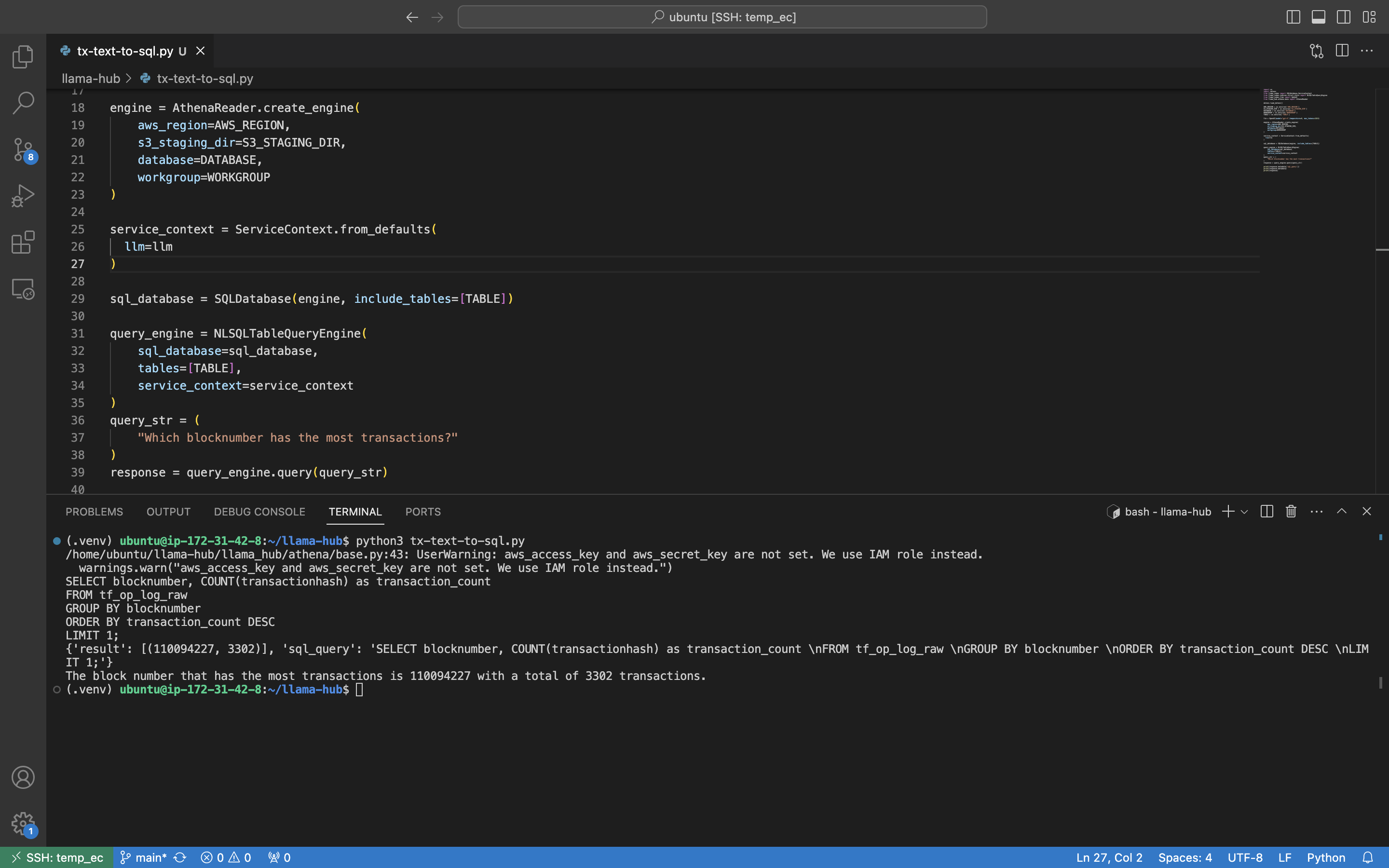
You provide AWS configuration parameters including region, S3 staging directory, database name, workgroup, and table names. The example demonstrates providing a query string ("Which blocknumber has the most transactions?") to a query engine. The reader returns query responses from your Athena database.
Integrations
Athena Reader works with:
- AWS Athena: Executes SQL queries with Athena
- SQLAlchemy: Used as the underlying database abstraction layer
- PyAthena: Provides the Athena-specific database driver
- LlamaIndex Core: Demonstrated with SQLDatabase and NLSQLTableQueryEngine components
- OpenAI: The example shows usage with OpenAI LLMs (GPT-4 model)
Who it's for
Athena Reader is for developers who need to execute SQL queries with AWS Athena. Users should be familiar with AWS IAM permissions, S3 configuration, and the LlamaIndex components demonstrated in the example.
Installation and usage
pip install llama-index-readers-athena

pip install llama-index-llms-openai
Example usage:
import os
import dotenv
from llama_index.core import SQLDatabase,ServiceContext
from llama_index.core.query_engine import NLSQLTableQueryEngine
from llama_index.llms.openai import OpenAI
from llama_index.readers.athena import AthenaReader

dotenv.load_dotenv()

AWS_REGION = os.environ['AWS_REGION']
S3_STAGING_DIR = os.environ['S3_STAGING_DIR']
DATABASE = os.environ['DATABASE']
WORKGROUP = os.environ['WORKGROUP']
TABLE = os.environ['TABLE']

llm = OpenAI(model="gpt-4",temperature=0, max_tokens=1024)

engine = AthenaReader.create_athena_engine(
    aws_region=AWS_REGION,
    s3_staging_dir=S3_STAGING_DIR,
    database=DATABASE,
    workgroup=WORKGROUP
)

service_context = ServiceContext.from_defaults(
  llm=llm
)

sql_database = SQLDatabase(engine, include_tables=[TABLE])

query_engine = NLSQLTableQueryEngine(
    sql_database=sql_database,
    tables=[TABLE],
    service_context=service_context
)
query_str = (
    "Which blocknumber has the most transactions?"
)
response = query_engine.query(query_str)
Source README
Athena reader.
pip install llama-index-readers-athena

pip install llama-index-llms-openai
Athena reader allow execute SQL with AWS Athena. We using SQLAlchemy and PyAthena under the hood.
Permissions
WE HIGHLY RECOMMEND USING THIS LOADER WITH AWS EC2 IAM ROLE.
Usage
Here's an example usage of the AthenaReader.
import os
import dotenv
from llama_index.core import SQLDatabase,ServiceContext
from llama_index.core.query_engine import NLSQLTableQueryEngine
from llama_index.llms.openai import OpenAI
from llama_index.readers.athena import AthenaReader

dotenv.load_dotenv()

AWS_REGION = os.environ['AWS_REGION']
S3_STAGING_DIR = os.environ['S3_STAGING_DIR']
DATABASE = os.environ['DATABASE']
WORKGROUP = os.environ['WORKGROUP']
TABLE = os.environ['TABLE']

llm = OpenAI(model="gpt-4",temperature=0, max_tokens=1024)

engine = AthenaReader.create_athena_engine(
    aws_region=AWS_REGION,
    s3_staging_dir=S3_STAGING_DIR,
    database=DATABASE,
    workgroup=WORKGROUP
)

service_context = ServiceContext.from_defaults(
  llm=llm
)

sql_database = SQLDatabase(engine, include_tables=[TABLE])

query_engine = NLSQLTableQueryEngine(
    sql_database=sql_database,
    tables=[TABLE],
    service_context=service_context
)
query_str = (
    "Which blocknumber has the most transactions?"
)
response = query_engine.query(query_str)
Screeshot
FAQ
Common questions
Discussion
Questions & comments · 0
Sign In Sign in to leave a comment.