
Deploy AI voice agents on Asterisk phone systems
Open-source modular AI voice agent for Asterisk/FreePBX, mixing STT/LLM/TTS providers with six validated production baselines.
7.5.6Add to Favorites
Why it matters
Enable enterprises to add conversational AI voice capabilities to their existing Asterisk or FreePBX phone infrastructure, handling inbound and outbound calls with natural language understanding, speech-to-text, text-to-speech, and custom actions through a modular pipeline architecture.
Outcomes
What it gets done
Route incoming calls to AI agents that understand and respond to customer inquiries in real-time
Mix and match STT, LLM, and TTS providers through 6 production-ready baseline configurations
Manage AI voice agents through a web-based admin UI with setup wizard and health monitoring
Integrate with Asterisk dialplans using AudioSocket or ExternalMedia RTP transports
Source
Get it from source
Spark does not host a copy of it.
Open sourceReports
Agent outcome reports
No reports yet
Overview
AVA-AI-Voice-Agent-for-Asterisk
AVA is an open-source, modular AI voice agent for Asterisk and FreePBX that mixes and matches STT, LLM, and TTS providers per call, with six validated production baselines and a Docker-based Admin UI for setup. Use it when adding a flexible, provider-agnostic AI voice agent to an existing Asterisk/FreePBX system; restrict the Admin UI's network access and rotate its default password before production use.
What it does
AVA is an open-source AI voice agent for Asterisk/FreePBX phone systems, built as a modular pipeline that lets you mix and match speech-to-text, LLM, and text-to-speech providers, with six production-ready "golden baseline" configurations validated for enterprise deployment.
When to use - and when NOT to
Use it when you want to add an AI voice agent to an existing Asterisk or FreePBX phone system - answering calls, running configured actions, routing to a specific agent by slug - and want the flexibility to swap STT, LLM, and TTS providers per call rather than being locked into one vendor stack. For managing many PBXs or customer installations at once, a commercial layer called AVA Operator exists as an early-access preview on top of the same core, but the MIT-licensed AVA Core itself remains free and fully functional standalone.
Inputs and outputs
Setup starts with a required preflight check (sudo ./preflight.sh --apply-fixes), which creates the .env file and generates a JWT_SECRET, then docker compose ... up -d --build --force-recreate admin_ui starts the Admin UI on port 3003, where a one-time admin password is printed to the container logs and must be changed at first login. A Setup Wizard configures STT/LLM/TTS providers and generates the Asterisk dialplan needed to route calls into the agent, using a Stasis(asterisk-ai-voice-agent) dialplan entry where Set(AI_AGENT=sales-agent) selects an operator-managed agent by slug and an optional AI_PROVIDER override picks a specific provider or pipeline per call. The ai_engine service exposes a health endpoint (curl http://localhost:15000/health) reporting healthy or degraded status for monitoring.
Integrations
Asterisk/FreePBX for telephony and dialplan integration, Docker Compose for deployment, with a GPU compose overlay for local NVIDIA-accelerated inference, and a modular pipeline architecture accepting pluggable STT, LLM, and TTS providers rather than one fixed vendor stack. An interactive or scripted CLI (agent setup, plus legacy hidden aliases like agent init/agent doctor) supports headless installs alongside the browser-based Admin UI and Setup Wizard. Each Agent can be scoped to only the transfer destinations, Google/Microsoft calendars, and voicemail mailboxes it should use, and outbound campaigns support CSV/Excel lead import with scheduling and AMD (answering-machine detection). A VICIdial Remote Agent integration lets VICIdial stay authoritative for campaigns, dispositions, and DNC/callback handling while AAVA supplies the mapped AI agent, and an opt-in 16 kHz wideband audio path improves call quality over the default 8 kHz telephony profile on supported Asterisk versions.
Who it's for
Telephony and IT teams running Asterisk or FreePBX who want to add a flexible, provider-agnostic AI voice agent to handle calls - with a validated path to production via the golden baselines - without being locked into a single STT/LLM/TTS vendor, and who need enough security discipline, password rotation, network restriction of the Admin UI, to run it safely in production.
Both GUI-driven and CLI-driven setup paths exist side by side, so a team can choose the Setup Wizard for a guided first install and fall back to the interactive or scripted CLI (agent setup, or the manual docker compose route with a hand-edited .env file) for headless provisioning, automated deployments, or environments where a browser-based wizard isn't practical. The documentation set is deliberately split by concern - a dedicated Installation Guide, a Transport Compatibility matrix, and a separate WebSocket Transport Setup guide for the opt-in authenticated transport - so a team can pick the right combination of provider, codec, and topology for their specific PBX before wiring the dialplan, rather than discovering an incompatible combination only after a test call fails.
Source README






The most powerful, flexible open-source AI voice agent for Asterisk/FreePBX. Featuring a modular pipeline architecture that lets you mix and match STT, LLM, and TTS providers, plus 6 production-ready golden baselines validated for enterprise deployment.
Managing multiple PBXs or customer installations? Explore AVA Operator - the commercial multi-installation management layer built around AVA Core, currently available as an early-access preview. AVA Core remains MIT-licensed, free, and fully functional on its own.
📖 Table of Contents
- 🚀 Quick Start
- 🎉 What's New
- 🌟 Why Asterisk AI Voice Agent?
- ✨ Features
- 🎥 Demo
- 🛠️ AI-Powered Actions
- 🩺 Agent CLI Tools
- ⚙️ Configuration
- 🏗️ Project Architecture
- 📊 Requirements
- 🗺️ Documentation
- 🤝 Contributing
- AVA Operator
- 💬 Community
- 📝 License
🚀 Quick Start
Get the Admin UI running in 2 minutes.
For a complete first successful call walkthrough (dialplan + transport selection + verification), see:
- Installation Guide
- Transport Compatibility
- WebSocket Transport Setup - opt-in authenticated transport; qualify the intended provider, codec, and topology
1. Run Pre-flight Check (Required)
# Clone repository
git clone https://github.com/hkjarral/AVA-AI-Voice-Agent-for-Asterisk.git
cd AVA-AI-Voice-Agent-for-Asterisk

# Run preflight with auto-fix (creates .env, generates JWT_SECRET)
sudo ./preflight.sh --apply-fixes
Important: Preflight creates your
.envfile and generates a secureJWT_SECRET. Always run this first!
2. Start the Admin UI
# Start the Admin UI container
docker compose -p asterisk-ai-voice-agent up -d --build --force-recreate admin_ui
3. Access the Dashboard
Open in your browser:
- Local:
http://localhost:3003 - Remote server:
http://<server-ip>:3003
First login: On first start, a one-time admin password is printed to the container logs. Retrieve it with:
docker compose -p asterisk-ai-voice-agent logs admin_ui | grep -i password
You must change it at first login. Restrict port 3003 via firewall, VPN, or reverse proxy for production use.
Follow the Setup Wizard to configure your providers and make a test call.
⚠️ Security: The Admin UI is accessible on the network. Restrict port 3003 via firewall, VPN, or reverse proxy for production use.
4. Verify Installation
GPU users: If you have an NVIDIA GPU for local AI inference, see docs/LOCAL_ONLY_SETUP.md for the GPU compose overlay (
docker-compose.gpu.yml) before building.
# Start ai_engine (required for health checks)
docker compose -p asterisk-ai-voice-agent up -d --build ai_engine

# Check ai_engine health
curl http://localhost:15000/health
# Expected: {"status":"healthy"} ("degraded" is also possible if a subsystem is unhealthy)

# View logs for any errors
docker compose -p asterisk-ai-voice-agent logs ai_engine | tail -20
5. Connect Asterisk
The wizard will generate the necessary dialplan configuration for your Asterisk server.
Transport selection is configuration-dependent (not strictly “pipelines vs full agents”). Use the validated matrix in:
🔧 Advanced Setup (CLI)
For users who prefer the command line or need headless setup.
Option A: Interactive CLI
./install.sh
agent setup
Note: Legacy commands
agent init,agent quickstart,agent doctor,agent troubleshoot, andagent demoremain as hidden compatibility aliases. New workflows should use the visible commands documented indocs/CLI_TOOLS_GUIDE.md.
Option B: Manual Setup
# Configure environment
cp .env.example .env
# Edit .env with your API keys

# Start services
docker compose -p asterisk-ai-voice-agent up -d
Configure Asterisk Dialplan
Add this to your FreePBX (extensions_custom.conf):
[from-ai-agent]
exten => s,1,NoOp(Asterisk AI Voice Agent)
 ; AI_AGENT selects an operator-managed agent by slug.
 same => n,Set(AI_AGENT=sales-agent)
 ; Optional: override that agent's configured provider/pipeline for this call.
 ; same => n,Set(AI_PROVIDER=google_live)
 same => n,Stasis(asterisk-ai-voice-agent)
 same => n,Hangup()
Notes:
- Use
AI_AGENTto select an operator-managed agent. Its configured target is authoritative unlessAI_PROVIDERis intentionally set as a per-call override. - Generate a current snippet with
agent dialplan --agent <slug>. - See
docs/FreePBX-Integration-Guide.mdfor channel variable precedence and examples.
Test Your Agent
Health check:
agent check
View logs:
docker compose -p asterisk-ai-voice-agent logs -f ai_engine
🎉 What's New
v7.5.6 - Safer outbound context, Agent hangup policies, and configured summary LLMs
v7.5.6 is an in-place feature and reliability release. It does not migrate
databases, reassign Agents, or change Audio Profiles.
- Outbound lead context is delivered or the call fails closed - ARI
origination now uses its documentedvariablesobject, restoring routing,
identity, AudioSocket, AMD/consent, and campaign metadata. Nonempty leadcustom_varsis bounded, confirmed before provider startup, recovered after
an engine restart, and redacted from diagnostics
(#613). - Hangup intent markers can be scoped per Agent - each Agent can inherit,
extend, or replace the global end-of-call phrases. New calls capture an
immutable policy, and Full Local negotiates call-scoped support so older
servers and malformed overrides fail closed
(#619). - Post-call summaries can use configured modular LLMs - each webhook can
select an enabled LLM provider and configure its model readiness, timeout,
word limit, and prompt. Explicit selections never fall back to another
provider; summary failures leave{summary}empty while webhook delivery
continues. Existing webhooks retain the legacy OpenAI behavior until
configured (#618). - Summary prompts stay isolated from the live Agent persona - provider
adapters receive the webhook's summary instructions as authoritative job
context, and the default Groq LLM moves toopenai/gpt-oss-120b.
See the v7.5.6 changelog,
migration notes, and
validation matrix.
v7.5.5 - Sidebar collapse, post-call webhook variables, and configurable extension availability
v7.5.5 is an in-place feature release. It does not migrate databases, reassign
Agents, or change Audio Profiles.
- Collapsible Admin UI sidebar - the left navigation can collapse to an
icon-only rail, with hover tooltips and a persisted preference, reclaiming
space on smaller displays (#596). - Pre-call variables now flow into post-call webhooks - each pre-call
output variable is exposed as its own placeholder in webhook payload
templates, matching prompt and in-call tool behavior
(#608). - Configurable extension availability mapping -
check_extension_status
now classifies multiple ARI device states per extension (including
operator-configured custom states for DND/away) via a configurable
free/busy/unavailable mapping, with a fail-closed default and new Admin UI
editors for per-extension and global state mapping
(#577). check_extension_statusreliability fixes - availability fields
survive JSON sanitization across all tool adapters, live-transfer channel
activity is cross-checked against stale device state, and an unmappeddevice_state_idcan no longer bypassrestrict_to_configured_extensions
(#577).
See the v7.5.5 changelog,
migration notes, and
validation matrix.
v7.5.4 - Privacy-safe diagnostics and provider/update hardening
v7.5.4 is an in-place reliability and privacy release. It does not migrate
databases, reassign Agents, or change Audio Profiles.
- Diagnostics are truly opt-in - disabled playback taps and full-call RCA
capture perform no per-call conversion, locking, file creation, write, or
cleanup deletion. Enabled paths reject symlinks, unsafe writable ancestors,
and foreign ownership before audio is written. - ARI silent failures recover promptly - 10-second WebSocket ping and timeout
defaults make readiness fail in about 20 seconds before normal reconnect logic
takes over. - Deepgram telephony choices are coherent - Flux and Nova receive the right
language fields, the UI exposes the commonly used telephony models and seven
end-to-end Aura languages, and incompatible language/model/voice combinations
fail before a remote session opens. - Docker status is accurate again - Docker SDK 7.1 restores Admin UI socket
compatibility and detection follows rootful, rootless, TCP, and named-pipe
endpoint configuration. - Updates preserve optional Local AI state - absent and unselected Local AI
stays absent, while an installed stopped service can be refreshed without
being started, including rollback. - Call History privacy is operator-controlled - strict, routing-visible, and
explicit off modes make the redaction boundary visible without rewriting
historical records (#589).
See the v7.5.4 changelog,
migration notes, and
validation matrix.
v7.5.3 - One-click audio recovery and safer transfers
v7.5.3 focuses on getting an installation back to a known-good configuration
without undoing the operator's unrelated work.
- Restore audio defaults in context - Providers, Audio Profiles, and
modular Pipelines each expose their own restore action in the Admin UI.
Provider restores keep credentials, models, voices, prompts, enabled state,
and provider identity; profile restores keep Agent assignments; pipeline
restores keep STT/LLM/TTS provider selections and non-audio options. - Backend-owned baselines - restore values come from the same canonical
registry used by validation, including the supported OpenAI Realtime GAlinear16/24 kHz contract. Environment-owned overrides remain visible and
are never silently rewritten. - Explicit apply guidance - each restore reports whether no action, a hot
reload, or an AI Engine restart is needed before new calls use the baseline. - Fail-closed dialplan transfers - extension, queue, and ring-group
transfers validate known-missing targets, require a confirmed ARI handoff,
and preserve ownership safely when Asterisk's response is indeterminate.
FreePBX queues use the standardext-queuescontext by default (#577). - Query what the agent actually did - completed in-call tools now expose a
stabletool_call_id, normalized success/failure status, action, and
reconcilabletarget_idin Call History and its API without mixing telemetry
into the transcript (#587).
These recovery actions are intentionally narrow: they do not provide a global
factory reset and do not change secrets or Agent routing.
See the v7.5.3 changelog for implementation and
compatibility details.
v7.5.2 - Opt-in HD Voice over 16 kHz AudioSocket
v7.5.2 adds a call-scoped wideband path without changing existing Agent
profiles or the established 8 kHz compatibility defaults.
- Native 16 kHz AudioSocket - assign
wideband_pcm_16kto an Agent to use
Asteriskslin16and rate-specific AudioSocket framing in both directions. - Provider and pipeline alignment - Grok, Google Live, Deepgram, OpenAI,
ElevenLabs, Local Hybrid, and Full Local retain truthful per-call media
contracts, including retries, tool continuations, interruption, and cleanup. - Fail-closed compatibility - wideband requires Asterisk 20.17+, 21.12+,
22.7+, or 23.1+ and a genuinely wideband endpoint or SIP trunk path such as
G.722. ExternalMedia RTP and PSTN/G.711 calls remain on an 8 kHz profile. - Simple rollback - switch the Agent back to
telephony_ulaw_8kortelephony_enhanced_8k; no global transport or provider-default change is
required.
See the v7.5.2 changelog,
v7.5.2 migration notes,
and v7.5.2 validation matrix.
v7.5.1 - Safer Admin apply and complete call history
The v7.5.1 hotfix focuses on recovery and observability without changing audio
profiles, provider transport, or fresh-install defaults.
- Recoverable Apply Changes - the Admin UI prepares its updater runner
before touching a live service and restores the previous image and container
environment if a Compose replacement fails or does not become healthy. - Complete realtime transcripts - OpenAI and Grok keep assistant transcript
state separate from interleaved caller-final events, preventing clipped
prefixes in Call History and post-call consumers. - Apply instead of unnecessary restart - tool-only edits advertise and use
hot reload for new calls. Provider, environment, and process-level changes
remain on the restart/recreate path.
No database migration or audio-profile reassignment is required. Existing
stored transcripts are not rewritten.
See the v7.5.1 changelog and
v7.5.1 migration notes.
v7.5.0 - Enhanced telephony audio and VICIdial integration 🎧
v7.5.0 improves narrowband call audio without changing the established
8 kHz Asterisk wire contract, and adds a production-oriented VICIdial Remote
Agent integration.
- Opt-in enhanced telephony audio - assign
telephony_enhanced_8kto an
Agent to use stateful band-limited downsampling for cleaner G.711 playback.
Existing profiles keep their compatibility behavior, and switching back totelephony_ulaw_8kis the immediate rollback. - Consistent provider and pipeline policy - hosted providers and modular TTS
pipelines inherit the Agent's Audio Profile by default, expose narrow
troubleshooting overrides, and validate incompatible encoding, rate,
resampler, overlap, and segmentation combinations before apply. - Safer interruption and teardown - resampler state is isolated per call and
reset across responses, interruptions, and cleanup; replaced streams cannot
be removed by stale cleanup; and late pipeline output is blocked after call
teardown takes ownership. - VICIdial Remote Agents - VICIdial remains authoritative for campaigns,
customer channels, reporting, dispositions, DNC, callbacks, and transfers,
while AAVA supplies the mapped AI Agent with fail-closed ownership checks and
sanitized lifecycle evidence. - More recoverable upgrades - the host recovery script handles mixed Git
ownership, stale updater images,/roottraversal constraints, and tracked
local edits while preserving bounded backups and exact release targeting.
See the v7.5.0 changelog,
Audio Profiles, and
VICIdial Remote Agent setup for details.
v7.4.1 - Reliable, simpler outbound calling 📞
Outbound campaigns are easier to prepare, safer to schedule, and much easier
to troubleshoot from the Admin UI.
- Simpler lead intake - import validated CSV or Excel
.xlsxfiles, or add
individual leads manually. Samples and new campaigns use the canonicalAI_AGENT/agentrouting model while legacyAI_CONTEXT/contextinputs
remain compatible. - Safer campaign scheduling - scheduled calls consistently receive the lead's
called number, malformed timezone or calling-window settings fail closed,
campaign concurrency is counted correctly, and stale attempts recover through
one validated timeout policy. - More reliable human handling - human-first AMD defaults reduce false
voicemail classification, and terminal farewell/hangup handling prevents new
caller input from reviving a call that is already ending. - Better HTTP-tool workflows - pre-call, in-call, and post-call HTTP tools
enforce method/body compatibility; pre-call output variables remain available
for enriched greetings; and bounded, sanitized tool responses and diagnostics
are visible in Call History and Scheduling. - Safer upgrades - updater recovery now handles older Git installations,
Docker Compose access after privilege drops, and mixed-ownership checkouts more
predictably without sacrificing local tracked changes.
See the Outbound Calling guide and
v7.4.1 changelog for details.
v7.4.0 - Agent-scoped tools and Agent-only routing 🧰
Each Agent can now receive only the transfer destinations, calendars, and
voicemail mailboxes it should be allowed to use.
- Per-Agent resource access - configure the global inventory on Tools, then
choose Inherit, Selected, or None under Agents → Edit Agent → Tools
for the transfer family, Google Calendar, Microsoft Calendar, and voicemail. - One enforced call snapshot - provider schemas, prompt guidance, execution,
deferred transfers, and audit metadata all use the same effective resource set.
Empty or stale selections fail closed, and a globally disabled tool always wins. - Restart-free tool updates - Tools → Save & Apply validates and publishes a
new tool generation for new calls. Active calls keep the generation they started
with; a failed build leaves the previous generation running. - Contexts retired - runtime persona routing now reads Agents from
agents.db.
Legacy YAML Contexts are imported atomically on upgrade, andAI_CONTEXTremains
a deprecated compatibility alias while dialplans move toAI_AGENT. - Cleaner first run - empty installations start with Receptionist, Sales, and
Support instead of a collection of demonstration Contexts. - Call History compatibility - tool names remain
google_calendar,microsoft_calendar, andleave_voicemail, so existing filters and reports keep
working.
Before upgrading-especially from v7.3.0-v7.3.3-read the
current upgrade procedure
and Contexts → Agents migration guide.
v7.3.5 - Caller connection ringback 📞
Callers no longer wait through silent provider or pipeline startup.
- Per-agent ringback control - enable Play ringback while connecting in
the Agents UI;tone:ringis supplied as the default repeating Asterisk tone. - One implementation for every call path - full-agent providers and modular
pipelines share the same caller-only lifecycle, without sending setup audio to
the AI provider. - Clean audio handoff - ringback stops on the first provider or pipeline
greeting audio and is also cleared on no-greeting readiness, startup failure,
disconnect, or call cleanup. - Safe and opt-in - existing agents remain unchanged until the setting is
enabled. YAML/API users may configure an Asterisk-localtone:,sound:, orrecording:media URI.
See Connection Audio / Ringback
and the v7.3.5 changelog.
v7.3.3 - Local AI stabilization 🧠
v7.3.3 is a Local-AI-only stabilization release. It adds no providers and keeps
the cloud-provider call paths unchanged.
- Calls are isolated by session - agent prompts and conversation state no
longer mutate shared Local AI Server configuration or leak across reused
WebSocket connections. AI Engine and Local AI Server should be upgraded
together; the legacy unscoped switch remains temporarily compatible. - Barge-in abandons interrupted output - late LLM/TTS work is quarantined,
the interrupted exchange is removed from weak-model history, and the
replacement turn stays focused on what the caller just said. - Farewells finish exactly once - Local
hangup_callspeaks the selected
Kokoro/Piper/etc. farewell without a second LLM rewrite, drains partial
AudioSocket or RTP tails, recordsagent_hangup, and then disconnects. - CPU/GPU deployment is safer - dependency pins, CUDA/cuDNN validation,
optional llama.cpp architecture targeting, and idempotent preflight checks
reduce first-build and rerun failures. - Community GPU evidence - Tesla V100S testing passed Faster-Whisper CUDA
float16, Llama 3.1 8B Q4_K_M, Kokoro, AudioSocket, ExternalMedia, barge-in,
terminal hangup, concurrent session isolation, and restart recovery.
See the Local AI community test matrix and the
Unreleased changelog for the complete scope.
v7.3.2 - stabilization release 🛡️
v7.3.2 is a stabilization-only patch release built from the supervised
AudioSocket and ExternalMedia validation cycle.
- No new providers - scope is limited to reliability, deployment safety,
documentation, and contributor-facing CI. - Grok ExternalMedia repaired - clean barge-in, cancelled-output quarantine,
named-instance runtime inheritance, complete replacement turns, and exact
inactivity announcements through xAIforce_message. - AudioSocket and modular pipelines hardened - terminal playback, pipeline
producer ownership, talk-detect echo, and inactivity-grace regressions are
covered by focused tests and supervised calls. - Updater and provider-failure recovery hardened - safer ownership,
rollback/stash handling, readiness validation, and an opt-in dialplan redirect. - PR quality gates expanded - Admin backend/frontend checks and CLI
cross-compilation now run before merge.
Release evidence and remaining gates are tracked in the
v7.3.2 validation matrix.
v7.3.1 - Silence watchdog & safe call endings ☎️
AVA now protects silent calls and finishes every terminal message before disconnecting.
- 30-second inbound inactivity protection by default - AVA asks “Are you still there?”, waits 15 seconds for a reply, then speaks a configurable final warning and ends the call. Outbound agents remain opt-in.
- The agent keeps its configured voice - check-ins and final warnings are synthesized by the active Google Live, OpenAI Realtime, Grok, Deepgram, ElevenLabs, local full-agent, or pipeline voice.
- Transport-safe hangup - watchdog and
hangup_callfarewells drain AudioSocket or ExternalMedia/RTP streaming buffers and ARI file playback before ARI disconnects the caller. Fixed sleeps no longer clip long final sentences. - Deepgram and ElevenLabs lifecycle fixes - Deepgram control frames no longer split greetings, and ElevenLabs response-completion plus hosted-silence handling keeps AVA's watchdog authoritative.
- Global and per-agent controls - configure defaults under Advanced Settings → Voice Activity Detection → Caller Inactivity, then optionally override them per agent. Call History labels watchdog endings as No input timeout.
See Caller inactivity configuration, ElevenLabs setup, and the full v7.3.1 changelog.
v7.3.0 - Per-agent voices 🎙️
Voice now belongs to agents. Configure one provider, create multiple agents that share it - each with its own voice.
- Provider-aware voice picker in the Agent form: a dropdown of OpenAI's 10 GA voices, suggestions + custom clone IDs for Grok, Google Live's 30 prebuilt voices, Deepgram's Aura models - the control adapts to the agent's selected AI Engine.
- Provider-specific safety - the provider-level voice becomes the default voice; agents without one behave exactly as before. OpenAI and Google log and fall back for unknown values. Deepgram preserves a configured Aura value for review but fails the call before connection when the voice is unknown or its language does not match the Deepgram Agent language.
- Observable - every call logs the resolved voice and its source, and Call History shows "Voice: marin (from agent)" per call.
- Agent voice changes apply instantly - no engine restart.
Thanks @foytech for seeding this feature (#497). Full guide: docs/VOICE_SELECTION.md.
v7.2.0 - Live-status dashboard 📡
Real-time system status for the Admin UI - pushed, not polled.
- Live-status hub - a single
/api/live-statussnapshot endpoint plus an SSE stream (/api/live-status/stream) aggregates AI Engine health, Local AI connectivity, active sessions, audio directories, platform checks, and Asterisk ARI into one normalized status feed. - Push-first -
ai_engineandlocal_ai_serverpush their own readiness to the Admin UI (POST /api/live-status/publish, authenticated withLIVE_STATUS_PUSH_TOKEN), so the dashboard converges in sub-second time after a restart instead of waiting on staggered polls. Legacy/api/system/*probes remain as fallback/enrichment. - Configurable -
LIVE_STATUS_POLL_INTERVAL_SECONDS(default 30 s, min 2 s) andLIVE_STATUS_INITIAL_PROBE_TIMEOUT_SECONDS(default 2 s), read live from.env.
Full notes in CHANGELOG.md.
v7.1.1 - Dashboard reliability & Admin UI polish 🛠️
A focused quality release across the Admin UI - no call-path changes.
- Dashboard reliability - the Asterisk status pill no longer flaps on a transient ARI blip: it reads the engine's authoritative, reconnect-supervised ARI state and applies hysteresis. The system endpoints the Dashboard polls every 5s no longer block the admin event loop, the heaviest is TTL-cached, polling backs off on errors, failed polls surface in the error banner, and a single bad poll no longer flashes cards to "Loading…".
- No more "Loading configuration…" flash - ~11 config pages now seed from a shared stale-while-revalidate cache of the config document, so revisiting a settings page is instant.
- Accessibility (WCAG AA) - form labels programmatically associated with inputs, a focus-trapping modal, a navigation landmark + "skip to content" link, accessible names on icon-only buttons, non-colour status cues on the topology, a visible dark-mode toggle on-state, and light-mode contrast fixes. Debug
console.logs (including one that leaked the auth token to the browser console) were removed. - Prompt editor - configured tool names are colour-coded by their in-call status (enabled / global / not-enabled) as you type.
- Fix (#436) - a canonical
google_live: { type: full }provider can be edited and saved again.
Full notes in CHANGELOG.md.
v7.0.0 - the Agents release 🎯
The biggest release yet: manage your AI agents from the Admin UI, not a config file.
- 🤖 Agents tab - create, edit, and manage agents in the UI. Start from a template (receptionist, after-hours, appointment booker, and more), set the prompt and provider, and copy a ready-to-paste dialplan snippet.
- 📊 Multi-agent dashboard - live KPIs (active agents, active calls, calls routed, transfers), per-agent stats, and routing breakdowns at a glance.
- ☎️ New
AI_AGENTdialplan variable - route a call to an agent by name. Your existingAI_CONTEXTdialplans keep working unchanged. - 🔄 Automatic migration - your existing contexts move into a local agents database on first start. Back up
agents.dbbefore later major-version upgrades; see the operator migration guide for rollback boundaries. - 🔒 Security hardening - no more
admin/admin: a one-time admin password is generated and must be changed at first login. Config exports no longer bundle your.envby default.
⚠️ Major release - please read the Upgrade Notes before upgrading from 6.x.
v6.5.4 (2026-05-25) - OpenAI Realtime GA cleanup across every code path
Follow-up to the v6.5.3 hotfix. v6.5.3 only flipped config/ai-agent.yaml; v6.5.4 brings the rest of the codebase in line:
- Pydantic defaults in
src/config.pynow default toapi_version: ga+model: gpt-realtime(so fresh wizard installs are correct). - Admin UI "Add Provider" template for OpenAI Realtime no longer seeds the sunset preview model.
- Model dropdown removes the 5 sunset preview options and adds 3 new GA models -
gpt-realtime-1.5(best audio-in/audio-out quality),gpt-realtime-2(reasoning voice model, GPT-5-class), andgpt-realtime-mini(cost-optimized) - alongside the existinggpt-realtime. - Legacy preview values in operator YAML now render in a "Custom (legacy - will not connect)" optgroup with a yellow warning banner above the form so the broken state is visible without silently swapping the operator's config.
- Engine emits a one-shot warning when
api_version: betais detected in config (exactly once per provider lifetime, not per reconnect attempt). - Docs: full rewrite of
docs/Provider-OpenAI-Setup.mdmodel section + fix todocs/TROUBLESHOOTING_GUIDE.md.
v6.5.3 hotfix (2026-05-25) - OpenAI Realtime restored
OpenAI sunset the Realtime Beta API on 2026-05-12 and removed the gpt-4o-realtime-preview-2024-12-17 model on 2026-05-07. Shipped config/ai-agent.yaml still pinned api_version: beta + that preview model, so every operator using OpenAI Realtime hit error.code: beta_api_shape_disabled and the WebSocket closed immediately. Two-line config flip - no code change required. The provider's GA wire-protocol path has shipped since v6.0.0; v6.5.3 just makes it the default everyone gets:
api_version: ga(wasbeta)model: gpt-realtime(wasgpt-4o-realtime-preview-2024-12-17)
If you have an ai-agent.local.yaml that explicitly pins api_version: beta, remove the override or change it to ga. Refs: OpenAI deprecations, gpt-realtime.
v6.5.2 (2026-05-24) - xAI Grok + multi-instance full-agent providers
🆕 xAI Grok Voice Agent realtime provider (NEW, v6.5.2)
- Fifth full-agent realtime provider - structurally parallel to OpenAI Realtime and Google Live, built on a multi-instance foundation from day one
- μ-law @ 8 kHz caller input with no input resampling; observed xAI output is PCM16 @ 24 kHz and AAVA converts it to the configured Asterisk transport format
- Five named voices (
eve,ara,rex,sal,leo) plus custom voice ID free-text for cloned voices - Custom function-tools identical to OpenAI Realtime; xAI-native tools (
web_search,x_search,file_search,mcp) accepted via YAMLextra_toolsescape hatch - Conservative long-session warning at 28 minutes for compatibility with older xAI limits; xAI's current Voice Agent model page lists a 120-minute maximum session
- Setup guide: docs/Provider-Grok-Setup.md
🏢 Multi-instance full-agent providers (NEW, v6.5.2)
- Run multiple instances of the same full-agent provider type with isolated credentials (e.g.
acme_google_live+globex_google_liveboth usingtype: google_live) - Per-instance credential files at
/app/project/secrets/providers/<provider_key>/{api-key,agent-id,vertex-json}- the new per-provider Vertex upload path does NOT mutate.env - Route via
AI_PROVIDER, an Agent's provider selection plusAI_AGENT, or DID-based dispatch with AsteriskGosub - Setup guide: docs/Multi-Instance-Full-Agent-Providers.md
- Breaking for multi-instance setups: short aliases
AI_PROVIDER=openai,AI_PROVIDER=google,provider: deepgram_agentnow fail validation - use exact provider instance keys instead. Single-instance setups using the canonical block names are unaffected.
🎛 Admin UI polish (v6.5.2)
- Uniform per-instance credentials paste-style uploader across all full-agent provider forms (Grok, OpenAI Realtime, Deepgram, Google Live, ElevenLabs Agent)
- EnvPage adds a new "Per-Instance Provider Credentials" status section so operators can audit credential file presence without SSH
- Dashboard System Topology rebuilt: tri-state per-component health with 2-strike debounce (transient probe blips no longer flip dots red), responsive provider grid, multi-instance sub-rows grouped by provider type, Asterisk + AI Engine cards stretched to match Providers height
- Backend probe timeouts bumped (ai_engine 1.5s → 5s; local_ai_server 2.5s → 5s) to stop legitimate localhost probes timing out under load
- ~260 inline help tooltips backfilled across provider forms, Setup Wizard, and System pages - new
HelpTooltipis viewport-aware (flips placement to keep popovers visible in scrolled modals)
📞 Call recordings (v6.5.2)
- Browser playback for compact
.ulawrecordings (Asterisk's 8 kHz μ-law output, ~10× smaller than PCM WAV) via server-sideaudioop.ulaw2linWAV wrapping - no transcode dependency - Uppercase
.WAV, compressed WAV, and.gsmrecordings transcode viasox;AAVA_RECORDING_TRANSCODE_TIMEOUT_SECenv var (default 120s) governs the timeout
Previously in v6.5.1
- 💻 CPU-demo profile end-to-end - Faster-Whisper
tiny.en+ Piper + Qwen 0.5B wired through the Admin UI; runtime Device/Compute selectors with CPU/float16gating; Filler Audio and LLM/TTS Overlap runtime toggles - 🛡️ Local provider hot-path hardening -
send_audio()no longer blocks on per-frame reconnect;asyncio.Lockserializes_reconnect()against_send_loop's on-ConnectionClosedpath - 🎨 Faster-Whisper verify path tolerates the runtime CUDA→CPU fallback so working CPU/int8 configurations no longer get rolled back as "verification failed"
Previously in v6.5.0
- 🔧 Local LLM tool-gated response (#368) - new WS protocol message types
tool_context/tool_resultv2; per-WebSocket fail-closed sync prevents cross-call ACL/policy/prompt leakage on reused connections - ☁️ Gemini 3.1 Flash Live verified compatible (no engine changes); Vertex AI mode is the production answer for #351 barge-in
- 🎤 Deepgram Flux v2 + nova-3 default flip; Admin UI surfaces "Flux Turn-Detection Tuning" panel for flux-* models
- 🩺 Admin UI HTTP-tool-test guard now reads
.envfirst so Environment-page edits toAAVA_HTTP_TOOL_TEST_*take effect without a container restart (#370)
For older releases, expand Previous Versions below. Full release notes in CHANGELOG.md.
Previous Versions
v6.4.2 - Microsoft Calendar V1 + Google Calendar overhaul
- 🗓️ Microsoft Calendar - Outlook / Microsoft 365 integration via device-code OAuth, Graph free/busy, legacy per-context account binding, Tools UI Connect/Verify/Disconnect (migrated to per-Agent resource access in v7.4)
- 📅 Google Calendar - multi-account / legacy per-context binding (#338), JSON upload + auto-discover, Domain-Wide Delegation, native free/busy mode (migrated to per-Agent resource access in v7.4)
- 🎯 Reschedule reliability - server-side
event_idresolution + 400/404 fallback eliminates LLM-id-hallucination duplicate bookings - 🔧 Date/time prompt placeholders (
{today},{current_date}, etc.) so models stop reasoning with stale years - OpenAI Realtime duplicate-events fix (per-
response_idasync-event gating); per-contexttool_overridesnow actually take effect on OpenAI Realtime / Deepgram / Google Live; Google Live 30-voice catalog (#349)
v6.4.1 - CPU Latency Optimization
- ⚡ Streaming LLM→TTS overlap - sentence-boundary token streaming, sub-2s perceived latency on pipelines
- Pipeline filler audio (instant "One moment please" acknowledgment) configurable via Admin UI
- Qwen 2.5-1.5B Instruct recommended for CPU; ~15-30 tok/s vs Phi-3's ~0.8 tok/s
- Direct PCM→µ-law conversion in all 5 TTS backends (10-50ms saved per response)
- Preflight hardening - Buildx detection, RAM/disk/network checks, GPU install gated behind
--apply-fixes
v6.4.0 - Attended Transfer & Russian Speech
- 📞 Attended transfer with three screening modes:
basic_tts,ai_briefing,caller_recording - ExternalMedia RTP streaming delivery; provider-agnostic transfer-target tool guidance
- 🗣️ Russian speech backends: Sherpa Offline STT (VAD-gated), T-one STT, Silero TTS (multi-language)
- 🎧 Admin UI: fullscreen dashboard panels, per-message conversation timestamps, JSONPath
[*]HTTP-tool wildcards
v6.3.2 - Azure Speech & MiniMax LLM
- Microsoft Azure Speech Service STT & TTS pipeline adapters (REST batch, WebSocket streaming, SSML)
- MiniMax LLM M2.7 via OpenAI-compatible API with tool-calling
- Call Recording Playback in Admin UI Call Details modal
- Azure SSRF prevention, PII logging discipline, input validation hardening
v6.3.1 - Local AI Server & Guardrails
- Backend enable/rebuild flow, model lifecycle UX, GPU ergonomics, CPU-first onboarding
- Structured local tool gateway, hangup guardrails, tool-call parsing robustness
agent check --local/--remoteCLI verification
v6.1.1 - Operator Config & Live Agent Transfer
- Operator config overrides (
ai-agent.local.yaml), live agent transfer tool - Experimental ViciDial community-tested configuration notes, Asterisk config discovery in Admin UI
- OpenAI Realtime GA API, Email system overhaul, NAT/GPU support
v5.3.1 - Phase Tools & Stability
- Pre-call HTTP lookups, in-call HTTP tools, and post-call webhooks (Milestone 24)
- Deepgram Voice Agent language configuration
- ExternalMedia RTP greeting cutoff fix
v4.4.3 - Cross-Platform Support
- 🌍 Pre-flight Script: System compatibility checker with auto-fix mode.
- 🔧 Admin UI Fixes: Models page, providers page, dashboard improvements.
- 🛠️ Developer Experience: Code splitting, ESLint + Prettier.
v4.4.2 - Local AI Enhancements
- 🎤 New STT Backends: Kroko ASR, Sherpa-ONNX.
- 🔊 Kokoro TTS: High-quality neural TTS.
- 🔄 Model Management: Dynamic backend switching from Dashboard.
- 📚 Documentation: LOCAL_ONLY_SETUP.md guide.
v4.4.1 - Admin UI
- 🖥️ Admin UI: Modern web interface (http://localhost:3003).
- 🎙️ ElevenLabs Conversational AI: Premium voice quality provider.
- 🎵 Background Music: Ambient music during AI calls.
v4.3 - Complete Tool Support & Documentation
- 🔧 Complete Tool Support: Works across ALL pipeline types.
- 📚 Documentation Overhaul: Reorganized structure.
- 💬 Discord Community: Official server integration.
v4.2 - Google Live API & Enhanced Setup
- 🤖 Google Live API: Gemini 2.0 Flash integration.
- 🚀 Interactive Setup:
agent initwizard (agent quickstartremains available for backward compatibility).
v4.1 - Tool Calling & Agent CLI
- 🔧 Tool Calling System: Transfer calls, send emails.
- 🩺 Agent CLI Tools:
doctor,troubleshoot,demo.
🌟 Why Asterisk AI Voice Agent?
| Feature | Benefit |
|---|---|
| Asterisk-Native | Works directly with your existing Asterisk/FreePBX - no external telephony providers required. |
| Truly Open Source | MIT licensed with complete transparency and control. |
| Modular Architecture | Choose cloud, local, or hybrid - mix providers as needed. |
| Production-Ready | Battle-tested baselines with Call History-first debugging. |
| Cost-Effective | Local Hybrid costs ~$0.001-0.003/minute (LLM only). |
| Privacy-First | Keep audio local while using cloud intelligence. |
✨ Features
7 Golden Baseline Configurations
OpenAI Realtime (Recommended for Quick Start)
- Modern cloud AI with natural conversations (<2s response).
- Config:
config/ai-agent.golden-openai.yaml - Best for: Enterprise deployments, quick setup.
Deepgram Voice Agent (Enterprise Cloud)
- Advanced Deepgram-managed Think stage for complex reasoning (<3s response); requires only a Deepgram API key.
- Config:
config/ai-agent.golden-deepgram.yaml - Best for: Deepgram ecosystem, advanced features.
Google Live API (Multimodal AI)
- Gemini Live (Flash) with multimodal capabilities (<2s response).
- Config:
config/ai-agent.golden-google-live.yaml - Best for: Google ecosystem, advanced AI features.
ElevenLabs Agent (Premium Voice Quality)
- ElevenLabs Conversational AI with premium voices (<2s response).
- Config:
config/ai-agent.golden-elevenlabs.yaml - Best for: Voice quality priority, natural conversations.
Local Hybrid (Privacy-Focused)
- Local STT/TTS + Cloud LLM (OpenAI). Audio stays on-premises.
- Config:
config/ai-agent.golden-local-hybrid.yaml - Best for: Audio privacy, cost control, compliance.
Telnyx AI Inference (Cost-Effective Multi-Model)
- Local STT/TTS + Telnyx LLM with 53+ models (GPT-4o, Claude, Llama).
- OpenAI-compatible API with competitive pricing.
- Config:
config/ai-agent.golden-telnyx.yaml - Best for: Model flexibility, cost optimization, multi-provider access.
xAI Grok Voice Agent (Realtime Voice)
- xAI realtime voice with five named voices (
eve/ara/rex/sal/leo) or a custom cloned voice; μ-law @ 8 kHz caller input and observed PCM16 @ 24 kHz output converted for Asterisk. - Config:
config/ai-agent.golden-grok.yaml - Best for: xAI ecosystem, telephony-native low-latency audio.
- xAI realtime voice with five named voices (
Additional LLM Providers
- MiniMax LLM (High-Performance Cost-Effective)
- Local STT/TTS + MiniMax M3 LLM with enhanced reasoning and coding.
- OpenAI-compatible API with tool-calling support.
- Models:
MiniMax-M3(default, latest flagship),MiniMax-M2.7(previous flagship),MiniMax-M2.7-highspeed(low-latency). - Activate: set
MINIMAX_API_KEYin.env, then configureproviders.minimax_llminconfig/ai-agent.yaml(see theminimax_llmsection withenabled: true). - Best for: Long-context conversations, cost-effective high-performance LLM.
Fully Local (Optional)
AVA also supports a Fully Local mode (100% on-premises, no cloud APIs). Three topologies are supported:
| Topology | Latency | Best For |
|---|---|---|
| CPU-Only | 5-15s/turn | Privacy, testing |
| GPU (same box) | 0.5-2s/turn | Production local |
| Split-Server (remote GPU) | 1-3s/turn | PBX on VPS + GPU box |
GPU setup uses docker-compose.gpu.yml overlay with CUDA-enabled llama.cpp. Community-validated: RTX 4090 achieves ~1.0s E2E.
- See: docs/LOCAL_ONLY_SETUP.md (canonical guide for all local topologies)
- Hardware guidance: docs/HARDWARE_REQUIREMENTS.md
🏠 Self-Hosted LLM with Ollama (No API Key Required)
Run your own local LLM using Ollama - perfect for privacy-focused deployments:
# In ai-agent.yaml
active_pipeline: local_hybrid
pipelines:
  local_hybrid:
    stt: local_stt
    llm: ollama_llm
    tts: local_tts
Features:
- No API key required - fully self-hosted on your network
- Tool calling support with compatible models (Llama 3.2, Mistral, Qwen)
- Local Vosk STT + Your Ollama LLM + Local Piper TTS
- Complete privacy - all processing stays on-premises
Requirements:
- Mac Mini, gaming PC, or server with Ollama installed
- 8GB+ RAM (16GB+ recommended for larger models)
- See docs/OLLAMA_SETUP.md for setup guide
Recommended Models:
| Model | Size | Tool Calling |
|---|---|---|
llama3.2 |
2GB | ✅ Yes |
mistral |
4GB | ✅ Yes |
qwen2.5 |
4.7GB | ✅ Yes |
Technical Features
- Tool Calling System: AI-powered actions (transfers, emails) work with any provider.
- Agent CLI Tools:
setup,check,rca,update,versioncommands (legacy aliases:init,doctor,troubleshoot). - Modular Pipeline System: Independent STT, LLM, and TTS provider selection.
- Multiple Transports: AudioSocket (default in
config/ai-agent.yaml), ExternalMedia RTP, and opt-in, version-gated Asterisk Media WebSocket (see the transport matrix). - Per-Agent Audio Profiles: Stable and enhanced 8 kHz telephony profiles, plus opt-in 16 kHz AudioSocket with provider-native PCM conversion on supported Asterisk versions and G.722/wideband endpoint or trunk legs. ExternalMedia RTP remains on the supported 8 kHz profiles; G.711/PSTN Agents remain on an 8 kHz profile.
- Streaming-First Downstream: Streaming playback when possible, with automatic fallback to file playback for robustness.
- High-Performance Architecture: Separate
ai_engineandlocal_ai_servercontainers. - Observability: Built-in Call History for per-call debugging + optional
/metricsscraping. - State Management: SessionStore for centralized, typed call state.
- Barge-In Support: Interrupt handling with configurable gating.
🖥️ Admin UI
Modern web interface for configuration and system management.
Quick Start:
docker compose -p asterisk-ai-voice-agent up -d --build --force-recreate admin_ui
# Access at: http://localhost:3003
# Retrieve one-time password: docker compose -p asterisk-ai-voice-agent logs admin_ui | grep -i password
Key Features:
- Setup Wizard: Visual provider configuration.
- Dashboard: Real-time system metrics, container status, and Asterisk connection indicator.
- Asterisk Setup: Live ARI status, module checklist, config audit with guided fix commands.
- Live Logs: WebSocket-based log streaming.
- YAML Editor: Monaco-based editor with validation.
🎥 Demo
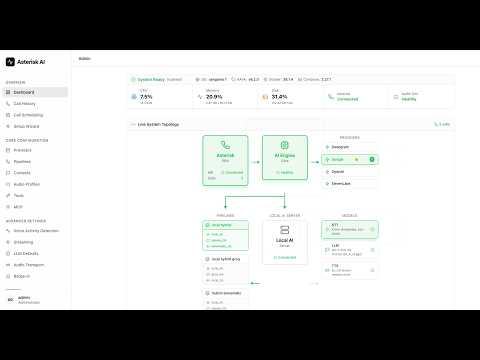
📞 Try it Live! (US Only)
Experience our production-ready configurations with a single phone call:
- Standard Voice: (925) 736-6718
- HD Voice: (909) 788-2282
The HD...
FAQ
Common questions
Discussion
Questions & comments · 0
Sign In Sign in to leave a comment.