
DeepLabCut
[📚Documentation](https://deeplabcut.github.io/DeepLabCut/README.html) | [🛠️ Installation](https://deeplabcut.github.io/DeepLabCut/docs/installation.html) | [🌎 Home Page](https://www.deeplabcut.org) | [🐿🐴🐁🐘🐆 Model Zoo](http://www.mackenziemathislab.org/deeplabcut/) | [🚨 News](https://deeplabcut.github.io/DeepLabCut/README.html#news-and-in-the-news) | [🪲 Reporting Issues](https://github.com/DeepLabCut/DeepLabCut/issues)
3.0.2Add to Favorites
Source
Get it from source
Spark does not host a copy of it.
Open sourceReports
Agent outcome reports
No reports yet
Overview
DeepLabCut
What it does


📚Documentation |
🛠️ Installation |
🌎 Home Page |
🐿🐴🐁🐘🐆 Model Zoo |
🚨 News |
🪲 Reporting Issues
🫶 Getting Assistance |
∞ DeepLabCut Online Course |
📝 Publications |
👩🏾💻👨💻 DeepLabCut AI Residency












Welcome! 👋
DeepLabCut™️ is a toolbox for state-of-the-art markerless pose estimation of animals performing various behaviors. As long as you can see (label) what you want to track, you can use this toolbox, as it is animal and object agnostic. Read a short development and application summary below.
Installation
Please click the link above for all the information you need to get started! Please note that currently we support only Python 3.10+ (see conda files for guidance).
Quick start
Developers Stable Release: very quick start (Python 3.10+ required) to install
DeepLabCut with the PyTorch engine
- [1] Install PyTorch (install and then select the desired
CUDA version if you want to use a GPU):pip install torch torchvision.
Or as an example for GPU support (please check pytorch docs to get the perfect version for your CUDA):
conda install pytorch cudatoolkit=11.3 -c pytorch
- [2] Then, install
DeepLabCut(with all functions + the GUI):
pip install --pre "deeplabcut[gui]"
or pip install --pre "deeplabcut" (headless
version with PyTorch)!
To use the TensorFlow (TF) engine: you'll need to run pip install "deeplabcut[gui,tf]" or pip install "deeplabcut[tf]" (headless version with TF). Alternatively, we also offer more targeted optional TensorFlow installs for specific CUDA setups, e.g. deeplabcut[tf-cu11] or deeplabcut[tf-cu12]. Please refer to our installation instructions for more detailed information on Python version, CUDA compatibility, etc.
We aim to deprecate the tensorflow backend in version 3.2 (release date TBD).
Documentation: The DeepLabCut Process
Our docs walk you through using DeepLabCut, and key API points. For an overview of the toolbox and workflow for project management, see our step-by-step at Nature Protocols paper.

Code demo
🐭 Pose tracking of single animals demo 
See more demos here.
We provide data and several Jupyter Notebooks, walking you through a demo dataset to test your installation, and another to run DeepLabCut from the start on your own data.
We also show how to use the code in Docker, and on Google Colab.
Why use DeepLabCut?
DeepLabCut continues to be actively maintained and we strive to provide a user-friendly GUI and API for computer vision researchers and life scientists alike. This means we integrate state-of-the-art models and frameworks, while providing our "best-guess" defaults for life scientists.
We highly encourage you to read our papers to get a better understanding of what to use and how to modify the models for your setting.
Performance 🔥
In general, we provide all the tooling for you to train and use custom models with various high-performance backbones.
Pretrained Models
We also provide two foundation pretrained animal models: SuperAnimal-Quadruped & SuperAnimal-TopViewMouse.
To gauge their out-of-distribution performance, we provide the following tables.
These models are trained on the SuperAnimal-Quadruped dataset with AP-10K held out for out-of-domain testing and the SuperAnimal-TopViewMouse dataset with DLC-openfield held out for out-of-distribution testing (see Ye et al. 2024).
We provide models that include AP-10K in the API (and GUI).
Note, there are many different models to select from in DeepLabCut 3.0. We strongly recommend you check this Guide for more details.
This table, and those below, give you a sense of performance in real-world complex in-the-wild and lab mouse data, respectively.
This link provides the model weights to reproduce the numbers; but please note, our full models are in our DLClibrary and released in the API.
DLC 3.0 Pose Estimation (Top Down Models)
| Model Name | Type | mAP SA-Q on AP-10K | mAP SA-TVM on DLC-OpenField |
|---|---|---|---|
| top_down_resnet_50 | Top-Down | 54.9 | 93.5 |
| top_down_resnet_101 | Top-Down | 55.9 | 94.1 |
| top_down_hrnet_w32 | Top-Down | 52.5 | 92.4 |
| top_down_hrnet_w48 | Top-Down | 55.3 | 93.8 |
| rtmpose_s | Top-Down | 52.9 | 92.9 |
| rtmpose_m | Top-Down | 55.4 | 94.8 |
| rtmpose_x | Top-Down | 57.6 | 94.5 |
The History
Development and Applications
In 2018, we demonstrated the capabilities for trail tracking, reaching in mice and various Drosophila behaviors during egg-laying (see Mathis et al. for details). There is, however, nothing specific that makes the toolbox only applicable to these tasks and/or species.
The toolbox has already been successfully applied (by us and others) to rats, humans, various fish species, bacteria, leeches, various robots, cheetahs, mouse whiskers and race horses.
DeepLabCut utilized the feature detectors (ResNets + readout layers) of one of the state-of-the-art algorithms for human pose estimation by Insafutdinov et al., called DeeperCut, which inspired the name for our toolbox (see references below). Since this time, the package has changed substantially.
The code has been re-tooled and re-factored since 2.1+: We have added faster and higher performance variants with MobileNetV2s, EfficientNets, and our own DLCRNet backbones (see Pretraining boosts out-of-domain robustness for pose estimation and Lauer et al 2022). Additionally, we have improved the inference speed and provided both additional and novel augmentation methods, added real-time, and multi-animal support.
In v3.0+ we have updated the backend to support PyTorch. This brings not only an easier installation process for users, but performance gains, developer flexibility, and a lot of new tools! Importantly, the high-level API stays the same, so it will be a seamless transition for users 💜!
We currently provide state-of-the-art performance for animal pose estimation and the labs (M. Mathis Lab and A. Mathis Group) have both top journal and computer vision conference papers.
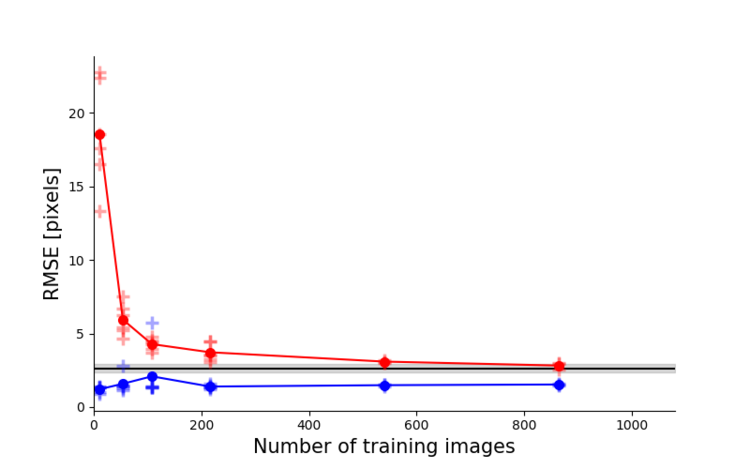
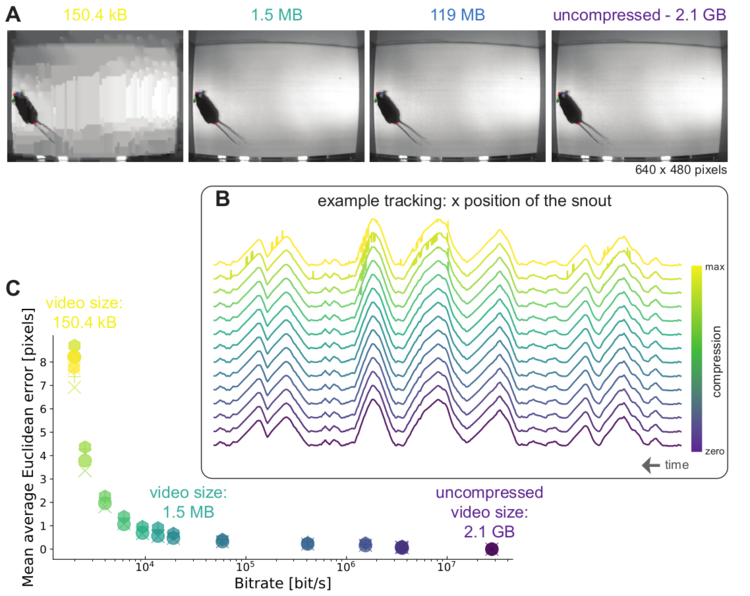


Left: Due to transfer learning it requires little training data for multiple, challenging behaviors (see Mathis et al. 2018 for details). Mid Left: The feature detectors are robust to video compression (see Mathis/Warren for details). Mid Right: It allows 3D pose estimation with a single network and camera (see Mathis/Warren). Right: It allows 3D pose estimation with a single network trained on data from multiple cameras together with standard triangulation methods (see Nath* and Mathis* et al. 2019).
Ecosystem
DeepLabCut is part of a larger open-source eco-system, providing behavioral tracking for neuroscience, ecology, medical, and technical applications.
Moreover, many new tools are being actively developed. See DLC-Utils for some helper code.

Code contributors
DeepLabCut was originally developed by Alexander Mathis & Mackenzie Mathis, and was extended in 2.0 with the core dev team consisting of Tanmay Nath (2.0-2.1), Jessy Lauer (2.1-2.4), and Niels Poulsen (2.3-3.0).
DeepLabCut is an open-source tool and has benefited from suggestions and edits by many individuals including early contributors: Mert Yuksekgonul, Tom Biasi, Richard Warren, Ronny Eichler, Hao Wu, Federico Claudi, Gary Kane and Jonny Saunders as well as the 100+ contributors.
Please see AUTHORS for more details!
🤩 This is an actively developed package and we welcome community development and involvement:
Get Assistance & be part of the DLC Community✨
| 🚉 Platform | 🎯 Goal | ⏱️ Estimated Response Time | 📢 Support Squad |
|---|---|---|---|
| GitHub - Issues | To report bugs and code issues🐛 (we encourage you to search issues first) | 2-5 days | DLC Core Dev Team |
| GitHub - Contributing | To contribute your expertise and experience🙏💯 | 2-5 days | DLC Core Dev Team |
| 🐭Tag: DeepLabCut |
To ask help and support questions 👋 | Promptly🔥 | The DLC Community |
|
To discuss with other users, share ideas and collaborate💡 | 2-5 days | The DLC Community |
 |
To keep up with our latest news and updates 📢 | 2-5 days | DLC Team |
|
To keep up with our latest news and updates 📢 | 2-5 days | DLC Team |
References & Citations
Please see our dedicated page on how to cite DeepLabCut 🙏 and our suggestions for your Methods section!
Major Versions
For all versions, please see here.
VERSION 3.0: A whole new experience with PyTorch🔥. While the high-level API remains the same, the backend and developer friendliness have greatly improved, along with performance gains!
VERSION 2.3: Model Zoo SuperAnimals, and a whole new GUI experience.
VERSION 2.2: Multi-animal pose estimation, identification, and tracking with DeepLabCut is supported (as well as single-animal projects).
VERSION 2.0-2.1: This is the Python package of DeepLabCut that was originally released in Oct 2018 with our Nature Protocols paper (preprint here).
This package includes graphical user interfaces to label your data, and take you from data set creation to automatic behavioral analysis. It also introduces an active learning framework to efficiently use DeepLabCut on large experimental projects, and data augmentation tools that improve network performance, especially in challenging cases.
VERSION 1.0: The initial, Nature Neuroscience version of DeepLabCut can be found in the history of git, or here: https://github.com/DeepLabCut/DeepLabCut/releases/tag/1.11
News
Major releases
💜 We released a major update, moving from 2.x --> 3.x with the backend change to PyTorch
💜 The DeepLabCut Model Zoo launches SuperAnimals, see more here.
💜 DeepLabCut supports multi-animal pose estimation! maDLC is out of beta/rc mode and beta is deprecated, thanks to the testers out there for feedback! Your labeled data will be backwards compatible, but not all other steps. Please see the new 2.2+ releases for what's new & how to install it, please see our new paper, Lauer et al 2022, and the new docs on how to use it!
💜 We support multi-animal re-identification, see Lauer et al 2022.
💜 We have a real-time package available! DLC-live on GitHub and DLC-live-GUI
In the news
June 2024: Our second DLC paper 'Using DeepLabCut for 3D markerless pose estimation across species and behaviors' in Nature Protocols has surpassed 1,000 Google Scholar citations!
May 2024: DeepLabCut was featured in Nature: 'DeepLabCut: the motion-tracking tool that went viral'
January 2024: Our original paper 'DeepLabCut: markerless pose estimation of user-defined body parts with deep learning' in Nature Neuroscience has surpassed 3,000 Google Scholar citations!
December 2023: DeepLabCut hit 600,000 downloads!
October 2023: DeepLabCut celebrates a milestone with 4,000 🌟 in Github!
July 2023: The user forum is very active with more than 1k questions and answers:
May 2023: The Model Zoo is now fully integrated into the DeepLabCut GUI, making it easier than ever to access a variety of pre-trained models. Check out the accompanying paper: SuperAnimal pretrained pose estimation models for behavioral analysis by Ye et al.
December 2022: DeepLabCut hits 450,000 downloads and 2.3 is the new stable release
August 2022: DeepLabCut hit 400,000 downloads
August 2021: 2.2 becomes the new stable release for DeepLabCut.
July 2021: Docs are now at https://deeplabcut.github.io/DeepLabCut and we now include TensorFlow 2 support!
May 2021: DeepLabCut hit 200,000 downloads! Also, Our preprint on 2.2, multi-animal DeepLabCut is released!
Jan 2021: Pretraining boosts out-of-domain robustness for pose estimation published in the IEEE Winter Conference on Applications of Computer Vision. We also added EfficientNet backbones to DeepLabCut, those are best trained with cosine decay (see paper). To use them, just pass "
efficientnet-b0" to "efficientnet-b6" when creating the trainingset!Dec 2020: We released a real-time package that allows for online pose estimation and real-time feedback. See DLClive.deeplabcut.org.
5/22 2020: We released 2.2beta5. This beta release has some of the features of DeepLabCut 2.2, whose major goal is to integrate multi-animal pose estimation to DeepLabCut.
Mar 2020: Inspired by suggestions we heard at this weeks CZI's Essential Open Source Software meeting in Berkeley, CA we updated our docs. Let us know what you think!
Feb 2020: Our review on animal pose estimation is published!
Nov 2019: DeepLabCut was recognized by the Chan Zuckerberg Initiative (CZI) with funding to support this project. Read more in the Harvard Gazette, on CZI's Essential Open Source Software for Science site and in their Medium post
Oct 2019: DLC 2.1 released with lots of updates. In particular, a Project Manager GUI, MobileNetsV2, and augmentation packages (Imgaug and Tensorpack). For detailed updates see releases
Sept 2019: We published two preprints. One showing that ImageNet pretraining contributes to robustness and a review on animal pose estimation. Check them out!
Jun 2019: DLC 2.0.7 released with lots of updates. For updates see releases
Feb 2019: DeepLabCut joined twitter
Jan 2019: We hosted workshops for DLC in Warsaw, Munich and Cambridge. The materials are available here
Jan 2019: We joined the Image Source Forum for user help:
Nov 2018: We posted a detailed guide for DeepLabCut 2.0 on BioRxiv. It also contains a case study for 3D pose estimation in cheetahs.
Nov 2018: Various (post-hoc) analysis scripts contributed by users (and us) will be gathered at DLCutils. Feel free to contribute! In particular, there is a script guiding you through
importing a project into the new data format for DLC 2.0Oct 2018: new pre-print on the speed video-compression and robustness of DeepLabCut on BioRxiv
Sept 2018: Nature Lab Animal covers DeepLabCut: Behavior tracking cuts deep
Kunlin Wei & Konrad Kording write a very nice News & Views on our paper: Behavioral Tracking Gets Real
August 2018: Our preprint appeared in Nature Neuroscience
August 2018: NVIDIA AI Developer News: AI Enables Markerless Animal Tracking
July 2018: Ed Yong covered DeepLabCut and interviewed several users for the Atlantic.
April 2018: first DeepLabCut preprint on arXiv.org
Funding
We are grateful for the following support and funding over the years!
This software project was supported in part by the Essential Open Source Software for Science (EOSS) program at Chan Zuckerberg Initiative (cycles 1, 3, 3-DEI, 4), and jointly with the Kavli Foundation for EOSS Cycle 6!
We also thank the Rowland Institute at Harvard for funding from 2017-2020, and EPFL from 2020-present.
examples/README.md
Demo Jupyter & Colaboratory Notebooks:

We provide a Project Manager GUI that will walk you through the major steps and options of the DeepLabCut Toolbox. However, there are more options and features that can be accessed by running the code in an interactive environment, such as Jupyter*. Moreover, if you don't have a GPU, you can create your project on any computer, then move your project to the cloud to use GPUs. To do this, we provide you with Google Colaboratory Notebooks (see Demo using Google Colaboratory below).
Demo 1: run DeepLabCut on our open-field data
- This will give you a feel of the workflow for DeepLabCut. Follow the instructions inside the notebook!
Note, the notebooks with labeled data: reaching data, or open-field data can be run on a CPU, GPU, etc. The one with the open-field data even achieves good/okay results, when trained for half an hour on a GPU! (To note, this is NOT the full dataset that was used in Mathis et al, 2018)
Demo 2: Set up DeepLabCut on your own data
- Now that you're a master of the demos, this Notebook walks you through how to build your own pipeline:
- Create a new project
- Label new data
- Then, either use your CPU, or your GPU (the Notebook will guide you at this junction), to train, analyze and perform some basic analysis of your data.
For GPU-based training and analysis you will need to switch to either our supplied Docker container, or you need to install your local GPU in an Anaconda Env, or use Google Colab, more below:
Demo 3: DeepLabCut training and analysis on Google Colaboratory (with Google's GPUs!):
We suggest making a "Fork" of this repo, git clone or download the folder into your google drive, then linking your google account to your GitHub (you'll see how to do this in the Notebook below). Then you can edit the Notebooks for your own data too (just put https://colab.research.google.com/ in front of the web address of your own repo).
You can use Google Colaboratory to demo running DeepLabCut on our data. Here is an example colab-ready Jupyter Notebook for the open field data, which you can launch by clicking the badge below:
Using Colab on your data for the training and analysis of new videos, i.e. the parts that need a GPU!
- Click Open in Colab to launch the notebook.
- Make the notebook live by clicking 'Connect' in the Colab toolbar, and then click "Runtime > Change Runtime Type > and select Python3 and GPU as your hardware. Follow the instructions in the Notebook.
- Be aware, they often don't let you run on their GPUs for very long (>6 hrs) without a Pro account, so make sure your
save_intersvariable is lower for this setting.
Here is a demo of us using the Colab Notebooks: https://www.youtube.com/watch?v=qJGs8nxx80A & https://www.youtube.com/watch?v=j13aXxysI2E
Warning: Colab updates their CUDA/TensorFlow likely faster than we can keep up, so this may not work at all future points in time (and, as a reminder, this whole package is released with a LICENSE that implies no Liability and no Warranty).
Using 3D DeepLabCut:
Ready to take your pose estimation to a new dimension? As of 2.0.7+ we support 3D within the package. Please check out the dedicated 3D_Demo_DeepLabCut.ipynb above for more details!
Using the DLC Model Zoo:
We provide a COLAB notebook to use the growing number of networks that are trained on specific animals/scenarios. Read more here: https://deeplabcut.github.io/DeepLabCut/docs/ModelZoo.html. This code will also create a new project folder so you can refine, add new bodyparts or label other objects, and re-train. Launch COLAB here:
Using Python/iPython:
All of DeepLabCut can be run from an ipython console in the program terminal! Go here for detailed instructions!
We also have some video tutorials to demonstrate how we use Anaconda and Docker via the terminal:
https://www.youtube.com/watch?v=7xwOhUcIGio & https://www.youtube.com/watch?v=bgfnz1wtlpo
* You can download DeepLabCut & associated files:
To have a copy of DeepLabCut on your own computer, we recommend using Anaconda to install Python and Jupyter Notebooks, see the Installation page. Then, on your local machine using these notebooks to guide you, you can (1) demo our labeled data (or create your own), (2) create a project, extract frames to label, use the GUI to label, and create a training set for the neural network(s).
We suggest making a "Fork" of this repo and/or then place DeepLabCut files in a folder:git clone https://github.com/DeepLabCut/DeepLabCut
so you can access it locally with Anaconda. You can also click the "download" button, rather than using git. Then you can edit the Notebooks as you like!
Source README
📚Documentation |
🛠️ Installation |
🌎 Home Page |
🐿🐴🐁🐘🐆 Model Zoo |
🚨 News |
🪲 Reporting Issues
🫶 Getting Assistance |
∞ DeepLabCut Online Course |
📝 Publications |
👩🏾💻👨💻 DeepLabCut AI Residency
Welcome! 👋
DeepLabCut™️ is a toolbox for state-of-the-art markerless pose estimation of animals performing various behaviors. As long as you can see (label) what you want to track, you can use this toolbox, as it is animal and object agnostic. Read a short development and application summary below.
Installation
Please click the link above for all the information you need to get started! Please note that currently we support only Python 3.10+ (see conda files for guidance).
Quick start
Developers Stable Release: very quick start (Python 3.10+ required) to install
DeepLabCut with the PyTorch engine
- [1] Install PyTorch (install and then select the desired
CUDA version if you want to use a GPU):pip install torch torchvision.
Or as an example for GPU support (please check pytorch docs to get the perfect version for your CUDA):
conda install pytorch cudatoolkit=11.3 -c pytorch
- [2] Then, install
DeepLabCut(with all functions + the GUI):
pip install --pre "deeplabcut[gui]"
or pip install --pre "deeplabcut" (headless
version with PyTorch)!
To use the TensorFlow (TF) engine: you'll need to run pip install "deeplabcut[gui,tf]" or pip install "deeplabcut[tf]" (headless version with TF). Alternatively, we also offer more targeted optional TensorFlow installs for specific CUDA setups, e.g. deeplabcut[tf-cu11] or deeplabcut[tf-cu12]. Please refer to our installation instructions for more detailed information on Python version, CUDA compatibility, etc.
We aim to deprecate the tensorflow backend in version 3.2 (release date TBD).
Documentation: The DeepLabCut Process
Our docs walk you through using DeepLabCut, and key API points. For an overview of the toolbox and workflow for project management, see our step-by-step at Nature Protocols paper.
Code demo
🐭 Pose tracking of single animals demo
See more demos here.
We provide data and several Jupyter Notebooks, walking you through a demo dataset to test your installation, and another to run DeepLabCut from the start on your own data.
We also show how to use the code in Docker, and on Google Colab.
Why use DeepLabCut?
DeepLabCut continues to be actively maintained and we strive to provide a user-friendly GUI and API for computer vision researchers and life scientists alike. This means we integrate state-of-the-art models and frameworks, while providing our "best-guess" defaults for life scientists.
We highly encourage you to read our papers to get a better understanding of what to use and how to modify the models for your setting.
Performance 🔥
In general, we provide all the tooling for you to train and use custom models with various high-performance backbones.
Pretrained Models
We also provide two foundation pretrained animal models: SuperAnimal-Quadruped & SuperAnimal-TopViewMouse.
To gauge their out-of-distribution performance, we provide the following tables.
These models are trained on the SuperAnimal-Quadruped dataset with AP-10K held out for out-of-domain testing and the SuperAnimal-TopViewMouse dataset with DLC-openfield held out for out-of-distribution testing (see Ye et al. 2024).
We provide models that include AP-10K in the API (and GUI).
Note, there are many different models to select from in DeepLabCut 3.0. We strongly recommend you check this Guide for more details.
This table, and those below, give you a sense of performance in real-world complex in-the-wild and lab mouse data, respectively.
This link provides the model weights to reproduce the numbers; but please note, our full models are in our DLClibrary and released in the API.
DLC 3.0 Pose Estimation (Top Down Models)
| Model Name | Type | mAP SA-Q on AP-10K | mAP SA-TVM on DLC-OpenField |
|---|---|---|---|
| top_down_resnet_50 | Top-Down | 54.9 | 93.5 |
| top_down_resnet_101 | Top-Down | 55.9 | 94.1 |
| top_down_hrnet_w32 | Top-Down | 52.5 | 92.4 |
| top_down_hrnet_w48 | Top-Down | 55.3 | 93.8 |
| rtmpose_s | Top-Down | 52.9 | 92.9 |
| rtmpose_m | Top-Down | 55.4 | 94.8 |
| rtmpose_x | Top-Down | 57.6 | 94.5 |
The History
Development and Applications
In 2018, we demonstrated the capabilities for trail tracking, reaching in mice and various Drosophila behaviors during egg-laying (see Mathis et al. for details). There is, however, nothing specific that makes the toolbox only applicable to these tasks and/or species.
The toolbox has already been successfully applied (by us and others) to rats, humans, various fish species, bacteria, leeches, various robots, cheetahs, mouse whiskers and race horses.
DeepLabCut utilized the feature detectors (ResNets + readout layers) of one of the state-of-the-art algorithms for human pose estimation by Insafutdinov et al., called DeeperCut, which inspired the name for our toolbox (see references below). Since this time, the package has changed substantially.
The code has been re-tooled and re-factored since 2.1+: We have added faster and higher performance variants with MobileNetV2s, EfficientNets, and our own DLCRNet backbones (see Pretraining boosts out-of-domain robustness for pose estimation and Lauer et al 2022). Additionally, we have improved the inference speed and provided both additional and novel augmentation methods, added real-time, and multi-animal support.
In v3.0+ we have updated the backend to support PyTorch. This brings not only an easier installation process for users, but performance gains, developer flexibility, and a lot of new tools! Importantly, the high-level API stays the same, so it will be a seamless transition for users 💜!
We currently provide state-of-the-art performance for animal pose estimation and the labs (M. Mathis Lab and A. Mathis Group) have both top journal and computer vision conference papers.
Left: Due to transfer learning it requires little training data for multiple, challenging behaviors (see Mathis et al. 2018 for details). Mid Left: The feature detectors are robust to video compression (see Mathis/Warren for details). Mid Right: It allows 3D pose estimation with a single network and camera (see Mathis/Warren). Right: It allows 3D pose estimation with a single network trained on data from multiple cameras together with standard triangulation methods (see Nath* and Mathis* et al. 2019).
Ecosystem
DeepLabCut is part of a larger open-source eco-system, providing behavioral tracking for neuroscience, ecology, medical, and technical applications.
Moreover, many new tools are being actively developed. See DLC-Utils for some helper code.
Code contributors
DeepLabCut was originally developed by Alexander Mathis & Mackenzie Mathis, and was extended in 2.0 with the core dev team consisting of Tanmay Nath (2.0-2.1), Jessy Lauer (2.1-2.4), and Niels Poulsen (2.3-3.0).
DeepLabCut is an open-source tool and has benefited from suggestions and edits by many individuals including early contributors: Mert Yuksekgonul, Tom Biasi, Richard Warren, Ronny Eichler, Hao Wu, Federico Claudi, Gary Kane and Jonny Saunders as well as the 100+ contributors.
Please see AUTHORS for more details!
🤩 This is an actively developed package and we welcome community development and involvement:
Get Assistance & be part of the DLC Community✨
| 🚉 Platform | 🎯 Goal | ⏱️ Estimated Response Time | 📢 Support Squad |
|---|---|---|---|
| GitHub - Issues | To report bugs and code issues🐛 (we encourage you to search issues first) | 2-5 days | DLC Core Dev Team |
| GitHub - Contributing | To contribute your expertise and experience🙏💯 | 2-5 days | DLC Core Dev Team |
| 🐭Tag: DeepLabCut |
To ask help and support questions 👋 | Promptly🔥 | The DLC Community |
|
To discuss with other users, share ideas and collaborate💡 | 2-5 days | The DLC Community |
|
To keep up with our latest news and updates 📢 | 2-5 days | DLC Team |
|
To keep up with our latest news and updates 📢 | 2-5 days | DLC Team |
References & Citations
Please see our dedicated page on how to cite DeepLabCut 🙏 and our suggestions for your Methods section!
Major Versions
For all versions, please see here.
VERSION 3.0: A whole new experience with PyTorch🔥. While the high-level API remains the same, the backend and developer friendliness have greatly improved, along with performance gains!
VERSION 2.3: Model Zoo SuperAnimals, and a whole new GUI experience.
VERSION 2.2: Multi-animal pose estimation, identification, and tracking with DeepLabCut is supported (as well as single-animal projects).
VERSION 2.0-2.1: This is the Python package of DeepLabCut that was originally released in Oct 2018 with our Nature Protocols paper (preprint here).
This package includes graphical user interfaces to label your data, and take you from data set creation to automatic behavioral analysis. It also introduces an active learning framework to efficiently use DeepLabCut on large experimental projects, and data augmentation tools that improve network performance, especially in challenging cases.
VERSION 1.0: The initial, Nature Neuroscience version of DeepLabCut can be found in the history of git, or here: https://github.com/DeepLabCut/DeepLabCut/releases/tag/1.11
News
Major releases
💜 We released a major update, moving from 2.x --> 3.x with the backend change to PyTorch
💜 The DeepLabCut Model Zoo launches SuperAnimals, see more here.
💜 DeepLabCut supports multi-animal pose estimation! maDLC is out of beta/rc mode and beta is deprecated, thanks to the testers out there for feedback! Your labeled data will be backwards compatible, but not all other steps. Please see the new 2.2+ releases for what's new & how to install it, please see our new paper, Lauer et al 2022, and the new docs on how to use it!
💜 We support multi-animal re-identification, see Lauer et al 2022.
💜 We have a real-time package available! DLC-live on GitHub and DLC-live-GUI
In the news
June 2024: Our second DLC paper 'Using DeepLabCut for 3D markerless pose estimation across species and behaviors' in Nature Protocols has surpassed 1,000 Google Scholar citations!
May 2024: DeepLabCut was featured in Nature: 'DeepLabCut: the motion-tracking tool that went viral'
January 2024: Our original paper 'DeepLabCut: markerless pose estimation of user-defined body parts with deep learning' in Nature Neuroscience has surpassed 3,000 Google Scholar citations!
December 2023: DeepLabCut hit 600,000 downloads!
October 2023: DeepLabCut celebrates a milestone with 4,000 🌟 in Github!
July 2023: The user forum is very active with more than 1k questions and answers:
May 2023: The Model Zoo is now fully integrated into the DeepLabCut GUI, making it easier than ever to access a variety of pre-trained models. Check out the accompanying paper: SuperAnimal pretrained pose estimation models for behavioral analysis by Ye et al.
December 2022: DeepLabCut hits 450,000 downloads and 2.3 is the new stable release
August 2022: DeepLabCut hit 400,000 downloads
August 2021: 2.2 becomes the new stable release for DeepLabCut.
July 2021: Docs are now at https://deeplabcut.github.io/DeepLabCut and we now include TensorFlow 2 support!
May 2021: DeepLabCut hit 200,000 downloads! Also, Our preprint on 2.2, multi-animal DeepLabCut is released!
Jan 2021: Pretraining boosts out-of-domain robustness for pose estimation published in the IEEE Winter Conference on Applications of Computer Vision. We also added EfficientNet backbones to DeepLabCut, those are best trained with cosine decay (see paper). To use them, just pass "
efficientnet-b0" to "efficientnet-b6" when creating the trainingset!Dec 2020: We released a real-time package that allows for online pose estimation and real-time feedback. See DLClive.deeplabcut.org.
5/22 2020: We released 2.2beta5. This beta release has some of the features of DeepLabCut 2.2, whose major goal is to integrate multi-animal pose estimation to DeepLabCut.
Mar 2020: Inspired by suggestions we heard at this weeks CZI's Essential Open Source Software meeting in Berkeley, CA we updated our docs. Let us know what you think!
Feb 2020: Our review on animal pose estimation is published!
Nov 2019: DeepLabCut was recognized by the Chan Zuckerberg Initiative (CZI) with funding to support this project. Read more in the Harvard Gazette, on CZI's Essential Open Source Software for Science site and in their Medium post
Oct 2019: DLC 2.1 released with lots of updates. In particular, a Project Manager GUI, MobileNetsV2, and augmentation packages (Imgaug and Tensorpack). For detailed updates see releases
Sept 2019: We published two preprints. One showing that ImageNet pretraining contributes to robustness and a review on animal pose estimation. Check them out!
Jun 2019: DLC 2.0.7 released with lots of updates. For updates see releases
Feb 2019: DeepLabCut joined twitter
Jan 2019: We hosted workshops for DLC in Warsaw, Munich and Cambridge. The materials are available here
Jan 2019: We joined the Image Source Forum for user help:
Nov 2018: We posted a detailed guide for DeepLabCut 2.0 on BioRxiv. It also contains a case study for 3D pose estimation in cheetahs.
Nov 2018: Various (post-hoc) analysis scripts contributed by users (and us) will be gathered at DLCutils. Feel free to contribute! In particular, there is a script guiding you through
importing a project into the new data format for DLC 2.0Oct 2018: new pre-print on the speed video-compression and robustness of DeepLabCut on BioRxiv
Sept 2018: Nature Lab Animal covers DeepLabCut: Behavior tracking cuts deep
Kunlin Wei & Konrad Kording write a very nice News & Views on our paper: Behavioral Tracking Gets Real
August 2018: Our preprint appeared in Nature Neuroscience
August 2018: NVIDIA AI Developer News: AI Enables Markerless Animal Tracking
July 2018: Ed Yong covered DeepLabCut and interviewed several users for the Atlantic.
April 2018: first DeepLabCut preprint on arXiv.org
Funding
We are grateful for the following support and funding over the years!
This software project was supported in part by the Essential Open Source Software for Science (EOSS) program at Chan Zuckerberg Initiative (cycles 1, 3, 3-DEI, 4), and jointly with the Kavli Foundation for EOSS Cycle 6!
We also thank the Rowland Institute at Harvard for funding from 2017-2020, and EPFL from 2020-present.
examples/README.md
Demo Jupyter & Colaboratory Notebooks:
We provide a Project Manager GUI that will walk you through the major steps and options of the DeepLabCut Toolbox. However, there are more options and features that can be accessed by running the code in an interactive environment, such as Jupyter*. Moreover, if you don't have a GPU, you can create your project on any computer, then move your project to the cloud to use GPUs. To do this, we provide you with Google Colaboratory Notebooks (see Demo using Google Colaboratory below).
Demo 1: run DeepLabCut on our open-field data
- This will give you a feel of the workflow for DeepLabCut. Follow the instructions inside the notebook!
Note, the notebooks with labeled data: reaching data, or open-field data can be run on a CPU, GPU, etc. The one with the open-field data even achieves good/okay results, when trained for half an hour on a GPU! (To note, this is NOT the full dataset that was used in Mathis et al, 2018)
Demo 2: Set up DeepLabCut on your own data
- Now that you're a master of the demos, this Notebook walks you through how to build your own pipeline:
- Create a new project
- Label new data
- Then, either use your CPU, or your GPU (the Notebook will guide you at this junction), to train, analyze and perform some basic analysis of your data.
For GPU-based training and analysis you will need to switch to either our supplied Docker container, or you need to install your local GPU in an Anaconda Env, or use Google Colab, more below:
Demo 3: DeepLabCut training and analysis on Google Colaboratory (with Google's GPUs!):
We suggest making a "Fork" of this repo, git clone or download the folder into your google drive, then linking your google account to your GitHub (you'll see how to do this in the Notebook below). Then you can edit the Notebooks for your own data too (just put https://colab.research.google.com/ in front of the web address of your own repo).
You can use Google Colaboratory to demo running DeepLabCut on our data. Here is an example colab-ready Jupyter Notebook for the open field data, which you can launch by clicking the badge below:
Using Colab on your data for the training and analysis of new videos, i.e. the parts that need a GPU!
- Click Open in Colab to launch the notebook.
- Make the notebook live by clicking 'Connect' in the Colab toolbar, and then click "Runtime > Change Runtime Type > and select Python3 and GPU as your hardware. Follow the instructions in the Notebook.
- Be aware, they often don't let you run on their GPUs for very long (>6 hrs) without a Pro account, so make sure your
save_intersvariable is lower for this setting.
Here is a demo of us using the Colab Notebooks: https://www.youtube.com/watch?v=qJGs8nxx80A & https://www.youtube.com/watch?v=j13aXxysI2E
Warning: Colab updates their CUDA/TensorFlow likely faster than we can keep up, so this may not work at all future points in time (and, as a reminder, this whole package is released with a LICENSE that implies no Liability and no Warranty).
Using 3D DeepLabCut:
Ready to take your pose estimation to a new dimension? As of 2.0.7+ we support 3D within the package. Please check out the dedicated 3D_Demo_DeepLabCut.ipynb above for more details!
Using the DLC Model Zoo:
We provide a COLAB notebook to use the growing number of networks that are trained on specific animals/scenarios. Read more here: https://deeplabcut.github.io/DeepLabCut/docs/ModelZoo.html. This code will also create a new project folder so you can refine, add new bodyparts or label other objects, and re-train. Launch COLAB here:
Using Python/iPython:
All of DeepLabCut can be run from an ipython console in the program terminal! Go here for detailed instructions!
We also have some video tutorials to demonstrate how we use Anaconda and Docker via the terminal:
https://www.youtube.com/watch?v=7xwOhUcIGio & https://www.youtube.com/watch?v=bgfnz1wtlpo
* You can download DeepLabCut & associated files:
To have a copy of DeepLabCut on your own computer, we recommend using Anaconda to install Python and Jupyter Notebooks, see the Installation page. Then, on your local machine using these notebooks to guide you, you can (1) demo our labeled data (or create your own), (2) create a project, extract frames to label, use the GUI to label, and create a training set for the neural network(s).
We suggest making a "Fork" of this repo and/or then place DeepLabCut files in a folder:git clone https://github.com/DeepLabCut/DeepLabCut
so you can access it locally with Anaconda. You can also click the "download" button, rather than using git. Then you can edit the Notebooks as you like!
Discussion
Questions & comments · 0
Sign In Sign in to leave a comment.