
Access Splunk Data via MCP
List Splunk saved searches, alerts, fired alerts, indexes, and macros - paginated and filterable, via STDIO or SSE.
1.0.2Add to Favorites
Why it matters
Integrate Splunk with your AI development environment to access saved searches, alerts, indexes, and macros. Enables AI-driven querying and analysis of your Splunk data.
Outcomes
What it gets done
Retrieve Splunk saved searches and alerts.
Query Splunk indexes and macros.
Filter and retrieve fired alerts.
Utilize Splunk data for AI context and RAG.
Source
Get it from source
Spark does not host a copy of it.
Open sourceReports
Agent outcome reports
No reports yet
Capabilities
Tools your agent gets
Retrieves a list of Splunk saved searches with pagination support
Retrieves a list of Splunk alerts with filtering by title and pagination
Retrieves a list of fired alerts with filtering by search name and time range
Retrieves a list of Splunk indexes with pagination
Retrieves a list of Splunk macros with pagination
Overview
Splunk MCP Server (Go) gives an AI assistant read-only, paginated access to Splunk saved searches, alerts, fired alerts, indexes, and macros over STDIO or SSE, with an included data-dictionary resource. Use it for conversational, read-only Splunk browsing of alerts, searches, indexes, and macros. Requires SPLUNK_URL and SPLUNK_TOKEN configured.
What it does
Splunk MCP Server (Go) gives an AI assistant read access to Splunk's saved searches, alerts, fired alerts, indexes, and macros, with pagination and filtering support across STDIO and SSE transports.
When to use - and when NOT to
Use it when you want an AI assistant to list Splunk saved searches, check which alerts are configured or which fired within a time range, browse indexes, or review macros including their underlying queries. Example prompts: "How many MCP tools for Splunk are available?", "How many Splunk indexes do we have?", "Can you list first 5 Splunk macros including underlying queries?", "How many alerts with 'Alert_CRITICAL' in the name were fired in the last day?", and "Read the MCP Resource 'Data Dictionary' and find the contact person for the Splunk index XYZ." All tools support pagination (customizable count/offset, max 100 results per call). Do not expect write/administrative capabilities - this server is read-only, focused on listing and filtering existing Splunk configuration and alert data. Transport can be either STDIO (a locally spawned process) or SSE (a running server reachable over HTTP), so the right choice depends on whether the client integrates via a local command or a network endpoint.
Capabilities
list_splunk_saved_searches: list saved searches, paginated.list_splunk_alerts: list alerts, filterable by title, paginated.list_splunk_fired_alerts: list fired alerts, filterable by search name and time range.list_splunk_indexes: list indexes, paginated.list_splunk_macros: list macros, paginated.
Also includes an MCP Prompt for searching alerts by keyword, and an MCP Resource backed by a local CSV file for Splunk context (e.g. a data dictionary mapping indexes to contacts).
How to install
Available via Smithery, or run with Docker:
docker build -t mcp-server-splunk .
docker run --rm -i \
  -e SPLUNK_URL=https://your-splunk-instance:8089 \
  -e SPLUNK_TOKEN=your-splunk-token \
  mcp-server-splunk
Or build from source: go build -o cmd/mcp-server-splunk/mcp-server-splunk cmd/mcp-server-splunk/main.go. Configure Cursor (STDIO), replacing command with the actual path to your built binary:
{
  "mcpServers": {
    "splunk_stdio": {
      "name": "Splunk MCP Server (STDIO)",
      "description": "MCP server for Splunk integration",
      "type": "stdio",
      "env": {
        "SPLUNK_URL": "https://your-splunk-instance:8089",
        "SPLUNK_TOKEN": "your-splunk-token"
      }
    }
  }
}
Or SSE mode by pointing at a running http://localhost:3001/sse endpoint. Both SPLUNK_URL and SPLUNK_TOKEN are required. Built on the mark3labs/mcp-go SDK. The project has also been certified by MCP Review, and its repository includes a demo GIF showing integration with Cursor.
Who it's for
Security and observability teams using Splunk who want an AI assistant to browse saved searches, alerts, indexes, and macros conversationally instead of navigating the Splunk web UI.
Source README
MCP Server for Splunk
A Go implementation of the MCP server for Splunk. Supports STDIO and SSE (Server-Sent Events HTTP API). Uses github.com/mark3labs/mcp-go SDK.
Quickstart - Cursor integration
By configuring MCP Settings in Cursor, you can include remote data directly into the LLM context.
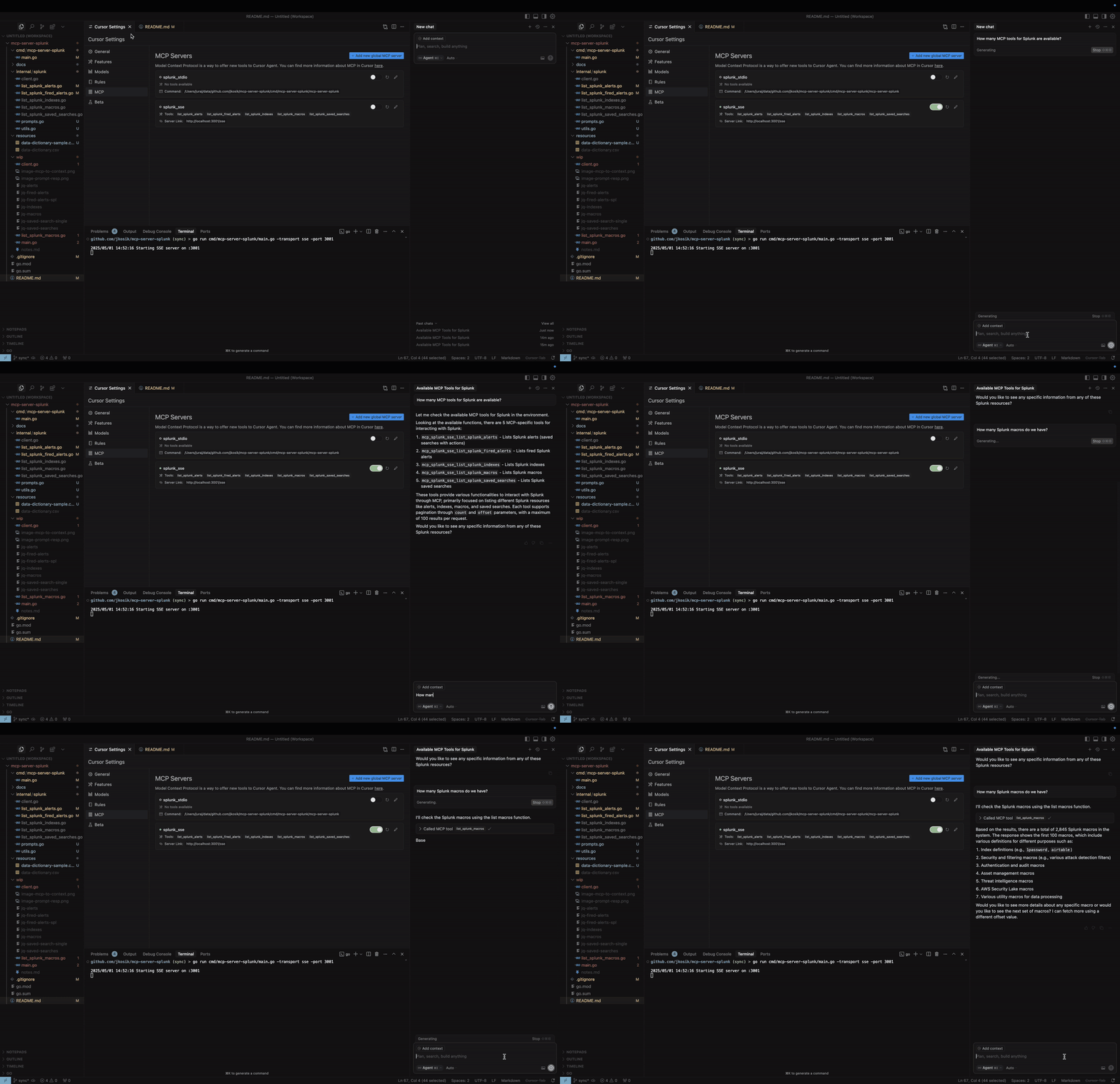
STDIO mode
cd /tmp # CHANGE ME
git clone https://github.com/jkosik/mcp-server-splunk.git
cd mcp-server-splunk/cmd/mcp-server-splunk/
Update Cursor settings in ~/.cursor/mcp.json:
{
  "mcpServers": {
    "splunk_stdio": {
      "name": "Splunk MCP Server",
      "description": "Splunk MCP server",
      "type": "stdio",
      "command": "/tmp/mcp-server-splunk/cmd/mcp-server-splunk/mcp-server-splunk", # CHANGE ME
      "env": {
        "SPLUNK_URL": "https://changeme.splunkcloud.com:8089", # CHANGE ME
        "SPLUNK_TOKEN": "abcdef" # CHANGE ME
      }
    }
  }
}
Alternatively re-build the server first:
go build -o cmd/mcp-server-splunk/mcp-server-splunk cmd/mcp-server-splunk/main.go
SSE mode
Start the server:
export SPLUNK_URL=https://your-splunk-instance:8089
export SPLUNK_TOKEN=your-splunk-token

# Start the server
go run cmd/mcp-server-splunk/main.go -transport sse -port 3001
Update Cursor settings in ~/.cursor/mcp.json:
{
  "mcpServers": {
    "splunk_sse": {
      "name": "Splunk MCP Server (SSE)",
      "description": "MCP server for Splunk integration (SSE mode)",
      "type": "sse",
      "url": "http://localhost:3001/sse"
    }
  }
}
MCP Tools and Prompts
list_splunk_saved_searches- Parameters:
count(number, optional): Number of results to return (max 100, default 100)offset(number, optional): Offset for pagination (default 0)
- Parameters:
list_splunk_alerts- Parameters:
count(number, optional): Number of results to return (max 100, default 10)offset(number, optional): Offset for pagination (default 0)title(string, optional): Case-insensitive substring to filter alert titles
- Parameters:
list_splunk_fired_alerts- Parameters:
count(number, optional): Number of results to return (max 100, default 10)offset(number, optional): Offset for pagination (default 0)ss_name(string, optional): Search name pattern to filter alerts (default "*")earliest(string, optional): Time range to look back (default "-24h")
- Parameters:
list_splunk_indexes- Parameters:
count(number, optional): Number of results to return (max 100, default 10)offset(number, optional): Offset for pagination (default 0)
- Parameters:
list_splunk_macros- Parameters:
count(number, optional): Number of results to return (max 100, default 10)offset(number, optional): Offset for pagination (default 0)
- Parameters:
internal/splunk/prompt.goimplements an MCP Prompt to find Splunk alerts for a specific keyword (e.g. GitHub or OKTA) and instructs Cursor to utilise multiple MCP tools to review all Splunk alerts, indexes and macros first to provide the best answer.cmd/mcp/server/main.goimplements MCP Resource in the form of local CSV file with Splunk related content, providing further context to the chat.
Local usage and testing
STDIO mode (default)
export SPLUNK_URL=https://your-splunk-instance:8089
export SPLUNK_TOKEN=your-splunk-token

# List available tools
echo '{"jsonrpc":"2.0","id":1,"method":"tools/list","params":{}}' | go run cmd/mcp-server-splunk/main.go | jq

# Call list_splunk_saved_searches tool
echo '{"jsonrpc":"2.0","id":1,"method":"tools/call","params":{"name":"list_splunk_saved_searches","arguments":{}}}' | go run cmd/mcp-server-splunk/main.go | jq
SSE mode (Server-Sent Events HTTP API)
export SPLUNK_URL=https://your-splunk-instance:8089
export SPLUNK_TOKEN=your-splunk-token

# Start the server
go run cmd/mcp-server-splunk/main.go -transport sse -port 3001

# Call the server and get Session ID from the output. Do not terminate the session.
curl http://localhost:3001/sse

# Keep session running and and use different terminal window for the final MCP call
curl -X POST "http://localhost:3001/message?sessionId=YOUR_SESSION_ID" \
  -H "Content-Type: application/json" \
  -d '{"jsonrpc":"2.0","id":1,"method":"tools/list","params":{}}' | jq
Installing via Smithery
Dockerfile and smithery.yaml are used to support hosting this MCP server at [Smithery](https://smithery.ai/server/@jkosik/.
Certified by MCP Review: https://mcpreview.com/mcp-servers/jkosik/mcp-server-splunk
FAQ
Common questions
Discussion
Questions & comments · 0
Sign In Sign in to leave a comment.