
Access Snowflake Cortex AI Capabilities
Brings Snowflake Cortex Search, Analyst, and Agent capabilities into the MCP ecosystem.
1.0.0Add to Favorites
Why it matters
Leverage Snowflake Cortex AI for advanced data querying and analysis. This asset provides access to Cortex Search for RAG, Cortex Analyst for structured data queries, and Cortex Agent for orchestrating complex data tasks.
Outcomes
What it gets done
Query unstructured data using Cortex Search for RAG applications.
Analyze structured data via semantic modeling with Cortex Analyst.
Orchestrate data extraction and analysis across data types with Cortex Agent.
Execute SQL queries directly on Snowflake data.
Source
Get it from source
Spark does not host a copy of it.
Open sourceReports
Agent outcome reports
No reports yet
Capabilities
Tools your agent gets
Query unstructured data in Snowflake for Retrieval Augmented Generation (RAG) applications
Query structured data in Snowflake through advanced semantic modeling
Agent orchestrator for extracting structured and unstructured data
Execute SQL queries
Overview
Snowflake Cortex MCP Server
An MCP server that brings Snowflake Cortex Search, Analyst, and Agent capabilities to any MCP client via a dynamic payload builder and PAT authentication. Use when an MCP client needs to query Snowflake data via natural-language text-to-SQL, semantic search, or orchestrated multi-tool agent queries.
What it does
Brings Snowflake Cortex AI capabilities into the MCP ecosystem: Cortex Search for querying unstructured data (as used in RAG applications), Cortex Analyst for querying structured data through rich semantic modeling, and Cortex Agent as an agentic orchestrator across both structured and unstructured retrieval. A Payload Builder utility dynamically constructs Cortex Agent requests instead of hardcoding tool definitions - it takes a natural-language query plus a list of tool definitions (each with a name, type, and optional resources, keyed by snake_case tool name to include semantic models or search indexes) and assembles them into an MCP payload that the Cortex Agent server consumes and orchestrates, returning a structured, SSE-streamed response parsed with processSSEResponse(). Connection to Snowflake goes through the Cortex/REST API, authenticated via a Programmatic Access Token (PAT) passed as an environment variable - PATs don't evaluate secondary roles, so the token must be created against a single role with access to everything it needs, or "any role."
When to use - and when NOT to
Use it when an MCP client (Claude Desktop, Cursor, fast-agent, VS Code + GitHub Copilot, or any client supporting basic MCP tools/resources) needs to query Snowflake data or run Cortex-powered natural-language analysis, text-to-SQL, or semantic search - you can register multiple Cortex Search or Cortex Analyst instances, and the client picks the appropriate one based on the user's prompt. It is explicitly not a substitute for a Next.js (or other) HTTP API backend: an MCP server runs as a sidecar communicating over stdio/sockets with server.tool("name", handler)-style tool exposure, aimed at giving AI clients structured capabilities, while an HTTP API route serves browsers and other web clients over HTTP/JSON for user-facing apps - putting MCP directly inside a Next.js route doesn't work, since MCP clients won't connect to a web API endpoint. All tools here are managed services reachable via REST API; no separate remote deployment is required, since the MCP client itself spins up the server when configured (a future version may support remote deployment).
Inputs and outputs
import { buildAgentConfig, ToolDefinition } from "./mcp/payloadBuilder";
import { runCortexAgentQuery } from "./mcp/MCP";

const toolDefinitions: ToolDefinition[] = [
  {
    name: "Text2SQL",
    type: "cortex_analyst_text_to_sql",
    resources: { semantic_model_file: process.env.SEMANTIC_MODEL_VIEW }
  },
  {
    name: "Vehicles_Search",
    type: "cortex_search",
    resources: {
      name: process.env.VEHICLES_SEARCH_SERVICE,
      id_column: "relative_path",
      title_column: "title",
      max_results: 10
    }
  },
  { name: "sql_execution_tool", type: "sql_exec" }
];

const query = "Show me the top selling brands by total sales quantity in TX for Books in 2003";

const payload = buildAgentConfig(toolDefinitions, query);
const result = await runCortexAgentQuery(payload, process.env.SNOWFLAKE_PAT);

console.error(result);
Input is a natural-language query plus the registered tool definitions; output is a structured or SSE-streamed response from the Cortex Agent, routed through whichever tool(s) - text-to-SQL, search, or raw SQL execution - the query needs. The MCP Inspector (yarn inspector or npx @modelcontextprotocol/inspector tsx --env-file .env dist/mcp/MCP.js) is the recommended way to troubleshoot the server directly.
How to install
Run yarn dev to start the server locally. For Claude Desktop, add an mcpServers entry (e.g. under the macOS ~/Library/Application Support/Claude/claude_desktop_config.json or Windows %APPDATA%\Claude\claude_desktop_config.json) pointing to npx.cmd/tsx with --env-file set to your .env and the entry script src/mcp/MCP.ts; the client then spins the server up itself. Connection parameters (including SNOWFLAKE_PAT) are supplied as environment variables via .env.
Who it's for
Developers building an AI assistant or Copilot-style tool that needs to query Snowflake - structured data via semantic models, unstructured data via Cortex Search, or orchestrated multi-tool agent queries - from any MCP-compatible client rather than a custom REST integration.
Source README
Snowflake Cortex AI Model Context Protocol (MCP) Server
This Snowflake MCP server provides tooling for Snowflake Cortex AI features, bringing these capabilities to the MCP ecosystem. When connected to an MCP Client (e.g. Claude for Desktop, fast-agent, Agentic Orchestration Framework), users can leverage these Cortex AI features.
The MCP server currently supports the below Cortex AI capabilities:
- Cortex Search: Query unstructured data in Snowflake as commonly used in Retrieval Augmented Generation (RAG) applications.
- Cortex Analyst: Query structured data in Snowflake via rich semantic modeling.
- Cortex Agent: Agentic orchestrator across structured and unstructured data retrieval
RUN:
yarn dev
MCP servers are not the same thing as a Next.js API backend:
- MCP server
  - Runs as a sidecar/service.
  - Communicates with an MCP client (like VS Code, Cursor, Claude Desktop).
  - Protocol is `stdio`/`sockets`, not HTTP.
  - Tools are exposed via `server.tool("name", handler)`.
  - Goal: provide AI clients with structured capabilities (SQL exec, search, etc).
- Next.js API route
  - Exposes HTTP endpoints (`/api/runAgent`).
  - Clients are browsers, Postman, other web services.
  - Protocol is HTTP/JSON.
  - Goal: power web apps, user-facing dashboards, external integrations.
So putting MCP directly inside Next.js **doesn’t make sense** (MCP clients won’t connect to a Next.js API route).
Getting Started
Connecting to Snowflake
The MCP server uses the Snowflake Cortex / REST API for all authentication and connection methods. Please refer to the official Snowflake documentation for comprehensive authentication options and best practices.
Connection parameters can be passed as environment variables. The server supports Programmtic Access Token to make all API calls.
Payload Builder: Dynamically Creating Agent Requests
The MCP server provides a Payload Builder utility to dynamically construct requests for Cortex Agents. This eliminates hardcoding tool definitions, resources, or queries, making your integrations flexible and maintainable.
How It Works
[Your Query]  --->  buildAgentConfig()  --->  MCP Payload
                                 |
                                 v
                          [Tool Definitions]
                                 |
                                 v
                           [Tool Resources]
                                 |
                                 v
                        [Cortex Agent Server]
                                 |
                                 v
                    [Structured / Streamed Response]
- Query: The user’s natural language input.
- Tool Definitions: Each tool’s
name,type, and optionalresources. - Tool Resources: Keyed by tool name (snake_case), includes semantic models, search indexes, etc.
- MCP Server: Consumes the payload and orchestrates the tools.
- Response: Streamed via SSE, parsed using
processSSEResponse.
Example Usage
import { buildAgentConfig, ToolDefinition } from "./mcp/payloadBuilder";
import { runCortexAgentQuery } from "./mcp/MCP";

const toolDefinitions: ToolDefinition[] = [
  {
    name: "Text2SQL",
    type: "cortex_analyst_text_to_sql",
    resources: { semantic_model_file: process.env.SEMANTIC_MODEL_VIEW }
  },
  {
    name: "Vehicles_Search",
    type: "cortex_search",
    resources: {
      name: process.env.VEHICLES_SEARCH_SERVICE,
      id_column: "relative_path",
      title_column: "title",
      max_results: 10
    }
  },
  { name: "sql_execution_tool", type: "sql_exec" }
];

const query = "Show me the top selling brands by total sales quantity in TX for Books in 2003";

// Build payload dynamically
const payload = buildAgentConfig(toolDefinitions, query);

// Run agent query
const result = await runCortexAgentQuery(payload, process.env.SNOWFLAKE_PAT);

console.error(result);
Key Points
- Exact Matching:
tool_spec.namemust match the snake_case key intool_resources. - Environment Variables: Use
.envfor dynamic configuration of semantic views, search services, etc. - Streaming Response: MCP returns streamed data; always use
processSSEResponse()to parse it safely. - Extending Tools: Add new tools to
toolDefinitionsand the builder automatically includes them in the payload.
This section will help developers quickly understand how to generate payloads programmatically and avoid common errors like mismatched tool_resources.
Using with MCP Clients
The MCP server is client-agnostic and will work with most MCP Clients that support basic functionality for MCP tools and (optionally) resources. Below are some examples.
Claude Desktop
To integrate this server with Claude Desktop as the MCP Client, add the following to your app's server configuration. By default, this is located at
- macOS: ~/Library/Application Support/Claude/claude_desktop_config.json
- Windows: %APPDATA%\Claude\claude_desktop_config.json
Set the path to the service configuration file and configure your connection method.
{
  "mcpServers": {
    "Cortex Agent AI": {
      "command": "ABSOLUTE_PATH\\npx.cmd",
      "args": [
        "tsx",
        "--watch",
        "--env-file",
        "ABSOLUTE_PATH\\.env",
        "ABSOLUTE_PATH\\src\\mcp\\MCP.ts"
      ]
    }
  }
}
Add the MCP server as context in the chat.
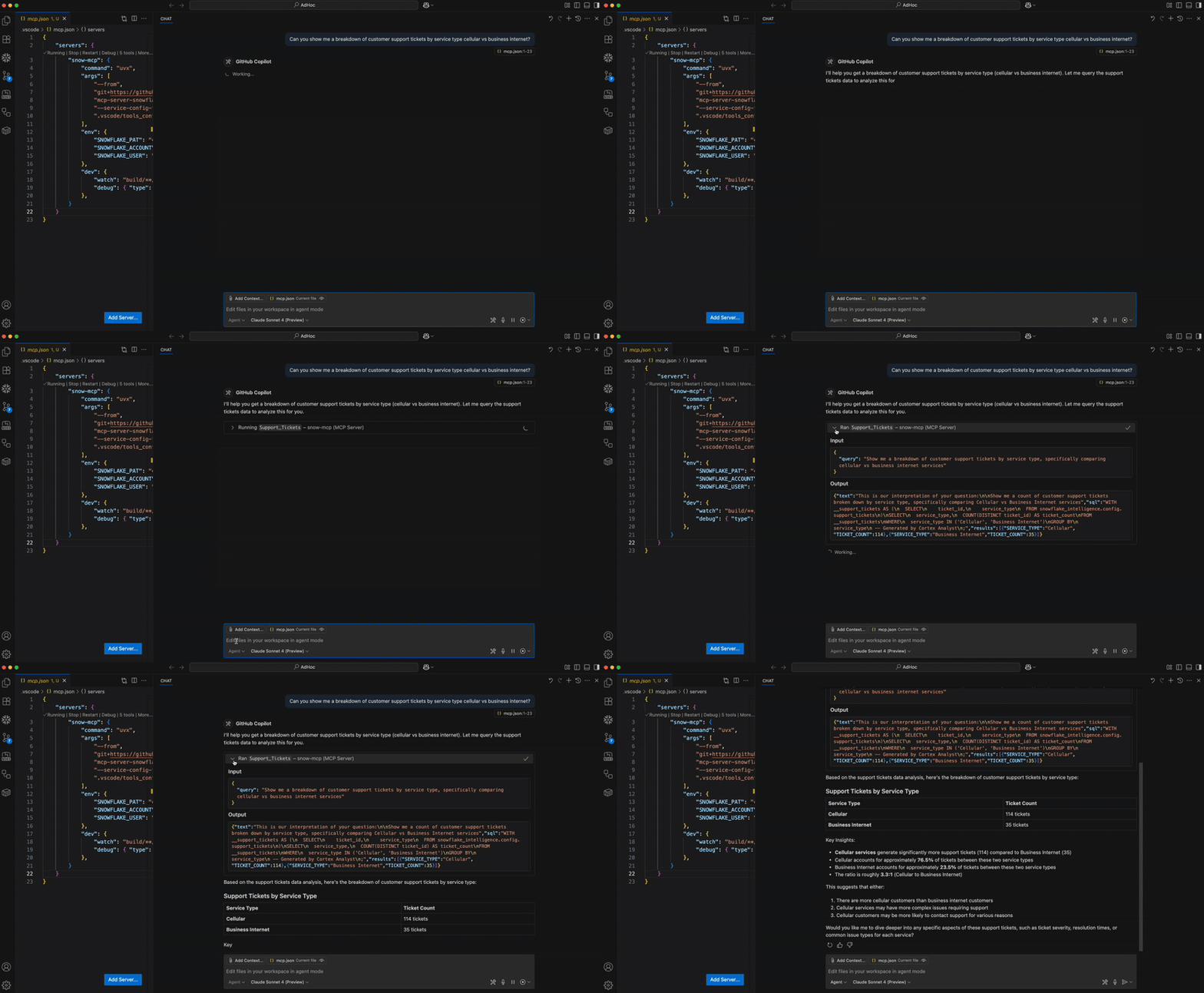
Microsoft Visual Studio Code + GitHub Copilot
For prerequisites, environment setup, step-by-step guide and instructions, please refer to this blog.
Troubleshooting
Running MCP Inspector
The MCP Inspector is suggested for troubleshooting the MCP server. Run the below to launch the inspector.
`yarn inspector`

OR

`npx @modelcontextprotocol/inspector tsx --env-file .env dist/mcp/MCP.js`
Read More: INSPECTOR.md
FAQs
How do I connect to Snowflake?
- Using Programmatic Access Token (PAT). Set as environment variable SNOWFLAKE_PAT.
How do I try this?
- The MCP server is intended to be used as one part of the MCP ecosystem. Think of it as a collection of tools. You'll need an MCP Client to act as an orchestrator. See the MCP Introduction for more information.
Where is this deployed? Is this in Snowpark Container Services?
- All tools in this MCP server are managed services, accessible via REST API. No separate remote service deployment is necessary. Instead, the current version of the server is intended to be started by the MCP client, such as Claude Desktop, Cursor, fast-agent, etc. By configuring these MCP client with the server, the application will spin up the server service for you. Future versions of the MCP server may be deployed as a remote service in the future.
I'm receiving permission errors from my tool calls.
- If using a Programmatic Access Tokens, note that they do not evaluate secondary roles. When creating them, please select a single role that has access to all services and their underlying objects OR select any role. A new PAT will need to be created to alter this property.
How many Cortex Search or Cortex Analysts can I add?
- You may add multiple instances of both services. The MCP Client will determine the appropriate one(s) to use based on the user's prompt.
FAQ
Common questions
Discussion
Questions & comments · 0
Sign In Sign in to leave a comment.