
Generate and Manage Dagster Data Pipelines
Dagster is a cloud-native data pipeline orchestrator with a declarative, asset-based Python programming model and built-in observability.
1.13.19Add to Favorites
Why it matters
Streamline your data engineering by programmatically creating and managing Dagster projects and components. This asset provides CLI tools to accelerate the development of your data pipelines.
Outcomes
What it gets done
Create new Dagster projects
Generate reusable Dagster components
Manage project structure and dependencies via CLI
Facilitate CI/CD for data pipelines
Source
Get it from source
Spark does not host a copy of it.
Open sourceReports
Agent outcome reports
No reports yet
Overview
Dagster MCP Server
Dagster is a cloud-native data pipeline orchestrator built around a declarative, asset-based Python programming model. Teams declare data assets - tables, datasets, ML models, reports - as plain functions, and Dagster resolves the dependency graph, schedules runs, and keeps assets up to date, with integrated lineage, observability, and testing across the whole development lifecycle. Use it when a team is building and maintaining a graph of interdependent data assets and wants declarative definitions with built-in lineage and observability. Not worth the overhead for a single ad hoc script with no scheduling or lineage needs.
What it does
Dagster is a cloud-native data pipeline orchestrator covering the whole development lifecycle, with integrated lineage and observability, a declarative programming model, and built-in testability. It is built for developing and maintaining data assets - tables, datasets, machine learning models, and reports. Assets are declared as plain Python functions decorated with @dg.asset, and Dagster resolves the dependency graph between them, runs them at the right time, and keeps them up to date; the resulting asset graph is rendered visually in Dagster's web UI. A downstream asset simply takes an upstream one as a function argument to declare the dependency:
@dg.asset
def continent_change_model(country_populations: pd.DataFrame) -> LinearRegression:
    data = country_populations.dropna(subset=["change"])
    return LinearRegression().fit(pd.get_dummies(data[["continent"]]), data["change"])
It is designed to be used at every stage of the data lifecycle, from local development and unit tests through staging and production.
When to use - and when NOT to
Use Dagster when a team is building or maintaining a graph of interdependent data assets and wants a declarative way to define them, CI/CD-friendly reusable components, and centralized observability, diagnostics, and lineage as pipeline complexity grows. It functions as a multi-tenant orchestration engine meant to scale both technically and organizationally, so it fits teams already thinking in terms of pipelines, not a single ad hoc script. It is not a fit for a one-off data transformation with no need for scheduling, lineage tracking, or testing across environments - the asset-based model is overhead for that case.
Capabilities
Dagster works as a productivity platform (a declarative approach to defining assets, or running basic tasks directly, with CI/CD practices, reusable components, and early data-quality checks built in), as an orchestration engine (a multi-tenant, multi-tool runtime meant to scale in production), and as a unified control plane (centralized metadata with observability, diagnostics, cataloging, and lineage to spot issues and performance opportunities). It ships a growing library of integrations with popular data tools so it can sit alongside existing infrastructure rather than replacing it.
How to install
Dagster is distributed on PyPI and officially supports Python 3.9 through 3.14, installed with uv add dagster dagster-webserver dagster-dg-cli. New users are pointed to the official documentation and a hands-on ETL pipeline tutorial to get from installation to a first working pipeline.
Who it's for
Data engineers and platform teams building and maintaining data assets - tables, datasets, ML models, and reports - who want one declarative, testable orchestration layer that spans local development through production. It is Apache 2.0 licensed.
Source README








Dagster is a cloud-native data pipeline orchestrator for the whole development lifecycle, with integrated lineage and observability, a declarative programming model, and best-in-class testability.
It is designed for developing and maintaining data assets, such as tables, data sets, machine learning models, and reports.
With Dagster, you declare-as Python functions-the data assets that you want to build. Dagster then helps you run your functions at the right time and keep your assets up-to-date.
Here is an example of a graph of three assets defined in Python:
import dagster as dg
import pandas as pd

from sklearn.linear_model import LinearRegression


@dg.asset
def country_populations() -> pd.DataFrame:
    df = pd.read_html("https://tinyurl.com/mry64ebh")[0]
    df.columns = ["country", "pop2022", "pop2023", "change", "continent", "region"]
    df["change"] = df["change"].str.rstrip("%").astype("float")
    return df


@dg.asset
def continent_change_model(country_populations: pd.DataFrame) -> LinearRegression:
    data = country_populations.dropna(subset=["change"])
    return LinearRegression().fit(pd.get_dummies(data[["continent"]]), data["change"])


@dg.asset
def continent_stats(
    country_populations: pd.DataFrame, continent_change_model: LinearRegression
) -> pd.DataFrame:
    result = country_populations.groupby("continent").sum()
    result["pop_change_factor"] = continent_change_model.coef_
    return result
The graph loaded into Dagster's web UI:
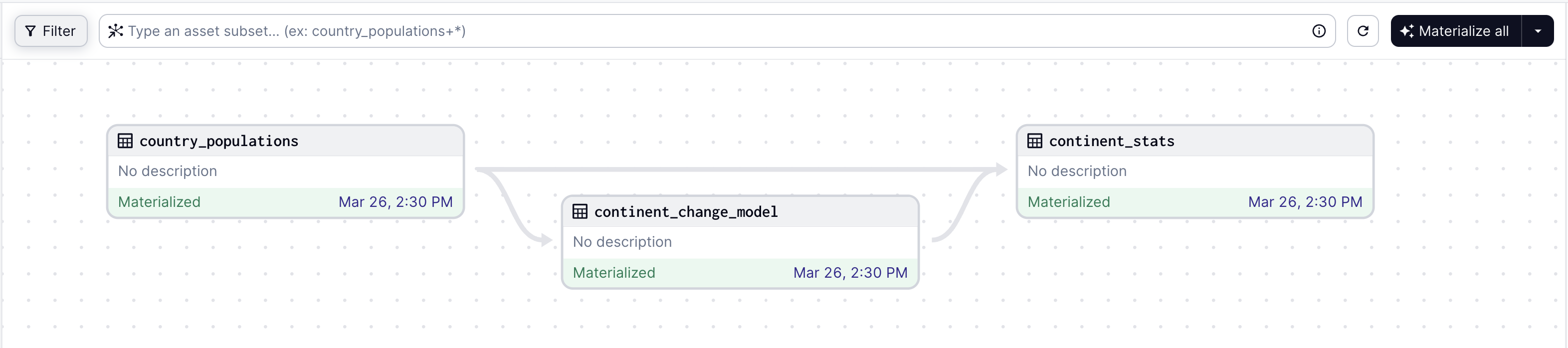
Dagster is built to be used at every stage of the data development lifecycle - local development, unit tests, integration tests, staging environments, all the way up to production.
Quick Start:
If you're new to Dagster, we recommend checking out the docs or following the hands-on tutorial.
Dagster is available on PyPI and officially supports Python 3.9 through Python 3.14.
uv add dagster dagster-webserver dagster-dg-cli
Documentation
You can find the full Dagster documentation here, including the Quickstart guide.
Key Features:
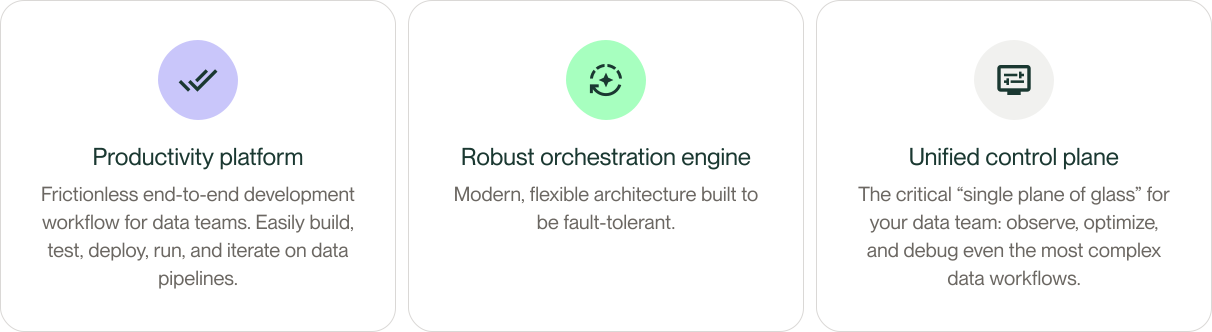
Dagster as a productivity platform
Identify the key assets you need to create using a declarative approach, or you can focus on running basic tasks. Embrace CI/CD best practices from the get-go: build reusable components, spot data quality issues, and flag bugs early.
Dagster as a robust orchestration engine
Put your pipelines into production with a robust multi-tenant, multi-tool engine that scales technically and organizationally.
Dagster as a unified control plane
Maintain control over your data as the complexity scales. Centralize your metadata in one tool with built-in observability, diagnostics, cataloging, and lineage. Spot any issues and identify performance improvement opportunities.
Master the Modern Data Stack with integrations
Dagster provides a growing library of integrations for today’s most popular data tools. Integrate with the tools you already use, and deploy to your infrastructure.

Community
Connect with thousands of other data practitioners building with Dagster. Share knowledge, get help,
and contribute to the open-source project. To see featured material and upcoming events, check out
our Dagster Community page.
Join our community here:
FAQ
Common questions
Discussion
Questions & comments · 0
Sign In Sign in to leave a comment.