
Control Ableton Live with AI
An MCP server that lets LLMs control Ableton Live over OSC, built on AbletonOSC's address mappings.
1.0.0Add to Favorites
Why it matters
Integrate AI assistants with Ableton Live for advanced music production control. Automate track manipulation, routing, and DAW functions via OSC.
Outcomes
What it gets done
Control Ableton Live tracks and routing using OSC messages.
Enable AI assistants to interact with DAW functions.
Map OSC addresses for seamless integration with MCP clients.
Automate music production tasks based on AI commands.
Source
Get it from source
Spark does not host a copy of it.
Open sourceReports
Agent outcome reports
No reports yet
Overview
Ableton Live MCP Server
An MCP server that lets an LLM control Ableton Live over OSC, built on the AbletonOSC control-surface implementation. It ships an MCP server component plus an OSC daemon that relays commands to and from Ableton Live. Reach for it when you want to drive a live Ableton Live session - track routing, set prep - from an MCP client like Claude Desktop, not as a standalone client on its own.
What it does
This MCP server implements the Model Context Protocol to let LLMs communicate with Ableton Live. It talks to Ableton over OSC (Open Sound Control), building on the AbletonOSC implementation and exhaustively mapping AbletonOSC's OSC addresses to MCP tools that an MCP client can call.
The project has two components: mcp_ableton_server.py, the MCP server that handles communication between MCP clients and the OSC daemon, and osc_daemon.py, the OSC daemon that relays commands to Ableton Live and processes its responses. Running the daemon (uv run osc_daemon.py) starts it listening for MCP client connections on port 65432, forwarding messages to Ableton Live via OSC on port 11000, and receiving OSC responses from Ableton on port 11001 - all on localhost by default. Those defaults, along with the socket and Ableton host addresses, are editable directly in the AbletonOSCDaemon class in osc_daemon.py.
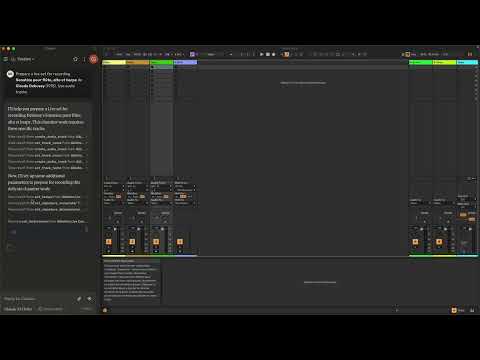
Once connected, example prompts shown for Claude Desktop include asking Claude to "prepare a set to record a rock band" or to "set the input routing channel of all tracks that have 'voice' in their name to Ext. In 2" - i.e. natural-language requests translated into OSC commands against a running Ableton Live session.
When to use - and when NOT to
Use it when you want an LLM to control a running Ableton Live session - triggering OSC-mapped actions like track routing or set preparation - through an MCP client such as Claude Desktop.
Do not use it as a standalone Ableton Live client without an MCP client in front of it, and do not expect resource or prompt primitives yet - the project's own TODO list still has "explore resources and prompts primitives opportunities" and "build a standalone Ableton Live MCP client" as open, unimplemented items.
Capabilities
It exposes an MCP-compatible API for controlling Ableton Live, built on python-osc for the underlying OSC send/receive layer and on AbletonOSC's existing OSC address surface, with request-response handling for the Ableton Live commands it forwards. Because it maps AbletonOSC's addresses exhaustively, its control surface tracks whatever AbletonOSC itself exposes rather than a hand-picked subset.
How to install
Requirements are Python 3.8+, the python-osc library, fastmcp, the uv package installer (recommended), and AbletonOSC installed as Ableton's control surface. Install uv first:
curl -LsSf https://astral.sh/uv/install.sh | sh
Then clone the project repository, run uv sync to install the project and its dependencies, and follow AbletonOSC's own instructions to install it as the control surface. For Claude Desktop, add the server to the mcpServers section of the platform's config file (~/Library/Application Support/Claude/claude_desktop_config.json on macOS, %APPDATA%/Claude/claude_desktop_config.json on Windows), pointing command at the project's virtualenv Python and args at mcp_ableton_server.py - keeping the server's dependencies self-contained and the setup portable. It is licensed under the MIT License.
Who it's for
Musicians and Ableton Live users who want to drive a live set - track routing, session prep, and similar OSC-mapped actions - from an LLM through an MCP client, rather than through Ableton's own UI or a script.
Source README
Ableton Live MCP Server
📌 Overview
The Ableton Live MCP Server is a server implementing the
Model Context Protocol (MCP) to facilitate
communication between LLMs and Ableton Live. It uses OSC (Open Sound
Control) to send and receive messages to/from Ableton Live. It is based on
AbletonOSC implementation and
exhaustively maps available OSC adresses to
tools accessible to
MCP clients.
This project consists of two main components:
mcp_ableton_server.py: The MCP server handling the communication between
clients and the OSC daemon.osc_daemon.py: The OSC daemon responsible for relaying commands to Ableton
Live and processing responses.
✨ Features
- Provides an MCP-compatible API for controlling Ableton Live from MCP clients.
- Uses python-osc for sending and receiving OSC messages.
- Based on the OSC implementation from
AbletonOSC. - Implements request-response handling for Ableton Live commands.
⚡ Installation
Requirements
- Python 3.8+
python-osc(for OSC communication)fastmcp(for MCP support)uv(recommended Python package installer)- AbletonOSC as a control surface
Installation Steps
Install
uv(https://docs.astral.sh/uv/getting-started/installation):curl -LsSf https://astral.sh/uv/install.sh | shClone the repository:
git clone https://github.com/your-username/mcp_ableton_server.git
cd mcp_ableton_server
Install the project and its dependencies:
uv syncInstall AbletonOSC Follow the instructions at
AbletonOSC
🚀 Usage
Running the OSC Daemon
The OSC daemon will handle OSC communication between the MCP server and Ableton
Live:
uv run osc_daemon.py
This will:
- Listen for MCP client connections on port 65432.
- Forward messages to Ableton Live via OSC on port 11000.
- Receive OSC responses from Ableton on port 11001.
Example Usage
In Claude desktop, ask Claude:
- Prepare a set to record a rock band
- Set the input routing channel of all tracks that have "voice" in their name
to Ext. In 2
⚙️ Configuration
By default, the server and daemon run on localhost (127.0.0.1) with the
following ports:
- MCP Server Socket: 65432
- Ableton Live OSC Port (Send): 11000
- Ableton Live OSC Port (Receive): 11001
To modify these, edit the AbletonOSCDaemon class in osc_daemon.py:
self.socket_host = '127.0.0.1'
self.socket_port = 65432
self.ableton_host = '127.0.0.1'
self.ableton_port = 11000
self.receive_port = 11001
Claude Desktop Configuration
To use this server with Claude Desktop, you need to configure it in your Claude
Desktop settings. The configuration file location varies by operating system:
- macOS:
~/Library/Application Support/Claude/claude_desktop_config.json - Windows:
%APPDATA%/Claude/claude_desktop_config.json
Add the following configuration to your mcpServers section:
{
  "mcpServers": {
    "Ableton Live Controller": {
      "command": "/path/to/your/project/.venv/bin/python",
      "args": ["/path/to/your/project/mcp_ableton_server.py"]
    }
  }
This configuration ensures that:
- The server runs with all dependencies properly managed
- The project remains portable and reproducible
TODO
- Explore resources and prompts primitives opportunities.
- Build a standalone Ableton Live MCP client.
FAQ
Common questions
Discussion
Questions & comments · 0
Sign In Sign in to leave a comment.