
CaseCite - Private Legal RAG
Research firm documents, review contracts, and draft with citations in a self-hosted legal workspace using your chosen AI providers.
1.3.0Add to Favorites
Source
Get it from source
Spark does not host a copy of it.
Open sourceReports
Agent outcome reports
No reports yet
Overview
CaseCite combines document research, contract review, tabular extraction, drafting, and CourtListener tools on a self-hosted deployment. Saved workflows and matter scoping organize repeatable work around a shared corpus. Use it for legal document workflows where the firm manages infrastructure and provider keys. Verify generated work against documents and current law, and configure both chat and embedding endpoints when text must stay on your network.
The workflow you build
CaseCite combines legal document research, contract analysis, drafting, and case-law tools in a self-hosted workspace. Documents, the search index, chat history, and analyses are stored on your deployment. AI features send questions and relevant document text to the providers you configure under your own keys. Nothing is sent to the maintainers, and the platform has no telemetry.
Start by uploading and indexing a corpus. Research combines semantic retrieval with keyword BM25 rescoring and answers with inline citations. Deep research breaks a question into an editable plan, searches your documents and CourtListener, verifies quotations against their text, and records the search steps. You can also open a CourtListener opinion and chat directly with it, or explore judge analytics, dockets, oral arguments, precedents, and case-law trends.
Contract review accepts indexed documents or pasted text. It supports single-contract chat, clause-by-clause comparison of two to four contracts against a baseline, and export of a redline, draft, or analysis. Tabular review applies defined fields across a document set, returning a row per document with each value linked to an exact supporting passage and labelled verified, unverified, or not found. You can rerun individual cells, rows, or columns, preview run cost, and export CSV or Excel with a Citations sheet.
Saved workflows combine extraction, analysis, comparison, drafting, deep research, and citation checks into ordered background jobs. Step outputs are retained, and a failed run resumes at the failed step. Starter templates cover NDA intake, lease review, and due diligence. Drafting uses up to four selected reference documents, extracts text server-side, and supports PDF conversion. Long drafts begin with a section plan for review, draft sections against the references, and reconcile the result; revisions target the affected sections.
Matters are an API-only preview with no frontend UI; they group engagement documents, research chats, and analyses with access controls and audit activity. An active matter scopes Research, Contracts, and Drafting. API matter creation and membership changes require the matters.manage permission. Strategy briefs search CourtListener for each proposition and discard citations without a locatable verbatim quotation; that workflow is exposed through the API. A practice profile, which you edit and own, supplies standing context for reviews, redlines, and drafts. The Word task pane can analyze the open document, jump to flagged passages, insert rewrites as tracked changes, and insert research answers as footnoted paragraphs. It authenticates through a short code approved in the web app, without holding browser cookies; configure its origin on the server.
When to use this bundle - and when NOT to
Use CaseCite for a firm-controlled corpus and repeatable research or contract processes. Every generated answer, analysis, and draft needs verification against original documents and current law. Citation check scans citing opinions for negative-treatment language; it is not a substitute for Shepard's, KeyCite, a citator, or a lawyer's judgment.
Self-hosting does not keep all processing local automatically. Uploading sends text to the configured embeddings provider: OpenAI by default, or Voyage or Cohere. Questions, analysis, and drafting send relevant text to OpenAI, Anthropic, or Gemini. CourtListener receives case-law queries and citations. To keep document text on your network, configure both OPENAI_BASE_URL for chat and EMBEDDING_BASE_URL for embeddings to servers you host. Setting only the chat endpoint still sends text to OpenAI for embedding. Choosing Pinecone also stores document text with Pinecone rather than the local Chroma option.
Application-layer AES-256-GCM protects uploaded originals, provider keys, connector tokens, and MFA secrets. Derived text, vector chunks, chats, and analyses rely on host-volume encryption that you provide. Per-user keys are encrypted server-side and shown masked; environment fallback keys are shared across users. Per-user cost attribution requires per-user keys. Preserve the root encryption key and use the documented salt-rotation procedure: changing the root key makes stored documents unreadable. CaseCite holds no SOC 2, ISO 27001, or HIPAA certification.
How to get started
Prepare Docker, Docker Compose, and openssl. The bundled production stack includes Postgres, Redis, and Caddy. Startup fails closed if required environment variables are missing or retain placeholder values. Set SECRET_KEY, ENCRYPTION_SALT, AUDIT_HMAC_KEY, POSTGRES_PASSWORD, REDIS_PASSWORD, DOMAIN, DISK_ENCRYPTION_ACKNOWLEDGED, and REGISTRATION_BOOTSTRAP_TOKEN. Generate SECRET_KEY and AUDIT_HMAC_KEY with openssl rand -hex 32; generate ENCRYPTION_SALT and the bootstrap token with openssl rand -hex 16. AUDIT_HMAC_KEY needs at least 32 characters. Set DISK_ENCRYPTION_ACKNOWLEDGED=true after providing host-volume encryption. DOMAIN supplies the default CORS_ORIGINS and ALLOWED_HOSTS.
The production helper scripts/setup_production.py supports --generate-secrets, --create-env, and --validate. Environment creation generates secrets and writes .env with mode 0600; it refuses to overwrite an existing file because existing keys may protect data. Validation checks the existing configuration. Keep a copy of SECRET_KEY, ENCRYPTION_SALT, and AUDIT_HMAC_KEY off the server: backups cannot be restored without them. Start the bundled stack with:
docker compose -f docker-compose.prod.yml up -d
The first registered account becomes administrator and requires the bootstrap token; subsequent self-service registration is off by default. An existing reverse proxy uses the root Compose configuration with external Postgres and Redis. Supply DATABASE_URL, REDIS_URL, CORS_ORIGINS, and ALLOWED_HOSTS directly, set DB_SSL=require for a managed database, and set TRUSTED_PROXIES to the proxy subnet so client IPs remain distinct. Optional or mandatory TOTP MFA, role permissions, scoped records, session controls, and an HMAC-SHA256 audit chain support administration. Sessions are capped at five per user with an eight-hour absolute lifetime and an idle timeout. Rotating refresh tokens use httpOnly cookies with Redis revocation; CSRF controls, per-IP rate limits, and account lockout add protection.
Supply provider keys centrally or through each user's Settings. CourtListener is the only case-law source. Citation check refuses to run without its token, and anonymous access to other case-law operations is heavily rate-limited. An administrator can save the token instance-wide.
Import connectors include Google Drive, OneDrive, Box, Dropbox, Filevine, and Clio. File pickers allow selected-file imports; the sync UI imports the whole connected account after confirmation. Clio cannot sync a single folder. Filevine is administrator-only and disabled until explicitly enabled. The iManage and NetDocuments connectors are experimental, untested against a live tenant, and disabled unless enabled by configuration. Microsoft and Google request read-only scopes, while earlier broader grants require reconnection. Azure AD offers backend token exchange without a sign-in button; SAML, generic OIDC, and SCIM are unsupported.
Who it's for
CaseCite serves legal firms researching their documents, reviewing contracts, and drafting from a shared corpus. Apache License 2.0 permits self-hosting, modification, redistribution, and commercial use subject to its notice and attribution requirements. Documents, prompts, and outputs remain yours. Versions through 1.3.0 retain their earlier Elastic License 2.0 terms.
Source README
CaseCite - Private Legal RAG

CaseCite is an open-source, self-hosted legal research platform. Upload your firm's documents, ask questions, and research cases & judges - on infrastructure you control. Documents, the search index and chat history are stored on your own servers. AI features send your questions and the relevant document text to the AI providers you configure, under your own API keys (BYOK); nothing is sent to the CaseCite maintainers, and there is no telemetry. See What leaves your infrastructure.
What it does
Nine tools behind one login, all reading from the same document corpus.
Research (/research) |
Chat over your firm's documents - semantic retrieval with keyword (BM25) rescoring of the candidates, and inline citations back to the source. Deep research for bigger questions: a plan of sub-questions you edit before anything runs, each researched over your documents and CourtListener, every quote verified against the text it came from, and a step log of what was searched. |
Documents (/documents) |
Upload, index, and organize your corpus. Import from Google Drive, OneDrive, Box, Dropbox, Filevine, or Clio - OAuth sync, or a file picker where OAuth verification isn't needed. iManage and NetDocuments connectors exist but are experimental (untested against a live tenant) and off unless EXPERIMENTAL_CONNECTORS=true. |
Contracts (/contracts) |
Full contract review pipeline: analyze an indexed contract or pasted text, chat with a single contract, compare 2-4 contracts clause-by-clause against a baseline, and export a redline, a draft, or the analysis itself. |
Tabular review (/review-tables) |
Review hundreds of contracts at once: define the fields you need, point the table at a set of documents, and get one row per document with every value tied to the exact passage that supports it (verified, unverified or not found). Re-run a cell, row or column; see the cost before a run; export to Excel with a Citations sheet, or CSV. |
Workflows (/workflows) |
Save a review, research or drafting process as an ordered list of steps (extract fields, analyse contracts, compare against a baseline, draft a document, deep research, check citations) and run it over any set of documents as one background job. Every step's output is kept, a failed run resumes from the step that failed, and three starter templates (NDA intake, lease review, due-diligence pass) show the shape. See docs/workflows.md. |
Drafting (/drafting) |
Draft a document grounded in up to four documents you pick from the Knowledge Base, with server-side text extraction and PDF conversion. Set a target length for long documents (30-page agreements): you review a section plan first, then every section is drafted in its own context window against the full references and the whole is reconciled. Revisions to long drafts are scoped to the sections they touch. |
Matters (/matters) |
One workspace per client engagement: the documents, research chats and contract analyses filed under it, who can see them, and an activity feed from the audit trail. Set a matter as active in the header and Research, Contracts and Drafting scope themselves to it. Owners invite colleagues, file documents in bulk, and hand a matter over when someone leaves. |
Case view (/case/:id) |
Open a CourtListener opinion and chat with it directly. |
Judge intel (/judge-intel) |
Judge analytics from CourtListener. |
Legal tools (/tools) |
Case lookup, citation check (a scan of citing opinions for negative-treatment language - not a Shepard's/KeyCite substitute), precedents, dockets, oral arguments, and case-law trends. |
Screenshots
Captured from the real UI against a mocked API with fictional firm, matter and
case data (frontend/e2e/screenshots.spec.ts). No real client or case appears.
| Research over the firm's documents | Knowledge Base |
|---|---|
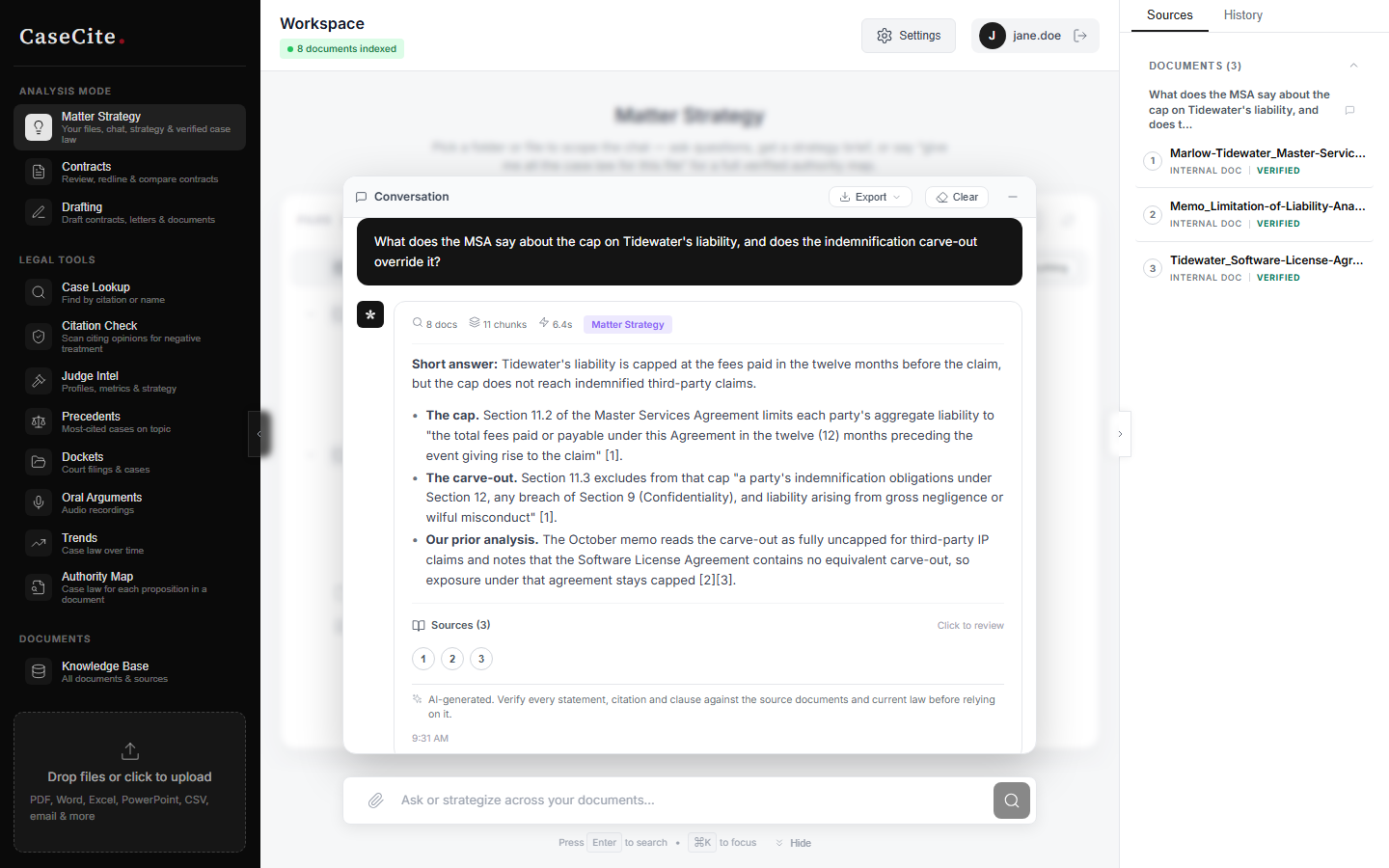 |
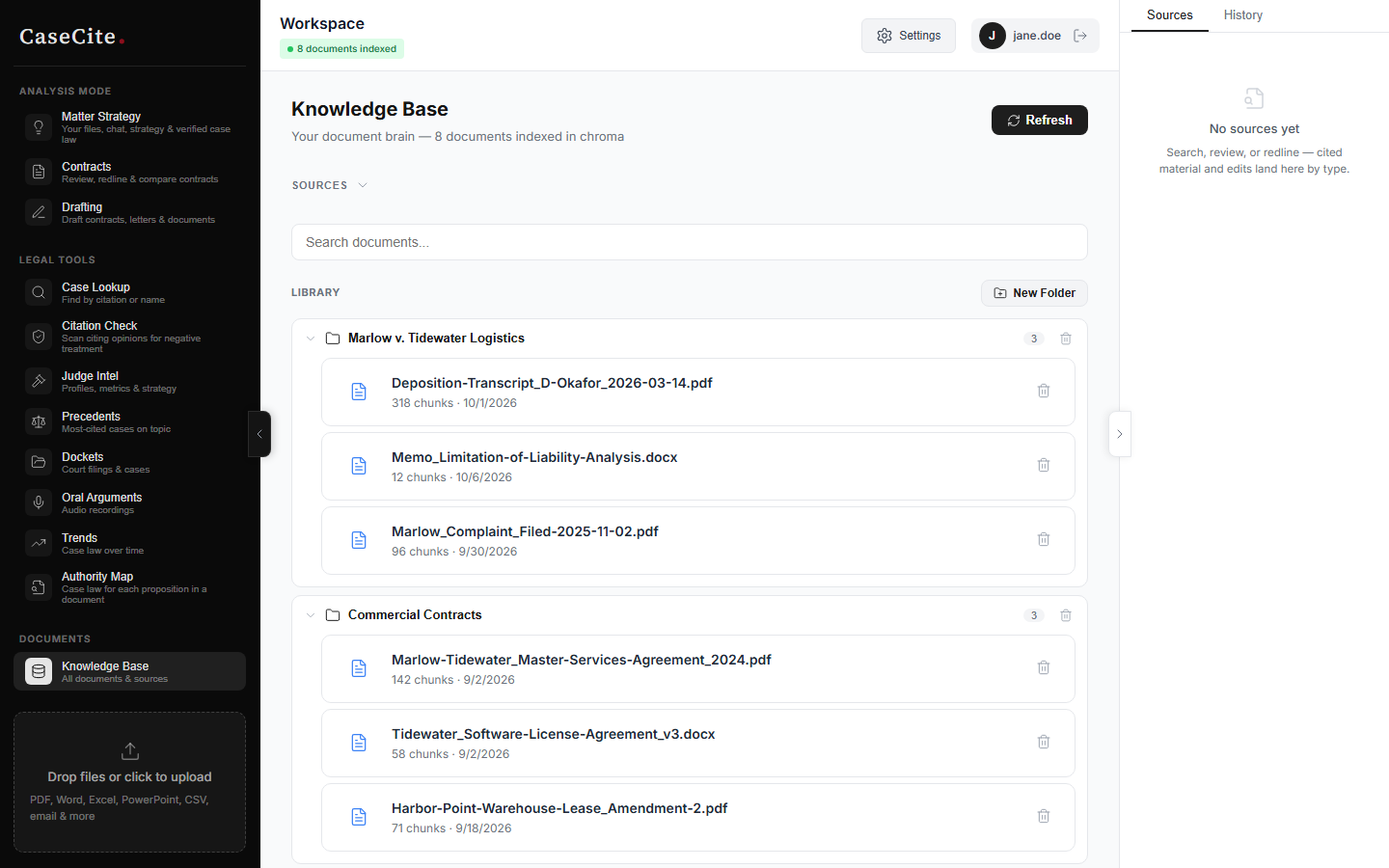 |
| Contract analysis | Citation check |
|---|---|
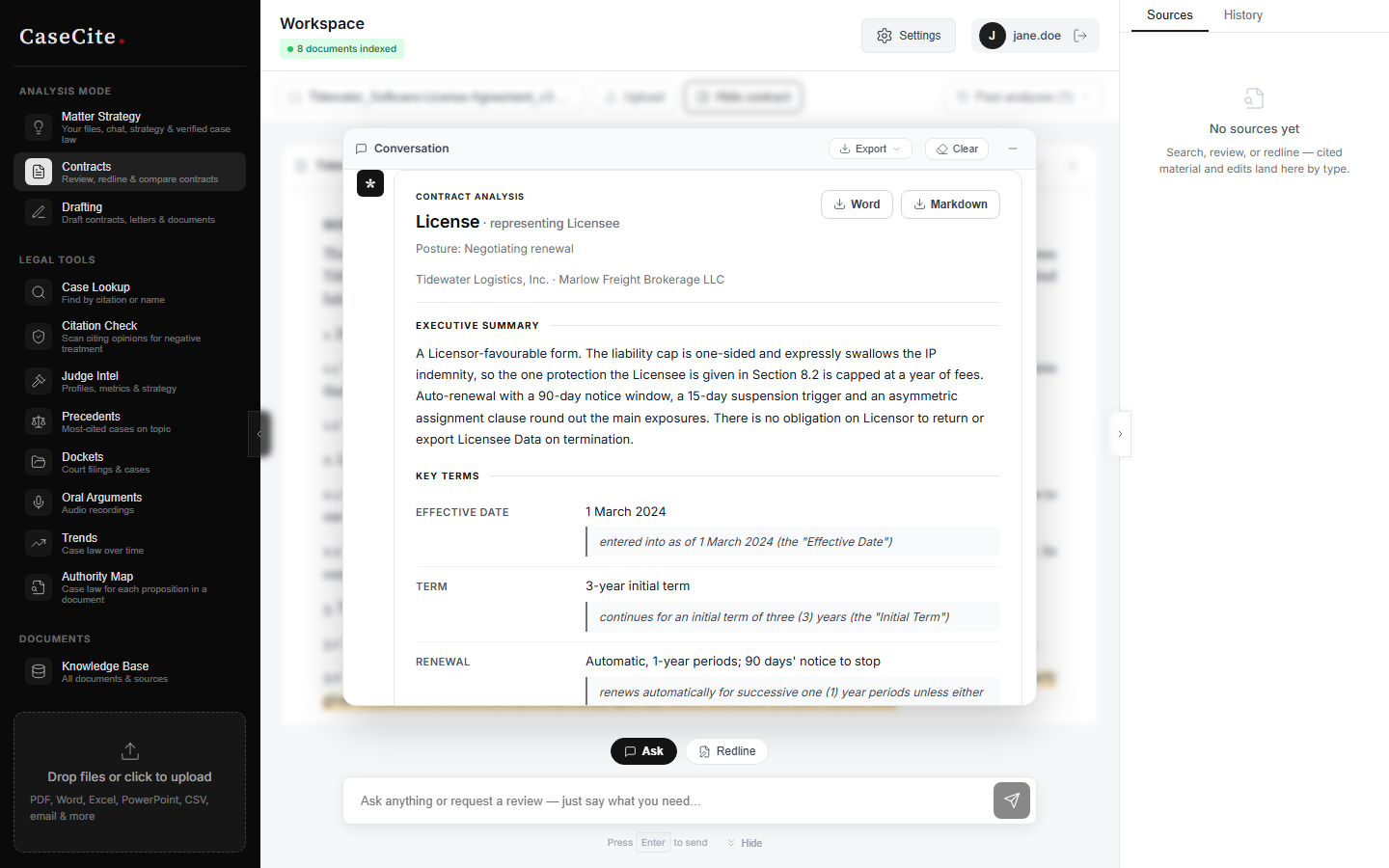 |
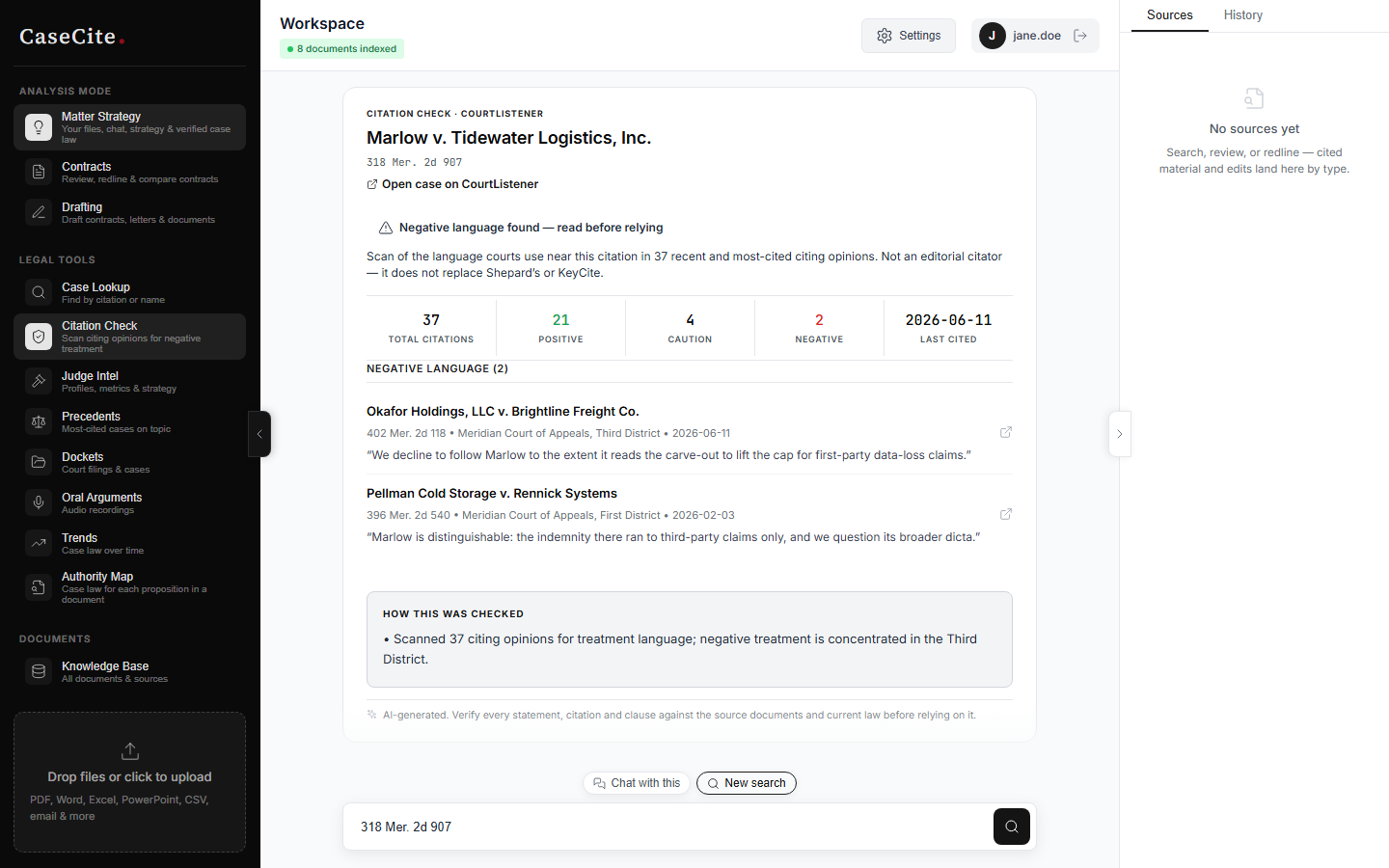 |
Practice profile. Nothing about any practice area is baked into the product. You state what you practice, CaseCite drafts a profile of what matters in that practice, and you edit and own it (saved via Settings). It then rides along with every review, redline, and draft as standing context.
Every AI-generated answer, analysis and draft carries a notice to verify it against the source documents and current law before relying on it. CaseCite is a research aid, not a substitute for a lawyer's judgment or for a citator.
What leaves your infrastructure
Documents, the vector index, chat history and analyses are stored only on your deployment. Using the AI features transmits content to third parties you choose:
- Uploading a document sends its text to the embeddings provider (OpenAI by default; Voyage or Cohere if configured).
- Asking a question, analysing or drafting sends the question and the relevant document text to the LLM provider (OpenAI, Anthropic or Gemini).
- Case-law tools send search queries and citations to CourtListener.
To keep document text entirely on your network, run both models yourself: set
OPENAI_BASE_URL (chat) and EMBEDDING_BASE_URL (embeddings) to
OpenAI-compatible servers you host. Setting only the first still sends
document text to OpenAI for embedding. The full list of outbound data flows,
and how to restrict them, is in docs/subprocessors.md.
Quick start
Prerequisites
- Docker + Docker Compose
openssl(to generate secrets)- An AI provider API key (OpenAI is the simplest start: it covers both chat and embeddings). Optional at the server level - users can each save their own.
Run it (self-contained: bundles Postgres, Redis, and an HTTPS proxy)
git clone https://github.com/thomasunise/casecite.git && cd casecite
cp .env.example .env

# 1. Generate the three REQUIRED secrets (the .env.example placeholders
#    intentionally refuse to boot). Copy each value into .env:
openssl rand -hex 32   # -> SECRET_KEY
openssl rand -hex 32   # -> AUDIT_HMAC_KEY
openssl rand -hex 16   # -> ENCRYPTION_SALT

# 2. In .env also set OPENAI_API_KEY (or leave it empty and save a key under
#    Settings after signing in), then uncomment and set DOMAIN,
#    POSTGRES_PASSWORD and REDIS_PASSWORD in the "Bundled production stack"
#    section (generation hints are in the file; use DOMAIN=localhost to try it
#    on your machine). CORS_ORIGINS and ALLOWED_HOSTS default from DOMAIN.
#    Set REGISTRATION_BOOTSTRAP_TOKEN too (openssl rand -hex 16) — you need it
#    to create the first account.

# 3. Set DISK_ENCRYPTION_ACKNOWLEDGED=true in .env (required to boot).
#    What this acknowledges: the app encrypts BYOK keys and uploaded documents
#    at the application layer (AES-256-GCM), but derived text (vector chunks,
#    chat history, analyses) is stored in cleartext in the app, Postgres and
#    Redis volumes — full-disk encryption of the host is YOUR responsibility.

# 4. Start the full stack (bundled Postgres + Redis + Caddy):
docker compose -f docker-compose.prod.yml up -d
python3 scripts/setup_production.py --create-env --domain <host> does steps
1-2 for you (it generates every secret and writes .env with mode 0600).
Then open https://$DOMAIN (with DOMAIN=localhost: https://localhost).
On a localhost trial Caddy redirects HTTP to HTTPS and serves a certificate
from its own self-signed local CA - the browser warning on first visit is
expected. See "TLS on Internal Networks" in docs/deployment.md
to trust that CA or bring your own certificate.
The first account you register becomes the admin, and registering it requires
the REGISTRATION_BOOTSTRAP_TOKEN from .env - so nobody else who reaches a
fresh instance can claim it. The exact command is under "Create the admin
account" in docs/deployment.md. After that, invite
colleagues from Settings → Users; self-service registration is off by default.
Deploying behind an existing reverse proxy (Coolify/Traefik)? Use the root
docker-compose.ymlinstead (it expects an external Postgres and Redis and declares the persistent data volume), and readdeploy/COOLIFY-SETUP.md- you must also setTRUSTED_PROXIESto the proxy's subnet or client IPs collapse to one.
Key custody (BYOK)
Users provide AI provider keys via the Settings modal. What firm evaluators should know about custody:
- Per-user keys are stored server-side, AES-256-GCM-encrypted (PBKDF2 key derivation, HKDF per-record separation), in a file store on the data volume.
- Keys are displayed masked-only and are never sent to the browser; the backend decrypts them on demand for each request.
- Env-configured fallback keys (e.g.
OPENAI_API_KEYin.env) are shared by all users of the install - per-user cost attribution requires per-user BYOK keys. ENCRYPTION_SALTcan be rotated without losing stored keys: keep the old value inENCRYPTION_SALT_PREVIOUSand runpython -m app.utils.reencryptinside the backend container - seedocs/secret-rotation.md.SECRET_KEYcannot be rotated without making stored documents unreadable; keep it safe and backed up off the server.
Word add-in
word-addin/ is a task-pane add-in for Microsoft Word that talks to your own
CaseCite server: analyze the open document and jump to each flagged passage,
insert a suggested rewrite as a tracked change, and research the firm's
documents with the answer inserted as footnoted paragraphs. It signs in with a
short code you approve in the web app (/device), so the pane never holds
your browser cookies, and its session shows up under Settings → Security →
Sessions as "Word add-in". Set WORD_ADDIN_ORIGIN on the server to the
origin the pane is served from. Build, sideloading on Windows, Mac and the
web, Centralized Deployment and the current limits are in
word-addin/README.md.
Configuration
Required env vars
The stack fails closed on startup if any of these are missing or left as placeholders.
| Variable | Description |
|---|---|
SECRET_KEY |
JWT/CSRF signing key and root of at-rest encryption - openssl rand -hex 32 (never change after first run) |
ENCRYPTION_SALT |
At-rest encryption salt - openssl rand -hex 16 (never change after first run except via the rotation procedure) |
AUDIT_HMAC_KEY |
Audit-log chain key, at least 32 characters - openssl rand -hex 32 |
POSTGRES_PASSWORD |
Password for the bundled Postgres |
REDIS_PASSWORD |
Password for the bundled Redis |
DOMAIN |
Public hostname (or localhost); CORS_ORIGINS + ALLOWED_HOSTS default from it |
DISK_ENCRYPTION_ACKNOWLEDGED |
Set true to acknowledge that full-disk encryption of the host volumes is your responsibility (app-layer AES-256-GCM covers BYOK keys + document originals; derived text is cleartext) |
REGISTRATION_BOOTSTRAP_TOKEN |
Needed to register the first (admin) account - openssl rand -hex 16 |
Not required to boot, but the product does little without them:
| Variable | Description |
|---|---|
OPENAI_API_KEY (or another provider) |
Server-level provider key shared by all users. Without one, each user must save their own key under Settings before chat, analysis or indexing works. |
COURTLISTENER_API_TOKEN |
CourtListener is the only case-law source in the app. Citation check requires a token; the other case-law tools work without one but are heavily rate-limited. Free token; see CourtListener API token. |
Using the root
docker-compose.yml(external DB/Redis) instead of the bundled stack? ThenDATABASE_URL,REDIS_URL,CORS_ORIGINS, andALLOWED_HOSTSare required directly, and setDB_SSL=requirefor a managed database.
Optional env vars
| Variable | Default | Description |
|---|---|---|
ANTHROPIC_API_KEY |
- | Claude access |
VOYAGE_API_KEY |
- | Voyage AI legal embeddings |
OPENAI_BASE_URL |
- | OpenAI-compatible endpoint for chat (self-hosted model or gateway) |
EMBEDDING_BASE_URL |
- | OpenAI-compatible endpoint for embeddings; set with OPENAI_BASE_URL to keep document text on your network |
VECTOR_DB |
chroma |
chroma (local) or pinecone (stores document text with Pinecone) |
TRUSTED_PROXIES |
127.0.0.1 |
Reverse-proxy IP/CIDR - required behind a proxy |
REQUIRE_MFA |
false |
Require every password account to enrol TOTP MFA |
SESSION_ABSOLUTE_TIMEOUT_HOURS / SESSION_IDLE_TIMEOUT_MINUTES |
8 / 120 |
Session lifetime and idle timeout |
ALLOW_REGISTRATION |
false |
Allow self-service sign-up after the first account |
SENDGRID_API_KEY |
- | Enables password-reset emails (change-password works without it) |
.env.example documents every setting.
Connector notes
- The sync API imports one folder (
folder_id) or, with an explicitsync_all, the whole account. The UI has no folder picker yet: "Sync Now" imports the whole connected account after a second confirmation that says so. To bring in selected files, use the file pickers instead. Clio's listing is account-wide, so Clio cannot sync a single folder. - Filevine uses one firm-wide API key, so it is off until
FILEVINE_ENABLED=trueand is then available to admins only. - The iManage and NetDocuments connectors are experimental. They are
implemented against the vendors' published APIs but have not been tested
against a live tenant, so they are not registered by default: they do not
appear in the connector list and every route for them is refused. Set
EXPERIMENTAL_CONNECTORS=trueto enable them (they are then listed with"experimental": true). If you test them against a real tenant, the maintainer welcomes a report of what worked and what did not. - Microsoft and Google connections request read-only scopes. Connections made before this release keep their broader grant until reconnected.
CourtListener API token
Legal tools, Judge intel, Case view, and the case-law side of the strategy engine all read from CourtListener. CourtListener is the only case-law source in the app. The app starts without a token, but the case-law half of the product is not usable without one:
- Citation check hard-fails without it -
validate_citationrefuses to run and returns a "token required" error that names where to set the token (_check_tokeninbackend/app/services/courtlistener_client.py). - Every other CourtListener call falls back to anonymous access, which is rate-limited hard enough that research features become unusable under any real load.
Get a free token at
https://www.courtlistener.com/help/api/rest/#permissions, then either set
COURTLISTENER_API_TOKEN in .env, or save it instance-wide as an admin
(Settings → API Keys, or POST /api/v1/admin/integrations/courtlistener) -
the stored token overrides the .env value at runtime without a restart.
Project structure
backend/
  app/
    main.py              FastAPI app, middleware, health
    config.py            Pydantic settings
    routers/             API routers
    services/
      rag/               RAG pipeline (search, generation, citations, intent)
      vectordb.py        ChromaDB/Pinecone abstraction
      embeddings.py      Multi-provider embeddings
      auth.py            JWT auth
      strategy.py        Matter strategy briefs
      courtlistener.py   CourtListener API
      ...
    middleware/          Security, CSRF
  migrations/            Alembic migrations
frontend/
  src/
    App.tsx
    api/                 Per-domain API clients
    views/               Page views
    stores/              Zustand stores
    components/          Shared components + modals
    layout/              App shell
scripts/                 Backup/restore, production setup, key rotation, NOTICE generator
docs/                    Deployment, data flows, secret rotation, incident response, ADRs
Dockerfile               Unified image (frontend + backend)
docker-compose.prod.yml  Bundled stack: Caddy + Postgres + Redis + backend
docker-compose.yml       Behind an existing proxy (Coolify/Traefik); external Postgres + Redis
docker-compose.dev.yml   Local development
API-only (no UI yet)
These are implemented and reachable over the API, but the frontend does not expose them yet. Treat them as preview:
- Matters (
/api/v1/matters) - matter records, membership, and sharing of documents and chats between members. Creating matters and changing membership requires thematters.managepermission. - Strategy briefs (
/api/v1/strategy) - each proposition is searched on CourtListener, candidate opinions are read, and a citation is kept only when a verbatim quote can be located in the real opinion text. Unsupported citations are dropped rather than shown. - Azure AD SSO - backend token exchange only; there is no sign-in button. SAML, generic OIDC and SCIM are not supported.
Everything else in the feature table above, plus user administration and the audit log (Settings, admins only), has a UI.
Security
- Password sign-in (PBKDF2-SHA256) with optional or mandatory TOTP MFA and recovery codes; password reset by email and change-password in the app
- JWT access tokens with rotating refresh tokens in httpOnly cookies, JTI revocation in Redis (required in production), "sign out everywhere"
- Sessions capped at 5 per user, with an 8-hour absolute lifetime and an idle timeout
- Role-based permissions (
require_permission), adjustable per role by an admin - Per-user (and per-matter) scoping on every document, chat and analysis
- CSRF double-submit cookies, HMAC-signed; per-IP rate limiting; account lockout
- AES-256-GCM at-rest encryption for uploaded originals, API keys, connector tokens and MFA secrets. The vector index and database rely on disk encryption that you provide
- CSP, HSTS, X-Frame-Options, Permissions-Policy headers
- Audit log with HMAC-SHA256 chain hashing, verified at startup and on demand
CaseCite holds no security certification (SOC 2, ISO 27001, HIPAA). What it does and does not do is described in SECURITY.md, which also explains how to report a vulnerability; known gaps are listed in ROADMAP.md.
scripts/setup_production.py
#!/usr/bin/env python3
"""
Production Setup Script for CaseCite

This script helps generate production secrets securely.
Run this script to:
1. Generate new cryptographic secrets
2. Create a .env file with secure values
3. Validate existing configuration

Usage:
    python3 scripts/setup_production.py --generate-secrets
    python3 scripts/setup_production.py --create-env --domain app.example.com
    python3 scripts/setup_production.py --validate

Rotating ENCRYPTION_SALT is a separate tool (scripts/rotate_encryption_key.py);
SECRET_KEY cannot be rotated in place — see docs/secret-rotation.md.
"""

import argparse
import os
import secrets
import sys
from pathlib import Path

# Mirrors _PLACEHOLDER_PREFIXES in backend/app/config.py, plus the values this
# script and .env.example use for "fill this in".
PLACEHOLDER_PREFIXES = ("change-me", "REPLACE_WITH", "REPLACE-ME", "your-", "sk-your")
PLACEHOLDER_DOMAIN = "your-domain.com"


def generate_secret_key() -> str:
    """Generate a cryptographically secure secret key (64 hex chars = 32 bytes)."""
    return secrets.token_hex(32)


def generate_encryption_salt() -> str:
    """Generate a cryptographically secure encryption salt (32 hex chars = 16 bytes)."""
    return secrets.token_hex(16)


def print_secrets():
    """Generate and print new secrets."""
    print("\n" + "=" * 60)
    print("GENERATED PRODUCTION SECRETS")
    print("=" * 60)
    print("\nCopy these values to your .env file or secrets manager:\n")
    print(f"SECRET_KEY={generate_secret_key()}")
    print(f"ENCRYPTION_SALT={generate_encryption_salt()}")
    print(f"AUDIT_HMAC_KEY={generate_secret_key()}")
    print(f"POSTGRES_PASSWORD={generate_secret_key()}")
    print(f"REDIS_PASSWORD={generate_secret_key()}")
    print("\n" + "=" * 60)
    print("IMPORTANT SECURITY NOTES:")
    print("=" * 60)
    print("1. Never commit these values to git")
    print("2. Use a secrets manager in production (AWS Secrets Manager, Azure Key Vault)")
    print("3. Never change SECRET_KEY or ENCRYPTION_SALT after first run without")
    print("   following docs/secret-rotation.md — encrypted data becomes unreadable")
    print("4. Keep a copy of SECRET_KEY, ENCRYPTION_SALT and AUDIT_HMAC_KEY off the")
    print("   server: backups cannot be restored without them")
    print("=" * 60 + "\n")


def create_env_template(domain: str = PLACEHOLDER_DOMAIN, disk_encrypted: bool = False) -> str:
    """Create a new .env with generated secrets."""
    env_content = f"""# CaseCite - Production Configuration
# ==================================================
# Generated by setup_production.py
# IMPORTANT: This file contains sensitive credentials. Never commit to git.

# ============================================
# AI Provider Keys (optional at the server level)
# ============================================
# Leave all of these empty for a bring-your-own-key instance: each user then
# saves their own provider key under Settings. Set one here to give every user
# a shared server-level key.
# Get at https://platform.openai.com/api-keys
OPENAI_API_KEY=

# Optional: legal-tuned embeddings. Get from https://www.voyageai.com/
VOYAGE_API_KEY=

# Optional: Alternative LLM (Claude). Get from https://console.anthropic.com/
ANTHROPIC_API_KEY=

# ============================================
# REQUIRED: Security Secrets
# ============================================
# These were auto-generated. Keep a copy OFF this server: a backup cannot be
# restored without SECRET_KEY, ENCRYPTION_SALT and AUDIT_HMAC_KEY.
# WARNING: never change ENCRYPTION_SALT or SECRET_KEY after first run — at-rest
# encrypted data (documents, API keys, connector tokens) becomes unrecoverable.
SECRET_KEY={generate_secret_key()}
ENCRYPTION_SALT={generate_encryption_salt()}
AUDIT_HMAC_KEY={generate_secret_key()}
# Previous encryption salts for key rotation (comma-separated, oldest last)
# See: python3 scripts/rotate_encryption_key.py
ENCRYPTION_SALT_PREVIOUS=

# ============================================
# REQUIRED: Database & Redis
# ============================================
# The bundled docker-compose.prod.yml interpolates these passwords AND builds
# DATABASE_URL/REDIS_URL from them, so set the passwords below. If you point at
# an EXTERNAL managed database, set DATABASE_URL/REDIS_URL directly instead and
# set DB_SSL=require.
POSTGRES_PASSWORD={generate_secret_key()}
REDIS_PASSWORD={generate_secret_key()}
# DATABASE_URL=postgresql+asyncpg://user:password@host:5432/casecite
# REDIS_URL=redis://:password@host:6379/0

# ============================================
# REQUIRED: Data-at-rest acknowledgement
# ============================================
# Vector chunks, chat history and extracted clause text are stored in
# cleartext. Put the Docker volumes (rag_data, postgres_data, redis_data) on an
# encrypted disk (LUKS or provider disk encryption), then set this to true.
# Production refuses to start until it is.
DISK_ENCRYPTION_ACKNOWLEDGED={"true" if disk_encrypted else "false"}

# ============================================
# Environment Settings
# ============================================
DEBUG=false

# ============================================
# REQUIRED: Domain, CORS, Allowed Hosts
# ============================================
# DOMAIN drives the bundled Caddy proxy; CORS_ORIGINS/ALLOWED_HOSTS default from it.
DOMAIN={domain}
CORS_ORIGINS=https://{domain}
ALLOWED_HOSTS={domain}
FRONTEND_URL=https://{domain}
# Behind an external reverse proxy, set this to the proxy's IP/subnet or all
# clients collapse to one IP (rate limits + lockout break). See docs.
# TRUSTED_PROXIES=10.0.0.0/8,172.16.0.0/12

# ============================================
# First-admin bootstrap
# ============================================
# REQUIRED in production: the FIRST account (the admin) can only be registered
# by someone who supplies this token, so nobody else who reaches a fresh
# instance can claim the admin slot. See "Create the admin account" in
# docs/deployment.md.
REGISTRATION_BOOTSTRAP_TOKEN={secrets.token_urlsafe(24)}

# ============================================
# Legal Tools Integration
# ============================================
# FREE - Get token at https://www.courtlistener.com/profile/
COURTLISTENER_API_TOKEN=

# ============================================
# OAuth Redirect URIs
# ============================================
# The API is served from the same hostname as the app, under /api/v1.
GOOGLE_REDIRECT_URI=https://{domain}/api/v1/connectors/google/callback
MICROSOFT_REDIRECT_URI=https://{domain}/api/v1/connectors/microsoft/callback
BOX_REDIRECT_URI=https://{domain}/api/v1/connectors/box/callback
DROPBOX_REDIRECT_URI=https://{domain}/api/v1/connectors/dropbox/callback
NETDOCUMENTS_REDIRECT_URI=https://{domain}/api/v1/connectors/netdocuments/callback
IMANAGE_REDIRECT_URI=https://{domain}/api/v1/connectors/imanage/callback
CLIO_REDIRECT_URI=https://{domain}/api/v1/connectors/clio/callback

# ============================================
# OAuth Credentials (get from respective providers)
# ============================================
# Google - https://console.cloud.google.com/
GOOGLE_CLIENT_ID=
GOOGLE_CLIENT_SECRET=
GOOGLE_API_KEY=
GOOGLE_APP_ID=

# Microsoft - https://portal.azure.com/
MICROSOFT_CLIENT_ID=
MICROSOFT_CLIENT_SECRET=
MICROSOFT_TENANT_ID=

# Box - https://developer.box.com/
BOX_CLIENT_ID=
BOX_CLIENT_SECRET=

# Dropbox - https://www.dropbox.com/developers/
DROPBOX_APP_KEY=
DROPBOX_APP_SECRET=

# ============================================
# Email (SendGrid) — optional
# ============================================
# Enables password-reset emails. Self-service change-password works without it.
# Get from https://sendgrid.com/
SENDGRID_API_KEY=
"""
    return env_content


def _parse_env(content: str) -> dict[str, str]:
    """Parse KEY=value lines (comments and blanks skipped; last assignment wins)."""
    values: dict[str, str] = {}
    for raw in content.splitlines():
        line = raw.strip()
        if not line or line.startswith("#") or "=" not in line:
            continue
        key, value = line.split("=", 1)
        values[key.strip()] = value.strip().strip('"').strip("'")
    return values


def _is_placeholder(value: str) -> bool:
    return (
        not value
        or value.startswith(PLACEHOLDER_PREFIXES)
        or value.startswith("REPLACE")
        or PLACEHOLDER_DOMAIN in value
    )


def validate_env_file(env_path: Path) -> bool:
    """Validate that the .env file has required production settings."""
    if not env_path.exists():
        print(f"ERROR: .env file not found at {env_path}")
        return False

    with open(env_path, encoding="utf-8") as f:
        values = _parse_env(f.read())

    issues = []
    warnings = []

    # Always required. The app refuses to start in production without these.
    for var in ("SECRET_KEY", "ENCRYPTION_SALT", "AUDIT_HMAC_KEY"):
        value = values.get(var, "")
        if var not in values:
            issues.append(f"Missing required variable: {var}")
        elif _is_placeholder(value):
            issues.append(f"{var} has placeholder value - needs real value")
        elif var != "ENCRYPTION_SALT" and len(value) < 32:
            issues.append(f"{var} is too short - needs 32+ characters")

    # Database / Redis: either the URL itself, or the password the bundled
    # docker-compose.prod.yml builds the URL from.
    for url_var, password_var in (
        ("DATABASE_URL", "POSTGRES_PASSWORD"),
        ("REDIS_URL", "REDIS_PASSWORD"),
    ):
        url, password = values.get(url_var, ""), values.get(password_var, "")
        if _is_placeholder(url) and _is_placeholder(password):
            issues.append(
                f"Set {password_var} (bundled docker-compose.prod.yml) or {url_var} "
                "(external service)"
            )

    # Hostname: DOMAIN (bundled stack derives CORS_ORIGINS/ALLOWED_HOSTS from it)
    # or both set explicitly (docker-compose.yml / bare metal).
    domain = values.get("DOMAIN", "")
    if _is_placeholder(domain):
        for var in ("CORS_ORIGINS", "ALLOWED_HOSTS"):
            if _is_placeholder(values.get(var, "")):
                issues.append(f"{var} is not set (or set DOMAIN for the bundled stack)")
    for var in ("DOMAIN", "CORS_ORIGINS", "ALLOWED_HOSTS", "FRONTEND_URL"):
        if PLACEHOLDER_DOMAIN in values.get(var, ""):
            issues.append(f"{var} still contains the placeholder '{PLACEHOLDER_DOMAIN}'")

    if values.get("DISK_ENCRYPTION_ACKNOWLEDGED", "").lower() != "true":
        issues.append(
            "DISK_ENCRYPTION_ACKNOWLEDGED is not true - encrypt the data volumes, "
            "then set it to true (the app refuses to start otherwise)"
        )

    if values.get("DEBUG", "").lower() == "true":
        issues.append("DEBUG is enabled - must be false for production")

    # Advisory only: a server-level provider key is optional (BYOK).
    if all(_is_placeholder(values.get(var, "")) for var in ("OPENAI_API_KEY", "ANTHROPIC_API_KEY")):
        warnings.append(
            "No server-level AI provider key - fine for bring-your-own-key, but each "
            "user must save their own key under Settings before anything works"
        )
    for var in ("OPENAI_API_KEY", "ANTHROPIC_API_KEY", "VOYAGE_API_KEY", "COHERE_API_KEY"):
        value = values.get(var, "")
        if value and _is_placeholder(value):
            issues.append(f"{var} has placeholder value - set a real key or leave it empty")
    if not values.get("REGISTRATION_BOOTSTRAP_TOKEN"):
        warnings.append(
            "REGISTRATION_BOOTSTRAP_TOKEN is not set - on a fresh instance the first "
            "(admin) account cannot be registered without it"
        )
    if values.get("BACKUP_ENCRYPTION_KEY"):
        warnings.append(
            "BACKUP_ENCRYPTION_KEY is in this file - keep it off this server (supply "
            "it in the backup job's environment instead)"
        )

    # Print results
    print("\n" + "=" * 60)
    print("ENVIRONMENT VALIDATION RESULTS")
    print("=" * 60)

    if issues:
        print("\n[FAIL] ISSUES FOUND (must fix):")
        for issue in issues:
            print(f"   - {issue}")

    if warnings:
        print("\n[WARN] WARNINGS:")
        for warning in warnings:
            print(f"   - {warning}")

    if not issues and not warnings:
        print("\n[OK] All validation checks passed!")
    elif not issues:
        print("\n[OK] No blocking issues.")

    print("=" * 60 + "\n")

    return len(issues) == 0


def main():
    parser = argparse.ArgumentParser(
        description="Production setup and secret generation for CaseCite"
    )
    parser.add_argument(
        "--generate-secrets",
        action="store_true",
        help="Generate new cryptographic secrets",
    )
    parser.add_argument(
        "--create-env",
        action="store_true",
        help="Create the .env file (refuses to overwrite an existing one)",
    )
    parser.add_argument(
        "--domain",
        type=str,
        default=PLACEHOLDER_DOMAIN,
        help="With --create-env: the public hostname (e.g. app.example.com)",
    )
    parser.add_argument(
        "--disk-encrypted",
        action="store_true",
        help="With --create-env: set DISK_ENCRYPTION_ACKNOWLEDGED=true "
        "(only if the data volumes are on an encrypted disk)",
    )
    parser.add_argument(
        "--validate", action="store_true", help="Validate existing .env configuration"
    )
    parser.add_argument(
        "--env-file",
        type=str,
        default=".env",
        help="Path to the .env file, relative to the repository root (default: .env)",
    )

    args = parser.parse_args()

    if not any([args.generate_secrets, args.create_env, args.validate]):
        parser.print_help()
        print("\nExamples:")
        print("  python3 scripts/setup_production.py --generate-secrets")
        print("  python3 scripts/setup_production.py --create-env --domain app.example.com")
        print("  python3 scripts/setup_production.py --validate")
        sys.exit(1)

    project_root = Path(__file__).resolve().parent.parent
    env_path = Path(args.env_file)
    if not env_path.is_absolute():
        env_path = project_root / env_path

    if args.generate_secrets:
        print_secrets()

    if args.create_env:
        if env_path.exists():
            print(f"ERROR: {env_path} already exists - refusing to overwrite it.")
            print("       Its SECRET_KEY/ENCRYPTION_SALT may protect existing data.")
            print("       Pass --env-file <other-name> to write somewhere else.")
            sys.exit(1)
        env_content = create_env_template(args.domain, args.disk_encrypted)
        # Owner read/write only from the moment the file exists (no-op on Windows).
        fd = os.open(env_path, os.O_WRONLY | os.O_CREAT | os.O_EXCL, 0o600)
        with os.fdopen(fd, "w", encoding="utf-8") as f:
            f.write(env_content)
        print(f"\n[OK] Created {env_path} (mode 0600)")
        if args.domain == PLACEHOLDER_DOMAIN:
            print(f"   Replace '{PLACEHOLDER_DOMAIN}' with your hostname")
        if not args.disk_encrypted:
            print("   Set DISK_ENCRYPTION_ACKNOWLEDGED=true once the volumes are encrypted")
        print("   Then run: python3 scripts/setup_production.py --validate")
        print("   IMPORTANT: Keep a secure backup of the generated secrets!\n")

    if args.validate:
        success = validate_env_file(env_path)
        sys.exit(0 if success else 1)


if __name__ == "__main__":
    main()
Discussion
Questions & comments · 0
Sign In Sign in to leave a comment.