
Query and manage databases directly from your IDE
VS Code extension that auto-loads your database, giving inline editing, a Laravel CodeLens integration, and a built-in MCP server for AI-IDE queries.
4.0.1Add to Favorites
Why it matters
Connect to and interact with multiple database systems (MySQL, Postgres, SQLite, MSSQL) without leaving your development environment, enabling seamless database operations during coding workflows.
Outcomes
What it gets done
Connect to MySQL databases from within your IDE
Query Postgres tables and retrieve results inline
Execute SQL commands against SQLite databases
Manage MSSQL database connections and operations
Source
Get it from source
Spark does not host a copy of it.
Open sourceReports
Agent outcome reports
No reports yet
Overview
DevDb is a VS Code extension that auto-loads a project's database and adds development affordances on top of it: a full database client with inline editing and JSON/SQL export, Laravel Eloquent CodeLens and factory generation, a SQL query explainer, and a built-in MCP server exposing the schema and query execution to AI IDEs like Claude Code, Cursor, and Windsurf. Use it inside VS Code on a SQLite, MySQL, MariaDB, PostgreSQL, or MSSQL project (free tier, with zero-config support for Laravel, Rails, Django, Adonis, and DDEV); MongoDB, SSH-tunnel connections, Supabase Cloud, Redis/Valkey, ClickHouse, DuckDB, Neon, and pgvector search require a Pro license.
What it does
DevDb is a VS Code extension that auto-loads a project's database and layers development/debugging affordances on top of it: a dedicated database client view, IDE-integrated Eloquent Model factory generation and CodeLens for Laravel, a right-click SQL query explainer, and an MCP server that exposes the connected database's schema and query execution to AI-powered IDEs and MCP clients.
When to use - and when NOT to
Use DevDb when working inside VS Code (or a VS Code-based IDE such as Cursor or Windsurf) on a project backed by SQLite, MySQL, MariaDB, PostgreSQL, or Microsoft SQL Server - the free tier covers all of these plus Supabase, with zero-config auto-discovery for DDEV, Adonis, Django, Ruby on Rails, and Laravel projects. Reach for the Pro license specifically when the database is MongoDB, sits over an SSH tunnel, is Supabase Cloud, is Redis/Valkey, ClickHouse, DuckDB or Neon, or needs PostgreSQL vector (pgvector) search - the free tier does not include these. It requires VS Code 1.83 or newer and is not supported on Ubuntu 20.04 or older, since those distros are EOL on the GitHub Actions runners DevDb builds against.
Inputs and outputs
Input is a live database connection - either auto-discovered zero-config from a supported framework's own config files, or declared explicitly in a project-root .devdbrc JSON file, which gets IntelliSense, JSON Schema validation, and quick-insert snippets per database type. Output is an interactive table browser with inline editing, deletion, null-setting, and JSON preview, plus data export to JSON or SQL INSERT statements; through the MCP server, output is instead structured tool responses (get-tables, get-schema, get-database-type, run-query) that an AI client can query directly.
Integrations
An MCP server ships built in. For Claude Code, add it with the script path copied from DevDb's own UI (via its hammer icon):
claude mcp add --transport stdio devdb-mcp-server node "<paste-script-path-here>"
Other VS Code-based IDEs (Cursor, Windsurf, Cline) instead paste a copied MCP config JSON into their own config file (.vscode/mcp.json, ~/.cursor/mcp.json, or ~/.codeium/windsurf/mcp_config.json). DevDb also integrates directly with Laravel (Eloquent Model CodeLens and factory generation, MySQL query-plan explanation via MySQL Visual Explain), and provides a custom vscode://devdb/open/table URI handler for opening a specific table from an external link or tool.
Who it's for
Developers who want to inspect and edit their application's database without leaving VS Code, and teams building AI-assisted workflows - Laravel, Rails, Django, Adonis, or DDEV projects especially, given the zero-config support - that want an AI IDE to query the real database schema through MCP rather than guessing from code alone.
Source README
DevDb



DevDb finds the database of your project and shows it in a panel in VS Code, Cursor and Windsurf. You do not write a connection.
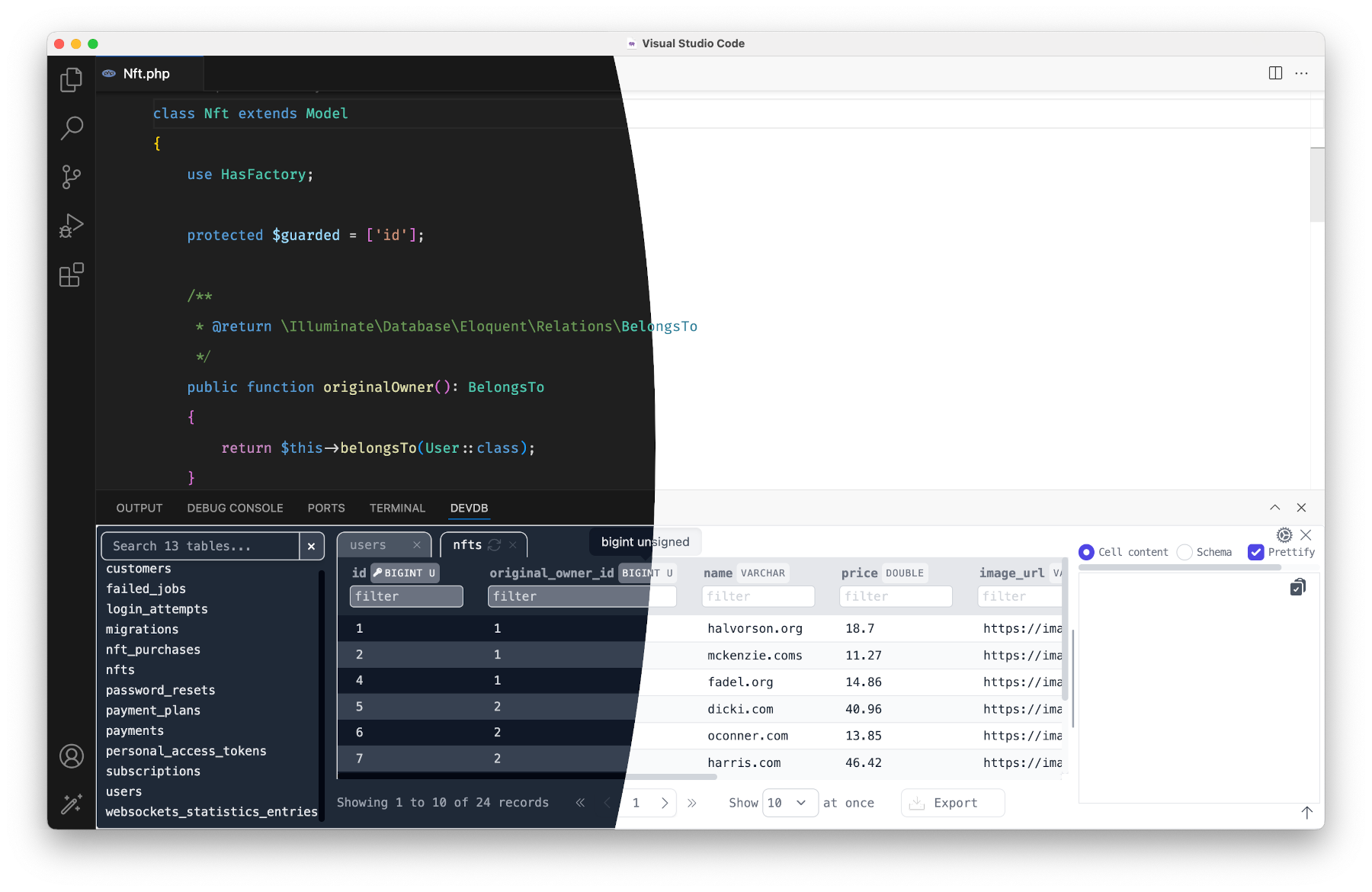




Features
- Zero-config detection. DevDb reads Laravel, Rails, Django, AdonisJS, DDEV, Supabase, Prisma, Drizzle, docker-compose, Wrangler and
DATABASE_URLsetups. More - Browse and edit. Filter rows, edit values, set
null, delete rows. Undo, redo and save withCmd+Z,Cmd+YandCmd+S. More - Editor features. Go to a table (
Cmd+K Cmd+G), open the table at the cursor, generate Laravel factories from real data, explain MySQL queries, export as JSON or SQL. More - MCP server. Claude Code, Cursor, Windsurf and other MCP clients can read your schema and run queries. Localhost only, with a token, read-only by default. More
- Remote connections (Pro). Direct with TLS, SSH tunnels with host key checks, and MongoDB. More
Supported datastores
| Datastore | Free | Pro |
|---|---|---|
| SQLite, MySQL, MariaDB, PostgreSQL, SQL Server | Yes | Yes |
| MongoDB that zero-config detection finds | Yes | Yes |
| Cloudflare D1 local | Yes | Yes |
| Remote MySQL, MariaDB, PostgreSQL (direct or SSH), remote MongoDB, Supabase Cloud | - | Yes |
| Redis / Valkey, ClickHouse, DuckDB, Neon | - | Yes |
| pgvector search, Cloudflare D1 remote, Turso / libSQL, DynamoDB | - | Yes |
DevDb Pro is a one-time payment for a lifetime license. See devdbpro.com and Pro and Licensing.
Quick start
- Install DevDb from the VS Code Marketplace or Open VSX.
- Open your project. Trust the workspace when VS Code asks.
- Press
Cmd+K Cmd+D(macOS) orCtrl+K Ctrl+D(Windows, Linux) to open the DevDb panel. - Click your database under Local Databases.
If DevDb does not find your database, add a .devdbrc file. Type devdb in it to get snippets. Add .devdbrc to .gitignore, because it can contain passwords.
Requirements: VS Code 1.90 or later. DevDb runs on macOS, Windows, Linux and Alpine (x64 and arm64) and Linux armhf. See Getting Started.
Documentation
| Topic | Link |
|---|---|
| Install and set up | Getting Started |
| Frameworks and tools that DevDb detects | Zero-Config Detection |
.devdbrc reference |
Config File |
| SSH tunnels, TLS, MongoDB, Supabase Cloud | Remote Connections |
| MCP setup and security | MCP Server |
| All settings | Settings |
| Errors and logs | Troubleshooting |
| Report a security problem | Security |
| Release notes | Changelog |
Sponsors
- DevWorkspace Pro: build and manage web apps on your computer, with DDEV, terminal, SSH, GitHub and AI sessions in one desktop app.
- Traycer AI: AI help in your VS Code workflow.
To support DevDb, sponsor the project, buy DevDb Pro, or see other projects.
FAQ
Common questions
Discussion
Questions & comments · 0
Sign In Sign in to leave a comment.