
Draw diagrams and visuals from voice on infinite canvas
This tldraw demo lets you drag a canvas region, speak your request, and have an AI agent draw the described diagram or illustration inside it.
1.0.0Add to Favorites
Why it matters
Transform spoken descriptions into complete visual diagrams, flowcharts, and illustrations on an infinite canvas by capturing regions, transcribing speech, and having an AI agent draw the requested content inside bounded areas.
Outcomes
What it gets done
Capture canvas regions by dragging rectangles and recording voice descriptions
Transcribe spoken requests using Mistral Voxtral speech-to-text
Queue multiple capture sessions and process them serially one at a time
Generate complete drawings inside bounded regions matching the spoken description
Source
Get it from source
Spark does not host a copy of it.
Open sourceReports
Agent outcome reports
No reports yet
Overview
Tldraw Agent Draw Demo
This demo adds a voice-driven capture workflow to tldraw's Agent starter kit: drag a region on the canvas, speak your request, and an AI agent transcribes it (via Mistral Voxtral) and draws the matching diagram, illustration, chart, or text inside that region. Use it to prototype voice-driven, spatially-anchored diagram generation on a canvas, or as a reference for extending tldraw's Agent starter kit; it needs Mistral and OpenRouter API keys, plus a tldraw license key for public deployment.
What it does
This demo extends tldraw's official Agent starter kit with a speech-driven "capture a region and describe it" workflow: drag a rectangle on an infinite canvas, speak what you want ("a flowchart for user login", "what is a neuron"), and an AI agent draws a complete result inside that region. Dragging several rectangles in a row queues them up - a new capture auto-stops the previous recording, and each is drawn in turn through a serialized queue, since the agent processes one request at a time. Each region's status pill tracks its progress: Recording, then Queued, then Transcribing, then Drawing.
The agent doesn't just dump the transcript as text - it assesses each request and picks the visual form that fits: a named drawing, a single illustration, a diagram, a chart, or literal text. Under the hood, selecting the Agent draw tool (keyboard shortcut a) and dragging starts a capture session and mic recording; clicking Stop (or starting a new capture) sends the audio to a /transcribe worker route that forwards it to Mistral Voxtral for speech-to-text, and the resulting text is sent through the standard agent.prompt() loop along with the captured area's bounds, so the drawing finishes inside the region in a single turn.
When to use - and when NOT to
Use this demo when you want to prototype or build a voice-driven, spatially-anchored way to generate diagrams, illustrations, or charts on an infinite canvas - explaining a concept out loud and having it appear exactly where you gestured, rather than typing a prompt into a chat panel. It's a good starting point for anyone building on tldraw's Agent starter kit who wants a concrete example of adding a new capture-and-transcribe input modality alongside the existing text-prompt flow.
It requires a Mistral API key for transcription and an OpenRouter (or other LLM provider) API key for the agent model, plus, for any public production deployment, a tldraw SDK license key - the tldraw SDK itself is free for development but proprietary-licensed for production use, separate from this repo's own MIT license. It's a demo/reference app, not a polished production product: it processes captures strictly one at a time via a serialized queue rather than in parallel.
Inputs and outputs
Input is a dragged rectangle region plus a spoken voice request captured through the browser's microphone. Setup requires copying the example environment file and filling in API keys:
cp .dev.vars.example .dev.vars
npm install
npm run dev
Required keys out of the box are MISTRAL_API_KEY (speech-to-text via Mistral) and OPENROUTER_API_KEY (the default agent model, google/gemini-2.5-flash, hosted via OpenRouter); optional keys (ANTHROPIC_API_KEY, GOOGLE_API_KEY, OPENAI_API_KEY) apply only if the model picker is switched to a native provider. The chosen model is persisted to localStorage per agent, overriding the code default (DEFAULT_MODEL_NAME in shared/models.ts) on reload.
Output is a set of tldraw shapes drawn directly inside the captured rectangle, matching the visual form the agent judged appropriate for the spoken request. Deployment builds and ships as a Cloudflare Worker (npm run build && npx wrangler deploy), with production secrets set via npx wrangler secret put rather than committed, and a VITE_TLDRAW_LICENSE_KEY env var supplying the required tldraw license for any public deployment.
Integrations
The app is built directly on tldraw's official Agent starter kit (MIT licensed) and the tldraw SDK itself (free for development, proprietary-licensed for production - a separate license key from tldraw.dev/pricing is required for public deployment). Speech transcription integrates with Mistral's Voxtral model via a Cloudflare Worker route; the agent's language model defaults to Google's Gemini 2.5 Flash routed through OpenRouter, with Anthropic, Google, and OpenAI available as alternative native providers through the model picker. The whole app deploys as a single Cloudflare Worker serving both the built client and the /stream and /transcribe API routes.
Who it's for
Developers exploring or building on tldraw's Agent starter kit who want a working reference implementation of a voice-driven, region-anchored drawing input, and anyone prototyping tools where a spoken description should turn into a diagram, illustration, or chart placed exactly where the user gestured on a canvas.
Source README
tldraw Agent Draw demo
Draw a rectangle on an infinite canvas, speak what you want, and an AI agent draws it
inside that region. Drag several rectangles in a row and they queue up, each drawn in turn.
This is built on tldraw's official
Agent starter kit (MIT licensed), extended with a
speech-driven "capture a region and describe it" workflow.
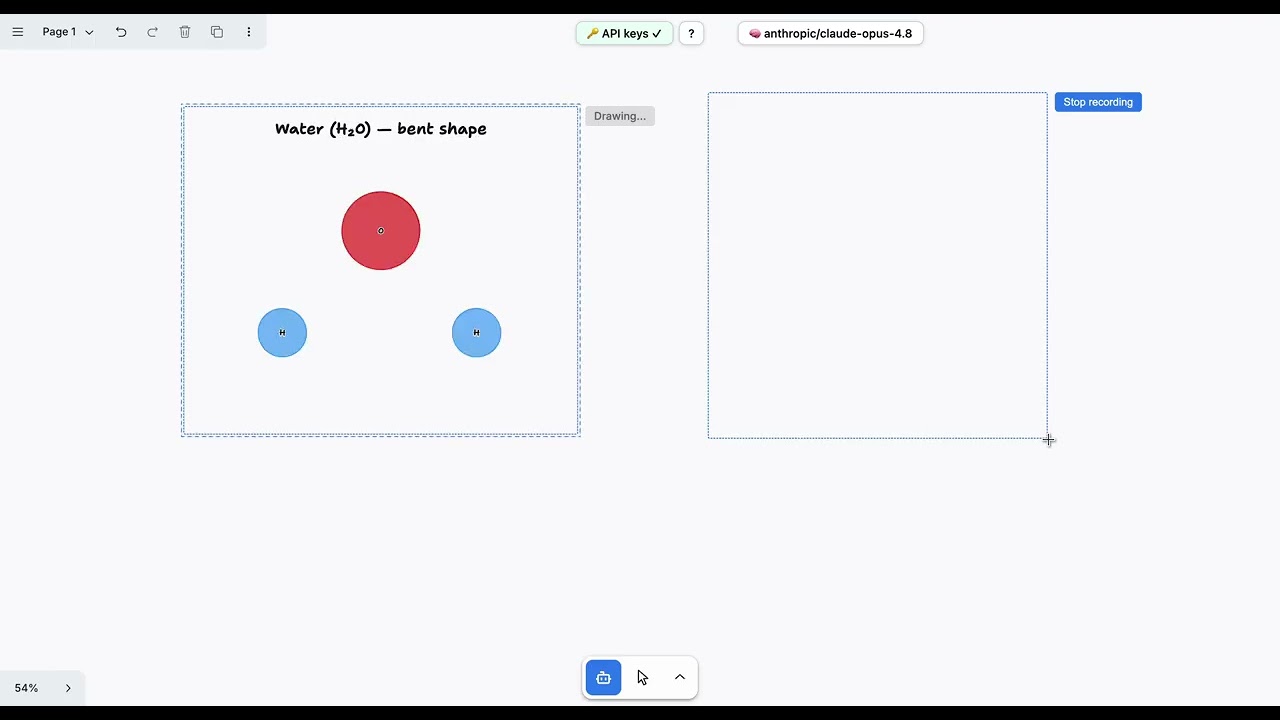
What it does
The tldraw Agent starter kit already gives you an agentic canvas: you type a prompt and an LLM
issues actions that create and arrange real tldraw shapes. This demo adds a different way in:
- Pick the Agent draw tool in the toolbar (keyboard
a). - Drag a rectangle to mark a region. Recording starts immediately; the region shows a dashed
outline and a Stop button. - Speak your request ("a flowchart for user login", "what is a neuron", "today I'll cover what
an LLM is, its pros and cons, and its uses"). - Click Stop (or just drag another rectangle, which auto-stops the previous recording and
queues it). Your speech is transcribed and the agent draws a complete result inside the
rectangle.
Because the agent runs one request at a time, multiple captures are processed through a serialized
queue: a newer capture waits until the earlier one's drawing is finished. Each region's pill shows
its status: Recording → Queued → Transcribing → Drawing.
The agent assesses each request and picks the visual form that fits, a named drawing, a single
illustration, a diagram, a chart, or literal text, rather than dumping the transcript as a wall of
text.
How it works
Agent draw tool (drag)  ──▶  capture session + mic recording
        │                          │
        ▼                          ▼  (Stop / next capture)
  dashed-outline overlay     FIFO queue, one at a time
                                   │
                                   ├─▶ POST /transcribe  ──▶  Mistral Voxtral  ──▶  text
                                   │
                                   └─▶ agent.prompt("CAPTURED AREA REQUEST…", area bounds)
                                              │
                                              ▼
                                   agent draws shapes inside the region
Key pieces (everything new lives alongside the unchanged starter-kit code):
| Path | Role |
|---|---|
client/tools/AreaCaptureTool.tsx |
The drag-to-capture tool (a tldraw StateNode). |
client/capture/captureSession.ts |
Capture state, the recorder, and the serialized transcribe-then-draw queue. |
client/capture/requestDrawInArea.ts |
Sends the captured-area request through the full agent.prompt loop so the drawing finishes in one turn. |
client/speech/AreaRecorder.ts |
Minimal one-clip mic recorder. |
client/components/AreaCaptureOverlay.tsx |
Dashed rectangle + status pill per capture. |
worker/routes/transcribe.ts |
Worker route that forwards audio to Mistral Voxtral. |
worker/prompt/sections/rules-section.ts |
The "Drawing inside a captured area" prompt rules. |
Environment setup
This app has two backends behind the Cloudflare Worker: an LLM provider for the agent and a
speech-to-text provider for transcription.
Copy the example env file and fill in keys:
cp .dev.vars.example .dev.vars
Required out of the box:
MISTRAL_API_KEY- speech-to-text (Mistral).OPENROUTER_API_KEY- the default agent model is an OpenRouter-hosted Gemini model
(OpenRouter).
Optional (only if you switch the model picker to a native provider):ANTHROPIC_API_KEY, GOOGLE_API_KEY, OPENAI_API_KEY.
Local development
npm install
npm run dev
Open the printed local URL (usually http://localhost:5173/), pick Agent draw, and drag a
rectangle.
Model selection
The model is chosen in the chat panel's dropdown and defaults to google/gemini-2.5-flash (via
OpenRouter), set by DEFAULT_MODEL_NAME in shared/models.ts. This model reliably finishes a
complete in-bounds drawing in a single prompt.
Note: your selection is persisted to localStorage per agent, so once you pick a model in a
browser, that saved choice is restored on reload and overrides the code default. Clear the app'slocalStorage if you change the default and want to see it.
Deployment
The app is a Cloudflare Worker (serving the built client and the /stream + /transcribe routes).
npm run build
npx wrangler deploy
Set the production secrets with npx wrangler secret put MISTRAL_API_KEY (and OPENROUTER_API_KEY,
etc.) rather than committing .dev.vars.
tldraw license for production. The tldraw SDK is free in development but requires a license key
for any public deployment (see Credits and license below). Get one from
tldraw.dev/pricing, a free 100-day trial, a free hobby license (shows
a "made with tldraw" watermark), or a commercial license. The app reads it fromVITE_TLDRAW_LICENSE_KEY (see .env.example) and passes it to the Tldraw component'slicenseKey prop in client/App.tsx. The key is inlined into the client bundle at build time
(expected for tldraw keys), so keep it in the gitignored .env, not in source.
FAQ
Common questions
Discussion
Questions & comments · 0
Sign In Sign in to leave a comment.