
Detect non-exact code duplication using embedding models
CLI tool using code embedding models to find differently-written duplicate logic that AI agents and other tools miss, across a whole codebase.
0.7.0Add to Favorites
Why it matters
Developers hire this tool to identify similar but non-identical code scattered across their codebase that traditional duplication detectors miss, enabling them to refactor duplicated logic that's hardest to spot manually and most harmful to maintain.
Outcomes
What it gets done
Index code units from Python, TypeScript, JavaScript, Java, Kotlin, C#, Go, or Rust projects
Calculate embeddings for each code unit and find pairs with close semantic similarity
Generate ranked clusters of similar code grouped by similarity and codebase distance
Filter reviewed duplicates using ignore files for incremental analysis across team workflows
Source
Get it from source
Spark does not host a copy of it.
Open sourceReports
Agent outcome reports
No reports yet
Overview
Slopo
Slopo is a CLI tool that uses code embedding models to detect the hardest-to-find kind of code duplication - similar logic implemented differently and spread far apart in a codebase - which AI coding agents typically miss because they only see the code they're currently working in. It produces a ranked cluster report from a Git diff or the whole codebase, with Claude Code and Codex skills for agent-driven review. Use it on medium-to-large or architecturally messy codebases to catch reimplemented logic before or after it's written; if you only need exact-copy or near-clone detection, the project itself recommends a faster, deterministic tool instead.
What it does
Slopo is a CLI tool that uses code embedding models to find the hardest-to-detect kind of code duplication: not copy-pasted blocks, but a similar implementation of the same problem written differently, spread far apart in a codebase - something hard for humans, AI agents, and traditional duplicate-detection tools alike to catch. It supports Python, TypeScript, JavaScript, Java, Kotlin, C#, Go, Rust, PHP, and Elixir, and can either review recent Git changes for similarity to existing code (useful for reviewing AI-generated code before committing) or analyze a whole codebase for refactoring candidates.
When to use - and when NOT to
Use it specifically to close a blind spot AI coding agents have: an agent only sees the part of a codebase it's currently working in (plus what it finds via references or similar names), and in larger or poorly-architected projects it can reimplement something that already exists elsewhere rather than reusing it. Slopo finds those distant, differently-written duplicates and hands an agent a ranked cluster report instead of making it search the whole codebase itself - which the project frames as both a cost reduction (embedding-model API calls are cheap compared to agent-model tokens) and a precision improvement (a focused cluster plus instruction keeps the agent's context narrow). It is deliberately narrow: it also catches exact copies and near-clones as a side effect, but if that's the only kind of duplication you care about, the project itself recommends a deterministic tool instead - faster, more mature, and without the ceremony of configuring an embedding model. It's aimed at developers experienced enough to judge whether a flagged cluster is a real problem; the author is explicit it "is not a magic vibe code fixer," since embedding similarity naturally surfaces plenty of code that looks alike but isn't actually a duplicate worth fixing.
Inputs and outputs
Input is your indexed source tree (slopo index then slopo embed to compute and store embeddings) plus, for a change review, the current Git diff against a configurable base (default HEAD, e.g. slopo review --base HEAD~1, including untracked-but-indexed files). Output from slopo analyze or slopo review is a Markdown report of clusters of similar code, each ranked by embedding similarity (cosine similarity, filtered by similarity_threshold) and boosted by how far apart the code sits in the codebase (up to a 15% boost for directory distance, 10% for same-file line distance, filtered by rerank_threshold) - meant as input for a human or an AI agent to judge, not a final verdict. Each cluster carries a stable hash that can be added to a committable slopo.ignore.txt to silence it in future runs.
Integrations
uv tool install slopo
slopo init
Installs via uv from PyPI in an isolated environment (no separate Python install needed). Embedding access needs a provider: the project's own benchmark recommends Jina AI's code-focused models (API or local via Ollama's jina-embeddings-v2-base-code, CPU-capable but slower) or Voyage AI's general-purpose model specifically (not their code-focused ones); any LiteLLM-supported provider or OpenAI-compatible server also works. For agent use, slopo agent-configs exports ready-made Claude Code and Codex skills (copied to .claude/skills or .agents/skills) that wrap three commands - slopo-review (judges whether flagged duplication in a diff is actionable), slopo-analyze-ignore (auto-filters obvious noise across the whole codebase), and slopo-analyze-one (walks through one cluster to decide ignore/note/refactor) - user-invoked only, since agents can't call them on their own.
Who it's for
Developers on medium-to-large, or architecturally messy, codebases who want to catch reimplemented-but-differently-written logic before it multiplies - especially teams reviewing AI-generated diffs for code an agent didn't realize already existed elsewhere.
Source README

Slopo
Embedding models are typically used for finding text written differently but having similar meaning. Some models are able to do the same with source code. Slopo is a CLI tool that uses this technology for finding hardest-to-detect code duplicates.
To learn what these AI models allow to detect, where they are weak, and which ones work best, see Embedding models benchmark for code duplication detection. It was written by the author of this tool, and the sample configuration in this documentation is the one that gives the best results based on this research.
What it can do
- Review recent changes to find similar code between the changed code and the rest of the codebase. For reviewing AI-generated code before committing.
- Analyze the whole codebase to find similar code. For refactoring and maintenance.
Supported languages
Python, TypeScript, JavaScript, Java, Kotlin, C#, Go, Rust, PHP, Elixir
Problems it solves
It augments AI coding agents' capabilities by allowing them to see duplicated code they are blind to.
Agents see only the part of the codebase they are currently working on, including related code found by references, similar names, etc. Usually, especially in smaller projects or with good architecture, they are able to spot existing implementations related to what they are working on.
Sometimes, especially in larger projects or with bad architecture, they miss a solution that already exists somewhere and implement it again. This is not copy-paste; this is a similar implementation for the same problem, which is hard to detect for humans, AI, and other tools. Slopo targets this blind spot by being able to see similar code across the whole codebase, no matter how big or poorly maintained it is.
Additional benefits
Not all code duplication is the hardest-to-detect one, and coding agents are able to spot much of that. Even then, Slopo may help.
AI cost reduction
- API access to embedding models costs practically nothing compared to models used in AI agents.
- When an agent receives the report with already found duplicates, it doesn't need to spend tokens on finding these itself.
If we move part of the workflow to a cheaper solution, the total cost and token usage should reduce.
Precision improvement
Coding agents perform best when they work on one focused, clearly defined task. The report containing a cluster with similar code provided by Slopo with a focused instruction is exactly that case. The agent loads into its context only relevant data, minimizing distractions and the chance of drifting in the wrong direction or missing something important.
Agents integration - demo
Slopo can be operated by AI coding agents, which are instructed on what exactly to do with results, not just to report them. They help with discarding nonactionable similarity quickly and provide a level of detail adequate to the situation.
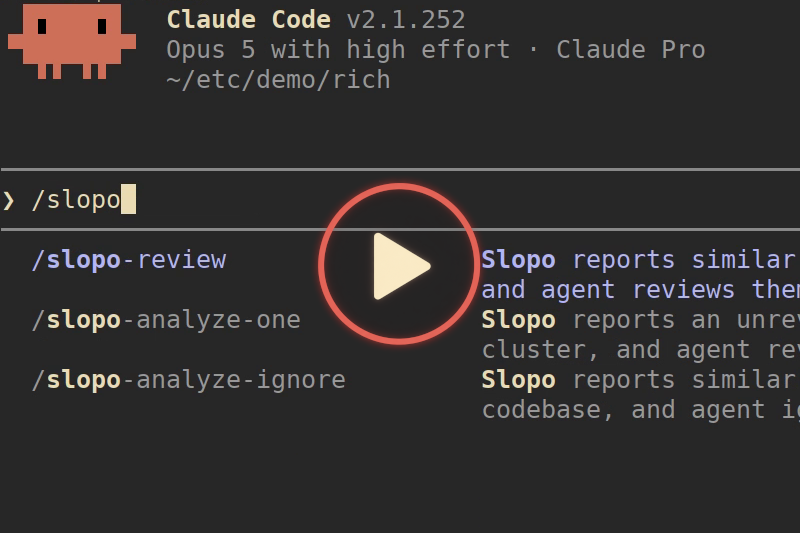
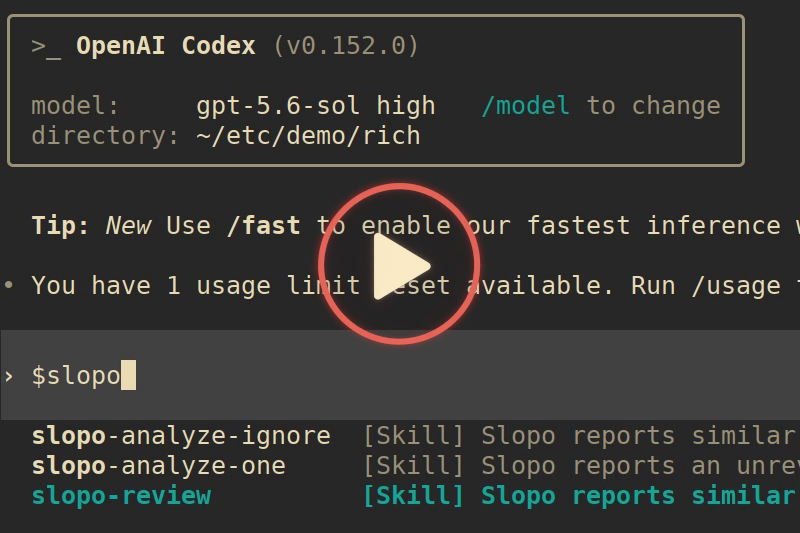
The following videos demonstrate a review of uncommitted changes, where a new implementation is similar to an already existing one.
| Claude Code | Codex |
|---|---|
 |
 |
How it works
An embedding is a vector that represents the meaning of a piece of text. Texts with similar meaning have embeddings close to each other. When two code snippets have embeddings that are close, the tool treats them as similar, and therefore as potential duplicates, even if they are written in different ways.
In addition to detecting non-exact code duplication, Slopo focuses on code sitting far apart in the codebase, often spread across different modules or separated within a large file. The further apart the code is, the higher its priority.
The result is clusters of similar code, ranked by similarity and by distance in the codebase. These are meant as input for your AI coding agent, which can check whether a cluster is a real duplicate.
Example report generated from Slopo code (src directory, git tag v0.2.0).
Accessing embedding model
According to the benchmark, two API providers are recommended:
- Jina AI - code-focused models available via API and for local use
- Voyage AI - only their general-purpose model, their code-focused models are not suitable here
Jina AI offers API keys with free tokens for non-commercial use, without registration. Paid options are available for commercial use. Simply open the main page, and the token will be generated. You should see "You have 10,000,000 tokens left in the API key below." However, free tokens are not always granted - this is probably because of abuse prevention mechanisms based on IP address or other measures (it's a guess, not official information).
Jina's API sometimes delays the initial request because servers may be offline and need to start. Subsequent requests are faster.
Local model
One tested solution is to use Ollama with jina-embeddings-v2-base-code. This is a small model that also runs on a CPU, but it may be (significantly) slower than the API, depending on the hardware you use. Pull the model from here.
Other models
Any model provider supported by LiteLLM can be configured. Additionally, any OpenAI-compatible server is supported.
Quick start
Once you figure out the model, the rest is quick.
Installation
uv tool install slopo
Update to the latest version (there are no automatic updates or notifications)
uv tool upgrade slopo
This command uses uv (installing uv), a Python package manager, to install Slopo from PyPI in an isolated virtual environment. No need to get Python separately.
Setup
Run slopo init to create a config file template containing further instructions. Only the directory with code for analysis and embedding model configuration is required.
Model configuration
Note: Don't use higher embedding dimensions than suggested. It won't give better results and will only reduce the tool's performance.
Jina AI
embedding_model: jina_ai/jina-code-embeddings-0.5b
embedding_dimensions: 256
embedding_params:
  task: code2code.query
If you are embedding a large project with the free API key and hitting rate limits, add the embedding_request_delay: 6 option to slow down.
Voyage AI
embedding_model: voyage/voyage-4-large
embedding_dimensions: 256
Local model
embedding_model: ollama/unclemusclez/jina-embeddings-v2-base-code
embedding_dimensions: 768
Running
Run slopo show-config to validate your config and show all configurable parameters, most are optional with sensible defaults.
Now you are ready to index code and calculate embeddings:
slopo index
slopo embed
To generate a report, run slopo analyze for the whole indexed codebase or slopo review for Git changes.
Running Slopo - summary
| Manual CLI | Coding agent | |
|---|---|---|
| Review Git changes | slopo index + embed + review |
slopo-review skill |
| Analyze whole codebase | slopo index + embed + analyze |
slopo-analyze-ignore and slopo-analyze-one skills |
| Output | Markdown report with clusters, scores, and code snippets for manual review | Compact report received by agent, results discussed with user |
Manual CLI
When code changes, run index and embed to synchronize data before getting a report.
Analyze the whole project
slopo analyze generates a report for code across the whole indexed codebase.
Each cluster has a hash, which can be added to slopo.ignore.txt to discard them in analysis.
Review recent changes
slopo review generates a report for code involving Git changes.
- The default
HEADbase can be configured with the--baseoption, for exampleslopo review --base HEAD~1 - Untracked files are included as long as they are indexed.
- It targets similar code across changed files and between changed and unchanged parts of the codebase.
- This feature requires
gitinstalled andsource_dirmust be a Git repository.
Integrating with coding agents
Integration is done with skills for Claude Code and Codex - src/slopo/agent/configs
Skill installation
Run slopo agent-configs to export configurations to a new directory containing skills for Claude Code and Codex.
Copy them to a skill directory in the desired location. They can be copied either to:
- Project-level configuration in project directory:
slopo-agent-configs/claude-code-skills -> .claude/skills
slopo-agent-configs/codex-skills -> .agents/skills
- Your home directory or other locations: follow the docs of the coding tool you use.
Slopo initialization
Agents run the Slopo CLI under the hood, so it should be configured, indexed, and embedded. Make sure it works first.
Agents use dedicated commands, and they don't read Markdown reports. Once initialized, you can run it only with agents; no need to index/embed each time.
Slopo configuration location
By default, the slopo command reads its config from the slopo.conf.yaml in the current directory. The typical setup assumes that it exists in the project root directory and also the coding agent is run from the root directory. Otherwise, you will get Error: Configuration file not found.
If you have custom file locations, you can add the slopo --config=... option to a command invoked by the skill.
Using with coding agents
Skills are configured to run only by the user, and the agent can't call them itself. For example, the slopo-review skill is run with /slopo-review on Claude Code and with $slopo-review on Codex.
Agents see only reports in compact form and errors without details. Everything else is logged to slopo.agent.log. This log contains the same messages and detailed errors, which are printed when commands are used manually.
Review of Git changes
Usage: slopo-review [base]
[base] is an optional Git base of changes to include in the report. By default HEAD (uncommitted changes).
Analyzes if duplication reported by Slopo is actionable or only noise. If it's worth looking at, it gives a short overview of what the duplication is about and the problem it creates. If the developer is interested, the agent performs deeper analysis, providing information allowing them to decide what to do next.
Filter out non-duplicates across the codebase
Usage: slopo-analyze-ignore
Shallow check of all reported similar code across the codebase. It filters out similar code, which is obviously noise rather than real duplication. Ignored code is added to the ignore file. All work is done without the developer's input.
Review one duplication across the codebase
Usage: slopo-analyze-one [cluster hash]
[cluster hash] is an optional hash you can find in a Markdown report generated with the analyze command. By default, it picks the first unreviewed similar code cluster with the highest score.
It analyzes one cluster and guides the developer to make a decision about what to do next: ignore, note for later, or refactor now.
Workflow: First, filter out noise with slopo-analyze-ignore, then review the rest with slopo-analyze-one.
Configuration
Run slopo --help and slopo show-config to explore it by yourself anytime.
Most configuration is done with a configuration file with two exceptions:
- The location of the configuration file can be overridden with the
--configoption. - The API key can be set with the
SLOPO_EMBEDDING_API_KEYenvironment variable, also picked up from a.envfile in the current directory.
Be aware that some parameters can't be changed after first indexing. You need to remove slopo.db and index/embed from the beginning: source_dir, embedding_model, embedding_dimensions, body_node_count_threshold.
All configurable parameters
source_dir: Source directory with code to index, absolute or relative path.source_dir_exclude: .gitignore-style patterns to exclude from indexing.db_file: SQLite database file with tool data.report_dir: Output directory for analysis report.ignore_file: Text file with ignored clusters.agent_log_file: Log file for commands run by coding agents.embedding_model: Embedding model name in LiteLLM format.embedding_dimensions: Embedding dimensions compatible with the used model. This value is also used to verify received embeddings dimensions.embedding_api_key: API key for embedding provider, alternatively configured with an environment variable. Optional, no need to set for local models.embedding_params: Additional properties passed to the LiteLLM and embedding API. Anything supported by the API provider is valid. Example:
embedding_params:
  api_base: http://example.com:123
  task: code2code.query
embedding_batch_sizeandembedding_batch_chars: Requests to the embedding API are batched for performance. Defaults are fine for most cases.embedding_request_delay: Delay in seconds after every batched request, by default no delay. Increase if you reach rate limits.similarity_threshold: Controls minimal cosine similarity between embeddings.rerank_threshold: Controls minimal similarity after applying a boost reflecting distance in the codebase.body_node_count_threshold: Number of AST nodes inside the body (excluding signature and annotations). This value reflects the minimum code complexity of the included code unit, more precise than text length. Increase if you notice unwanted, too-small code units in the report.
Portability
Hashes in a report generated by analyze are intended to be stable across platforms and the slopo.ignore.txt to be committed to Git and used by the whole team. Note that the hash changes when any code unit in the cluster changes or it's moved.
slopo.conf.yaml with source_dir relative to the project root can be committed and used across the team.
The order of code units in clusters can differ across platforms, but results should be the same, and the report is not intended to be committed. Embedding models don't return exactly the same floats every time, and this may cause edge cases when results differ a bit.
The tool's database slopo.db is local to each developer and not intended to be portable.
Is it the right tool?
This tool is dedicated to developers with at least minimal experience who are able to make technical decisions. This is not a magic vibe code fixer.
Slopo aims to solve one narrow problem. It focuses on detecting duplicated code that other tools miss: similar logic implemented in different ways. This has its own trade-offs:
- Working with embedding models adds complexity to usage.
- It may report much similar code, which is not a duplicate.
It naturally detects also exact copies and slightly changed clones, which can be detected by other tools. If this is only what you need, those tools are a better fit. They are deterministic, faster, more mature, and don't require the whole ceremony involving embedding models.
Not every project would benefit from Slopo equally. Larger or poorly maintained ones may benefit more, but it doesn't mean that others won't.
Details
Ranking thresholds
Similar code units are filtered in two passes, each with its own configurable threshold. The pipeline is as follows:
similarity_thresholdfilters out code unit pairs whose embeddings are not similar enough. The calculated value is cosine similarity ranging from-1to1where1means the same.- Similar pairs are grouped in clusters.
- Units in clusters are reranked after applying a boost. Boost is calculated based on the number of directory hops required to reach the other file in the pair (max. 15%). If they are in the same file, the boost is calculated based on distance in number of lines (max. 10%).
rerank_thresholdfilters out clusters whose highest-scoring pair is not high enough.
Exact-copy duplicates
The main goal of this tool is to detect non-exact code duplication, but exact copies (identical code at multiple paths) are reported too, just handled a little differently from merely similar code:
- The report shows the code once, listing every path where it appears, instead of repeating identical snippets.
- The
analyzecommand reports the "similarity ratio" (the share of code units flagged as similar) in two variants: including and excluding exact copies.
FAQ
Common questions
Discussion
Questions & comments · 0
Sign In Sign in to leave a comment.