
Build a Philosophy Quote Search and Generator
A CassIO/Astra DB CQL notebook building a philosophy quote search engine and generator with OpenAI vector embeddings.
Maintainer of this project? Claim this page to edit the listing.
1.0.0Add to Favorites
Why it matters
Leverage OpenAI embeddings and Cassandra/Astra DB to create a powerful search engine for philosophical quotes and a generator for new, inspired quotes.
Outcomes
What it gets done
Index philosophical quotes with vector embeddings in Cassandra/Astra DB.
Implement semantic search for quotes based on content similarity.
Optionally filter search results by author or tags.
Generate new philosophical quotes using LLMs based on search results.
Install
Add it to your toolbox
Run in your project directory:
curl -fsSL https://spark.entire.vc/get/oai-philosophicalquotescassio | bash Overview
Philosophy with Vector Embeddings, OpenAI and Cassandra / Astra DB through CQL
A CassIO/Astra DB CQL notebook building a philosophy quote search engine and generator, using OpenAI embeddings for semantic search and a retrieved-example-grounded generation step. Use as a reference for building semantic search-and-generation on Cassandra or Astra DB through CQL via the CassIO library specifically.
What it does
This notebook builds a philosophy quote finder and generator using OpenAI's vector embeddings with Apache Cassandra, or equivalently DataStax Astra DB accessed through CQL, as the vector store - using the CassIO library specifically (a companion README documents alternative technology choices for the same task, runnable as either a Colab or a regular Jupyter notebook). Indexing converts each quote into an embedding vector via OpenAI's Embedding, storing it in the vector store alongside metadata like the author's name and precomputed tags for later filtering. Search converts a query quote into an embedding on the fly and finds the closest stored vectors, optionally constrained by author or tag metadata - the underlying principle being that semantic similarity between quotes translates directly into vectors being metrically close together in the (1536-dimensional, unit-length-normalized) embedding space. Generation takes a topic or tentative quote suggestion, runs the same search step to retrieve similar existing quotes, then feeds those results into an LLM prompt that invents a new quote in the style of the retrieved examples and the original suggestion.
The search use case wraps the embed-then-query flow into a reusable function, testable with a bare quote, a quote restricted to a specific author, or one constrained to a saved tag. Because vector similarity search always returns the closest available results even when none are truly relevant, the notebook shows how to retrieve the actual similarity distance for each result and apply a cutoff threshold to discard results beyond it - noting that this distance is the cosine similarity between vectors (ranging -1 to +1) and that tuning a good threshold isn't a solved problem, just demonstrated here. An optional final section demonstrates partitioning the vector store by author: since each quote belongs to exactly one author (a "disjoint partitioning", unlike tags which can apply to multiple quotes), grouping quotes into per-author partitions lets queries scoped to a single author use fewer resources and return faster. This uses a different CassIO table abstraction where the author is stored as the partition id rather than as a metadata field, and the notebook also demonstrates inserting a given author's quotes concurrently via CassIO's asynchronous put_async method, collecting the resulting Future objects and calling result() on each to confirm completion.
When to use - and when NOT to
Use this as a reference for building a semantic search-and-generation system on Cassandra or Astra DB through CQL specifically via the CassIO library - retrieving content by meaning rather than keyword, then using retrieved examples to ground a generative step.
Connecting to Astra DB through CQL requires a Token with "Database Administrator" role (formatted like AstraCS:...) and a database ID (formatted like 3df2a5b6-...), both obtained from the Astra UI; connecting to a self-managed Cassandra cluster instead requires that cluster to support Vector Search, initialized with cassio.init(session=..., keyspace=...) rather than the Astra DB connection path.
Inputs and outputs
Input is a corpus of philosophy quotes (indexed with author and tag metadata) and, at query time, either a search quote (optionally filtered by author/tag) or a topic/tentative-quote suggestion for generation. Output is either a ranked list of semantically similar quotes with their similarity distance, or a newly generated quote grounded in retrieved examples and the original suggestion.
Integrations
Built on the CassIO library over Apache Cassandra or DataStax Astra DB (via CQL) as the vector store, and OpenAI's embedding and chat/completion models for indexing, search, and generation.
Who it's for
Developers learning how to build a semantic search-and-generation system on Cassandra/Astra DB via CQL, using vector embeddings for retrieval and an LLM for grounded generation.
Source README
Philosophy with Vector Embeddings, OpenAI and Cassandra / Astra DB through CQL
CassIO version
In this quickstart you will learn how to build a "philosophy quote finder & generator" using OpenAI's vector embeddings and Apache Cassandra®, or equivalently DataStax Astra DB through CQL, as the vector store for data persistence.
The basic workflow of this notebook is outlined below. You will evaluate and store the vector embeddings for a number of quotes by famous philosophers, use them to build a powerful search engine and, after that, even a generator of new quotes!
The notebook exemplifies some of the standard usage patterns of vector search -- while showing how easy is it to get started with the vector capabilities of Cassandra / Astra DB through CQL.
For a background on using vector search and text embeddings to build a question-answering system, please check out this excellent hands-on notebook: Question answering using embeddings.
Choose-your-framework
Please note that this notebook uses the CassIO library, but we cover other choices of technology to accomplish the same task. Check out this folder's README for other options. This notebook can run either as a Colab notebook or as a regular Jupyter notebook.
Table of contents:
- Setup
- Get DB connection
- Connect to OpenAI
- Load quotes into the Vector Store
- Use case 1: quote search engine
- Use case 2: quote generator
- (Optional) exploit partitioning in the Vector Store
How it works
Indexing
Each quote is made into an embedding vector with OpenAI's Embedding. These are saved in the Vector Store for later use in searching. Some metadata, including the author's name and a few other pre-computed tags, are stored alongside, to allow for search customization.

Search
To find a quote similar to the provided search quote, the latter is made into an embedding vector on the fly, and this vector is used to query the store for similar vectors ... i.e. similar quotes that were previously indexed. The search can optionally be constrained by additional metadata ("find me quotes by Spinoza similar to this one ...").

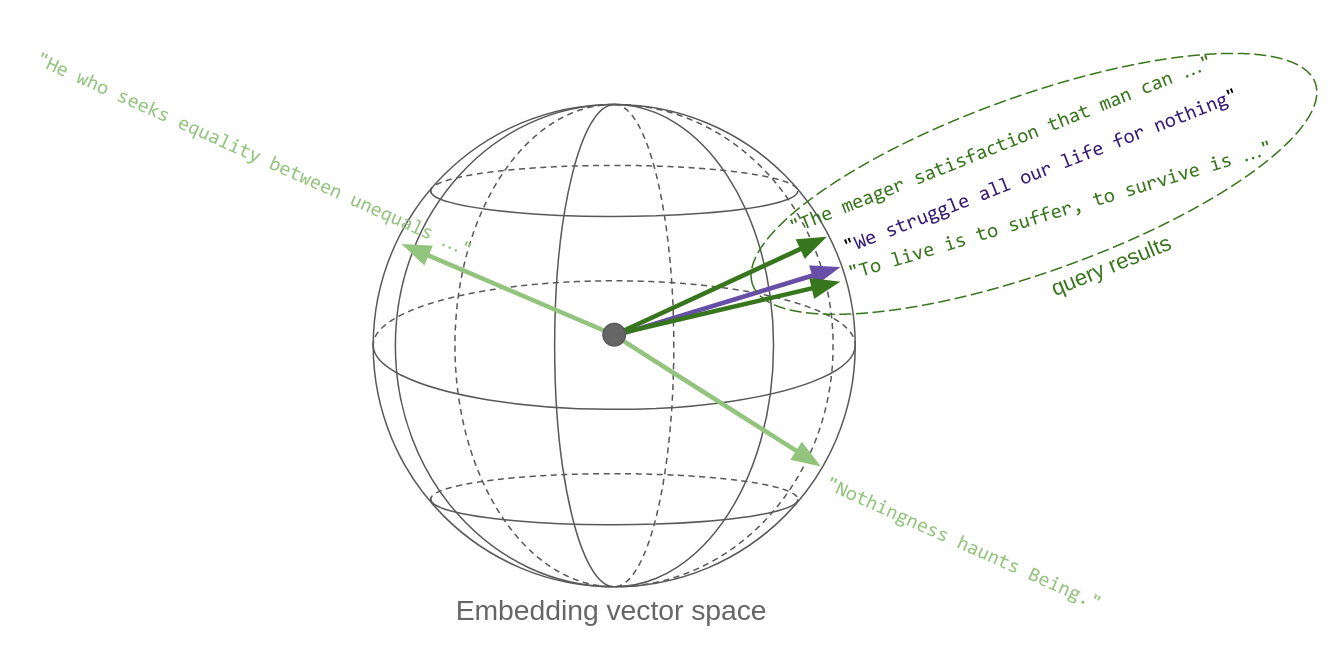
The key point here is that "quotes similar in content" translates, in vector space, to vectors that are metrically close to each other: thus, vector similarity search effectively implements semantic similarity. This is the key reason vector embeddings are so powerful.
The sketch below tries to convey this idea. Each quote, once it's made into a vector, is a point in space. Well, in this case it's on a sphere, since OpenAI's embedding vectors, as most others, are normalized to unit length. Oh, and the sphere is actually not three-dimensional, rather 1536-dimensional!
So, in essence, a similarity search in vector space returns the vectors that are closest to the query vector:
Generation
Given a suggestion (a topic or a tentative quote), the search step is performed, and the first returned results (quotes) are fed into an LLM prompt which asks the generative model to invent a new text along the lines of the passed examples and the initial suggestion.

Setup
First install some required packages:
Get DB connection
In order to connect to your Astra DB through CQL, you need two things:
A Token, with role "Database Administrator" (it looks like
AstraCS:...)the database ID (it looks like
3df2a5b6-...)Make sure you have both strings -- which are obtained in the Astra UI once you sign in. For more information, see here: database ID and Token.
If you want to connect to a Cassandra cluster (which however must support Vector Search), replace with cassio.init(session=..., keyspace=...) with suitable Session and keyspace name for your cluster.
Creation of the DB connection
This is how you create a connection to Astra DB through CQL:
(Incidentally, you could also use any Cassandra cluster (as long as it provides Vector capabilities), just by changing the parameters to the following Cluster instantiation.)
Creation of the Vector Store through CassIO
You need a table which support vectors and is equipped with metadata. Call it "philosophers_cassio":
Connect to OpenAI
Set up your secret key
A test call for embeddings
Quickly check how one can get the embedding vectors for a list of input texts:
Note: the above is the syntax for OpenAI v1.0+. If using previous versions, the code to get the embeddings will look different.
Load quotes into the Vector Store
Note: the above is the syntax for OpenAI v1.0+. If using previous versions, the code to get the embeddings will look different.
A quick inspection:
Check the dataset size:
Insert quotes into vector store
You will compute the embeddings for the quotes and save them into the Vector Store, along with the text itself and the metadata planned for later use. Note that the author is added as a metadata field along with the "tags" already found with the quote itself.
To optimize speed and reduce the calls, you'll perform batched calls to the embedding OpenAI service.
(Note: for faster execution, Cassandra and CassIO would let you do concurrent inserts, which we don't do here for a more straightforward demo code.)
Use case 1: quote search engine
For the quote-search functionality, you need first to make the input quote into a vector, and then use it to query the store (besides handling the optional metadata into the search call, that is).
Encapsulate the search-engine functionality into a function for ease of re-use:
Putting search to test
Passing just a quote:
Search restricted to an author:
Search constrained to a tag (out of those saved earlier with the quotes):
Cutting out irrelevant results
The vector similarity search generally returns the vectors that are closest to the query, even if that means results that might be somewhat irrelevant if there's nothing better.
To keep this issue under control, you can get the actual "distance" between the query and each result, and then set a cutoff on it, effectively discarding results that are beyond that threshold.
Tuning this threshold correctly is not an easy problem: here, we'll just show you the way.
To get a feeling on how this works, try the following query and play with the choice of quote and threshold to compare the results:
Note (for the mathematically inclined): this "distance" is exactly the cosine similarity between the vectors, i.e. the scalar product divided by the product of the norms of the two vectors. As such, it is a number ranging from -1 to +1, where -1 is for exactly opposite-facing vectors and +1 for identically-oriented vectors. Elsewhere (e.g. in the "CQL" counterpart of this demo) you would get a rescaling of this quantity to fit the [0, 1] interval, which means the resulting numerical values and adequate thresholds there are transformed accordingly.
Use case 2: quote generator
For this task you need another component from OpenAI, namely an LLM to generate the quote for us (based on input obtained by querying the Vector Store).
You also need a template for the prompt that will be filled for the generate-quote LLM completion task.
Like for search, this functionality is best wrapped into a handy function (which internally uses search):
Note: similar to the case of the embedding computation, the code for the Chat Completion API would be slightly different for OpenAI prior to v1.0.
Putting quote generation to test
Just passing a text (a "quote", but one can actually just suggest a topic since its vector embedding will still end up at the right place in the vector space):
Use inspiration from just a single philosopher:
(Optional) Partitioning
There's an interesting topic to examine before completing this quickstart. While, generally, tags and quotes can be in any relationship (e.g. a quote having multiple tags), authors are effectively an exact grouping (they define a "disjoint partitioning" on the set of quotes): each quote has exactly one author (for us, at least).
Now, suppose you know in advance your application will usually (or always) run queries on a single author. Then you can take full advantage of the underlying database structure: if you group quotes in partitions (one per author), vector queries on just an author will use less resources and return much faster.
We'll not dive into the details here, which have to do with the Cassandra storage internals: the important message is that if your queries are run within a group, consider partitioning accordingly to boost performance.
You'll now see this choice in action.
First, you need a different table abstraction from CassIO:
Now repeat the compute-embeddings-and-insert step on the new table.
Compared to what you have seen earlier, there is a crucial difference in that now the quote's author is stored as the partition id for the inserted row, instead of being added to the catch-all "metadata" dictionary.
While you are at it, by way of demonstration, you will insert all quotes by a given author concurrently: with CassIO, this is done by usng the asynchronous put_async method for each quote, collecting the resulting list of Future objects, and calling the result() method on them all afterwards, to ensure they all have executed. Cassandra / Astra DB well supports a high degree of concurrency in I/O operations.
(Note: one could have cached the embeddings computed previously to save a few API tokens -- here, however, we wanted to keep the code easier to inspect.)
With this new table, the similarity search changes accordingly (note the arguments to ann_search):
That's it: the new table still supports the "generic" similarity searches all right ...
... but it's when an author is specified that you would notice a huge performance advantage:
Well, you would notice a performance gain, if you had a realistic-size dataset. In this demo, with a few tens of entries, there's no noticeable difference -- but you get the idea.
Conclusion
Congratulations! You have learned how to use OpenAI for vector embeddings and Cassandra / Astra DB through CQL for storage in order to build a sophisticated philosophical search engine and quote generator.
This example used CassIO to interface with the Vector Store - but this is not the only choice. Check the README for other options and integration with popular frameworks.
To find out more on how Astra DB's Vector Search capabilities can be a key ingredient in your ML/GenAI applications, visit Astra DB's web page on the topic.
Cleanup
If you want to remove all resources used for this demo, run this cell (warning: this will delete the tables and the data inserted in them!):
FAQ
Common questions
Discussion
Questions & comments · 0
Sign In Sign in to leave a comment.