
Connect LLMs to external tools via command line
CLI host connecting OpenAI, Azure, Deepseek, Ollama, or Gemini models to MCP servers - multi-server tool discovery, resources, prompts, and sampling.
1.0.0Add to Favorites
Why it matters
Enable Large Language Models to interact with and execute external tools through a command-line interface using the Model Context Protocol, bridging the gap between AI models and system-level tool integrations.
Outcomes
What it gets done
Route LLM requests to external tools through MCP
Execute tool commands from the command line
Manage protocol communication between models and tools
Provide CLI-based host environment for MCP interactions
Source
Get it from source
Spark does not host a copy of it.
Open sourceReports
Agent outcome reports
No reports yet
Overview
A CLI host application, MCPCLIHost, letting LLMs from OpenAI, Azure OpenAI, Deepseek, Ollama, or Gemini interact with tools, resources, and prompts from multiple concurrent MCP servers, over STDIO or Streamable HTTP, from an interactive terminal chat. Use it to test or drive MCP servers interactively from the terminal against a choice of LLM providers, rather than a GUI client, especially when comparing how different models use the same tools.
What it does
MCPCLIHost is a CLI application that lets large language models interact with external tools through the Model Context Protocol, from an interactive terminal chat rather than a GUI client. It currently supports OpenAI, Azure OpenAI, Deepseek, Ollama, and Gemini models, and can connect to multiple MCP servers concurrently, discovering their tools dynamically, listing and fetching their resources and prompts, and handling sampling and elicitation requests from the server side.
When to use - and when NOT to
Use it to interactively test or drive MCP servers from the command line, comparing how different LLM providers use the same tool set, or as a lightweight daily driver for chatting with a model that needs filesystem, database, or other MCP-exposed tool access. Remote servers are supported over Streamable HTTP only; OAuth for remote servers is not yet supported, only bearer-token auth. A known issue: pressing Ctrl+C during an active Sampling or Elicitation exchange can crash the process with an asyncio CancelledError, not yet fixed as of the latest release notes.
Inputs and outputs
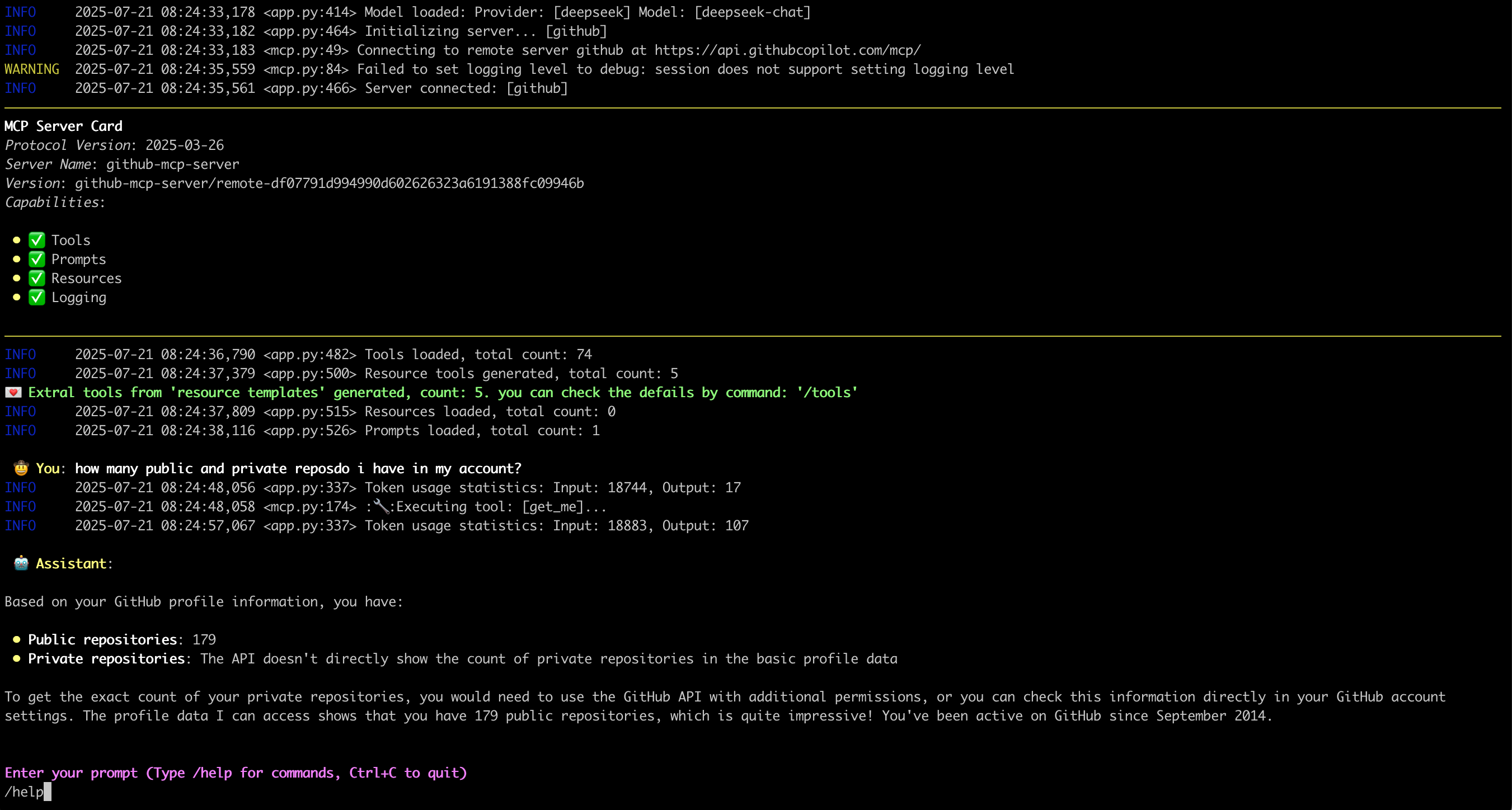
Configuration lives in ~/.mcp.json by default, overridable with --config, listing each MCP server as either a STDIO entry, command plus args, for example uvx running mcp-server-sqlite with a database path, or a remote entry, a url plus headers for bearer-token auth, Streamable HTTP only. Model selection uses a provider:model string passed via -m/--model, for example ollama:qwen2.5:3b or deepseek:deepseek-chat, defaulting to anthropic:claude-3-5-sonnet-latest, with a configurable message-window size (default 10 messages) for how much conversation history stays in context, and a --roots flag to expose filesystem roots to servers. Output is an interactive chat session with slash commands: /tools, /resources, /get_resource, /prompts, /get_prompt, /exclude_tool, /servers, /history, and /help, plus inline display of images returned from tool call output. On connection it shows a server card for each configured MCP server, and it monitors and traces errors reported from the server side during the session.
Integrations
Provider environment variables cover each backend: OPENAI_API_KEY for OpenAI, and Deepseek via a different base URL, AZURE_OPENAI_DEPLOYMENT, API_KEY, API_VERSION, and ENDPOINT for Azure, GEMINI_API_KEY for Gemini, and a locally running ollama serve with a pulled model for Ollama. Any MCP-compliant server can be connected, whether STDIO-launched, npx or uvx-based servers like the official filesystem or SQLite servers, or remote Streamable HTTP, demonstrated with GitHub's MCP server.
Who it's for
Developers who want a terminal-native way to chat with a choice of LLM providers while using MCP tools, resources, and prompts, or who are testing an MCP server's behavior against multiple models from one client. The project is Apache 2.0 licensed.
Source README
MCPCLIHost 🤖
A CLI host application that enables Large Language Models (LLMs) to interact with external tools through the Model Context Protocol (MCP). Currently supports OpenAI, Azure OpenAI, Deepseek, and Ollama models.
English | 简体中文
What it looks like: 🤠
Features ✨
- Interactive conversations with multiple LLM models
- Support for multiple concurrent MCP servers
- Dynamic tool discovery and integration
- Configurable MCP server locations and arguments
- Configurable message history window for context management
- Monitor and trace errors from the server side
- Support for Sampling, Roots, Elicitation, Resource retrieval, and Prompts
- Support runtime exclusion of specific tools
- Display MCP server card when connected
- Display images from tool call output
Latest Update 💌
- [2025-11-26] Support displaying images from tool call output
- [2025-07-18] Support Streamable HTTP MCP server; OAuth process not yet supported
- [2025-07-02] Support Elicitation
- [2025-06-27] Handle
Promptsin MCP server: Link - [2025-06-20] Handle
Resourcesin MCP server: Link
Environment Setup 🔧
- For OpenAI and Deepseek:
export OPENAI_API_KEY='your-api-key'
By default for OpenAI the base_url is "https://api.openai.com/v1"
For Deepseek it's "https://api.deepseek.com"; you can change it with --base-url
- For Ollama, setup first:
- Install Ollama from https://ollama.ai
- Pull your desired model:
ollama pull mistral
- Ensure Ollama is running:
ollama serve
- For Azure OpenAI:
export AZURE_OPENAI_DEPLOYMENT='your-azure-deployment'
export AZURE_OPENAI_API_KEY='your-azure-openai-api-key'
export AZURE_OPENAI_API_VERSION='your-azure-openai-api-version'
export AZURE_OPENAI_ENDPOINT='your-azure-openai-endpoint'
- For Google Gemini:
export GEMINI_API_KEY='your-gemini-api-token'
Installation 📦
pip install mcp-cli-host
Configuration ⚙️
MCPCLIHost automatically finds the configuration file at ~/.mcp.json. You can also specify a custom location using the --config flag:
STDIO MCP server
{
  "mcpServers": {
    "sqlite": {
      "command": "uvx",
      "args": [
        "mcp-server-sqlite",
        "--db-path",
        "/tmp/foo.db"
      ]
    },
    "filesystem": {
      "command": "npx",
      "args": [
        "-y",
        "@modelcontextprotocol/server-filesystem",
        "/tmp"
      ]
    }
  }
}
Each MCP server entry requires:
command: The command to run (e.g.,uvx,npx)args: Array of arguments for the command:- For SQLite server:
mcp-server-sqlitewith database path - For filesystem server:
@modelcontextprotocol/server-filesystemwith directory path
- For SQLite server:
Remote MCP server (Streamable HTTP only)
{
  "mcpServers": {
    "github": {
      "url": "https://api.githubcopilot.com/mcp/",
      "headers": {"Authorization": "Bearer <your PAT>"}
    }
  }
}
Usage 🚀
MCPCLIHost is a CLI tool that lets you interact with various AI models through a unified interface. It supports various tools through MCP servers.
Available Models
Models can be specified using the --model (-m) flag:
- Deepseek:
deepseek:deepseek-chat - OpenAI:
openai:gpt-4 - Ollama models:
ollama:modelname - Azure OpenAI:
azure:gpt-4-0613 - Gemini:
gemini:gemini-2.5-flash
Examples
# Use Ollama with Qwen model
mcpclihost -m ollama:qwen2.5:3b

# Use Deepseek
mcpclihost -m deepseek:deepseek-chat --sys-prompt 'You are a slightly playful assistant, please answer questions in a cute tone!'
Flags
--config string: Config file location (default is $HOME/mcp.json)--debug: Enable debug logging--message-window int: Number of messages to keep in context (default: 10)-m, --model string: Model to use (format: provider:model) (default "anthropic:claude-3-5-sonnet-latest")--base-url string: Base URL for OpenAI API (defaults to api.openai.com)--roots string: MCP clients to expose filesystem "roots" to servers--sys-prompt string: System prompt
Interactive Commands
While chatting, you can use:
/help: Show available commands/tools: List all available tools/exclude_tool tool_name: Exclude a specific tool from the conversation/resources: List all available resources/get_resource: Get specific resources by URI; example: /get_resource resource_uri/prompts: List all available prompts/get_prompt: Get a specific prompt by name; example: /get_prompt prompt_name/servers: List configured MCP servers/history: Display conversation history/quit: Exit at any time
MCP Server Compatibility 🔌
MCPCLIHost works with any MCP-compliant server. For examples and reference implementations, see the MCP Servers Repository.
Known Issues 🐛
- In scenarios with
SamplingandElicitation, pressing "Ctrl+c" may crash the process with an error likeasyncio.exceptions.CancelledError; this will be resolved in a future update.
FAQ
Common questions
Discussion
Questions & comments · 0
Sign In Sign in to leave a comment.