
Access ZenML ML Pipeline Data
MCP server for ZenML: read and manage ML pipelines, stacks, snapshots and deployments through generic, schema-discoverable tools.
2.0.0Add to Favorites
Why it matters
Connect to your ZenML server to gain read-only access to your ML and AI pipeline management data. Interact with users, stacks, pipelines, runs, services, and artifacts.
Outcomes
What it gets done
Retrieve information on users, stacks, pipelines, and runs
Access details about pipeline steps, services, and stack components
View artifact metadata and manage service connectors
Trigger new pipeline runs using available run templates
Source
Get it from source
Spark does not host a copy of it.
Open sourceReports
Agent outcome reports
No reports yet
Capabilities
Tools your agent gets
Retrieve information about users from the ZenML server.
Retrieve information about available stacks in ZenML.
Retrieve information about pipelines from the ZenML server.
Retrieve information about pipeline runs from the ZenML server.
Retrieve information about pipeline steps from the ZenML server.
Retrieve information about services from the ZenML server.
Retrieve information about stack components from the ZenML server.
Retrieve information about available flavors from the ZenML server.
Overview
MCP Server for ZenML exposes ZenML's ML pipelines, stacks, snapshots, deployments and model registry through generic, schema-discoverable MCP tools, with an independent read-only/read-write policy and legacy entity-specific tool names for migrating clients. Use it when an MCP client needs to read live ZenML pipeline, stack, snapshot, deployment or model-registry state, or trigger a pipeline run by snapshot.
What it does
MCP Server for ZenML implements a Model Context Protocol server for the ZenML API, ZenML being an open-source platform for building and managing ML and AI pipelines with a unified interface over data, models and experiments. It exposes live read access to core entities (users, stacks, stack components, flavors, service connectors), pipeline execution (pipelines, runs, steps with code and logs, schedules, artifact metadata), deployment and serving (snapshots - frozen pipeline configurations describing what to run or serve - deployments with status/URL/logs, and serving services), organization and discovery (projects, tags, builds), and the model registry (models and model versions). It can also trigger new pipeline runs via snapshots (preferred) or the deprecated template-based parameter.
Registration and write access are independent: the compact profile advertises 16 tools under a read_write policy or 11 under read_only, and the legacy profile advertises 57 or 52 respectively. Setting ZENML_MCP_WRITE_POLICY=read_only removes all generic mutation tools and trigger_pipeline from discovery and dispatch entirely, and resource-discovery schemas omit create/update/delete/action operations too; an invalid policy value fails closed to read-only, and an invalid profile value stops startup with a configuration error. Mutation results are reported as completed, accepted or unknown - the server never retries a mutation after it may have already reached ZenML, so an accepted or unknown result should be followed by the response's own reconciliation instructions (typically a named read) before deciding whether to call again; webhook creation and secret rotation return a new signing secret exactly once, with later reads omitting it.
Snapshots have replaced run templates as ZenML's preferred runnable-pipeline artifact, though 0.96.4 still supports run-template CRUD for migration; the legacy list_run_templates()/get_run_template(name)/trigger_pipeline(template_id=...) calls map to zenml_list_resources(resource_type="snapshot", ...), zenml_get_resource(resource_type="snapshot", ...) and trigger_pipeline(snapshot_name_or_id=...) respectively. A typical snapshot-first workflow: discover the active project, list runnable named snapshots, trigger a run by snapshot name, then list running deployments and read bounded deployment logs (default 100 lines, max 1000, capped at 100KB, requiring the matching deployer integration installed).
The first 2.0 release covers ordinary operations for projects, stacks and components, flavors, services, pipelines and runs, snapshots and templates, deployments, artifacts and versions, models and versions, tags, connectors, code repositories, webhooks, triggers, wait conditions and hook invocations; users, schedules, service connector types, secrets and resource requests are read-only.
The server also collects anonymous usage analytics: which tools are used and how often, error types (the type only, never messages or stack traces), basic environment info (OS, Python version, whether it runs in Docker or CI) and session duration. It does not collect the ZenML server URL or API key, pipeline or model names or other business data, or any personally identifiable information. Analytics are switched off with ZENML_MCP_ANALYTICS_ENABLED=false (or ZENML_MCP_DISABLE_ANALYTICS=true), and ZENML_MCP_ANALYTICS_DEV=true logs events to stderr instead of sending them. Docker users can set ZENML_MCP_ANALYTICS_ID (a valid UUID) to keep one anonymous ID across container restarts; without it, and when the container cannot persist the ID file, the server derives an anonymous UUID from a hash of ZENML_STORE_URL, and the URL itself is never sent.
When to use - and when NOT to
Use it when an MCP client needs to read live ZenML pipeline, stack, snapshot, deployment or model-registry state, or trigger pipeline runs by snapshot. It excludes ZenML Cloud control-plane administration, Resource Manager administration, user and credential administration, secret-value CRUD, connector login/verification, raw webhook events, and aggregate lineage/debugging tools; set ZENML_MCP_WRITE_POLICY=read_only when only inspection is needed.
Capabilities
The default compact tool profile advertises 16 tools: seven generic ones cover the resource catalog broadly - zenml_describe_resources discovers supported resource types and bounded operation schemas, zenml_list_resources lists with validated filters and pagination, zenml_get_resource/zenml_create_resource/zenml_update_resource/zenml_delete_resource handle CRUD by exact resource UUID, and zenml_action_resource runs an allowlisted lifecycle or relation action without retries - and nine focused tools remain for diagnostics, active context, streamed logs/code, pipeline triggering, and two experimental MCP Apps (diagnose_zenml_setup, get_active_user/get_active_project, trigger_pipeline, get_step_logs/get_step_code/get_deployment_logs, open_pipeline_run_dashboard/open_run_activity_chart). MCP Apps are interactive HTML UIs an MCP server serves directly into a client, rendered in a sandboxed iframe with bidirectional tool calls; this server ships two as proof-of-concept - a Pipeline Runs Dashboard (an interactive table of recent runs with status, steps and logs) and a Run Activity Chart (a 30-day bar chart of run activity by status). They require Streamable HTTP transport rather than stdio, and are currently supported by VS Code Insiders and Goose, with ChatGPT support launching soon and Claude Desktop/Claude.ai not yet rendering them as of late January 2026. Running them over Docker requires keeping the container port loopback-only behind an authenticated reverse proxy, since Host/Origin validation alone guards against DNS rebinding but does not authenticate callers. Setting ZENML_MCP_PROFILE=legacy restores the older entity-specific tool names (57 tools) for clients not yet migrated to the generic resource tools, without adding support for older ZenML server versions; both profiles omit credential-bearing configuration and other sensitive fields from every response.
How to install
The recommended path is the ZenML dashboard's MCP Settings page (Settings -> MCP), which generates pre-configured, credential-included snippets and one-click install links for VS Code, Claude Desktop, Cursor, Claude Code, OpenAI Codex and more, plus Docker or uv options. ZenML OSS users first create a service-account token under Settings -> Service Accounts and paste it into that page; ZenML Pro users generate a Personal Access Token with one click. A manual setup path is also documented for direct configuration.
Source README
MCP Server for ZenML
This project implements a Model Context Protocol (MCP) server for interacting with the ZenML API.

What is MCP?
The Model Context Protocol (MCP) is an open protocol that standardizes how applications provide context to Large Language Models (LLMs). It acts like a "USB-C port for AI applications" - providing a standardized way to connect AI models to different data sources and tools.
MCP follows a client-server architecture where:
- MCP Hosts: Programs like Claude Desktop or IDEs that want to access data through MCP
- MCP Clients: Protocol clients that maintain 1:1 connections with servers
- MCP Servers: Lightweight programs that expose specific capabilities through the standardized protocol
- Local Data Sources: Your computer's files, databases, and services that MCP servers can securely access
- Remote Services: External systems available over the internet that MCP servers can connect to
What is ZenML?
ZenML is an open-source platform for building and managing ML and AI pipelines. It provides a unified interface for managing data, models, and experiments.
For more information, see the ZenML website and our documentation.
Features
The server provides MCP tools to access core read functionality from the ZenML server, providing a way to get live information about:
Core Entities
- Users - user accounts and permissions
- Stacks - infrastructure configurations
- Stack Components - individual stack building blocks
- Flavors - available component types
- Service Connectors - cloud authentication
Pipeline Execution
- Pipelines - pipeline definitions
- Pipeline Runs - execution history and status
- Pipeline Steps - individual step details, code, and logs
- Schedules - automated run schedules
- Artifacts - metadata about data artifacts (not the data itself)
Deployment & Serving
- Snapshots - frozen pipeline configurations (the "what to run/serve" artifact)
- Deployments - runtime serving instances with status, URL, and logs
- Services - model serving endpoints
Organization & Discovery
- Projects - organizational containers for ZenML resources
- Tags - cross-cutting metadata labels for discovery
- Builds - pipeline build artifacts with image and code info
Models
- Models - ML model registry entries
- Model Versions - versioned model artifacts
Compatibility APIs (migration recommended)
- Pipeline run templates remain available in ZenML 0.97.0, while Snapshots are preferred for new workflows (see Migration Guide)
The server also allows you to trigger new pipeline runs using snapshots (preferred) or the deprecated template-based trigger parameter.
Note: We're continuously improving this integration based on user feedback. Please join our Slack community to share your experience and help us make it even better!
Tool profiles and write policy
The default compact profile advertises 16 tools. Seven generic tools cover the
resource catalog, reads, ordinary mutations, and finite lifecycle actions:
| Tool | Purpose |
|---|---|
zenml_describe_resources |
Discover supported resource types and bounded operation schemas |
zenml_list_resources |
List one resource type with validated filters and pagination |
zenml_get_resource |
Get one resource, with parent and project scope where required |
zenml_create_resource |
Create a supported resource from a typed payload |
zenml_update_resource |
Update one exact resource UUID |
zenml_delete_resource |
Delete or archive one exact resource UUID |
zenml_action_resource |
Run an allowlisted lifecycle or relation action without retries |
Nine focused tools remain because they provide diagnostics, active context, streamed logs or code, pipeline execution, or an interactive App:
diagnose_zenml_setupget_active_userandget_active_projecttrigger_pipelineget_step_logs,get_step_code, andget_deployment_logsopen_pipeline_run_dashboardandopen_run_activity_chart
get_step_logs returns at most 50,000 entries, oldest first, with a
possibly_truncated flag, plus a note saying which entries are missing and
why. Pass tail to get only the newest entries. On ZenML 0.97+ servers it
pages through the log store; on 0.96 it uses the older single-request endpoint.
Use ZENML_MCP_PROFILE=legacy when an existing client still depends on the old
entity-specific names such as list_pipeline_runs. This retains the
characterized tool-name and schema compatibility layer for ZenML 0.97.0. It
does not add support for older ZenML server versions. Use it only while
migrating: legacy response shapes may expose more operational metadata than the
compact tools, although the server omits credential-bearing configuration and
other sensitive fields from both profiles.
Registration and write access are independent:
| Profile | Policy | Advertised tools |
|---|---|---|
compact |
read_write |
16 |
compact |
read_only |
11 |
legacy |
read_write |
57 |
legacy |
read_only |
52 |
Set ZENML_MCP_WRITE_POLICY=read_only to remove all four generic mutation tools
and trigger_pipeline from MCP discovery and dispatch. Resource discovery also
omits create, update, delete, and action schemas. The older
ZENML_MCP_READ_ONLY=true setting remains accepted; invalid policy values fail
closed to read-only mode. An invalid ZENML_MCP_PROFILE stops startup with a
configuration error.
Version 2.0.0 requires MCP Python SDK 2.2.0 and ZenML 0.96.4. The compact
profile is the new default and is a breaking discovery change for clients that
call entity-specific tool names. Set ZENML_MCP_PROFILE=legacy while migrating
those clients, then move each call to the generic resource tools.
Mutation results distinguish completed, accepted, and unknown outcomes.
The server does not retry a mutation after it may have reached ZenML. For an
accepted or unknown result, follow the reconciliation instructions in the
response before deciding whether to call again. Use the named read when one is
available. Webhook creation and secret rotation can return a new signing secret
once; later reads omit it. Delete schemas state
whether an operation archives metadata, removes metadata, deprovisions a live
resource, or can delete stored artifact data.
The first 2.0 release covers ordinary operations for projects, stacks and
components, flavors, services, pipelines and runs, snapshots and templates,
deployments, artifacts and versions, models and versions, tags, connectors,
code repositories, webhooks, triggers, wait conditions, and hook invocations.
Users, schedules, service connector types, secrets, and resource requests have
the read-only coverage shown by zenml_describe_resources. It excludes ZenML
Cloud control-plane administration, Resource Manager administration, user and
credential administration, secret-value CRUD, connector login and verification,
raw webhook events, and aggregate debugging or lineage tools.
Start a generic workflow by discovering the precise schema, then calling it:
zenml_describe_resources(resource_type="pipeline_run", operation="list")
zenml_list_resources(
    resource_type="pipeline_run",
    filters={"status": "completed", "sort_by": "desc:created"},
    page=1,
    size=10,
)
Prompts and resources remain available in both profiles. The analysis prompts,
the bounded resource-schema endpoints, and most_recent_runs are MCP prompts or
resources rather than tools.
Run-template compatibility
ZenML 0.97.0 retains run-template CRUD APIs. Snapshots are preferred for new
workflows. Pipeline convenience creation and the template-based trigger
parameter are deprecated. In the legacy profile, get_run_template and
list_run_templates remain available for existing clients.
The legacy tag input remains in list_run_templates for schema compatibility,
but ZenML 0.97.0 has no equivalent server-side filter. A non-null value is
rejected before the SDK call. Snapshot tag filtering remains available.
Migration: Run Templates → Snapshots
Why the change? Snapshots replaced run templates as ZenML's preferred runnable pipeline artifact. The 0.97.0 SDK still supports run-template CRUD, while new code should use snapshots.
Quick Migration Guide
| Legacy Pattern (Templates) | Compact Pattern (Snapshots) |
|---|---|
list_run_templates() |
zenml_list_resources(resource_type="snapshot", filters={"runnable": true, "named_only": true}) |
get_run_template(name) |
zenml_get_resource(resource_type="snapshot", resource_id=id) |
trigger_pipeline(template_id=...) |
trigger_pipeline(snapshot_name_or_id=...) |
Example Workflow (Snapshot-First)
1. Discover project context:
   → get_active_project()

2. Find runnable snapshots:
   → zenml_list_resources(resource_type="snapshot", filters={"runnable": true, "named_only": true})

3. Trigger a run:
   → trigger_pipeline(snapshot_name_or_id="my-snapshot")

4. Check deployments:
   → zenml_list_resources(resource_type="deployment", filters={"status": "running"})
   → get_deployment_logs(name_id_or_prefix="my-deployment", tail=100)
Note: get_deployment_logs returns bounded output (default 100 lines, max 1000, capped at 100KB) and requires the appropriate deployer integration to be installed.
Quick Setup via Dashboard (Recommended)
The easiest way to set up the ZenML MCP Server is through your ZenML dashboard's MCP Settings page.
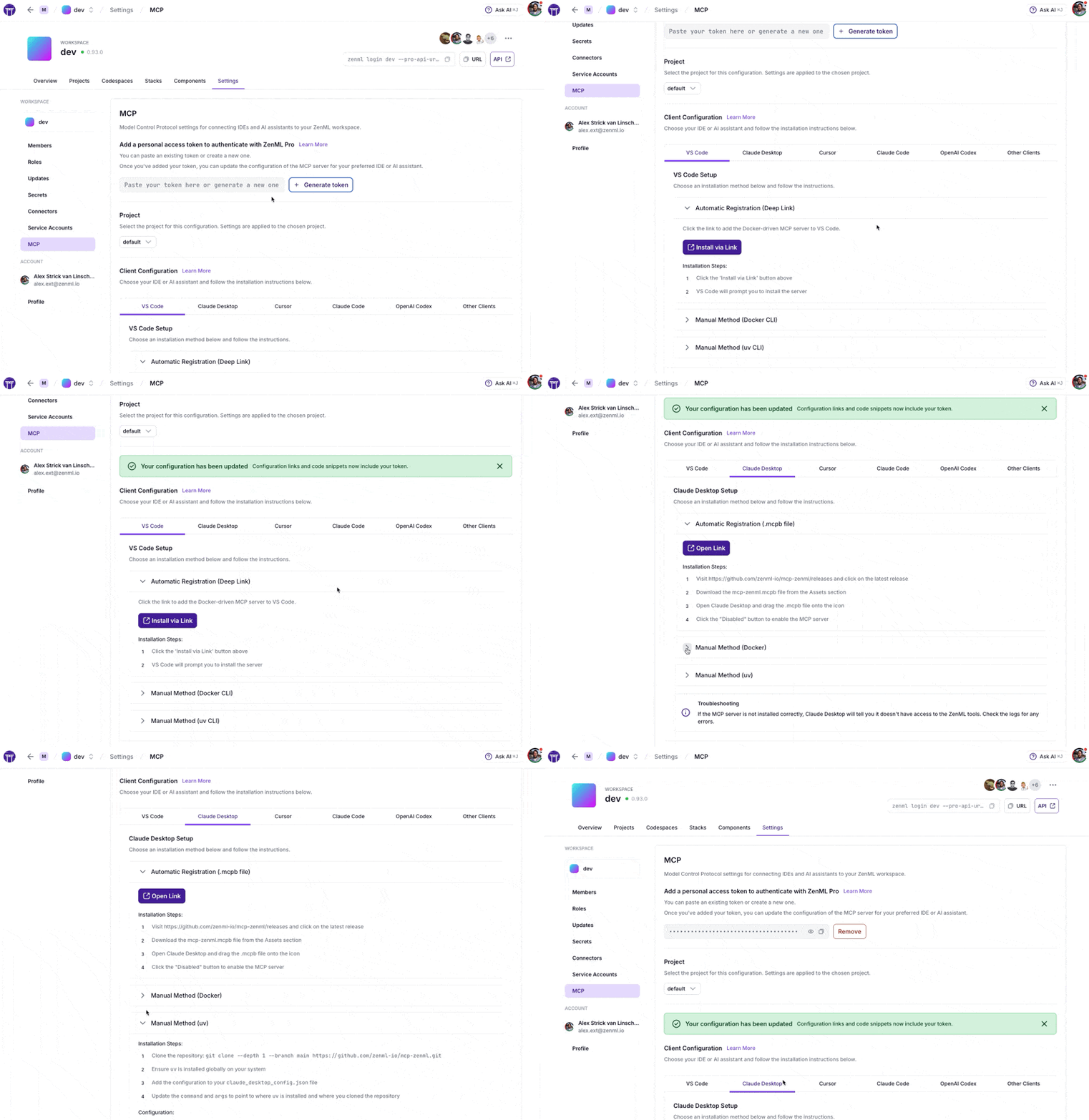
Navigate to Settings → MCP in your ZenML dashboard to get:
- Pre-configured snippets for your specific server URL and credentials
- One-click installation via deep links for supported IDEs
- Copy-paste configurations for VS Code, Claude Desktop, Cursor, Claude Code, OpenAI Codex, and more
- Docker and uv options based on your preference
ZenML Pro Users
The MCP Settings page lets you generate a Personal Access Token (PAT) with a single click. The token is automatically included in all generated configuration snippets.
ZenML OSS Users
- First create a service account token via Settings → Service Accounts
- Paste the token into the MCP Settings page
- Copy the generated configuration for your IDE
Prefer manual setup? See the detailed instructions below.
MCP Apps (Experimental)
What are MCP Apps? MCP Apps are interactive HTML UIs that MCP servers can serve directly into AI clients. They render in sandboxed iframes and can call server tools bidirectionally. See the official announcement for full details.
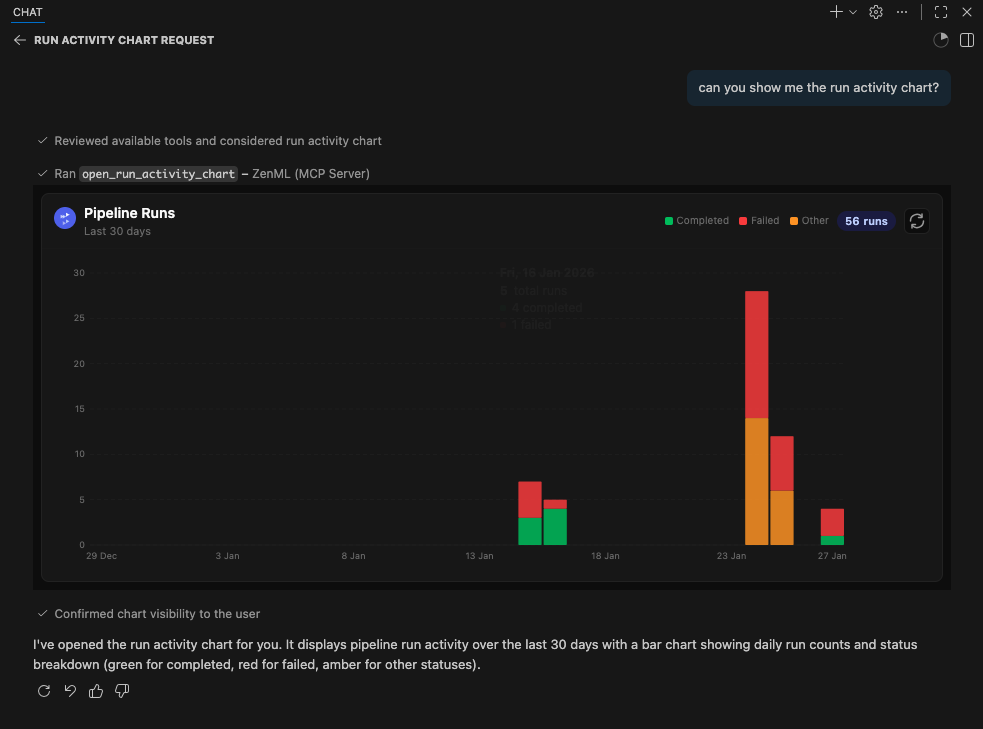
This server includes two experimental MCP Apps:
| App | Tool | Description |
|---|---|---|
| Pipeline Runs Dashboard | open_pipeline_run_dashboard |
Interactive table of recent pipeline runs with status, step details, and logs |
| Run Activity Chart | open_run_activity_chart |
Bar chart of pipeline run activity over the last 30 days with status breakdown |
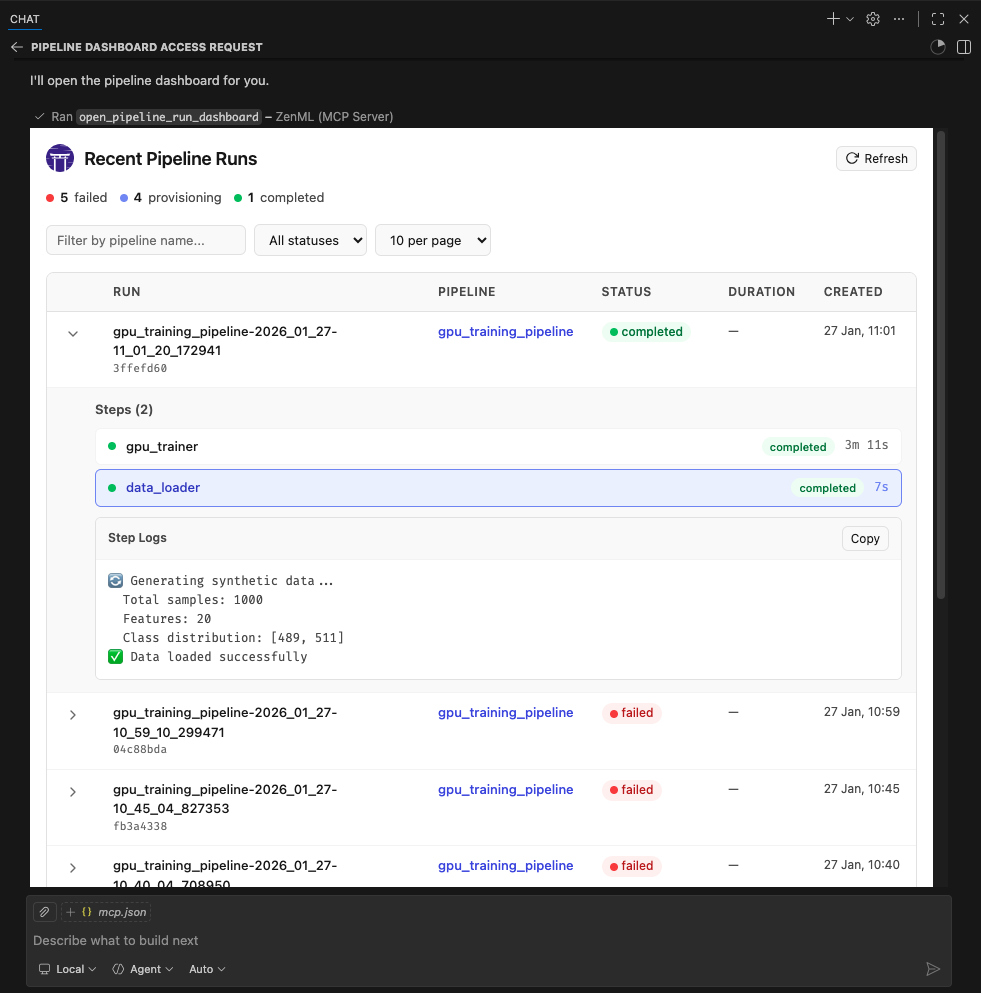
These apps are included as proof-of-concept examples. We welcome feedback and contributions for more MCP Apps. It is still early days for this new feature so we'll have to see how it evolves. We expect to support it more fully in the future.
Supported Clients
MCP Apps require Streamable HTTP transport (not stdio). The following clients currently support MCP Apps:
- ✅ VS Code (Insiders Edition)
- ✅ Goose
- ✅ ChatGPT (launching soon)
- ⚠️ Claude Desktop -- as of late January 2026, doesn't yet render Apps.
- ⚠️ Claude.ai (web) - as of late January 2026, doesn't yet render Apps.
Note: We were unable to test thoroughly with Claude Desktop or Claude.ai at the time of writing. If you encounter issues, please report them.
Running MCP Apps with Docker
MCP Apps use Streamable HTTP. Keep the container port bound to loopback and put an authenticated reverse proxy or identity-aware access service in front of it before allowing remote access. Host and Origin validation protect against DNS rebinding; they do not authenticate callers.
1. Build and run the Docker container:
docker build -t mcp-zenml:apps .

docker run --rm -d --name mcp-zenml-apps -p 127.0.0.1:8001:8001 \
  -e ZENML_STORE_URL="https://your-zenml-server.example.com" \
  -e ZENML_STORE_API_KEY="your-api-key" \
  -e ZENML_MCP_PROFILE="compact" \
  -e ZENML_MCP_WRITE_POLICY="read_write" \
  -e ZENML_ACTIVE_PROJECT_ID="your-project-id" \
  mcp-zenml:apps --transport streamable-http --host 0.0.0.0 --port 8001 \
  --disable-dns-rebinding-protection
2. Configure authenticated remote access:
Create a named Cloudflare Tunnel, Tailscale Funnel with access controls, or an
equivalent authenticated reverse proxy. Point its private origin at
http://127.0.0.1:8001, require an identity or service credential for the
public hostname, and pass only authenticated requests to the origin. Configure
your MCP client to use the provider's supported OAuth flow or authorization
headers.
Before adding ZenML credentials to the container, verify that an unauthenticated request cannot reach MCP:
curl -i https://mcp.example.com/mcp
The response must be the access provider's 401, 403, or login redirect. A
JSON-RPC or MCP response means the perimeter is open and must be fixed first.
3. Connect your authenticated client:
{
	"servers": {
		"ZenML": {
			"url": "https://mcp.example.com/mcp",
			"type": "http"
		}
	},
	"inputs": []
}
- Ask the AI to "open the pipeline runs dashboard" or "show the run activity chart"
Important notes:
ZENML_ACTIVE_PROJECT_IDis required - without it, pipeline run tools will fail with "No project is currently set as active"--disable-dns-rebinding-protectionis only appropriate when the authenticated proxy validates the public host and the container port remains loopback-only- Restrict the ZenML API key to the permissions the MCP client needs; use
ZENML_MCP_WRITE_POLICY=read_onlyfor inspection-only clients
Testing & Quality Assurance
This project includes automated testing to ensure the MCP server remains functional:
- 🔄 Automated Smoke Tests: A comprehensive smoke test runs every 3 days via GitHub Actions
- 🚨 Issue Creation: Failed tests automatically create GitHub issues with detailed debugging information
- ⚡ Fast CI: Uses UV with caching for quick dependency installation and testing
- 🧪 Manual Testing: You can run the smoke test locally using
uv run scripts/test_mcp_server.py server/zenml_server.py
The automated tests verify:
- MCP protocol connection and handshake
- Server initialization and tool discovery
- Basic tool functionality (when ZenML server is accessible)
- Resource and prompt enumeration
diagnose_zenml_setupreturns structured diagnostics even in constrained environments
Credential-free CI covers every adapter through the MCP protocol. PR and release CI also start a fresh ZenML 0.97.0 OSS server on a loopback address and run persisted CRUD and same-name project-isolation receipts. The server uses a temporary configuration and database that are removed when the job exits; no repository environment, self-hosted runner, or ZenML credential is required.
ZenML's local OSS server disables authentication and its SQL store does not
support pipeline replay or external deployment infrastructure. Restricted
access and feature-enabled trigger, replay, deployment, wait-condition, and
resource-request receipts therefore remain separate opt-in gates. They require
ZENML_MCP_RESTRICTED_INTEGRATION=1 with
ZENML_MCP_RESTRICTED_API_KEY, or ZENML_MCP_ACTION_INTEGRATION=1 with the
exact disposable fixture UUIDs in ZENML_MCP_ACTION_FIXTURE, respectively. A
gated skip is not evidence that those capabilities passed. An operator can set
ZENML_MCP_REQUIRE_COMPLETE_INTEGRATION=1 to turn a missing opt-in gate into a
failure. Cloud infrastructure provisioning is never part of the default test
run.
Debugging with MCP Inspector
For interactive debugging, use the MCP Inspector - a web-based tool that lets you test MCP tools in real-time:
# Using .env.local (recommended for development)
cp .env.local.example .env.local  # Then edit with your credentials
source .env.local && npx @modelcontextprotocol/inspector \
  -e ZENML_STORE_URL=$ZENML_STORE_URL \
  -e ZENML_STORE_API_KEY=$ZENML_STORE_API_KEY \
  -- uv run server/zenml_server.py
This opens a web UI with your credentials pre-filled - just click Connect and use the Tools tab to test any tool interactively.
See CLAUDE.md for more detailed debugging instructions.
Manual Setup
Prerequisites
You will need to have access to a deployed ZenML server. If you don't have one, you can sign up for a free trial at ZenML Pro and we'll manage the deployment for you.
Tip: Once you have a ZenML server, check out the MCP Settings page in your dashboard for the easiest setup experience.
Compatibility: The current version is tested against ZenML 0.97.0. If you are running an older ZenML version, please use an earlier release of this MCP server.
You will also (probably) need to have uv installed locally. For more information, see
the uv documentation.
We recommend installation via their installer script or via brew if using a
Mac. (Technically you don't need it, but it makes installation and setup easy.)
You will also need to clone this repository somewhere locally:
git clone https://github.com/zenml-io/mcp-zenml.git
Your MCP config file
The MCP config file is a JSON file that tells the MCP client how to connect to your MCP server. Different MCP clients will use or specify this differently. Two commonly-used MCP clients are Claude Desktop and Cursor, for which we provide installation instructions below.
You will need to specify your ZenML MCP server in the following format:
{
    "mcpServers": {
        "zenml": {
            "command": "/usr/local/bin/uv",
            "args": ["run", "path/to/server/zenml_server.py"],
            "env": {
                "LOGLEVEL": "WARNING",
                "NO_COLOR": "1",
                "ZENML_LOGGING_COLORS_DISABLED": "true",
                "ZENML_LOGGING_VERBOSITY": "WARN",
                "ZENML_ENABLE_RICH_TRACEBACK": "false",
                "ZENML_MCP_PROFILE": "compact",
                "ZENML_MCP_WRITE_POLICY": "read_write",
                "PYTHONUNBUFFERED": "1",
                "PYTHONIOENCODING": "UTF-8",
                "ZENML_STORE_URL": "https://your-zenml-server-goes-here.com",
                "ZENML_STORE_API_KEY": "your-api-key-here"
            }
        }
    }
}
There are four dummy values that you will need to replace:
- the path to your locally installed
uv(the path listed above is where it would be on a Mac if you installed it viabrew) - the path to the
zenml_server.pyfile (this is the file that will be run when you connect to the MCP server). This file is located inside this repository at the root. You will need to specify the exact full path to this file. - the ZenML server URL (this is the URL of your ZenML server. You can find this
in the ZenML Cloud UI). It will look something like
https://d534d987a-zenml.cloudinfra.zenml.io. - the ZenML server API key (this is the API key for your ZenML server. You can find this in the ZenML Cloud UI or read these docs on how to create one. For the purposes of the ZenML MCP server we recommend using a service account.)
You are free to change the way you run the MCP server Python file, but using
uv will probably be the easiest option since it handles the environment and
dependency installation for you.
Installation for use with Claude Desktop
Quick alternative: Use the MCP Settings page in your ZenML dashboard (Settings → MCP) to get pre-configured installation instructions and deep links for Claude Desktop.
You will need to have the latest version of Claude Desktop installed.
You can simply open the Settings menu and drag the mcp-zenml.mcpb file from the
root of this repository onto the menu and it will guide you through the
installation and setup process. You'll need to add your ZenML server URL and API key.
Note: MCP bundles (.mcpb) replace the older Desktop Extensions (.dxt) format; existing .dxt files still work in Claude Desktop.
Optional: Improving ZenML Tool Output Display
For a better experience with ZenML tool results, you can configure Claude to display the JSON responses in a more readable format. In Claude Desktop, go to Settings → Profile, and in the "What personal preferences should Claude consider in responses?" section, add something like the following (or use these exact words!):
When using zenml tools which return JSON strings and you're asked a question, you might want to consider using markdown tables to summarize the results or make them easier to view!
This will encourage Claude to format ZenML tool outputs as markdown tables, making the information much easier to read and understand.
Installation for use with Cursor
Quick alternative: The MCP Settings page in your ZenML dashboard (Settings → MCP) can generate the exact
mcp.jsoncontent with your credentials pre-filled.
You will need to have Cursor installed.
Cursor works slightly differently to Claude Desktop in that you specify the config file on a per-repository basis. This means that if you want to use the ZenML MCP server in multiple repos, you will need to specify the config file in each of them.
To set it up for a single repository, you will need to:
- create a
.cursorfolder in the root of your repository - inside it, create a
mcp.jsonfile with the content above - go into your Cursor settings and click on the ZenML server to 'enable' it.
In our experience, sometimes it shows a red error indicator even though it is working. You can try it out by chatting in the Cursor chat window. It will let you know if is able to access the ZenML tools or not.
Docker Image
You can run the server as a Docker container. The process communicates over stdio, so it will wait for an MCP client connection. Pass your ZenML credentials via environment variables.
Prebuilt Images (Docker Hub)
Pull the latest multi-arch image:
docker pull zenmldocker/mcp-zenml:latest
Versioned releases are tagged as X.Y.Z:
docker pull zenmldocker/mcp-zenml:2.0.0
Run with your ZenML credentials (stdio mode):
docker run -i --rm \
  -e ZENML_STORE_URL="https://your-zenml-server.example.com" \
  -e ZENML_STORE_API_KEY="your-api-key" \
  zenmldocker/mcp-zenml:latest
Canonical MCP config using Docker
{
  "mcpServers": {
    "zenml": {
      "command": "docker",
      "args": [
        "run", "-i", "--rm",
        "-e", "ZENML_STORE_URL=https://...",
        "-e", "ZENML_STORE_API_KEY=ZENKEY_...",
        "-e", "ZENML_ACTIVE_PROJECT_ID=...",
        "-e", "ZENML_MCP_PROFILE=compact",
        "-e", "ZENML_MCP_WRITE_POLICY=read_write",
        "-e", "LOGLEVEL=WARNING",
        "-e", "NO_COLOR=1",
        "-e", "ZENML_LOGGING_COLORS_DISABLED=true",
        "-e", "ZENML_LOGGING_VERBOSITY=WARN",
        "-e", "ZENML_ENABLE_RICH_TRACEBACK=false",
        "-e", "PYTHONUNBUFFERED=1",
        "-e", "PYTHONIOENCODING=UTF-8",
        "zenmldocker/mcp-zenml:latest"
      ]
    }
  }
}
Build Locally
From the repository root:
docker build -t zenmldocker/mcp-zenml:local .
Run the locally built image:
docker run -i --rm \
  -e ZENML_STORE_URL="https://your-zenml-server.example.com" \
  -e ZENML_STORE_API_KEY="your-api-key" \
  zenmldocker/mcp-zenml:local
MCP Bundles (.mcpb)
This project uses MCP Bundles (.mcpb) - the successor to Anthropic's Desktop Extensions (DXT). MCP Bundles package an entire MCP server (including dependencies) into a single file with user-friendly configuration.
Note on rename: MCP Bundles replace the older .dxt format. Claude Desktop remains backward‑compatible with existing .dxt files, but we now ship mcp-zenml.mcpb and recommend using it going forward.
The mcp-zenml.mcpb file in the repository root uses the MCPB 0.4 UV runtime.
The host installs the pinned Python dependencies for the current operating
system, so the same bundle works on macOS, Windows, and Linux without embedding
platform-specific native extensions. Installation needs network access the
first time UV resolves the bundled environment.
Bundle builds reuse the committed mcpb-uv.lock and resolve its Python
dependency graph in offline mode. The bundle's dependency list comes from
[project].dependencies in pyproject.toml. After changing that list, set
MCPB_REFRESH_LOCK=1 to re-resolve online while keeping every pin that still
fits; MCPB_REFRESH_LOCK=upgrade moves every pin to its newest version.
When you drag and drop the .mcpb file into Claude Desktop's settings, it automatically handles:
- Runtime dependency installation
- Secure configuration management
- Cross-platform compatibility
- User-friendly setup process
For more information, see Anthropic's announcement of Desktop Extensions (DXT) and related MCP bundle packaging guidance in their documentation: https://www.anthropic.com/engineering/desktop-extensions
Published on the Anthropic MCP Registry
This MCP server is published to the official Anthropic MCP Registry and is discoverable by compatible hosts. On each tagged release, our CI updates the registry entry via the registry’s mcp-publisher CLI using GitHub OIDC, so you can install or discover the ZenML MCP Server directly wherever the registry is supported (e.g., Claude Desktop’s Extensions catalog).
- Always up to date: the registry entry is refreshed with every release from the tagged commit’s
manifest.jsonandserver.json. - Alternate install paths: you can still install locally via the packaged
.mcpbbundle (see above) or run the Docker image.
Learn more about the registry here:
- Anthropic MCP Registry (community repo): https://github.com/modelcontextprotocol/registry
scripts/test_mcp_server.py
# /// script
# requires-python = ">=3.12"
# dependencies = [
# "httpx",
# "mcp[cli]==2.2.0",
# "zenml==0.97.0",
# "setuptools",
# "requests>=2.32.0",
# ]
#
# [tool.uv]
# exclude-newer-package = { mcp = "2026-09-08T00:00:00Z", "mcp-types" = "2026-09-08T00:00:00Z" }
#
# [tool.ty.rules]
# # ty >=0.0.62 takes rules from this block, not pyproject.toml. See CLAUDE.md "Note on third-party imports".
# unresolved-import = "ignore"
# ///
import argparse
import asyncio
import json
import os
import sys
from collections.abc import Mapping
from pathlib import Path
from typing import Any, TypedDict, cast
from mcp import ClientSession, StdioServerParameters
from mcp.client.stdio import stdio_client
sys.path.insert(0, str(Path(__file__).resolve().parents[1] / "server"))
from zenml_tool_catalog import tool_names # noqa: E402
class ToolInfo(TypedDict):
"""Type definition for tool information."""
name: str
description: str | None
class ResourceInfo(TypedDict):
"""Type definition for resource information."""
uri: str
name: str
description: str | None
class PromptInfo(TypedDict):
"""Type definition for prompt information."""
name: str
description: str | None
class ToolTestResult(TypedDict, total=False):
"""Type definition for tool test result."""
success: bool
content_length: int
error: str
class SmokeTestResults(TypedDict):
"""Type definition for smoke test results."""
connection: bool
initialization: bool
tools: list[ToolInfo]
resources: list[ResourceInfo]
prompts: list[PromptInfo]
tool_test_results: dict[str, ToolTestResult]
errors: list[str]
def _generic_project_id(payload: Mapping[str, Any]) -> str:
"""Validate the generic project-list contract and return its first ID."""
required_fields = {
"resource_type",
"items",
"total",
"page",
"size",
"effective_scope",
}
missing_fields = required_fields - set(payload)
items = payload.get("items")
if missing_fields or not isinstance(items, list):
raise ValueError(
"generic project list has an invalid shape; "
f"missing={sorted(missing_fields)}"
)
if payload["resource_type"] != "project":
raise ValueError("generic project list reported the wrong resource type")
if (
not items
or not isinstance(items[0], Mapping)
or not isinstance(items[0].get("id"), str)
):
raise ValueError("generic project list returned no project identifier")
return items[0]["id"]
def _validate_generic_project_get(
kind: str, payload: Mapping[str, Any], project_id: str
) -> None:
"""Validate that generic get returned the exact requested project."""
item = payload.get("item")
if (
kind != "structured"
or payload.get("resource_type") != "project"
or not isinstance(item, Mapping)
or item.get("id") != project_id
):
raise ValueError("generic project get returned an invalid project payload")
def _make_tool_info(name: str, description: str | None) -> ToolInfo:
"""Create a ToolInfo TypedDict from values."""
return {"name": name, "description": description}
def _make_resource_info(uri: Any, name: str, description: str | None) -> ResourceInfo:
"""Create a ResourceInfo TypedDict from values."""
return {"uri": str(uri), "name": name, "description": description}
def _make_prompt_info(name: str, description: str | None) -> PromptInfo:
"""Create a PromptInfo TypedDict from values."""
return {"name": name, "description": description}
def _get_mcp_field(obj: Any, *names: str, default: Any = None) -> Any:
"""Read a field from an MCP result object, trying multiple name variants.
Handles both camelCase (structuredContent, isError) and snake_case
(structured_content, is_error) field names across MCP client versions.
"""
if isinstance(obj, Mapping):
for n in names:
if n in obj and obj[n] is not None:
return obj[n]
return default
for n in names:
v = getattr(obj, n, None)
if v is not None:
return v
return default
def _extract_call_tool_output(result: Any) -> tuple[str, Any]:
"""Extract output from an MCP call_tool result, supporting both structured and text.
Returns (kind, payload) where:
- kind: "structured" if structuredContent is present, "text" otherwise
- payload: dict for structured, str for text
"""
# Check for structured content first (new MCP structured output)
structured = _get_mcp_field(result, "structuredContent", "structured_content")
if structured is not None:
return ("structured", structured)
# Fall back to text content extraction
if not hasattr(result, "content") or not result.content:
return ("text", "")
text_parts: list[str] = []
for item in result.content:
if hasattr(item, "text"):
text_parts.append(item.text)
else:
text_parts.append(str(item))
return ("text", "\n".join(text_parts))
def _is_structured_error_envelope(payload: Any) -> bool:
"""Check if a payload matches the canonical structured error envelope shape.
The envelope is: {"error": {"tool": str, "message": str, "type": str, ...}}
Validates the full shape to avoid false positives from legitimate "error" fields.
"""
if not isinstance(payload, dict):
return False
error = payload.get("error")
if not isinstance(error, dict):
return False
required = {"tool", "message", "type"}
if not required <= set(error.keys()):
return False
return all(isinstance(error[k], str) for k in required)
def _detect_tool_error(tool_name: str, kind: str, payload: Any) -> str | None:
"""Detect if tool output represents an error.
Handles both structured error envelopes ({"error": {"tool", "message", "type"}})
from structured tools and legacy error string patterns from text-only tools.
Args:
tool_name: The name of the tool being tested
kind: "structured" or "text" (from _extract_call_tool_output)
payload: dict for structured, str for text
Returns:
None if the output looks like success, or an error reason string.
"""
# Check structured error envelope (full shape validation)
if kind == "structured" and _is_structured_error_envelope(payload):
message = payload["error"]["message"]
return message[:100] + ("..." if len(message) > 100 else "")
# For structured results without "error" key, it's a success
if kind == "structured":
return None
# Legacy text-based error detection (for text-only tools like easter_egg, get_step_code)
text = payload if isinstance(payload, str) else str(payload)
if not text:
return None
normalized = text.lstrip()
# Check for generic exception pattern (most specific match using tool_name)
if normalized.startswith(f"Error in {tool_name}:"):
return normalized[:100] + ("..." if len(normalized) > 100 else "")
# Fallback: catch any "Error in " pattern
if normalized.startswith("Error in "):
return normalized[:100] + ("..." if len(normalized) > 100 else "")
# Error patterns from handle_tool_exceptions / _classify_exception
error_patterns = [
"Authentication failed", # HTTP 401
"Authorization failed", # HTTP 403
"Request failed", # HTTPError (various status codes)
"Logs not found", # 404 for get_step_logs
"Deployment not found or logs unavailable", # 404 for get_deployment_logs
"Missing dependency or integration", # ImportError / DependencyMissing
"Missing required environment variable", # ConfigurationError
"No project is currently set as active", # ProjectNotConfigured
"Authentication to ZenML failed", # CredentialsNotValid
"Could not reach ZenML server", # ConnectionError / Timeout
"Version mismatch", # VersionMismatch
"ZenML server error", # HTTP 5xx
]
for pattern in error_patterns:
if normalized.startswith(pattern):
return normalized[:100] + ("..." if len(normalized) > 100 else "")
return None
def _required_tools_for_profile(profile: str, write_policy: str) -> frozenset[str]:
"""Return the minimum advertised tool set for a registration profile."""
if profile not in {"compact", "legacy"}:
raise ValueError(f"Unknown MCP tool profile: {profile}")
if write_policy not in {"read_write", "read_only"}:
raise ValueError(f"Unknown MCP write policy: {write_policy}")
return frozenset(tool_names(profile, write_policy)) # type: ignore[arg-type]
def _profile_inventory_errors(
profile: str, write_policy: str, available_tools: set[str]
) -> list[str]:
"""Describe required tools missing from an advertised profile."""
required_tools = _required_tools_for_profile(profile, write_policy)
missing_tools = sorted(required_tools - available_tools)
unexpected_tools = sorted(available_tools - required_tools)
errors = []
if missing_tools:
errors.append(
f"MCP tool profile {profile!r} is missing required tools: "
+ ", ".join(missing_tools)
)
if unexpected_tools:
errors.append(
f"MCP tool profile {profile!r} has unexpected tools: "
+ ", ".join(unexpected_tools)
)
return errors
class MCPSmokeTest:
def __init__(
self,
server_path: str,
expected_profile: str = "compact",
expected_write_policy: str = "read_write",
):
"""Initialize the smoke test with the server path."""
self.server_path = Path(server_path)
self.expected_profile = expected_profile
self.expected_write_policy = expected_write_policy
# Explicitly pass environment variables to the subprocess
# This ensures ZENML_STORE_URL, ZENML_STORE_API_KEY, etc. are available
server_env = dict(os.environ)
server_env["ZENML_MCP_PROFILE"] = expected_profile
server_env["ZENML_MCP_WRITE_POLICY"] = expected_write_policy
server_env.pop("ZENML_MCP_READ_ONLY", None)
self.server_params = StdioServerParameters(
command="uv",
args=["run", str(self.server_path)],
env=server_env,
)
async def run_smoke_test(self) -> SmokeTestResults:
"""Run a comprehensive smoke test of the MCP server."""
results: SmokeTestResults = {
"connection": False,
"initialization": False,
"tools": [],
"resources": [],
"prompts": [],
"tool_test_results": {},
"errors": [],
}
try:
print(f"🚀 Starting smoke test for MCP server: {self.server_path}")
# Connect to the server
async with stdio_client(self.server_params) as (read, write):
print("✅ Connected to MCP server")
results["connection"] = True
async with ClientSession(read, write) as session:
# Initialize the session
print("🔄 Initializing session...")
await asyncio.wait_for(session.initialize(), timeout=60.0)
print("✅ Session initialized")
results["initialization"] = True
# List available tools
print("🔄 Listing available tools...")
tools_result = await asyncio.wait_for(
session.list_tools(), timeout=30.0
)
print(
f"🔄 Got tools result: {len(tools_result.tools) if tools_result.tools else 0} tools"
)
if tools_result.tools:
results["tools"] = [
_make_tool_info(tool.name, tool.description)
for tool in tools_result.tools
]
print(f"✅ Found {len(tools_result.tools)} tools:")
for tool in tools_result.tools:
print(f" - {tool.name}: {tool.description}")
available_tools = {tool.name for tool in tools_result.tools or []}
inventory_errors = _profile_inventory_errors(
self.expected_profile,
self.expected_write_policy,
available_tools,
)
for error in inventory_errors:
print(f"❌ {error}")
results["errors"].append(error)
# List available resources
print("🔄 Listing available resources...")
try:
resources_result = await asyncio.wait_for(
session.list_resources(), timeout=30.0
)
print(
f"🔄 Got resources result: {len(resources_result.resources) if resources_result.resources else 0} resources"
)
if resources_result.resources:
results["resources"] = [
_make_resource_info(res.uri, res.name, res.description)
for res in resources_result.resources
]
print(
f"✅ Found {len(resources_result.resources)} resources:"
)
for res in resources_result.resources:
print(f" - {res.name}: {res.description}")
except Exception as e:
print(
f"ℹ️ No resources available or error listing resources: {e}"
)
# List available prompts
print("🔄 Listing available prompts...")
try:
prompts_result = await asyncio.wait_for(
session.list_prompts(), timeout=30.0
)
print(
f"🔄 Got prompts result: {len(prompts_result.prompts) if prompts_result.prompts else 0} prompts"
)
if prompts_result.prompts:
results["prompts"] = [
_make_prompt_info(prompt.name, prompt.description)
for prompt in prompts_result.prompts
]
print(f"✅ Found {len(prompts_result.prompts)} prompts:")
for prompt in prompts_result.prompts:
print(f" - {prompt.name}: {prompt.description}")
except Exception as e:
print(f"ℹ️ No prompts available or error listing prompts: {e}")
# Test a few basic tools (if available)
print("🔄 Starting tool tests...")
await self._test_basic_tools(session, results)
print("✅ Tool tests completed")
except Exception as e:
error_msg = f"❌ Error during smoke test: {e}"
print(error_msg)
results["errors"].append(error_msg)
return results
async def _test_basic_tools(
self, session: ClientSession, results: SmokeTestResults
) -> None:
"""Test basic tools that are likely to be safe to call.
Safe tools are read-only, don't require entity IDs, and should return
empty pages (not errors) when no data exists.
"""
safe_tools_to_test: list[tuple[str, dict[str, Any]]] = [
# Safe tools: read-only, no required parameters, return empty pages when no data
("diagnose_zenml_setup", {}),
("zenml_describe_resources", {}),
(
"zenml_list_resources",
{"resource_type": "project", "page": 1, "size": 1},
),
("list_users", {}),
("list_stacks", {}),
("list_pipelines", {}),
("get_active_project", {}),
("get_active_user", {}),
("list_projects", {}),
("list_snapshots", {}),
("list_deployments", {}),
("list_tags", {}),
("list_builds", {}),
("list_artifacts", {}),
("open_pipeline_run_dashboard", {}),
("open_run_activity_chart", {}),
# Note: Do NOT add tools that require parameters (e.g., get_artifact_version,
# list_artifact_versions) since this test calls tools with empty args {}
]
available_tools = {tool["name"] for tool in results["tools"]}
print(f"🔄 Available tools for testing: {available_tools}")
generic_project_id: str | None = None
for tool_name, arguments in safe_tools_to_test:
if tool_name in available_tools:
try:
print(f"🧪 Testing tool: {tool_name}")
print(f"🔄 Calling tool {tool_name}...")
# Add timeout to prevent hanging (60s to handle slow CI environments)
result = await asyncio.wait_for(
session.call_tool(tool_name, arguments), timeout=60.0
)
print(f"🔄 Tool {tool_name} returned result")
# Check MCP-level isError flag first (support both camelCase and snake_case)
is_error = _get_mcp_field(
result, "isError", "is_error", default=False
)
if is_error:
error_msg = f"Tool {tool_name} returned isError=True"
print(f"❌ {error_msg}")
results["tool_test_results"][tool_name] = cast(
ToolTestResult,
{"success": False, "error": error_msg},
)
results["errors"].append(error_msg)
continue
# Extract output (structured or text) and check for errors
kind, payload = _extract_call_tool_output(result)
error_reason = _detect_tool_error(tool_name, kind, payload)
if error_reason:
error_msg = f"Tool {tool_name} returned error: {error_reason}"
print(f"❌ {error_msg}")
results["tool_test_results"][tool_name] = cast(
ToolTestResult,
{"success": False, "error": error_reason},
)
results["errors"].append(error_msg)
else:
# Tool executed successfully - compute content length
if kind == "structured":
content_length = len(json.dumps(payload))
if tool_name == "zenml_list_resources":
generic_project_id = _generic_project_id(payload)
print(
f"✅ Tool {tool_name} returned structured output ({content_length} bytes)"
)
else:
content_length = len(payload)
print(f"✅ Tool {tool_name} executed successfully")
results["tool_test_results"][tool_name] = cast(
ToolTestResult,
{"success": True, "content_length": content_length},
)
except TimeoutError:
error_msg = f"Tool {tool_name} timed out after 60s"
print(f"❌ {error_msg}")
results["tool_test_results"][tool_name] = cast(
ToolTestResult,...
FAQ
Common questions
Discussion
Questions & comments · 0
Sign In Sign in to leave a comment.