
Connect Wekan to external systems via REST API
MCP server exposing seven tools to list, create, move, and comment on Wekan Kanban board cards, with scripted API token setup.
1.0.0Add to Favorites
Why it matters
Integrate your Wekan project management system with external applications. This asset provides a REST API to programmatically manage tasks and boards, enabling automated workflows and data synchronization.
Outcomes
What it gets done
Add, edit, and delete Wekan tasks and boards via REST API
Automate Wekan API token generation and management
Configure Wekan integration using environment variables
Test authentication for Wekan API access
Source
Get it from source
Spark does not host a copy of it.
Open sourceReports
Agent outcome reports
No reports yet
Capabilities
Tools your agent gets
Add a new task to a Wekan board via REST API
Edit an existing task in a Wekan board via REST API
Delete a task from a Wekan board via REST API
Add a new board in Wekan via REST API
Edit an existing board in Wekan via REST API
Delete a board from Wekan via REST API
Overview
Wekan MCP Server exposes seven tools for AI agents to list boards, lists, swimlanes, and cards on a Wekan Kanban board, and to create, move, and comment on cards. It includes scripts that auto-generate a Wekan API token and write it into a .env config file. Use it when an agent needs to read or lightly manage an existing Wekan board; it doesn't cover deleting cards, managing labels or swimlanes, or board creation.
What it does
The Wekan MCP Server (built by namar0x0309 at GoAIX) gives AI agents seven tools to interact with a Wekan Kanban board: listBoards (list all boards accessible to the authenticated user), listLists (list all lists within a board), listSwimlanes (list all swimlanes in a board, used for organizing cards vertically), listCards (list all cards in a specific board and list), createCard (create a new card, with a required title and optional description, swimlane assignment, ISO 8601 due date, team-member IDs, and label IDs), moveCard (move a card to another list or swimlane within the same board), and commentCard (add a comment to an existing card). The project ships setup scripts that automatically generate a Wekan API token and write it into your environment configuration.
When to use - and when NOT to
Use this connector when an agent needs to read and manage Wekan boards - listing boards, lists, swimlanes, and cards, creating and moving cards, or commenting on them - as part of a workflow. It is scoped to these seven operations only: there's no support here for deleting cards, managing labels or swimlanes themselves, board creation, or any Wekan feature beyond the listed tools, so it's not a fit if your workflow needs broader Wekan administration.
Capabilities
createCard takes a required title plus optional description, swimlane assignment, an ISO 8601 due date, an array of team-member user IDs, and an array of label IDs. moveCard takes a target list or swimlane within the same board. commentCard takes the card and comment text. The list* tools (listBoards, listLists, listSwimlanes, listCards) each return the matching boards, lists, swimlanes, or cards for a given board, and where relevant list, identifier. For development, the server integrates with the MCP Inspector (npm run inspect, or npm run inspect:watch for automatic rebuilding), configured via mcp-inspector-config.json, and ships two Node test scripts - test-auth.js to verify the token is working, and test-all-methods.js to exercise every available method.
How to install
Authentication runs against a Wekan instance via either a pre-generated WEKAN_API_TOKEN or a WEKAN_USERNAME/WEKAN_PASSWORD pair that generates a fresh token on each request; configuration lives in a .env file (WEKAN_BASE_URL, plus token, username, password, user ID, and token-expiry fields). Generate the token automatically by running the platform's script - get-wekan-token.ps1 on Windows (PowerShell) or get-wekan-token.sh on Linux/macOS - which prompts for the Wekan endpoint, username, and password, then creates or updates .env with the resulting token and config; or configure manually by copying .env.example to .env and filling in your Wekan instance details and token. Its own token-generation command for Linux/macOS, quoted verbatim:
./get-wekan-token.sh
Who it's for
Developers wiring an AI agent into an existing Wekan board for card and board-list visibility and lightweight card management - creating, moving, and commenting on cards - without building the Wekan API integration and token handling themselves.
Source README
Wekan MCP Server
made by namar0x0309 with ❤️ at GoAIX
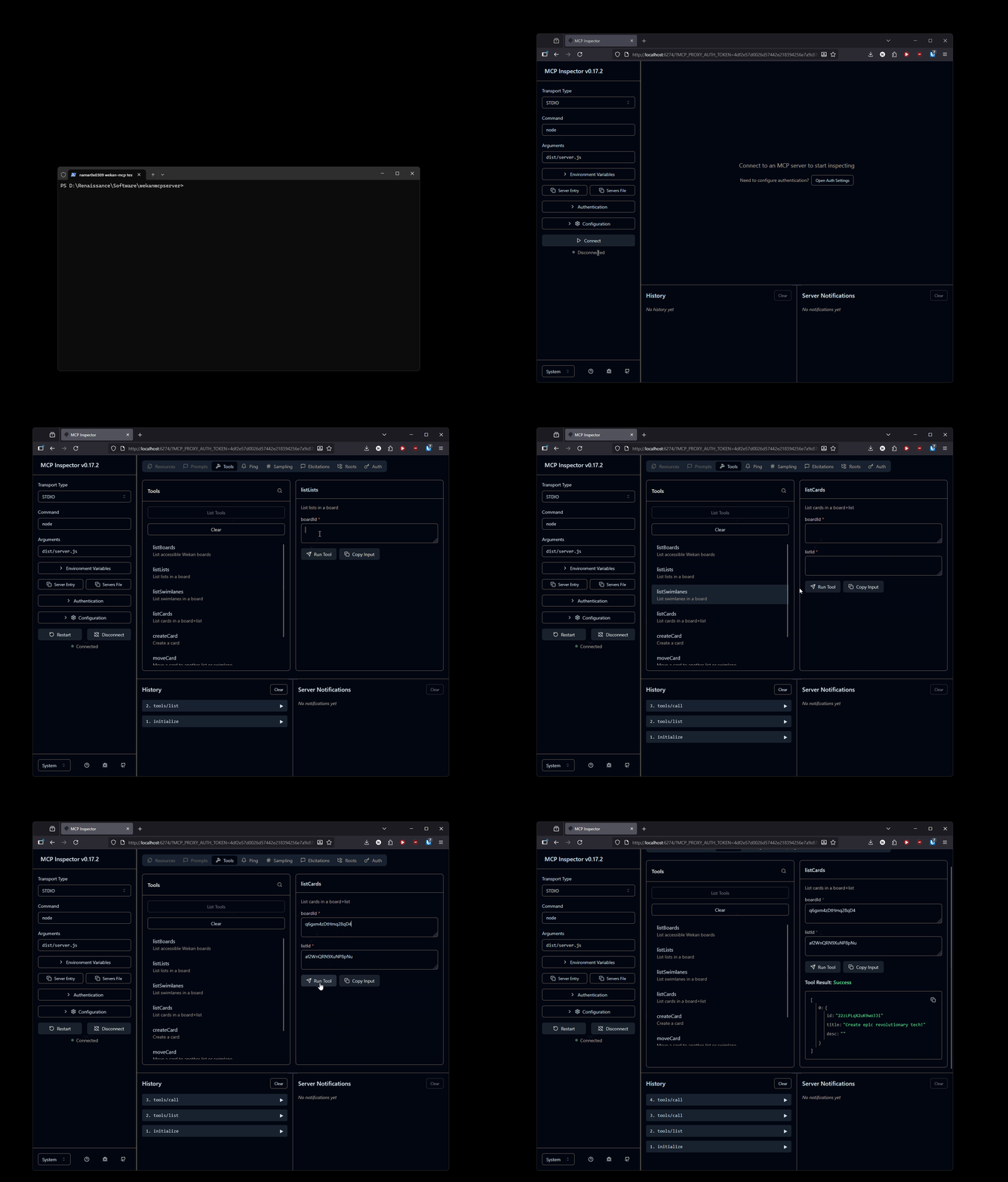
This project includes scripts to automatically generate Wekan API tokens and configure your environment.
Supported Agent Functionality
The Wekan MCP Server provides the following tools for AI agents to interact with Wekan:
Board Management
- listBoards - List all accessible Wekan boards available to the authenticated user
List Management
- listLists - List all lists within a specific board
Swimlane Management
- listSwimlanes - List all swimlanes in a board (used for organizing cards vertically)
Card Management
- listCards - List all cards in a specific board and list
- createCard - Create a new card with support for:
- Title (required)
- Description (optional)
- Swimlane assignment (optional)
- Due date (optional, ISO 8601 datetime format)
- Team members (optional, array of user IDs)
- Labels (optional, array of label IDs)
- moveCard - Move a card to another list or swimlane within the same board
Card Interaction
- commentCard - Add a comment to an existing card
Getting Started
Generate Wekan API Token
Run the appropriate script for your platform to generate your API token:
Windows (PowerShell):
./get-wekan-token.ps1
Linux/macOS (Bash):
./get-wekan-token.sh
The script will prompt you for:
- Wekan endpoint (e.g., https://wekan.namar0x0309.com)
- Username
- Password
After successful authentication, it will:
- Generate an API token
- Create or update the
.envfile with your token and configuration
Manual Configuration
If you prefer to configure manually, copy .env.example to .env and fill in your details:
cp .env.example .env
Then edit the .env file with your Wekan instance details and API token.
Environment Variables
The .env file contains:
WEKAN_BASE_URL: Your Wekan instance URLWEKAN_API_TOKEN: Generated API token for authenticationWEKAN_USERNAME: Your Wekan username (alternative to API token)WEKAN_PASSWORD: Your Wekan password (alternative to API token)WEKAN_USER_ID: Your Wekan user IDWEKAN_TOKEN_EXPIRES: Token expiration date
Note: You can authenticate using either:
WEKAN_API_TOKEN- Pre-generated token, orWEKAN_USERNAMEandWEKAN_PASSWORD- For automatic token generation on each request
Testing
You can test your configuration by running:
node test-auth.js
This will verify that your API token is working correctly.
You can also test all available methods:
node test-all-methods.js
Development
MCP Inspector
For development and debugging the MCP server, you can use the MCP Inspector:
npm run inspect
This will launch the MCP Inspector with the configuration from mcp-inspector-config.json.
For development with automatic rebuilding:
npm run inspect:watch
This will build the project and launch the inspector, automatically rebuilding when changes are detected.
FAQ
Common questions
Discussion
Questions & comments · 0
Sign In Sign in to leave a comment.