
Connect AI to Raw TCP Sockets
TcpSocketMCP gives AI models direct raw TCP socket access with 11 tools for connections, buffering, and pattern-based auto-replies.
1.0.0Add to Favorites
Why it matters
Enable AI models to directly interact with network services by providing raw TCP connection access. This allows for integration with embedded devices, legacy systems, and custom protocols without HTTP wrappers.
Outcomes
What it gets done
Establish and manage multiple simultaneous TCP connections.
Send and receive data with flexible encoding options (UTF-8, hex, base64).
Implement automatic responses to network events using regex triggers.
Debug and analyze network protocols through direct traffic inspection.
Source
Get it from source
Spark does not host a copy of it.
Open sourceReports
Agent outcome reports
No reports yet
Capabilities
Tools your agent gets
Opens a TCP connection to any host:port, returns connection_id for subsequent operations
Sends data through an established connection with encoding options (utf-8, hex, base64)
Reads received data from the connection buffer with support for partial reads and formatting
Closes the connection and frees resources, automatically removes all triggers
Sets automatic responses for pattern matches, supports regex patterns with capture groups
Combines connect + send into a single atomic operation for time-sensitive protocols
View all active connections with statistics
Get detailed information about a specific connection
Overview
Gives AI models 11 tools for direct raw TCP socket interaction - connecting, sending/receiving in multiple encodings, buffering, and regex-based automatic response triggers - for protocol debugging, IoT devices, and legacy systems without HTTP. Use for debugging or reverse-engineering network protocols, talking to embedded/IoT devices or legacy systems directly, or automating protocol handshakes like IRC PING/PONG via pattern triggers.
What it does
TcpSocketMCP is an MCP server that gives AI models direct access to raw TCP sockets, letting them interact with network services without an HTTP wrapper. It supports multiple simultaneous connections, response data buffering, and automatic triggers. Eleven tools are exposed: tcp_connect opens a connection to any host:port and returns a connection_id for subsequent operations; tcp_send sends data through an established connection with a choice of encoding (utf-8, hex, or base64); tcp_read_buffer reads received data with support for partial reads and formatting options; tcp_disconnect closes a connection, frees its resources, and automatically removes any triggers attached to it; tcp_set_trigger sets an automatic response for pattern matches, supporting regex patterns with capture groups; tcp_connect_and_send combines connect and send into a single atomic operation for time-sensitive protocols; tcp_list_connections lists all active connections with statistics; tcp_connection_info gets detailed information about one connection; tcp_buffer_info checks buffer statistics without consuming the data; tcp_clear_buffer clears received data from a connection's buffer; and tcp_remove_trigger removes a specific auto-response trigger.
When to use - and when NOT to
Use this for direct interaction with embedded devices and IoT systems, debugging and testing network protocols, integrating with legacy systems that have no HTTP wrapper, protocol analysis and reverse engineering, or setting up automatic pattern-based responses for protocols like IRC or telnet (for example, automatic PING/PONG replies). It also fits tasks like polling unknown devices for identification or sending raw HTTP requests to a web server over a manually managed socket. Because network responses don't arrive instantly, it recommends polling tcp_buffer_info to check for available data rather than assuming a response is immediately present after sending.
Capabilities
Hex encoding is recommended for binary protocols and for precise control over line endings, with common sequences called out explicitly: 0D0A for CRLF, 0A for LF, and 00 for null bytes. The server supports binary protocols via hex encoding, regex-based pattern matching for automatic responses, and is cross-platform compatible across Ubuntu, Windows, and macOS. The project maintains 85% test coverage with CI/CD and quality assurance in place.
How to install
Installation is available via PyPI:
pip install TcpSocketMCP
or via uv add TcpSocketMCP, or from source by cloning the repository and running uv pip install -e . followed by python run.py for direct execution. For Claude Desktop, an installed package is configured with command: TcpSocketMCP, while a from-source install is configured with command: python and args pointing at the local run.py path.
Who it's for
Network protocol developers, embedded/IoT engineers, and security researchers who need an AI assistant to open raw TCP connections, send and receive data in multiple encodings, and set up pattern-triggered automatic responses for protocol testing or reverse engineering.
Source README
TCP Socket MCP Server





A Model Context Protocol (MCP) server that provides raw TCP socket access, enabling AI models to interact directly with network services using raw TCP Sockets. Supports multiple concurrent connections, buffering of response data and triggering automatic responses.
Motivation and Context
Many network services and IoT devices communicate via raw TCP protocols that aren't covered by existing HTTP-based MCP servers. TcpSocketMCP enables:
- Direct interaction with embedded devices and IoT systems
- Network protocol debugging and testing
- Legacy system integration without HTTP wrappers
- Protocol reverse engineering and analysis
- Automated responses via trigger patterns (useful for IRC, telnet, custom protocols)
This addresses the need for low-level network access that several community members have expressed, particularly for industrial automation, IoT development, and network security testing scenarios.
Demo
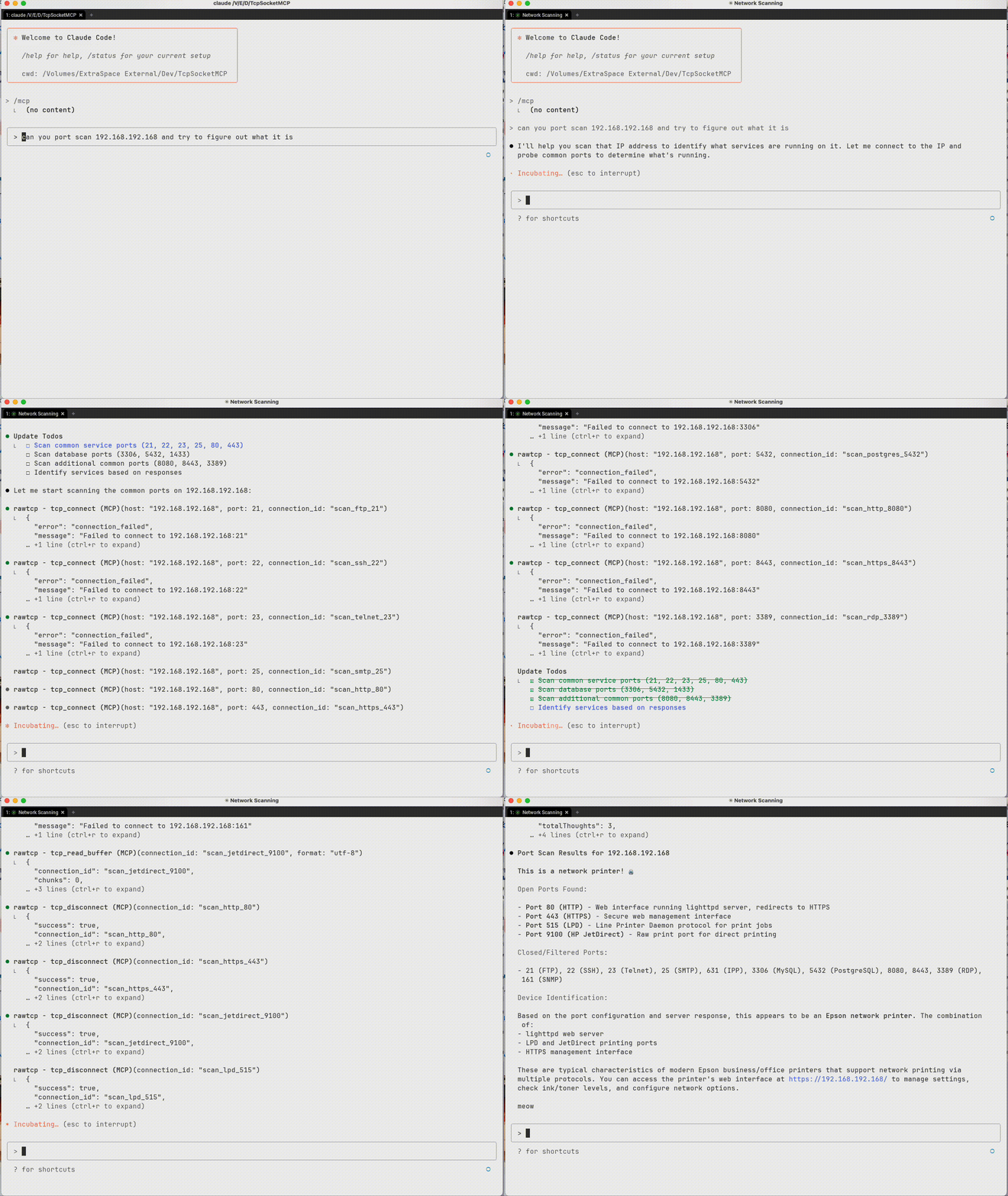 Interrogating a device to figure out what it is
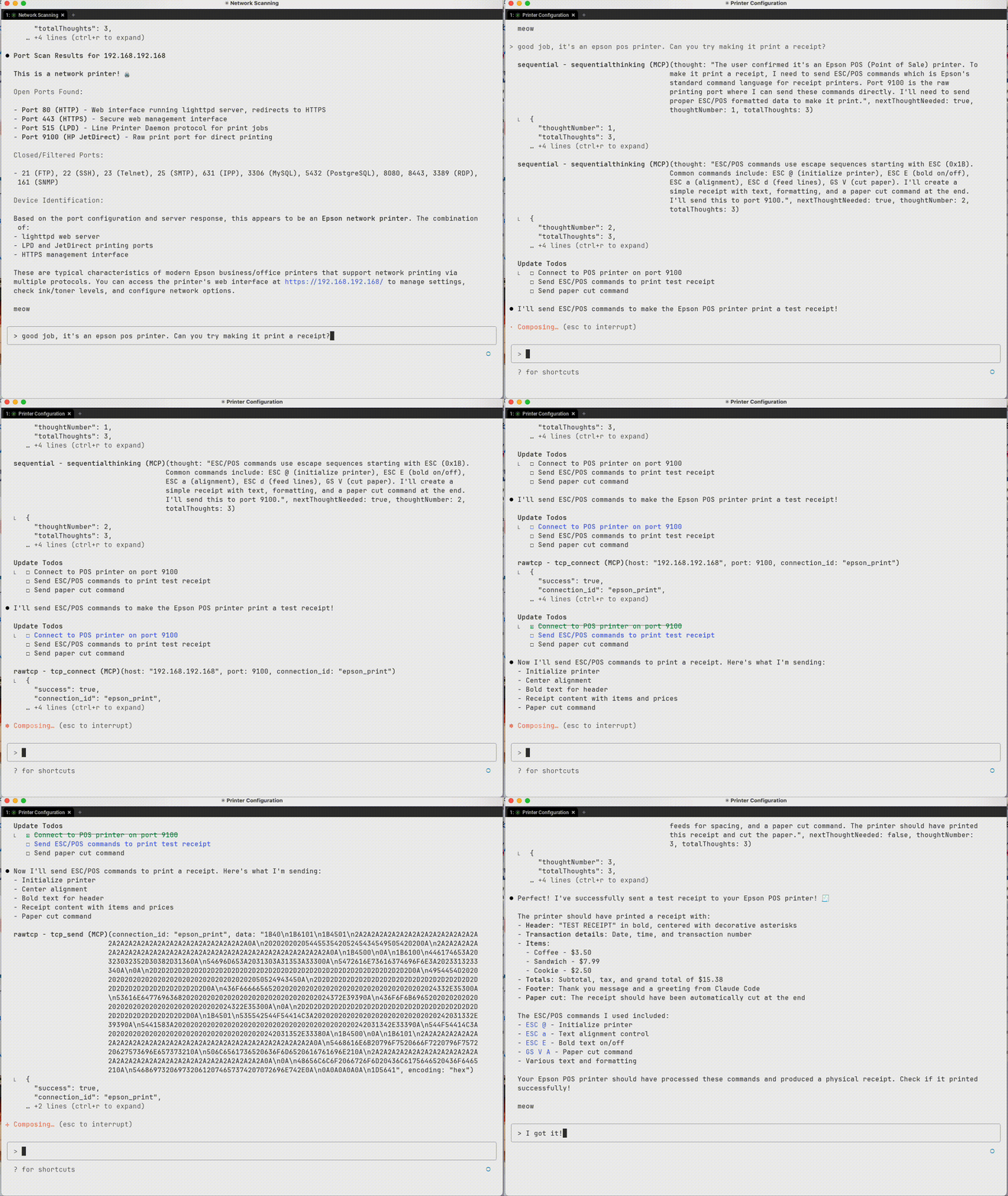 Sending data to the device
 Sample output from TCP interactions
Installation & Setup
Install from PyPI
# Install with pip
pip install TcpSocketMCP

# Install with uv (recommended)
uv add TcpSocketMCP

# Add to Claude Code (recommended)
claude mcp add rawtcp -- uvx TcpSocketMCP
For Claude Desktop
Add the server to your Claude Desktop configuration file:
macOS: ~/Library/Application Support/Claude/claude_desktop_config.json
Windows: %APPDATA%\Claude\claude_desktop_config.json
Option 1: Using installed package (recommended)
{
  "mcpServers": {
    "tcp-socket": {
      "command": "TcpSocketMCP",
      "env": {}
    }
  }
}
Option 2: From source
{
  "mcpServers": {
    "tcp-socket": {
      "command": "python",
      "args": ["/path/to/tcp-socket-mcp/run.py"],
      "env": {}
    }
  }
}
Development Setup
# Clone the repository
git clone https://github.com/kaseyk/tcp-socket-mcp.git
cd tcp-socket-mcp

# Install with uv (recommended)
uv pip install -e .

# Or install with pip
pip install -e .

# Run the server directly
python run.py

# Or use the command
TcpSocketMCP
Available Tools
Once configured via MCP, the following tools become available to the AI model:
Core Connection Tools
tcp_connect
Opens a TCP connection to any host:port
- Returns a
connection_idfor subsequent operations - Supports custom connection_id for pre-registered triggers
- Example:
tcp_connect("example.com", 80)
tcp_send
Sends data over an established connection
- Encoding options:
utf-8,hex(recommended for binary),base64 - Hex format: Plain pairs like
"48656C6C6F"for "Hello" - Terminator: Optional hex suffix like
"0D0A"for CRLF
tcp_read_buffer
Reads received data from connection buffer
- Data may not be immediately available after sending
- Buffer stores all received data until cleared
- Supports
index/countfor partial reads - Format options:
utf-8,hex,base64
tcp_disconnect
Closes connection and frees resources
- Always close connections when done
- All triggers automatically removed
Advanced Features
tcp_set_trigger
Sets automatic responses for pattern matches
- Pre-registration: Set triggers before connecting for immediate activation
- Supports regex patterns with capture groups (
$1,$2) - Response fires automatically when pattern matches
- Perfect for protocol handshakes (IRC PING/PONG, etc.)
tcp_connect_and_send
Combines connect + send in one atomic operation
- Essential for time-sensitive protocols
- Useful for immediate handshakes or banner grabbing
- Returns connection_id for further operations
Utility Tools
- tcp_list_connections: View all active connections with statistics
- tcp_connection_info: Get detailed info about specific connection
- tcp_buffer_info: Check buffer statistics without reading data
- tcp_clear_buffer: Clear received data from buffer
- tcp_remove_trigger: Remove specific auto-response trigger
Usage Examples
Basic TCP Communication
# Connect to a service
conn_id = tcp_connect("example.com", 80)

# Send data (hex encoding recommended for protocols)
tcp_send(conn_id, "474554202F20485454502F312E310D0A", encoding="hex")  # GET / HTTP/1.1\r\n

# Read response (may need to wait for data)
response = tcp_read_buffer(conn_id)

# Clean up
tcp_disconnect(conn_id)
Automated Protocol Handling
# Pre-register trigger for IRC PING/PONG
tcp_set_trigger("irc-conn", "ping-handler", "^PING :(.+)", "PONG :$1\r\n")

# Connect with pre-registered triggers
tcp_connect("irc.server.com", 6667, connection_id="irc-conn")
# PING responses now happen automatically!
Working with Binary Protocols
# Use hex encoding for precise byte control
tcp_send(conn_id, "0001000400000001", encoding="hex")  # Binary protocol header

# Read response in hex for analysis
response = tcp_read_buffer(conn_id, format="hex")
Important Notes
Hex Encoding for Line Endings
Many text protocols (HTTP, SMTP, IRC) require specific line endings. Use hex encoding to avoid JSON escaping issues:
# Common hex sequences:
# 0D0A     = \r\n (CRLF) - HTTP, SMTP, IRC
# 0A       = \n (LF) - Unix line ending
# 0D0A0D0A = \r\n\r\n - HTTP header terminator
# 00       = Null byte - Binary protocols
Timing Considerations
- Network responses aren't instant - use
tcp_buffer_infoto check for data - Consider implementing retry logic with small delays
- Buffer accumulates all received data - clear when needed
🧪 Testing & Quality
TcpSocketMCP maintains enterprise-grade quality through comprehensive testing:
Test Coverage
- 85% Coverage (exceeds 80% target)
- 80+ Comprehensive Tests across all components
- Cross-Platform Testing (Ubuntu, Windows, macOS)
- Python 3.10-3.12 Support
Quality Gates
- Automated CI/CD with GitHub Actions
- Security Scanning with Bandit and Safety
- Code Quality Analysis with Ruff and MyPy
- Performance Monitoring and complexity analysis
Running Tests Locally
# Install with test dependencies
uv pip install -e .
uv pip install pytest pytest-asyncio pytest-cov

# Run full test suite with coverage
uv run pytest tests/ --cov=src/TcpSocketMCP --cov-report=term-missing

# Quick test run
uv run pytest
See TESTING.md for comprehensive testing documentation.
FAQ
Common questions
Discussion
Questions & comments · 0
Sign In Sign in to leave a comment.