
Request OpenStack Cloud Resources via API
An MCP server giving LLMs real-time, filterable OpenStack compute, storage, network, and image resource queries.
1.0.0Add to Favorites
Why it matters
This asset provides an MCP-compliant API for requesting and managing OpenStack cloud resources, including compute, storage, and networking. It enables seamless integration with LLMs for automated cloud resource provisioning.
Outcomes
What it gets done
Request compute, storage, and networking resources from OpenStack.
Retrieve real-time status of OpenStack cluster resources.
Filter OpenStack resources by various criteria.
Integrate with LLMs for automated cloud management.
Source
Get it from source
Spark does not host a copy of it.
Open sourceReports
Agent outcome reports
No reports yet
Capabilities
Tools your agent gets
Retrieve OpenStack VM instances with filtering and verbosity level control
Overview
An MCP server that sits between an AI client and the OpenStack API, exposing compute, storage, network, and image resources as queryable tools. It runs as an async Starlette/Uvicorn service, talks to OpenStack via its SDK, and streams results back over SSE. Use it when an AI assistant needs to check live OpenStack resource state - instances, storage, networks, images - without writing SDK calls by hand; it is a query tool, not a provisioning one.
What it does
An OpenStack resource query service built on the Model Context Protocol (MCP), giving an LLM client structured API access to compute, storage, network, and image resources on an OpenStack cloud platform. It runs as an asynchronous HTTP service built on Starlette and Uvicorn, talks to OpenStack through the OpenStack SDK, and streams responses back over Server-Sent Events (SSE) so a connected AI client gets real-time feedback instead of a single blocking reply. Once started, the server exposes its MCP interface at http://localhost:8000/openstack.
When to use - and when NOT to
Use it when an LLM client needs live, structured visibility into an OpenStack cluster - for example checking the current state of compute instances, storage, network resources, or images without hand-writing OpenStack SDK calls. It is not a management or provisioning tool: the documented get_instances tool is a query interface with filter, limit, and detail-level controls, not a way to create, modify, or delete OpenStack resources. It also assumes a running OpenStack environment and valid admin credentials are already available.
Capabilities
- Real-time resource queries against a live OpenStack cluster via its API
- Multi-dimensional lookups spanning compute, storage, network, and image resources
- Flexible filtering by resource name, ID, or other conditions
- Three detail levels for returned information: basic, detailed, and full
- A documented
get_instancestool for querying VM instances, withfilter,limit(default 100), anddetail_level(default detailed) arguments - SSE streaming responses, with a
--json-responseflag available to switch to plain JSON instead - Extensible query set: new resource-lookup tools can be added by defining a resource-acquisition function, registering it in
list_tools, and implementing its logic incall_tool
How to install
Requires Python 3.10+ and an existing OpenStack environment. Install the published package:
pip install openstack-mcp-server
Then start the service, pointing it at the OpenStack API endpoint and admin credentials:
openstack-mcp-server --port 8000 --log-level INFO --auth-url 'http://<OpenStack-API-Endpoint>:5000/v3' --username '<OpenStack-Admin-User>' --password '<OpenStack-Admin-Password>'
--port defaults to 8000, --log-level accepts DEBUG, INFO, WARNING, ERROR, or CRITICAL and defaults to INFO. The project can also be run from source using uv venv, uv sync, and uv run ./src/mcp_openstack_http/server.py, and tested with the @modelcontextprotocol/inspector tool via npx or Docker. It is released under the Apache 2.0 license.
Who it's for
SRE and platform engineers who need a read-only, always-current view of what is running in their cloud, reachable from any MCP-speaking AI client, without handing that client credentials for a full management or provisioning tool.
Source README
OpenStack MCP Server
Overview
An OpenStack resource query service based on MCP (Model Context Protocol), providing API interfaces to query compute, storage, network, image, and other resources from the OpenStack cloud platform.
Features
- Real-time Resource Queries: Get the latest resource status of OpenStack clusters via API
- Multi-dimensional Information: Support querying various resources including compute, storage, network, and images
- Flexible Filtering: Filter resources by name, ID, and other conditions
- Detail Level Control: Support basic, detailed, and full information display levels
- Standard MCP Interface: Fully compatible with MCP protocol, seamlessly integrating with large language models
Technical Architecture
- High-performance asynchronous HTTP service based on Starlette and Uvicorn
- Interact with OpenStack API using OpenStack SDK
- Provide structured OpenStack resource information to large language models through MCP protocol
- Support SSE streaming output for real-time feedback
Architecture Diagram
┌─────────────┐    ┌─────────────┐    ┌─────────────┐
│             │    │             │    │             │
│  AI Client  │───▶│  MCP Server │───▶│  OpenStack  │
│  (LLM)      │◀───│  (Server)   │◀───│  API        │
│             │    │             │    │             │
└─────────────┘    └─────────────┘    └─────────────┘
Installation
Requirements
- Python 3.10+
- OpenStack environment
Install via pip
pip install openstack-mcp-server
Usage
Start the Service
openstack-mcp-server --port 8000 --log-level INFO --auth-url 'http://<OpenStack-API-Endpoint>:5000/v3' --username '<OpenStack-Admin-User>' --password '<OpenStack-Admin-Password>'
After starting, the MCP interface will be available at http://localhost:8000/openstack.
Parameters
--port: Service listening port, default is 8000--log-level: Log level, options are DEBUG, INFO, WARNING, ERROR, CRITICAL, default is INFO--json-response: Use JSON response instead of SSE stream, default is False
Interface Example
Through the MCP protocol, you can use the following tools to query OpenStack resources:
Get OpenStack VM Instances
{
  "name": "get_instances",
  "arguments": {
    "filter": "web-server",
    "limit": 10,
    "detail_level": "detailed"
  }
}
Parameter description:
filter: Filter condition, such as instance name or ID (optional)limit: Maximum number of results to return (optional, default 100)detail_level: Level of detail in the returned information, options are basic, detailed, full (optional, default detailed)
Install from Source
# Clone repository
git clone https://github.com/wangshqly0407/openstack-mcp-server.git
cd openstack-mcp-server
# Create virtual environment
uv venv
# Activate virtual environment
source .venv/bin/activate
# Initialize runtime environment
uv sync
# Start streaming HTTP MCP server
uv run ./src/mcp_openstack_http/server.py --port 8000 --log-level INFO --auth-url 'http://<OpenStack-API-Endpoint>:5000/v3' --username '<OpenStack-Admin-User>' --password '<OpenStack-Admin-Password>'
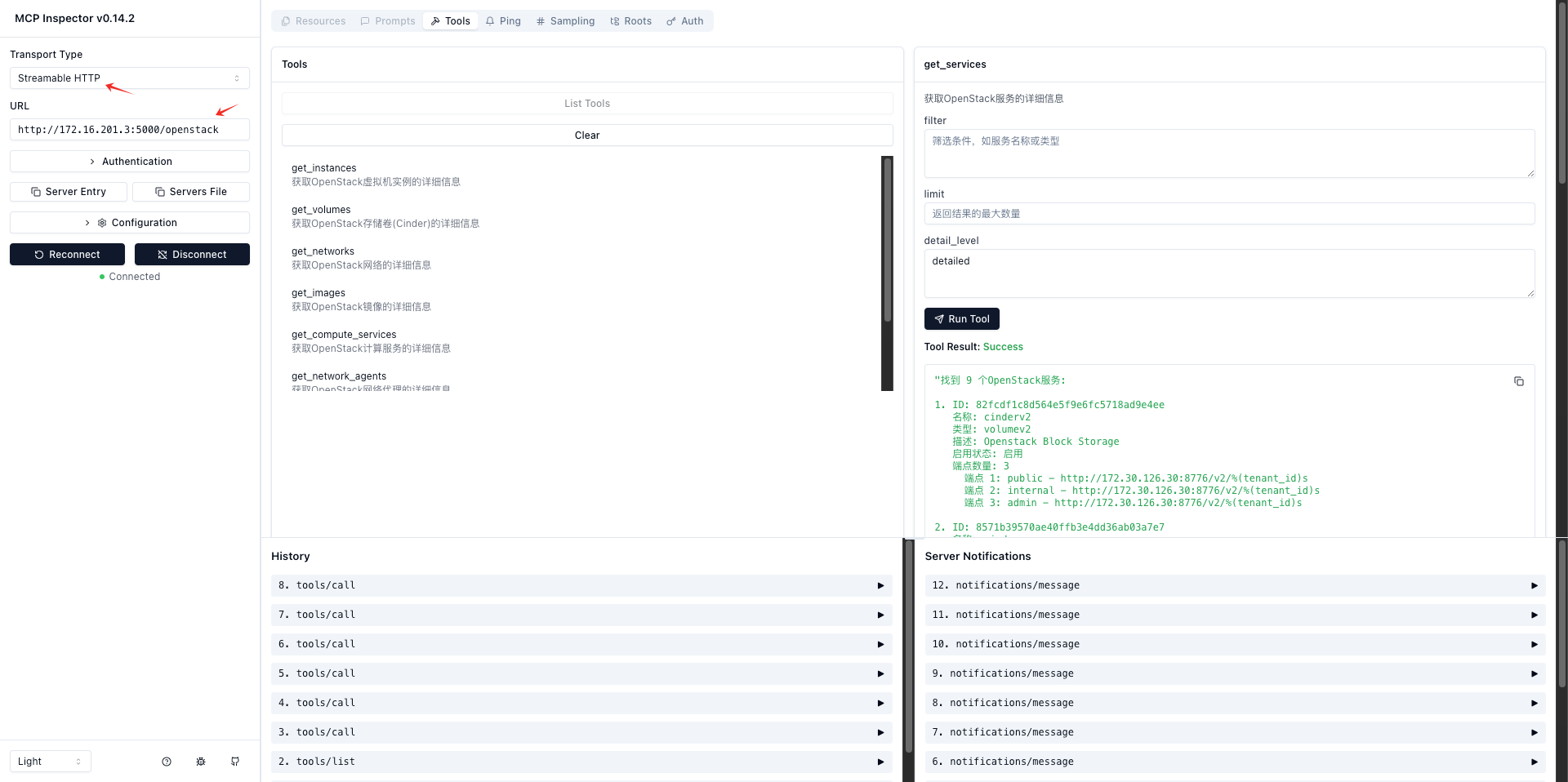
Testing and Verification
# Method 1: Test using npx
npx -y @modelcontextprotocol/inspector uv run ./src/mcp_openstack_http/server.py --port 8000 --log-level INFO --auth-url 'http://<OpenStack-API-Endpoint>:5000/v3' --username '<OpenStack-Admin-User>' --password '<OpenStack-Admin-Password>'

# Method 2: Test using docker
docker run -it --rm -p 6274:6274 -p 6277:6277 -v $(pwd):/app -w /app node:18 npx -y @modelcontextprotocol/inspector uv run ./src/mcp_openstack_http/server.py --port 8000 --log-level INFO --auth-url 'http://<OpenStack-API-Endpoint>:5000/v3' --username '<OpenStack-Admin-User>' --password '<OpenStack-Admin-Password>'
Access: http://localhost:6274/
Development Extensions
Adding New Resource Query Tools
- Add corresponding resource acquisition functions in
src/mcp_openstack_http/server.py - Register the new tool in the
list_toolsmethod - Implement the tool's processing logic in the
call_toolmethod
FAQ
Common questions
Discussion
Questions & comments · 0
Sign In Sign in to leave a comment.