
Analyze GitHub Repositories with Advanced Metrics
Analyze GitHub repository health, growth trends, and ecosystem insights via OpenDigger metrics like OpenRank and bus factor.
1.0.0Add to Favorites
Why it matters
Leverage advanced repository analytics and insights to understand GitHub project performance, identify trends, and perform comparative analysis.
Outcomes
What it gets done
Get metrics for single or multiple repositories.
Compare repository performance and conduct competitive analysis.
Analyze growth trends and developer activity over time.
Generate comprehensive repository health reports.
Source
Get it from source
Spark does not host a copy of it.
Open sourceReports
Agent outcome reports
No reports yet
Capabilities
Tools your agent gets
Get metrics for a single repository
Batch operations for multiple metrics
Comparative analysis of multiple repositories
Analyze growth trends over time periods
Ecosystem analytics and insights
System diagnostics and health monitoring
Overview
OpenDigger MCP Server gives an AI assistant 6 tools and 3 prompts for repository analytics via OpenDigger - fetching metrics like OpenRank and bus factor, comparing repositories, analyzing growth trends, and generating health reports. Use it for AI-assisted GitHub repository and ecosystem analytics. The server_health tool is Beta and not suited for production monitoring.
What it does
OpenDigger MCP Server gives an AI assistant advanced repository analytics through OpenDigger, an open-source project health and community metrics platform. It provides 6 tools and 3 guided prompts for fetching metrics, comparing repositories, analyzing growth trends, and generating health reports.
When to use - and when NOT to
Use it when you want to compare two repositories' activity (e.g. microsoft/vscode vs facebook/react), generate a comprehensive health report for a project, analyze contributor growth trends over a time period, or pull ecosystem-wide analytics. It covers core metrics (openrank, stars, forks, contributors, participants, issues_new/issues_closed, pull_requests, commits, activity), extended metrics (technical_fork, bus_factor, releases, inactive_contributors, maintainer_count, community_activity), and additional metrics (change_requests, pull_requests_accepted/merged, issue_comments, issue_response_time, code_change_lines, developer_network). Do not rely on server_health for production monitoring - it's explicitly marked Beta. Detailed installation instructions and configuration options for different IDEs are maintained separately in the project's own INSTALLATION.md file.
Capabilities
Tools: get_open_digger_metric (single repository metric), get_open_digger_metrics_batch (batch fetch multiple metrics), compare_repositories (multi-repository comparison), analyze_trends (growth trend analysis over time), get_ecosystem_insights (ecosystem-wide analytics), server_health (system diagnostics, Beta).
Prompts: repo_health_analysis (comprehensive repository health report), repo_comparison (competitive repository analysis), developer_insights (developer activity and contribution analysis).
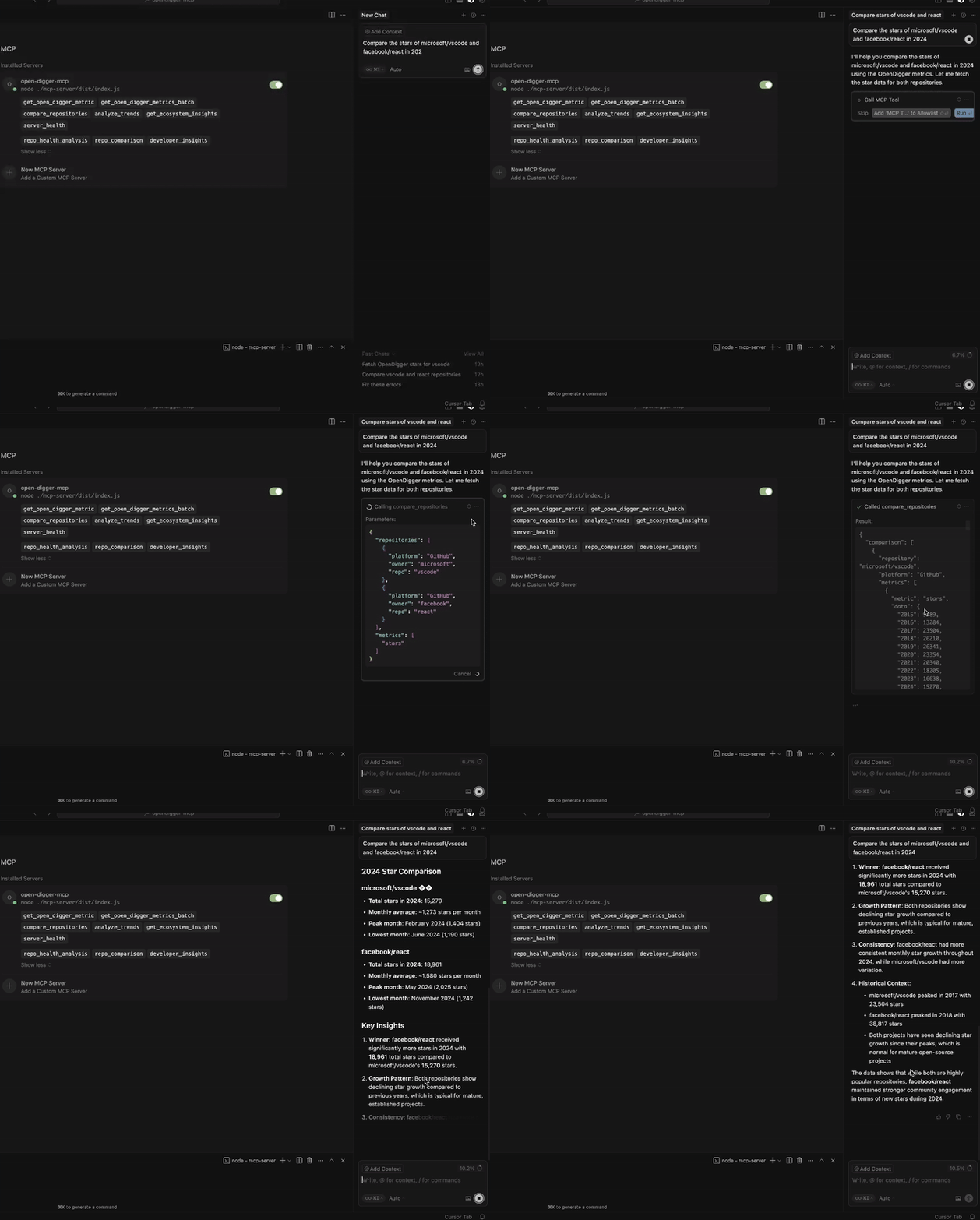
Example queries: "Compare microsoft/vscode and facebook/react using the compare_repositories tool," "Generate a health report for microsoft/vscode using the repo_health_analysis prompt," "Analyze the growth trends for contributors in microsoft/vscode over 2 years."
How to install
# Setup
git clone https://github.com/X-lab2017/open-digger-mcp-server.git

cd open-digger-mcp-server && cd mcp-server
npm install
npm run build

# Start server
npm start
For Cursor, configure .cursor/mcp.json:
{
  "mcpServers": {
    "open-digger": {
      "command": "node",
      "args": ["/full/path/to/dist/index.js"],
      "cwd": "/full/path/to/project",
      "env": { "CACHE_TTL_SECONDS": "300" }
    }
  }
}
Also compatible with VS Code, Claude Chat, or the official MCP Inspector. Optional environment variables include CACHE_TTL_SECONDS (cache duration) and SSE_PORT/SSE_HOST for an optional SSE server. Verify the server works with echo '{"jsonrpc":"2.0","id":1,"method":"tools/list","params":{}}' | node dist/index.js, which should list all 6 tools.
Cursor users can confirm the server loaded correctly by checking for a green status dot next to "open-digger-mcp", "6 tools" and "3 prompts" displayed in the server status, and no error indicators. Common troubleshooting steps include verifying absolute paths in .cursor/mcp.json, restarting Cursor completely, running chmod +x dist/index.js for permission errors, and clearing the npm cache (npm cache clean --force) followed by a rebuild for stale-cache issues.
Who it's for
Open-source maintainers, engineering managers, and researchers who want AI-assisted analysis of repository health, contributor activity, and ecosystem trends instead of manually digging through GitHub stats.
Source README
OpenDigger MCP Server
A Model Context Protocol (MCP) server for OpenDigger enabling advanced repository analytics and insights through tools and prompts.
Quick Start
# Setup
git clone https://github.com/X-lab2017/open-digger-mcp-server.git

# (Optional) Ensure you're on the master branch
git checkout master

cd open-digger-mcp-server && cd mcp-server
npm install
npm run build

# Start server
npm start
Expected output:
OpenDigger MCP Server running (on stdio)...
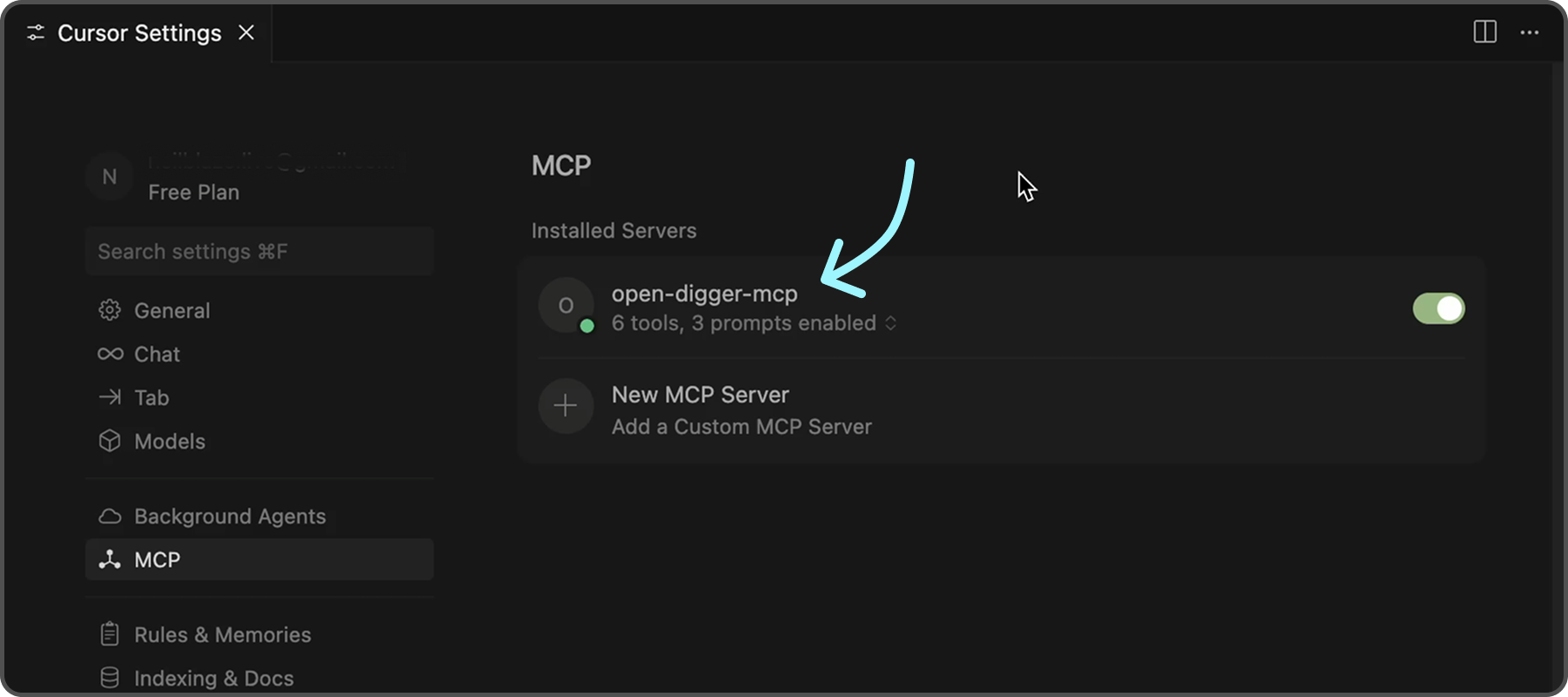
To further confirm that the server is functioning correctly, you can check the following indicators in Cursor:
- ✅ Green dot next to "open-digger-mcp" title
- ✅ "6 tools" displayed in server status
- ✅ "3 prompts" displayed in server status
- ✅ No error messages or red indicators
Features
Tools (6 Available)
| No. | Tool | Description |
|---|---|---|
| 1 | get_open_digger_metric |
Fetch single repository metrics |
| 2 | get_open_digger_metrics_batch |
Batch operations for multiple metrics |
| 3 | compare_repositories |
Multi-repository comparative analysis |
| 4 | analyze_trends |
Growth trend analysis over time periods |
| 5 | get_ecosystem_insights |
Ecosystem analytics & insights |
| 6 | server_health |
System diagnostics and health monitoring (Beta) |
Prompts (3 Available)
repo_health_analysis- Comprehensive repository health reportsrepo_comparison- Competitive repository analysisdeveloper_insights- Developer activity and contribution analysis
Metrics
Core Metrics:
openrank,stars,forks,contributors,participants,issues_new,issues_closed,pull_requests,commits,activityExtended Metrics:
technical_fork,bus_factor,releases,inactive_contributors,maintainer_count,community_activityAdditional Metrics:
change_requests,pull_requests_accepted,pull_requests_merged,issue_comments,issue_response_time,code_change_lines,developer_network
💡 Usage Examples
💠 Repository Comparison
Compare microsoft/vscode and facebook/react using the compare_repositories tool
💠 Health Analysis
Generate a health report for microsoft/vscode using the repo_health_analysis prompt
💠 Trend Analysis
Analyze the growth trends for contributors in microsoft/vscode over 2 years
Server Status Check
After starting the server, verify it's working:
# In a new terminal
echo '{"jsonrpc":"2.0","id":1,"method":"tools/list","params":{}}' | node dist/index.js
Expected response should list all 6 tools.
Configuration
Environment Variables (.env)
# Cache configuration (recommended)
CACHE_TTL_SECONDS=300

# Optional SSE server
SSE_PORT=3001
SSE_HOST=127.0.0.1
Cursor MCP (.cursor/mcp.json)
{
  "mcpServers": {
    "open-digger": {
      "command": "node",
      "args": ["/full/path/to/dist/index.js"],
      "cwd": "/full/path/to/project",
      "env": {
        "CACHE_TTL_SECONDS": "300"
      }
    }
  }
}
Development
npm run watch           # Development mode
npm run build           # Compile TypeScript
npm run clean           # Clean build files
npm run sse:test        # Test SSE server
Troubleshooting
Common Issues
Server not appearing in Cursor:
- Verify absolute paths in
.cursor/mcp.json - Restart Cursor completely (Cmd+Q / Alt+F4)
- Check MCP Settings section for error messages
Permission errors:
chmod +x dist/index.js
Build errors:
npm run clean
npm install
npm run build
Cache issues:
# Clear npm cache
npm cache clean --force

# Rebuild
npm run clean && npm run build
FAQ
Common questions
Discussion
Questions & comments · 0
Sign In Sign in to leave a comment.