
Process images and videos with OpenCV
Expose OpenCV image processing, feature detection, object tracking, and video tools through a Python MCP server.
1.0.0Add to Favorites
Why it matters
Empower AI assistants with advanced computer vision capabilities using OpenCV for image and video analysis, including object detection, face recognition, and edge detection.
Outcomes
What it gets done
Perform object detection using DNN models like YOLO.
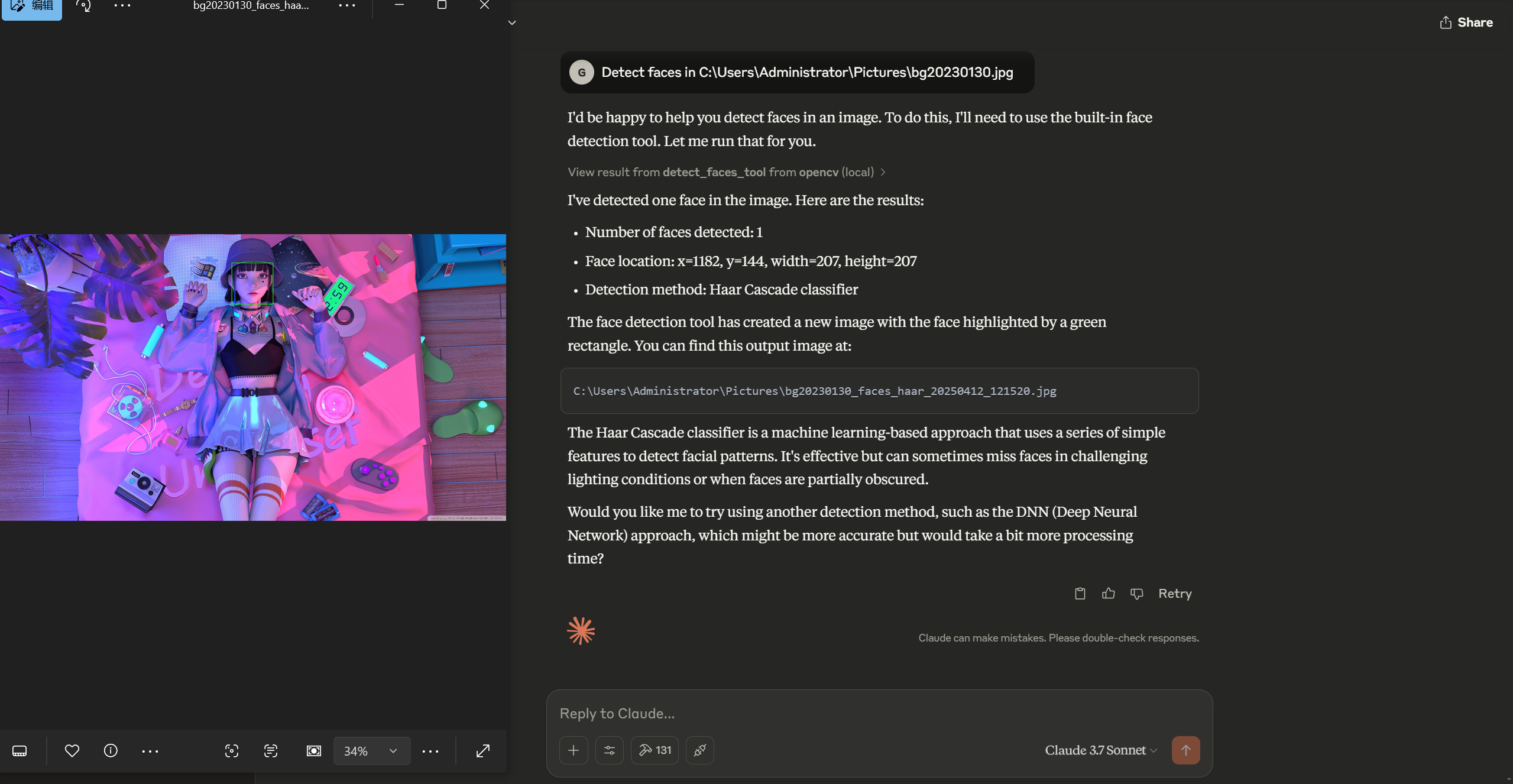
Detect and recognize faces in images.
Analyze video frames for object tracking and motion detection.
Apply various image processing filters and edge detection techniques.
Source
Get it from source
Spark does not host a copy of it.
Open sourceReports
Agent outcome reports
No reports yet
Capabilities
Tools your agent gets
Saves an image to a file
Converts an image between color spaces (BGR, RGB, GRAY, HSV, etc.)
Resizes an image to specified dimensions
Crops a region of an image
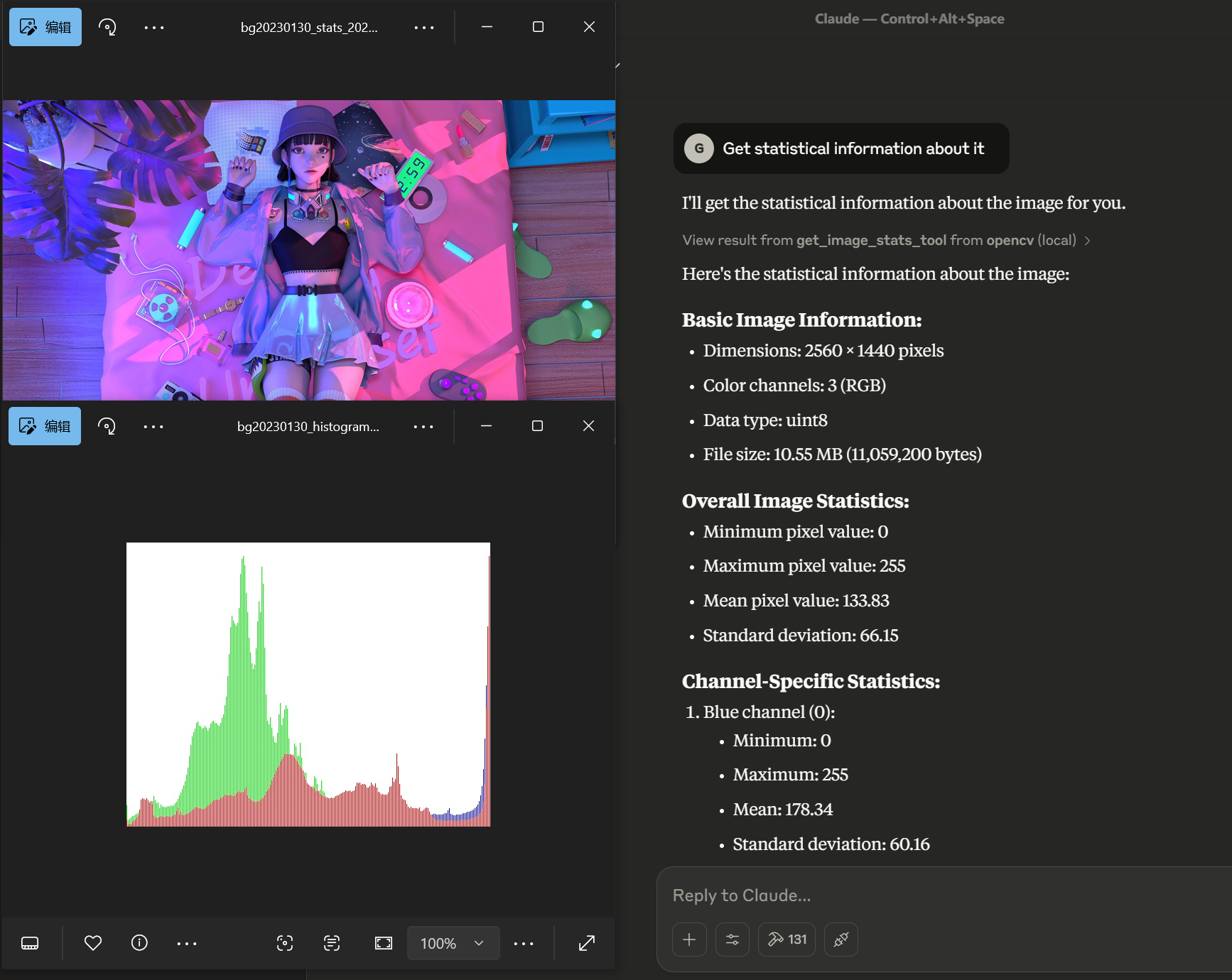
Gets statistical information about an image
Applies various filters to an image (blur, Gaussian, median, bilateral)
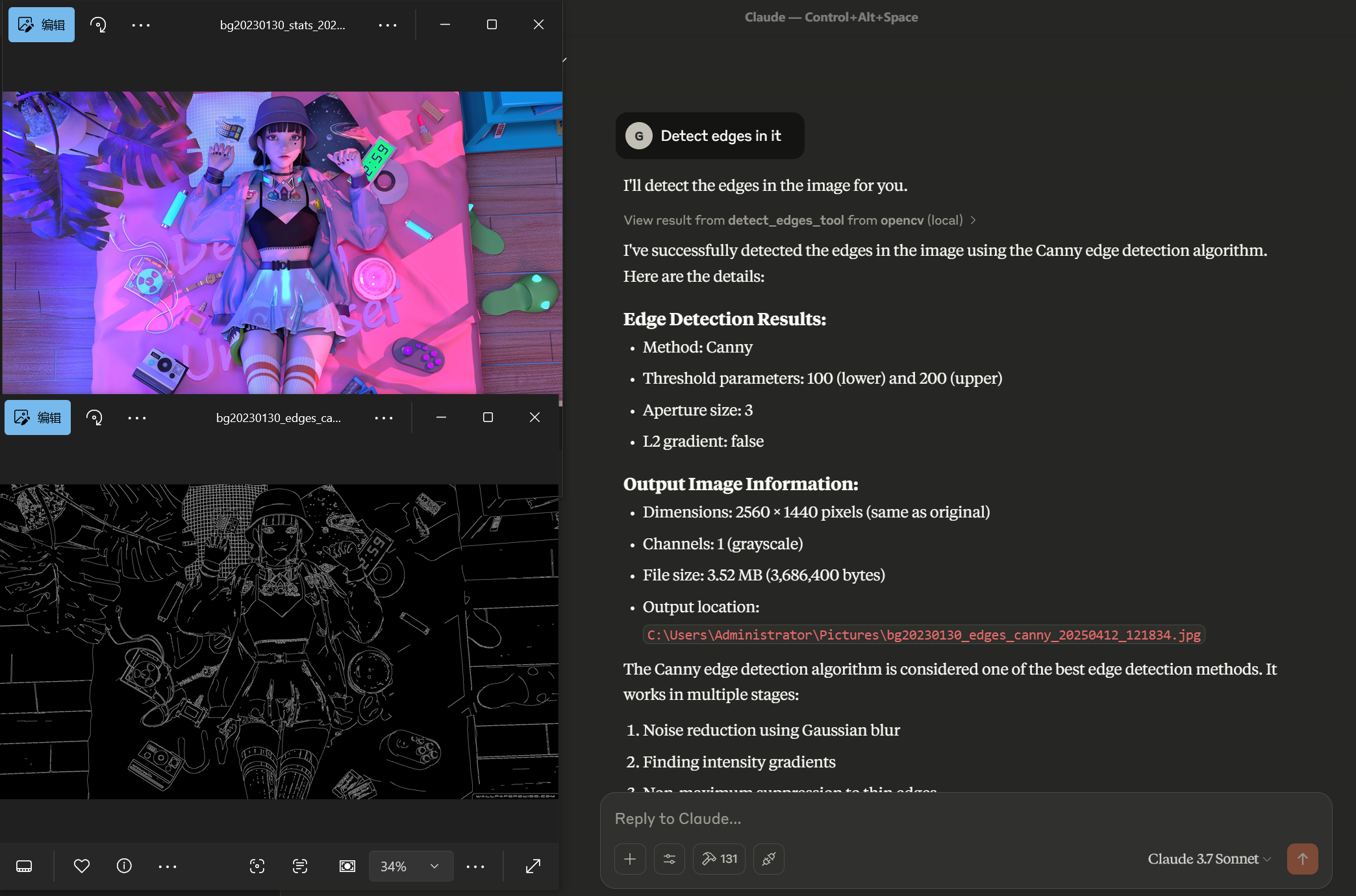
Detects edges in an image using various methods (Canny, Sobel, Laplacian, Scharr)
Applies thresholding to an image (binary, adaptive, etc.)
Overview
This Python MCP server exposes OpenCV tools for image manipulation, feature and object detection, and video processing. DNN face and YOLO object tools depend on configured model files. Use it to connect image and video operations to an MCP client or Python workflow. Supply the required model assets before expecting DNN detection to work.
What it does
OpenCV MCP Server exposes image and video operations through the Model Context Protocol. The Python package lets a connected assistant invoke tools for basic manipulation, enhancement, visual analysis, detection, and tracking. A Python client example is also included for applications that call the package directly.
Path-based tools return processed file locations and operation-specific information. Those outputs can feed subsequent tools: for example, a resized image can become the input to edge detection, and the resulting edges can feed contour detection. This supports a sequence of visual operations without treating each result as an unrelated artifact.
When to use
Use it when an MCP-connected workflow needs to inspect or transform image files, analyze video frames, or run configured detection models. Operations support edge and contour analysis, statistical information, faces, objects, and video processing. Real-time camera detection is also documented, with recording parameters and an output video path.
DNN-based face detection and YOLO object detection require pretrained model files. Model configurations and weights must be available and usable in the actual installation. Detection results depend on those configured models and the selected parameters.
Capabilities
Basic tools save images, convert BGR, RGB, GRAY, or HSV color spaces, resize and crop, and return statistics with histogram visualization. Processing tools apply blur, Gaussian, median, or bilateral filters; detect edges; threshold images; detect contours; find circles or lines; and match a template against an image.
Computer vision tools detect SIFT, ORB, or BRISK features and match features across two images. Face detection supports Haar cascades or DNN methods. Object detection uses pretrained DNN models, with confidence and suppression parameters shown in the examples.
Video tools extract selected frames, detect motion between frames, track an object from an initial bounding box, combine frames into a video, convert video to MP4, detect objects throughout a video, and record camera detections. Outputs include frame paths, tracking or detection information, and produced video locations. These documented operations do not establish specialized application accuracy.
How to install
The supplied package installation command is:
pip install opencv-mcp-server
The desktop MCP configuration launches opencv-mcp-server through uvx; Homebrew can supply uv, and the client needs restarting after configuration changes. A development installation uses a virtual environment and editable package installation.
MCP_TRANSPORT defaults to stdio. OPENCV_DNN_MODELS_DIR selects the DNN model directory, while CV_HAAR_CASCADE_DIR optionally selects cascade files. Named assets include the face detector's deploy.prototxt and Caffe weights, plus yolov3.weights, yolov3.cfg, and coco.names for object detection. Configure those files before using the corresponding tools.
OpenCV MCP Server is distributed under the MIT License.
Source README
🚀 OpenCV MCP Server
MCP server providing powerful OpenCV computer vision capabilities for AI assistants.
🔍 Introduction
OpenCV MCP Server is a Python package that provides OpenCV's image and video processing capabilities through the Model Context Protocol (MCP). This allows AI assistants and language models to access powerful computer vision tools for tasks ranging from basic image manipulation to advanced object detection and tracking.
With OpenCV MCP Server, AI systems can:
- Process and analyze images in various formats
- Perform real-time object detection and tracking
- Extract meaningful information from visual data
- Enhance and transform images using advanced algorithms
- Process video content with frame-by-frame analysis
✨ Features
- 📸 Basic image handling and manipulation (read, save, convert)
- 🖼️ Image processing and enhancement (resize, crop, filter application)
- 📊 Edge detection and contour analysis
- 🧠 Advanced computer vision capabilities (feature detection, object detection)
- 😃 Face detection and recognition
- 🎬 Video processing and analysis (frame extraction, motion detection)
- 🔍 Object tracking in videos
- 📹 Camera integration for real-time object detection
📊 Demo Examples
Edge Detection
Face Detection
Statistical Analysis
Video Processing
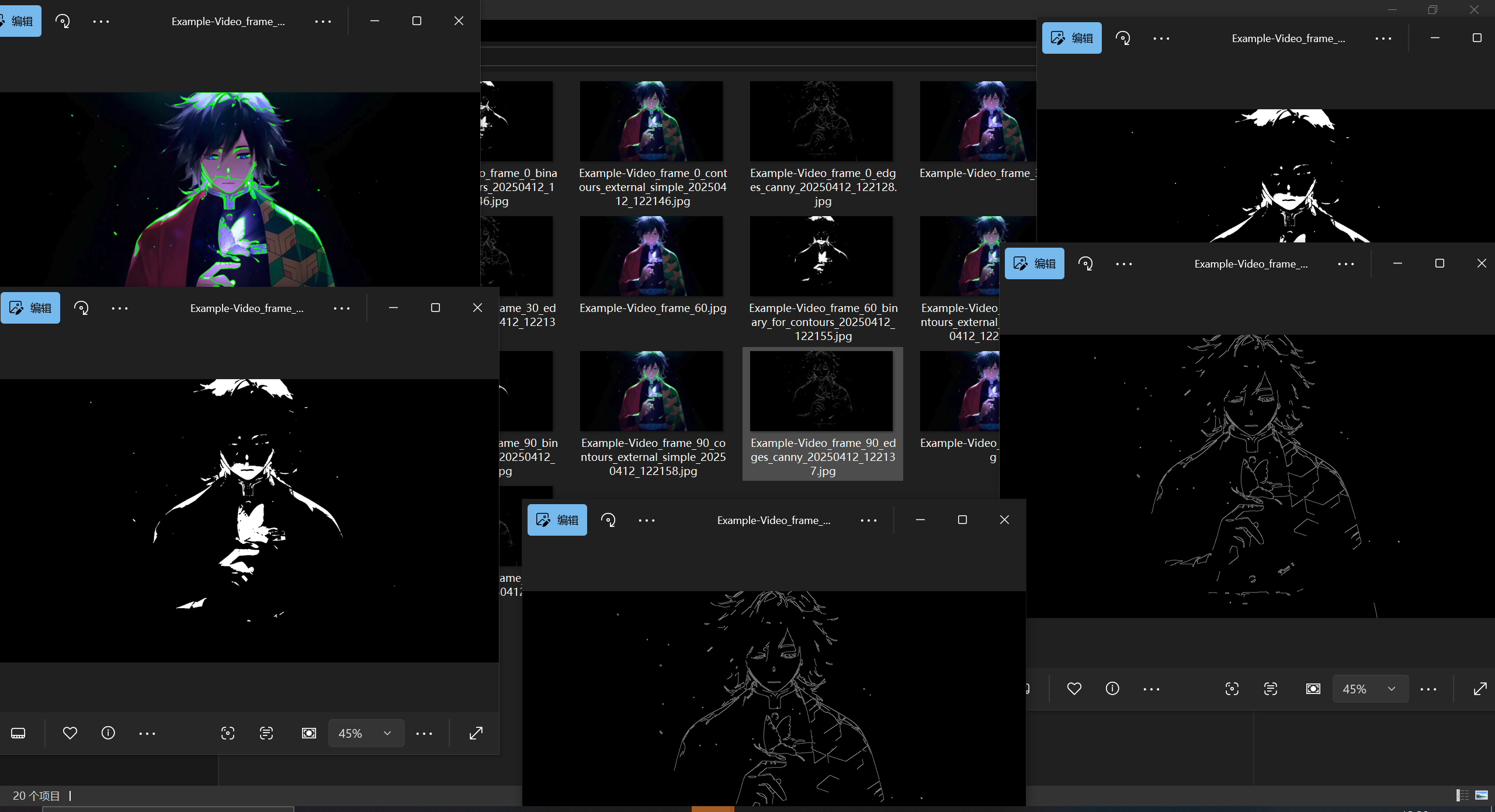
Original Video Sample
Contour Detection Processing
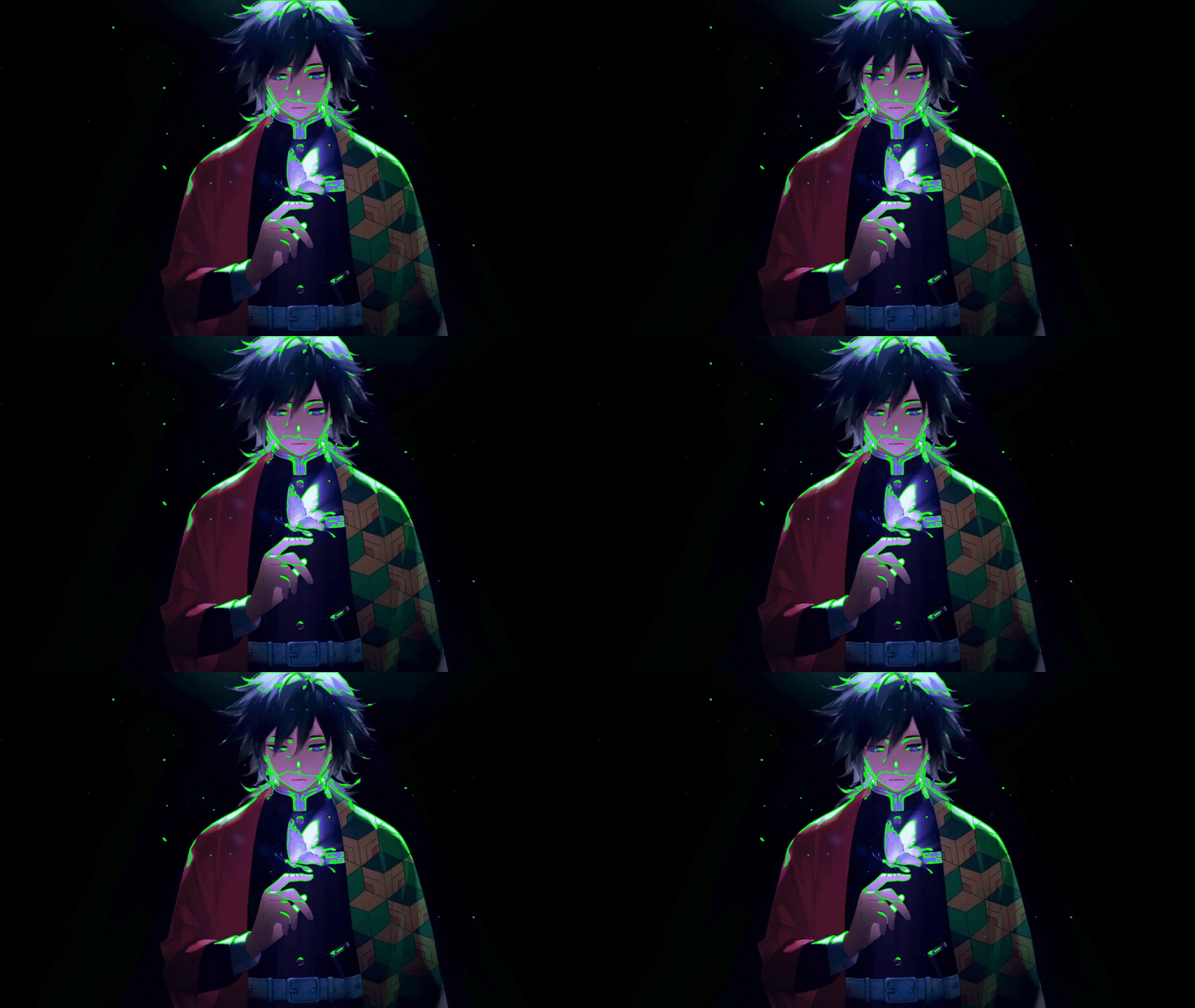 Example of contour detection processing applied to the original video above
📦 Installation
pip install opencv-mcp-server
For development:
# Clone the repository
git clone https://github.com/yourusername/opencv-mcp-server.git
cd opencv-mcp-server

# Create a virtual environment
python -m venv .venv
source .venv/bin/activate  # On Windows: .venv\Scripts\activate

# Install dependencies
pip install -e .
🔧 Usage
Use in Claude Desktop
Add to your Claude Desktop configuration:
{
    "mcpServers": {
        "opencv": {
            "command": "uvx",
            "args": [
                "opencv-mcp-server"
            ]
        }
    }
}
Install uvx
brew install uv
Then restart Claude Desktop
Basic Python Usage
from opencv_mcp_server import opencv_client

# Initialize client
client = opencv_client.OpenCVClient()

# Use tools
result = client.resize_image(
    image_path="input.jpg",
    width=800,
    height=600
)
Advanced Object Detection Example
Since all required models are already configured in the OPENCV_DNN_MODELS_DIR, you can use object detection without specifying model paths:
# Detect objects using pre-configured YOLO model
result = detect_objects_tool(
    image_path="street.jpg",
    confidence_threshold=0.5,
    nms_threshold=0.4
)
Configuration
The server can be configured using environment variables:
MCP_TRANSPORT: Transport method (default: "stdio")OPENCV_DNN_MODELS_DIR: Directory for storing DNN models (default: "models")CV_HAAR_CASCADE_DIR: Directory for storing Haar cascade files (optional)
🧠 Model Files Setup
The computer vision and object detection tools require pre-trained models to function properly. These models should be placed in the directory specified by the OPENCV_DNN_MODELS_DIR environment variable (default: "./models").
Required Models
The following models have been pre-configured:
Face Detection (DNN method)
deploy.prototxt- Face detection configurationres10_300x300_ssd_iter_140000.caffemodel- Face detection model weights
Object Detection (YOLO)
yolov3.weights- YOLO model weightsyolov3.cfg- YOLO configuration filecoco.names- Class names for detected objects
Model Usage
- The
detect_faces_tooluses the DNN models whenmethod="dnn"is specified - The
detect_objects_tooluses the YOLO models for general object detection
For those who need to download these models, see the "Installation" section or visit:
- YOLO models: https://pjreddie.com/darknet/yolo/
- Face detection models: https://github.com/opencv/opencv_3rdparty/tree/dnn_samples_face_detector_20170830
🧰 Available Tools
The OpenCV MCP Server provides a wide range of computer vision tools organized into four categories:
📸 Image Basics
These tools provide fundamental image manipulation capabilities:
save_image_tool: Save an image to a file- Parameters:
path_in(input image path),path_out(output file path) - Returns: Image save status and path information
- Example:
save_image_tool(path_in="processed.jpg", path_out="final.jpg")
- Parameters:
convert_color_space_tool: Convert image between color spaces (BGR, RGB, GRAY, HSV, etc.)- Parameters:
image_path,source_space,target_space - Returns: Converted image information and path
- Example:
convert_color_space_tool(image_path="image.jpg", source_space="BGR", target_space="HSV")
- Parameters:
resize_image_tool: Resize an image to specific dimensions- Parameters:
image_path,width,height,interpolation(optional) - Returns: Resized image information and path
- Example:
resize_image_tool(image_path="large.jpg", width=800, height=600)
- Parameters:
crop_image_tool: Crop a region from an image- Parameters:
image_path,x,y,width,height - Returns: Cropped image information and path
- Example:
crop_image_tool(image_path="scene.jpg", x=100, y=150, width=300, height=200)
- Parameters:
get_image_stats_tool: Get statistical information about an image- Parameters:
image_path,channels(boolean, default: true) - Returns: Image statistics and histogram visualization
- Example:
get_image_stats_tool(image_path="photo.jpg", channels=True)
- Parameters:
🖼️ Image Processing
These tools provide advanced image processing and transformation capabilities:
apply_filter_tool: Apply various filters to an image (blur, gaussian, median, bilateral)- Parameters:
image_path,filter_type,kernel_size, and filter-specific parameters - Returns: Filtered image and filter information
- Example:
apply_filter_tool(image_path="noisy.jpg", filter_type="gaussian", kernel_size=5)
- Parameters:
detect_edges_tool: Detect edges in an image using different methods (Canny, Sobel, Laplacian, Scharr)- Parameters:
image_path,method, threshold parameters, and method-specific parameters - Returns: Edge-detected image and method information
- Example:
detect_edges_tool(image_path="objects.jpg", method="canny", threshold1=100, threshold2=200)
- Parameters:
apply_threshold_tool: Apply threshold to an image (binary, adaptive, etc.)- Parameters:
image_path,threshold_type, threshold values and method-specific parameters - Returns: Thresholded image and threshold information
- Example:
apply_threshold_tool(image_path="scan.jpg", threshold_type="binary", threshold_value=127)
- Parameters:
detect_contours_tool: Detect and optionally draw contours in an image- Parameters:
image_path,mode,method, drawing parameters - Returns: Image with contours and contour information
- Example:
detect_contours_tool(image_path="shapes.jpg", mode="external", method="simple")
- Parameters:
find_shapes_tool: Find basic shapes in an image (circles, lines)- Parameters:
image_path,shape_type, shape-specific parameters - Returns: Image with shapes and shape information
- Example:
find_shapes_tool(image_path="geometry.jpg", shape_type="circles", min_radius=10)
- Parameters:
match_template_tool: Find a template in an image- Parameters:
image_path,template_path, matching parameters - Returns: Image with matches and match information
- Example:
match_template_tool(image_path="scene.jpg", template_path="object.jpg", threshold=0.8)
- Parameters:
🧠 Computer Vision
These tools provide high-level computer vision capabilities:
detect_features_tool: Detect features in an image using methods like SIFT, ORB, BRISK- Parameters:
image_path,method,max_features, drawing parameters - Returns: Image with keypoints and feature information
- Example:
detect_features_tool(image_path="landmark.jpg", method="sift", max_features=500)
- Parameters:
match_features_tool: Match features between two images- Parameters:
image1_path,image2_path,method, matching parameters - Returns: Image with matches and match information
- Example:
match_features_tool(image1_path="scene1.jpg", image2_path="scene2.jpg", method="sift")
- Parameters:
detect_faces_tool: Detect faces in an image using Haar cascades or DNN- Parameters:
image_path,method, method-specific parameters - Returns: Image with faces and face information
- Example:
detect_faces_tool(image_path="group.jpg", method="haar", min_neighbors=5)
- Parameters:
detect_objects_tool: Detect objects using pre-trained DNN models (e.g., YOLO)- Parameters:
image_path, model paths, detection parameters - Returns: Image with objects and object information
- Example:
detect_objects_tool(image_path="street.jpg", confidence_threshold=0.5)
- Parameters:
🎬 Video Processing
These tools provide video analysis and processing capabilities:
extract_video_frames_tool: Extract frames from a video file- Parameters:
video_path, frame selection parameters - Returns: Extracted frames information and paths
- Example:
extract_video_frames_tool(video_path="clip.mp4", start_frame=0, step=10, max_frames=20)
- Parameters:
detect_motion_tool: Detect motion between two frames- Parameters:
frame1_path,frame2_path, detection parameters - Returns: Motion detection results and visualizations
- Example:
detect_motion_tool(frame1_path="frame1.jpg", frame2_path="frame2.jpg", threshold=25)
- Parameters:
track_object_tool: Track an object across video frames- Parameters:
video_path,initial_bbox, tracking parameters - Returns: Tracking results and extracted frames
- Example:
track_object_tool(video_path="tracking.mp4", initial_bbox=[100, 100, 50, 50])
- Parameters:
combine_frames_to_video_tool: Combine frames into a video file- Parameters:
frame_paths,output_path, video parameters - Returns: Video creation results
- Example:
combine_frames_to_video_tool(frame_paths=["frame1.jpg", "frame2.jpg"], output_path="output.mp4")
- Parameters:
create_mp4_from_video_tool: Convert a video file to MP4 format- Parameters:
video_path,output_path, conversion parameters - Returns: Conversion results including MP4 path
- Example:
create_mp4_from_video_tool(video_path="input.avi", output_path="output.mp4")
- Parameters:
detect_video_objects_tool: Detect objects in a video and create a detection result video- Parameters:
video_path, model paths, detection parameters - Returns: Object detection results and output video path
- Example:
detect_video_objects_tool(video_path="traffic.mp4", confidence_threshold=0.5)
- Parameters:
detect_camera_objects_tool: Detect objects from computer's camera and save to video- Parameters:
camera_id, recording parameters, model paths, detection parameters - Returns: Object detection results and output video path
- Example:
detect_camera_objects_tool(camera_id=0, duration=30, confidence_threshold=0.5)
- Parameters:
📝 Advanced Usage Examples
📸 Basic Image Processing
# Resize an image
result = resize_image_tool(
    image_path="input.jpg",
    width=800,
    height=600
)
# Access the resized image path
resized_image_path = result["output_path"]

# Apply a Gaussian blur filter
result = apply_filter_tool(
    image_path="input.jpg",
    filter_type="gaussian",
    kernel_size=5,
    sigma=1.5
)
🧠 Object Detection
# Detect objects in an image using YOLO
result = detect_objects_tool(
    image_path="scene.jpg",
    confidence_threshold=0.5,
    nms_threshold=0.4
)
# Access detected objects
objects = result["objects"]
for obj in objects:
    print(f"Detected {obj['class_name']} with confidence {obj['confidence']}")
🎬 Video Analysis
# Extract frames from a video
result = extract_video_frames_tool(
    video_path="input.mp4",
    start_frame=0,
    step=10,
    max_frames=10
)
# Access extracted frames
frames = result["frames"]

# Detect objects in a video
result = detect_video_objects_tool(
    video_path="input.mp4",
    confidence_threshold=0.5,
    frame_step=5
)
🔄 Chaining Operations
Tools can be chained together by using the output_path from one tool as the input to another:
# First resize an image
result1 = resize_image_tool(
    image_path="input.jpg",
    width=800,
    height=600
)

# Then apply edge detection to the resized image
result2 = detect_edges_tool(
    image_path=result1["output_path"],
    method="canny",
    threshold1=100,
    threshold2=200
)

# Finally detect contours in the edge-detected image
result3 = detect_contours_tool(
    image_path=result2["output_path"],
    mode="external",
    method="simple"
)
🔍 Real-world Applications
OpenCV MCP Server can be used for a wide range of applications:
- 🤖 Autonomous Systems: Vision-based navigation and obstacle detection
- 🚗 Traffic Analysis: Vehicle counting, speed estimation, and license plate recognition
- 🔐 Security Systems: Motion detection and facial recognition
- 📱 Augmented Reality: Feature tracking and pose estimation
- 🏥 Medical Imaging: Tissue segmentation and anomaly detection
- 🏭 Industrial Inspection: Defect detection and quality control
- 🖼️ Digital Art: Image filtering and transformation
- 🎲 Gaming: Gesture recognition and player tracking
🗺️ Roadmap
Future enhancements planned for OpenCV MCP Server:
- 📊 Additional statistical analysis tools
- 🧬 Advanced segmentation algorithms
- 🧠 Integration with machine learning models
- 🌐 3D vision capabilities
- 📱 Mobile-friendly processing options
- ⚡ Performance optimizations for real-time processing
🤝 Contributing
Contributions are welcome! Please feel free to submit a Pull Request.
- Fork the project
- Create your feature branch (
git checkout -b feature/amazing-feature) - Commit your changes (
git commit -m 'Add some amazing feature') - Push to the branch (
git push origin feature/amazing-feature) - Open a Pull Request
📜 License
MIT License - See the LICENSE file for details.
📞 Contact
For questions or feedback, please open an issue on the GitHub repository.
Built with ❤️ using OpenCV and Python.
FAQ
Common questions
Discussion
Questions & comments · 0
Sign In Sign in to leave a comment.