
Query Multiple AI Models for Diverse Insights
An MCP server that queries multiple local Ollama models with different personas and combines their answers, giving Claude a council of AI perspectives.

1.0.0Add to Favorites
Why it matters
Leverage an 'expert council' of multiple Ollama models to generate diverse perspectives on a single query. This asset combines AI responses, allowing for richer analysis and decision-making.
Outcomes
What it gets done
Query multiple Ollama models simultaneously with a single prompt.
Assign custom roles and system prompts to individual AI models.
View and manage all available Ollama models on your system.
Integrate seamlessly with Claude for Desktop for enhanced workflows.
Source
Get it from source
Spark does not host a copy of it.
Open sourceReports
Agent outcome reports
No reports yet
Capabilities
Tools your agent gets
Shows all Ollama models available on your system
Queries multiple Ollama models with a single question and combines their responses
Overview
Multi-Model Advisor queries multiple local Ollama models with one question and combines their answers, with per-model persona customization. Use it when you want to compare how multiple local Ollama models answer the same question, each optionally with its own persona.
What it does
Queries multiple local Ollama models and combines their responses, giving diverse AI perspectives on a single question - a "council of advisors" Claude can synthesize alongside its own answer. Each model can be assigned a different role or persona via its own system prompt (e.g. one model creative, one empathetic, one analytical), and you can view all Ollama models available on your system.
Inputs and outputs
Requires Node.js 16+ and a running Ollama install. Install via Smithery:
npx -y @smithery/cli install @YuChenSSR/multi-ai-advisor-mcp --client claude
Or manually - clone, npm install, npm run build, then pull the default models:
ollama pull gemma3:1b
ollama pull llama3.2:1b
ollama pull deepseek-r1:1.5b
Configure via a .env file, including per-model system prompts, e.g.:
GEMMA_SYSTEM_PROMPT=You are a creative and innovative AI assistant. Think outside the box and offer novel perspectives.
LLAMA_SYSTEM_PROMPT=You are a supportive and empathetic AI assistant focused on human well-being.
DEEPSEEK_SYSTEM_PROMPT=You are a logical and analytical AI assistant. Think step-by-step and explain your reasoning clearly.
Then register the server in Claude for Desktop's config file (claude_desktop_config.json, path differs by OS).
Who it's for
Anyone who wants a second (and third, and fourth) opinion from locally-run models before Claude answers - useful when you want breadth of perspective without sending the question to an external API.
How it works
The server exposes two tools: list-available-models shows all Ollama models on your system, and query-models sends a question to multiple models at once. When Claude decides to use query-models, it sends your question to the configured models, each responds with its own perspective (shaped by its assigned persona), and Claude synthesizes a comprehensive answer from all of them. A typical prompt: "What are the most important skills for success in today's job market? You can use gemma3:1b, llama3.2:1b, deepseek-r1:1.5b to help you."
Troubleshooting
- Ollama connection issues: ensure Ollama is running (
ollama serve), checkOLLAMA_API_URLin.env, and verifyhttp://localhost:11434responds in a browser. - Model not found: confirm the model was pulled (
ollama pull <model-name>), verify its exact name withollama list, or checklist-available-models. - Claude not showing MCP tools: restart Claude after updating the config, confirm the absolute path in
claude_desktop_config.jsonis correct, and check Claude's logs for errors. - Not enough RAM: if a configured model is too large for available memory, specify a smaller model or upgrade RAM.
Source README
Multi-Model Advisor
(锵锵四人行)
A Model Context Protocol (MCP) server that queries multiple Ollama models and combines their responses, providing diverse AI perspectives on a single question. This creates a "council of advisors" approach where Claude can synthesize multiple viewpoints alongside its own to provide more comprehensive answers.
graph TD
    A[Start] --> B[Worker Local AI 1 Opinion]
    A --> C[Worker Local AI 2 Opinion]
    A --> D[Worker Local AI 3 Opinion]
    B --> E[Manager AI]
    C --> E
    D --> E
    E --> F[Decision Made]
Features
- Query multiple Ollama models with a single question
- Assign different roles/personas to each model
- View all available Ollama models on your system
- Customize system prompts for each model
- Configure via environment variables
- Integrate seamlessly with Claude for Desktop
Prerequisites
- Node.js 16.x or higher
- Ollama installed and running (see Ollama installation)
- Claude for Desktop (for the complete advisory experience)
Installation
Installing via Smithery
To install multi-ai-advisor-mcp for Claude Desktop automatically via Smithery:
npx -y @smithery/cli install @YuChenSSR/multi-ai-advisor-mcp --client claude
Manual Installation
Clone this repository:
git clone https://github.com/YuChenSSR/multi-ai-advisor-mcp.git
cd multi-ai-advisor-mcp
Install dependencies:
npm installBuild the project:
npm run buildInstall required Ollama models:
ollama pull gemma3:1b
ollama pull llama3.2:1b
ollama pull deepseek-r1:1.5b
Configuration
Create a .env file in the project root with your desired configuration:
# Server configuration
SERVER_NAME=multi-model-advisor
SERVER_VERSION=1.0.0
DEBUG=true

# Ollama configuration
OLLAMA_API_URL=http://localhost:11434
DEFAULT_MODELS=gemma3:1b,llama3.2:1b,deepseek-r1:1.5b

# System prompts for each model
GEMMA_SYSTEM_PROMPT=You are a creative and innovative AI assistant. Think outside the box and offer novel perspectives.
LLAMA_SYSTEM_PROMPT=You are a supportive and empathetic AI assistant focused on human well-being. Provide considerate and balanced advice.
DEEPSEEK_SYSTEM_PROMPT=You are a logical and analytical AI assistant. Think step-by-step and explain your reasoning clearly.
Connect to Claude for Desktop
Locate your Claude for Desktop configuration file:
- MacOS:
~/Library/Application Support/Claude/claude_desktop_config.json - Windows:
%APPDATA%\Claude\claude_desktop_config.json
- MacOS:
Edit the file to add the Multi-Model Advisor MCP server:
{
  "mcpServers": {
    "multi-model-advisor": {
      "command": "node",
      "args": ["/absolute/path/to/multi-ai-advisor-mcp/build/index.js"]
    }
  }
}
Replace
/absolute/path/to/with the actual path to your project directoryRestart Claude for Desktop
Usage
Once connected to Claude for Desktop, you can use the Multi-Model Advisor in several ways:
List Available Models
You can see all available models on your system:
Show me which Ollama models are available on my system
This will display all installed Ollama models and indicate which ones are configured as defaults.
Basic Usage
Simply ask Claude to use the multi-model advisor:
what are the most important skills for success in today's job market,
you can use gemma3:1b, llama3.2:1b, deepseek-r1:1.5b to help you
Claude will query all default models and provide a synthesized response based on their different perspectives.
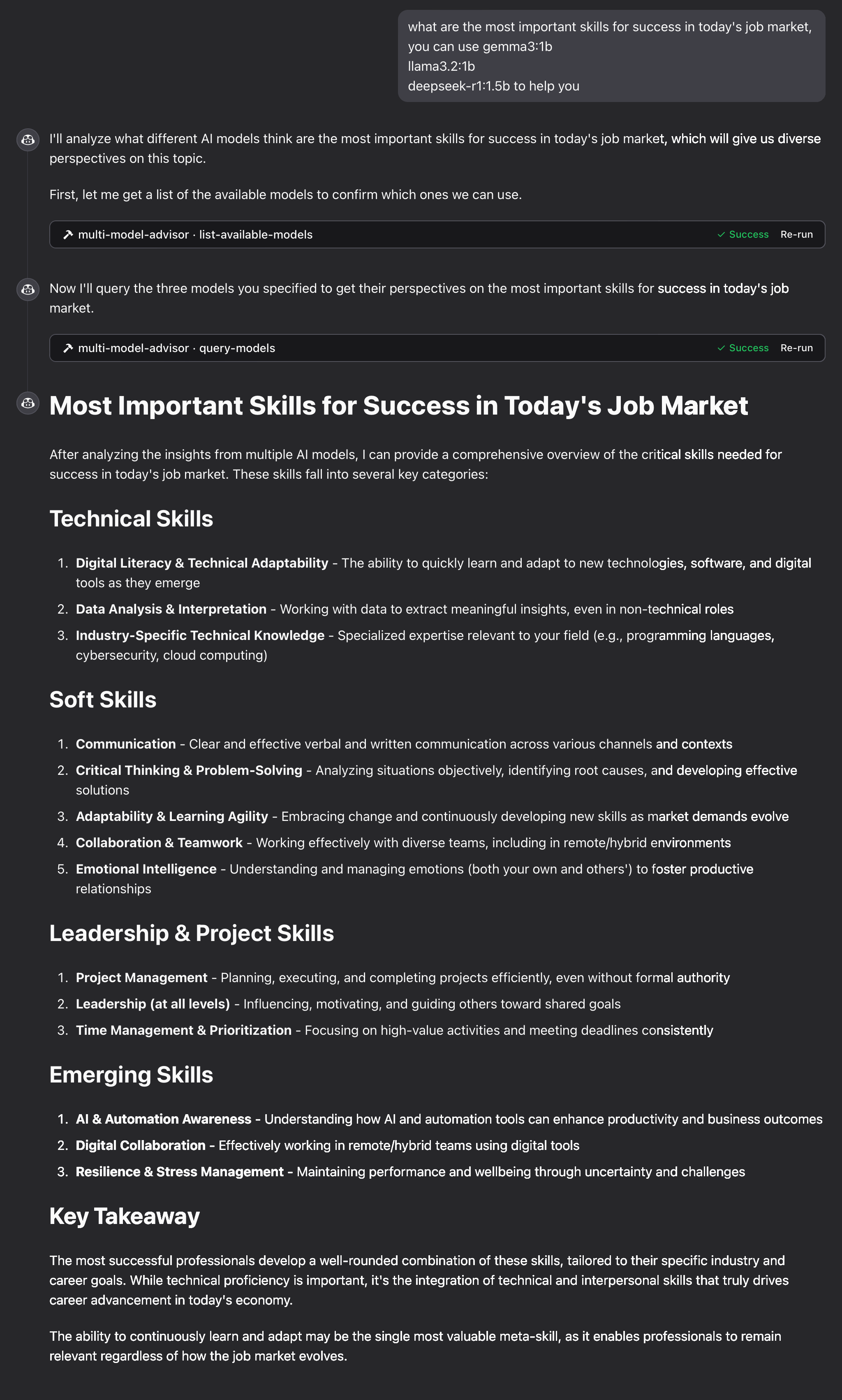
How It Works
The MCP server exposes two tools:
list-available-models: Shows all Ollama models on your systemquery-models: Queries multiple models with a question
When you ask Claude a question referring to the multi-model advisor:
- Claude decides to use the
query-modelstool - The server sends your question to multiple Ollama models
- Each model responds with its perspective
- Claude receives all responses and synthesizes a comprehensive answer
- Claude decides to use the
Each model can have a different "persona" or role assigned, encouraging diverse perspectives.
Troubleshooting
Ollama Connection Issues
If the server can't connect to Ollama:
- Ensure Ollama is running (
ollama serve) - Check that the OLLAMA_API_URL is correct in your .env file
- Try accessing http://localhost:11434 in your browser to verify Ollama is responding
Model Not Found
If a model is reported as unavailable:
- Check that you've pulled the model using
ollama pull <model-name> - Verify the exact model name using
ollama list - Use the
list-available-modelstool to see all available models
Claude Not Showing MCP Tools
If the tools don't appear in Claude:
- Ensure you've restarted Claude after updating the configuration
- Check the absolute path in claude_desktop_config.json is correct
- Look at Claude's logs for error messages
RAM is not enough
Some managers' AI models may have chosen larger models, but there is not enough memory to run them. You can try specifying a smaller model (see the Basic Usage) or upgrading the memory.
FAQ
Common questions
Trust
How it checks out
Discussion
Questions & comments · 0
Sign In Sign in to leave a comment.