
Synchronize Memory Across AI Tools
Persistent memory MCP server with 5ms local reads, hybrid Cloudflare sync, and natural memory triggers for 13+ AI applications.

11.13.0Add to Favorites
Why it matters
Integrate a production-ready memory service for AI assistants, offering zero database locking and a hybrid backend for fast local reads with cloud synchronization.
Outcomes
What it gets done
Enable intelligent memory search with Natural Memory Triggers.
Facilitate team collaboration through OAuth 2.1.
Provide multi-client support for various AI applications.
Source
Get it from source
Spark does not host a copy of it.
Open sourceReports
Agent outcome reports
No reports yet
Capabilities
Tools your agent gets
Store a new memory or update existing memory in the hybrid backend system.
Search memories using intelligent semantic search with natural language queries.
Retrieve specific memories by ID or context from local or cloud storage.
Delete a memory from the hybrid storage system.
List all memories with optional filtering and pagination.
Trigger memory consolidation with decay scoring inspired by dream processes.
Get natural memory triggers with relevance scores for current context.
Manually trigger synchronization between local cache and cloud backend.
Overview
mcp-memory-service MCP Server
mcp-memory-service gives AI assistants persistent memory using a hybrid backend of fast local SQLite-vec reads and background Cloudflare synchronization. It supports 13+ AI applications with natural memory triggers, automatic context injection, and OAuth 2.1 team collaboration. Use it when an AI assistant needs to retain and retrieve context across sessions and multiple clients. A pure sqlite backend is available if you want to avoid the Cloudflare sync component.
What it does
mcp-memory-service is a production-ready MCP server that gives AI assistants persistent, searchable memory. It uses a hybrid backend combining fast local reads (around 5ms) via SQLite-vec with ONNX embeddings and background synchronization to Cloudflare, so memory stays available offline while staying in sync across devices and clients.
When to use - and when NOT to
Use it when you want an AI assistant to retain context across sessions - automatically injecting relevant past memories, surfacing the top-3 most relevant memories at session start with relevance scores, and supporting concurrent access from multiple AI applications without database locking. It supports 13+ AI applications including Claude Desktop, VS Code, Cursor, and Continue, and offers team collaboration through OAuth 2.1. Do not use it if you need a fully offline-only setup with no cloud component at all - the hybrid backend's sync layer relies on Cloudflare, though a pure sqlite backend option exists if cloud sync isn't wanted.
Capabilities
- Zero database locking, allowing concurrent access from multiple clients at once.
- Hybrid storage backend: fast local reads plus background synchronization through Cloudflare.
- Natural Memory Triggers with 85%+ accuracy for automatic, context-aware memory retrieval.
- Intelligent memory search with automatic context injection into conversations.
- Team collaboration via OAuth 2.1.
- Memory consolidation system with decay scoring, inspired by how memory consolidation works during sleep.
- Multi-client support across Claude Desktop, VS Code, Cursor, Continue, and other MCP-compatible applications.
- Offline-capable via SQLite-vec with local ONNX embeddings.
- Git-aware context integration.
How to install
pip install mcp-memory-service
# or
uv pip install mcp-memory-service
# or from source
git clone https://github.com/doobidoo/mcp-memory-service.git
cd mcp-memory-service && python install.py
# or via Docker
docker-compose up -d
# or via Smithery for Claude
npx -y @smithery/cli install @doobidoo/mcp-memory-service --client claude
Configure Claude Desktop with:
{
  "mcpServers": {
    "memory": {
      "command": "memory",
      "args": ["server"],
      "env": { "MCP_MEMORY_STORAGE_BACKEND": "hybrid" }
    }
  }
}
MCP_MEMORY_STORAGE_BACKEND can be set to hybrid, cloudflare, or sqlite. Requires Python 3.12+ (check sqlite-vec compatibility on 3.13); macOS users may need Homebrew Python for SQLite extension support. Initial setup downloads a small (~25MB) embedding model automatically.
Who it's for
AI application builders and power users who want persistent, cross-session memory shared across many MCP clients, with fast local access and optional cloud sync for team or multi-device use.
Source README
This repository has moved to GitHub
Active development, issues, pull requests, CI and releases are at
https://github.com/doobidoo/mcp-memory-service as of 5 September 2026.This copy stays here, readable and unchanged, so that existing links, issue
numbers and pull request references keep resolving. It receives no further
pushes and its CI no longer runs. Please do not open issues or pull requests
here, they will not be seen.The wiki moved too: https://github.com/doobidoo/mcp-memory-service/wiki
mcp-memory-service
Persistent Shared Memory for AI Agent Pipelines
Open-source memory backend for AI agents - REST API, MCP, OAuth, CLI, dashboard. One self-hosted service, every transport.
Agents store decisions, share causal knowledge graphs, and retrieve
context in 5ms - without cloud lock-in or API costs.
Works with LangGraph · CrewAI · AutoGen · any HTTP client · Claude Desktop · OpenCode













▶ The 3D knowledge graph in motion - every memory a glowing node, every relationship a curved edge. (Video not playing? See it live at mcpmemory.services.)
Why Agents Need This
Your AI assistant forgets everything when you start a new chat. You spend 10 minutes re-explaining your architecture. Again. MCP Memory Service captures project context, architecture decisions, and code patterns automatically - new sessions start with everything already known.
| Without mcp-memory-service | With mcp-memory-service |
|---|---|
| Each agent run starts from zero | Agents retrieve prior decisions in 5ms |
| Memory is local to one graph/run | Memory is shared across all agents and runs |
| You manage Redis + Pinecone + glue code | One self-hosted service, zero cloud cost |
| No causal relationships between facts | Knowledge graph with typed edges (causes, fixes, contradicts) |
| Context window limits create amnesia | Autonomous consolidation compresses old memories |
Key capabilities for agent pipelines:
- Framework-agnostic REST API - 76 endpoints, no MCP client library needed
- Knowledge graph - agents share causal chains, not just facts
X-Agent-IDheader - auto-tag memories by agent identity for scoped retrievalconversation_id- bypass deduplication for incremental conversation storage- SSE events - real-time notifications when any agent stores or deletes a memory
- Embeddings run locally via ONNX - memory never leaves your infrastructure
🚀 Get Started in 60 Seconds
Not sure which setup fits your needs? See the Setup Guide - a decision tree walks you to the right path in under a minute.
1. Install:
pip install mcp-memory-service
2. Configure your AI client:
Claude Desktop
Add to your config file:
- macOS:
~/Library/Application Support/Claude/claude_desktop_config.json - Windows:
%APPDATA%\Claude\claude_desktop_config.json - Linux:
~/.config/Claude/claude_desktop_config.json
{
  "mcpServers": {
    "memory": {
      "command": "memory",
      "args": ["server"]
    }
  }
}
Restart Claude Desktop. Your AI now remembers everything across sessions.
Claude Code
claude mcp add memory -- memory server
Restart Claude Code. Memory tools will appear automatically.
Agent pipelines (REST API - LangGraph, CrewAI, AutoGen, any HTTP client)
MCP_ALLOW_ANONYMOUS_ACCESS=true memory server --http
# REST API running at http://localhost:8000
import asyncio
import httpx

BASE_URL = "http://localhost:8000"


async def main():
    async with httpx.AsyncClient() as client:
        # Store — auto-tag with X-Agent-ID header
        await client.post(f"{BASE_URL}/api/memories", json={
            "content": "API rate limit is 100 req/min",
            "tags": ["api", "limits"],
        }, headers={"X-Agent-ID": "researcher"})
        # Stored with tags: ["api", "limits", "agent:researcher"]

        # Search — scope to a specific agent
        results = await client.post(f"{BASE_URL}/api/memories/search", json={
            "query": "API rate limits",
            "tags": ["agent:researcher"],
        })
        print(results.json()["memories"])


asyncio.run(main())
Framework-specific guides: docs/agents/
OpenCode
Start the HTTP API:
MCP_ALLOW_ANONYMOUS_ACCESS=true memory server --http
Install the local plugin:
git clone https://github.com/doobidoo/mcp-memory-service.git
cd mcp-memory-service
mkdir -p ~/.config/opencode/plugins
cp opencode/memory-plugin.js ~/.config/opencode/plugins/
cp opencode/memory-plugin.config.example.json ~/.config/opencode/memory-plugin.json
OpenCode automatically loads local plugins from ~/.config/opencode/plugins/ and .opencode/plugins/.
Optional: register the /memory slash command in ~/.config/opencode/opencode.json to query status, search, and health from inside the TUI:
{
  "command": {
    "memory": {
      "description": "Show MCP Memory Service status. Usage: /memory, /memory search <query>, /memory health",
      "template": ""
    }
  }
}
See OpenCode integration guide for configuration, project-local installs, slash command details, TUI toasts, and current limitations.
The current OpenCode integration ships as repository files for the local plugin directory. If you installed only the PyPI package, clone the repository once to copy the plugin files.
The plugin defaults to
http://127.0.0.1:8000, butmemoryService.endpointandOPENCODE_MEMORY_ENDPOINTlet you target any reachable HTTP deployment.
🌐 claude.ai (Browser - Remote MCP)
Unlike desktop-only MCP servers, mcp-memory-service supports Remote MCP: persistent memory directly in your browser, on any device - no Claude Desktop required. Enterprise-ready (OAuth 2.0 + HTTPS + CORS), self-hosted or cloud-hosted.
# 1. Start server with Remote MCP
MCP_STREAMABLE_HTTP_MODE=1 \
MCP_SSE_HOST=0.0.0.0 \
MCP_OAUTH_ENABLED=true \
python -m mcp_memory_service.server

# 2. Expose publicly (Cloudflare Tunnel)
cloudflared tunnel --url http://localhost:8765

# 3. Add connector in claude.ai Settings → Connectors with the tunnel URL
#    OAuth flow will handle authentication automatically
Production Setup: Remote MCP Setup Guide (Let's Encrypt, nginx, Docker, firewall).
Step-by-Step Tutorial: Blog: 5-Minute claude.ai Setup | Wiki Guide
🔧 Advanced: Custom Backends & Team Setup
For production deployments, team collaboration, or cloud sync:
git clone https://github.com/doobidoo/mcp-memory-service.git
cd mcp-memory-service
python scripts/installation/install.py
Choose from:
- SQLite (local, fast, single-user)
- Cloudflare (cloud, multi-device sync)
- Hybrid (best of both: 5ms local + background cloud sync)
- Milvus (dedicated vector DB - Milvus Lite file, self-hosted, or Zilliz Cloud)
ℹ️ For long-lived services (MCP servers, web backends, notebook sessions), prefer Docker Milvus or Zilliz Cloud over Milvus Lite. See docs/milvus-backend.md for why.
⚡ Works With Your Favorite AI Tools
🤖 Agent Frameworks (REST API)
LangGraph · CrewAI · AutoGen · Any HTTP Client · OpenClaw/Nanobot · Custom Pipelines
🖥️ CLI & Terminal AI (MCP)
Claude Code · Gemini CLI · Gemini Code Assist · OpenCode · Codex CLI · Goose · Aider · GitHub Copilot CLI · Amp · Continue · Zed · Cody
🎨 Desktop & IDE (MCP)
Claude Desktop · VS Code · Cursor · Windsurf · Kilo Code · Raycast · JetBrains · Replit · Sourcegraph · Qodo
💬 Chat Interfaces (MCP)
ChatGPT (Developer Mode) · claude.ai (Remote MCP via HTTPS)
Works seamlessly with any MCP-compatible client or HTTP client - whether you're building agent pipelines, coding in the terminal, IDE, or browser.
💡 NEW: ChatGPT now supports MCP! Enable Developer Mode to connect your memory service directly. See setup guide →
Home Assistant and other clients without OAuth: connect with anonymous access on your LAN, no source patching needed. See setup guide →
✨ Features
🧠 Persistent Memory - Context survives across sessions with semantic search
🔍 Smart Retrieval - Finds relevant context automatically using AI embeddings
⚡ 5ms Speed - Instant context injection, no latency
🔄 Multi-Client - Works across 25+ AI applications
☁️ Cloud Sync - Optional Cloudflare backend for team collaboration
🔒 Privacy-First - Local-first, you control your data
📊 Web Dashboard - Visualize and manage memories at http://localhost:8000
🧬 Knowledge Graph - Interactive D3.js visualization of memory relationships
🏠 Homelab Quality Scoring - Point scoring at any OpenAI-compatible endpoint (Ollama, LiteLLM, vLLM)
🔗 Entity Extraction - Auto-links @mentions, #tags, URLs, and file paths from memory content to a queryable entity graph
💡 Insight Cards - Consolidation detects patterns, trends, and knowledge gaps across your memory corpus and surfaces them as structured insights
🏷️ Tag Match Filtering - tag_match=AND/OR on memory_search for precise multi-tag queries
🖥️ Dashboard Preview
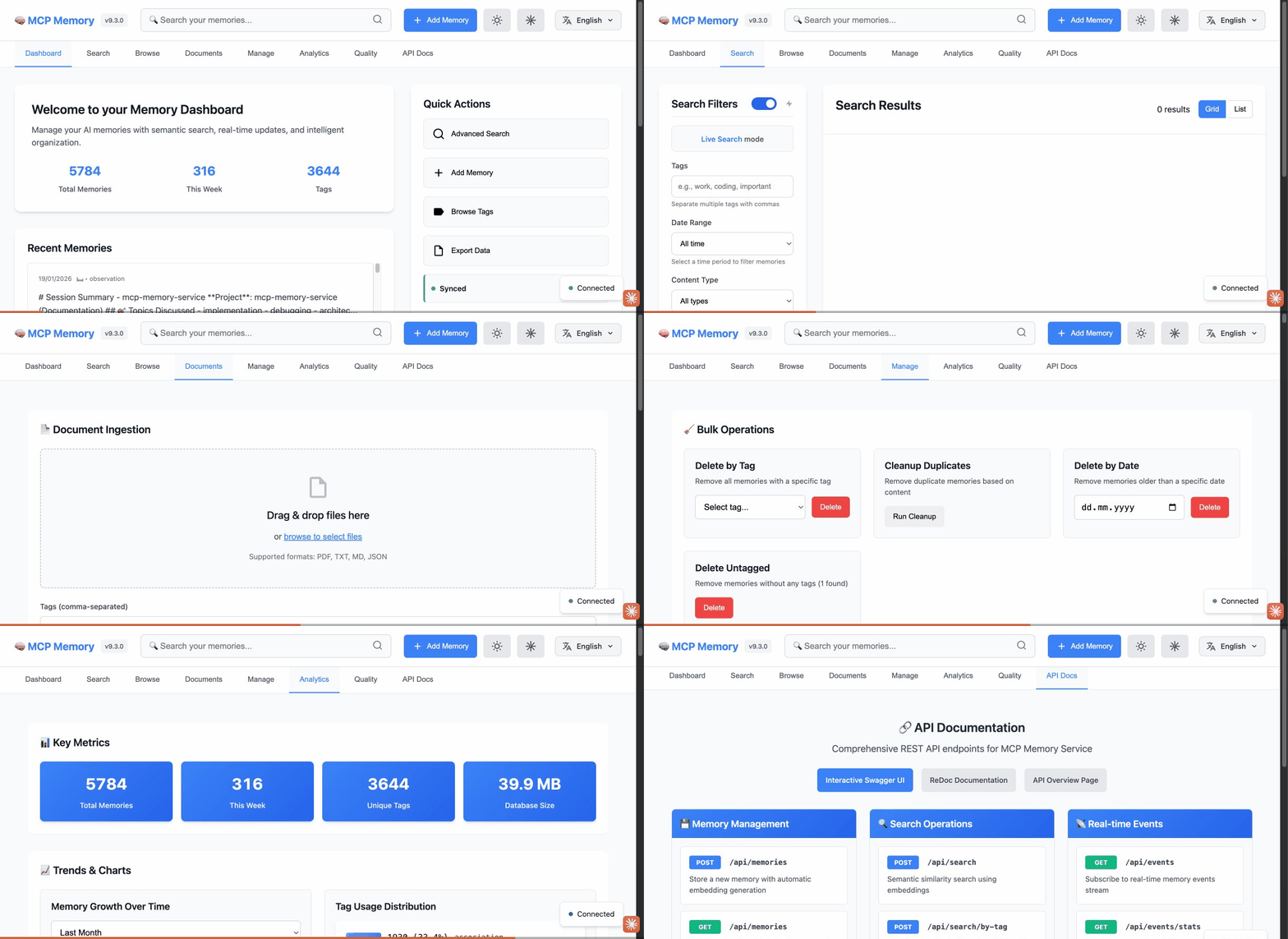
8 Dashboard Tabs: Dashboard • Search • Browse • Documents • Manage • Analytics • Quality • API Docs
🎬 Watch the Web Dashboard Walkthrough on YouTube - semantic search, tag browser, document ingestion, analytics, quality scoring, and API docs in under 2 minutes.
📖 See Web Dashboard Guide for complete documentation.
Real-World Deployments
Multi-Agent Cluster with Shared Memory
"After I work with one of the cluster agents on something I want my local agent to know about, the cluster agent adds a special tag to the memory entry that my local agent recognizes as a message from a cluster agent. So they end up using it as a comms bridge - and it's pretty delightful."
- @jeremykoerber (originally GitHub issue #591)
A 5-agent openclaw cluster uses mcp-memory-service as shared state and as an inter-agent messaging bus - without any custom protocol. Cluster agents tag memories with a sentinel like msg:cluster, and the local agent filters on that tag to receive cross-cluster signals. The memory service becomes the coordination layer with zero additional infrastructure.
# Cluster agent stores a learning and flags it for the local agent
await client.post(f"{BASE_URL}/api/memories", json={
    "content": "Rate limit on provider X is 50 RPM — switch to provider Y after 40",
    "tags": ["api", "limits", "msg:cluster"],       # sentinel tag
}, headers={"X-Agent-ID": "cluster-agent-3"})

# Local agent polls for cluster messages
results = await client.post(f"{BASE_URL}/api/memories/search", json={
    "query": "messages from cluster",
    "tags": ["msg:cluster"],
})
This pattern - tags as inter-agent signals - emerges naturally from the tagging system and requires no additional infrastructure.
Self-Hosted Docker Stack with Cloudflare Tunnel
"The quality of life that session-independent memory adds to AI workflows is immense. File-based memory demands constant discipline. Semantic recall from a live database doesn't. Storing data on my own hardware while making it remotely accessible across platforms turned out to be a feature I didn't know I needed."
- @PL-Peter (originally GitHub discussion #602)
A production-tested self-hosted deployment using Docker containers behind a Cloudflare tunnel, with AuthMCP Gateway handling authentication:
| Layer | Role |
|---|---|
| Cloudflare Tunnel | Name-based routing, subnet-based access control, authentication before hitting self-hosted resources |
| AuthMCP Gateway | Auth/aggregation with locally managed users, admin UI, per-user MCP server access control, bearer token auth |
| mcp-memory-service | Two Docker containers sharing one SQLite backend - one for MCP, one for the web UI (document ingestion) |
Security best practices for this setup:
- Use Cloudflare ZeroTrust with subnet-based access control (e.g., allow Anthropic subnets + your own IPs)
- Add Client IP Address Filtering to all Cloudflare API tokens (Dashboard → My Profile → API Tokens → Edit → Client IP Address Filtering) to limit abuse if a token leaks
- If using IPv6, include your IPv6 /64 network in the allowlist (Python prefers IPv6 by default)
- For long-running browser sessions, request the
offline_accessscope during authorization to receive a rotatingrefresh_token(lifetime viaMCP_OAUTH_REFRESH_TOKEN_EXPIRE_DAYS, default 30 days). Without this scope, access tokens are the only credential - extendMCP_OAUTH_ACCESS_TOKEN_EXPIRE_MINUTESup to1440(24h) if you need longer single-shot sessions. - Consider an auth proxy like AuthMCP or mcp-auth-proxy for robust session management
Fully-Offline Shared Memory Across Four Agents
"mcp-memory-service has been the shared memory layer for all my coding agents since February - Claude Code, Claude Desktop, Codex CLI and OpenCode all talk to the same sqlite-vec DB over stdio on my Mac. ~5,900 memories and counting. Every session starts by pulling a bootstrap profile from memory and ends by committing a session summary, so any agent can pick up where another left off - work context, project state, even a 'mistakes I made before' log. It's the closest thing to persistent identity my agents have."
- Mingjian Shao (AI PM & AI consultant, via LinkedIn)
A single local sqlite-vec database on a Mac acts as the shared brain for four different agents over stdio - no server, no cloud. Embeddings run fully offline via a local Qwen3-Embedding-0.6B (1024-dim) on MPS, with daily automated backups, scheduled consolidation, and the dashboard kept alive by a LaunchAgent.
Lesson worth stealing (offline embeddings): when the custom embedding model fails to load, the service can silently fall back to the default MiniLM (384-dim) and subsequent writes fail with dimension mismatches. If you pin a non-default embedding model, also pin the model path and set the Hugging Face offline flags so a load failure surfaces loudly instead of degrading - then a dimension mismatch can't corrupt the store.
Comparison with Alternatives
vs. Commercial Memory APIs
| Mem0 | Zep | DIY Redis+Pinecone | mcp-memory-service | |
|---|---|---|---|---|
| License | Proprietary | Enterprise | - | Apache 2.0 |
| Cost | Per-call API | Enterprise | Infra costs | $0 |
| 🌐 claude.ai Browser | ❌ Desktop only | ❌ Desktop only | ❌ | ✅ Remote MCP |
| OAuth 2.0 + DCR | ❓ Unknown | ❓ Unknown | ❌ | ✅ Enterprise-ready |
| Streamable HTTP | ❌ | ❌ | ❌ | ✅ (SSE also supported) |
| Framework integration | SDK | SDK | Manual | REST API (any HTTP client) |
| Knowledge graph | No | Limited | No | Yes (typed edges) |
| Auto consolidation | No | No | No | Yes (decay + compression) |
| On-premise embeddings | No | No | Manual | Yes (ONNX, local) |
| Privacy | Cloud | Cloud | Partial | 100% local |
| Hybrid search | No | Yes | Manual | Yes (BM25 + vector) |
| MCP protocol | No | No | No | Yes |
| REST API | Yes | Yes | Manual | Yes (76 endpoints) |
vs. MCP-Native Alternatives
MemPalace is an MCP-native alternative that went viral in April 2026 with strong LongMemEval claims. A community code review (Issue #27) subsequently showed that the headline numbers reflect the underlying vector store rather than the advertised Palace architecture, and the maintainers acknowledged most points. We keep the comparison here for transparency, but readers should interpret the scores with that context in mind.
| MemPalace | mcp-memory-service | |
|---|---|---|
| LongMemEval R@5 (raw ChromaDB, zero LLM) | 96.6%¹ | 86.0% (session) / 80.4% (turn) |
| LongMemEval R@5 (with reranking) | 100%² | - |
| Storage granularity | Session-level | Turn-level + session-level |
| Team / multi-device sync | ❌ Local only | ✅ Cloudflare sync |
| REST API / Web dashboard | ❌ | ✅ |
| OAuth 2.1 + multi-user | ❌ | ✅ |
| Knowledge graph | ❌ | ✅ (typed edges) |
| Auto consolidation | ❌ | ✅ (decay + compression) |
| Compatible AI tools | Claude-focused | 25+ tools |
| License | MIT | Apache 2.0 |
Why the benchmark gap? MemPalace stores whole sessions as single units - LongMemEval's "which session contains the answer?" question is answered structurally by that granularity. mcp-memory-service defaults to turn-level storage for fine-grained retrieval; using memory_store_session brings our score to 86.0% R@5. And per Issue #27, the 96.6% headline measures a raw ChromaDB baseline with the Palace architecture inactive - an apples-to-apples architectural comparison is not possible with the published numbers.
¹ Measured in MemPalace "raw mode" (plain text in ChromaDB with default embeddings). Per Issue #27, the Palace structural features are bypassed in this configuration.
² 100% result uses optional LLM reranking (~500 API calls) on a partially tuned test set. Clean held-out score (as reported by the maintainers): 98.4% R@5.
📊 Retrieval Benchmarks
Three benchmarks measure retrieval quality (all-MiniLM-L6-v2, 384d embeddings, zero LLM API calls):
LongMemEval (500 questions, ~45-62 distractor sessions per question):
| Question Type | R@5 | R@10 | NDCG@10 | MRR |
|---|---|---|---|---|
| Overall | 80.4% | 90.4% | 82.2% | 89.1% |
| single-session-assistant | 100.0% | 100.0% | 99.3% | 99.1% |
| knowledge-update | 84.6% | 96.8% | 86.2% | 95.5% |
| single-session-user | 91.4% | 92.9% | 86.0% | 83.8% |
| temporal-reasoning | 72.0% | 84.1% | 75.1% | 85.7% |
| multi-session | 70.7% | 86.0% | 77.6% | 89.4% |
DevBench (practical developer workflow queries):
| Category | Recall@5 | MRR |
|---|---|---|
| Overall | 91.1% | 0.861 |
| exact | 100% | 1.000 |
| semantic | 80.0% | 0.700 |
| cross-type | 90.0% | 0.867 |
LoCoMo (ACL 2024 long-term conversational memory):
| Category | Recall@5 | MRR |
|---|---|---|
| Overall | 49.7% | 0.414 |
| multi-hop | 72.0% | 0.600 |
| temporal | 33.5% | 0.274 |
Run benchmarks: python scripts/benchmarks/benchmark_longmemeval.py, python scripts/benchmarks/benchmark_devbench.py, python scripts/benchmarks/benchmark_locomo.py
🛠️ Configuration Highlights
Full reference: Configuration Guide
Server Lifecycle (CLI)
memory launch                  # Start HTTP server in background (127.0.0.1:8000)
memory launch --port 8192      # Custom port
memory info                    # Status and health
memory logs --lines 50         # Recent logs
memory stop                    # Stop server
These commands are optimized for fast startup and avoid loading heavy ML dependencies unless needed.
⚠️ Security Note: By default, the server binds to
127.0.0.1(localhost only).--host 0.0.0.0/MCP_HTTP_HOST=0.0.0.0exposes the API to your network - do this only in trusted environments with proper authentication and firewall rules. For untrusted networks, use TLS termination (reverse proxy with HTTPS) or VPN overlays.
Embedding Model Selection
The default model (all-MiniLM-L6-v2) works well for English-only content. If you store memories in other languages, switch to a multilingual model:
| Model | Languages | Dimensions | Use case |
|---|---|---|---|
all-MiniLM-L6-v2 (default) |
English only | 384 | Fastest, English-only deployments |
paraphrase-multilingual-MiniLM-L12-v2 |
50+ languages | 384 | Mixed-language or non-English content |
export MCP_EMBEDDING_MODEL=paraphrase-multilingual-MiniLM-L12-v2
⚠️ Switching models requires re-embedding existing memories (cross-language cosine drops from ~0.95 to ~0.10 otherwise): stop the service, run
python scripts/maintenance/regenerate_embeddings.pywith the new model env var, restart.
Quality Scoring with Your Local LLM
Homelab / self-hosted quality scoring (v10.45.0+): set MCP_QUALITY_AI_PROVIDER=openai-compatible to score memories with your local LLM instead of ONNX or a cloud API:
MCP_QUALITY_AI_PROVIDER=openai-compatible
MCP_QUALITY_AI_BASE_URL=http://localhost:11434/v1   # Ollama
MCP_QUALITY_AI_MODEL=qwen2.5:7b-instruct
# MCP_QUALITY_AI_API_KEY=ollama                     # optional
Recommended models: qwen2.5:7b-instruct (Ollama), mlx-community/Qwen2.5-7B-Instruct-4bit (MLX), or any instruct model via LiteLLM proxy. On endpoint failure, scoring falls back to implicit signals automatically.
Local quality scoring in a container. The standard and :slim images ship onnxruntime but not the exported ONNX models, and not the torch/transformers needed to export them - so MCP_QUALITY_AI_PROVIDER=local needs the models supplied from outside. There is no published :quality-cpu tag; it was retired rather than rebuilt per release, because the ONNX models are version-independent and rebuilding them on every patch was waste. Three supported paths:
- Export once, mount the directory (recommended). Run
scripts/quality/export_deberta_onnx.pyon any machine withtorch/transformers, then mount the result and pointMCP_QUALITY_ONNX_MODEL_DIRat it. - Build the image yourself -
tools/docker/Dockerfile.quality-cpustays in the tree and does the export at build time. - Use an endpoint you already run -
MCP_QUALITY_AI_PROVIDER=openai-compatibleagainst Ollama, vLLM, or a LiteLLM proxy, as configured above. No models to manage.
Recipes for all three, including a verified non-root read-only-rootfs Kubernetes setup: tools/docker/README.md.
🌐 SHODH Ecosystem Compatibility
MCP Memory Service is fully compatible with the SHODH Unified Memory API Specification v1.0.0: all SHODH implementations share the same memory schema (emotional metadata, episodic memory, source tracking, quality scoring), so memories export/import across implementations with full fidelity.
| Implementation | Backend | Embeddings | Use Case |
|---|---|---|---|
| shodh-memory | RocksDB | MiniLM-L6-v2 (ONNX) | Reference implementation |
| shodh-cloudflare | Cloudflare Workers + Vectorize | Workers AI (bge-small) | Edge deployment, multi-device sync |
| mcp-memory-service (this) | SQLite-vec / Hybrid | MiniLM-L6-v2 (ONNX) | Desktop AI assistants (MCP) |
📰 In the Media
Agents Overdrawn at the Memory Bank - Heavybit's Humans in the Loop deep dive talks to maintainer Heinrich Krupp about agent amnesia, why persistent memory is the missing infrastructure layer for agentic systems, and how mcp-memory-service closes the gap with local vector storage, ONNX embeddings, and typed knowledge graphs.
"Your project has inspired me in many ways. In my view, it's the best implementation of MCP memory I've found so far."
- Michał Zubkowicz
AI Tinkerers Zürich Talk (full video) - Maintainer Heinrich Krupp presents mcp-memory-service to the AI Tinkerers Zürich meetup, covering persistent memory architecture, semantic search, and multi-agent memory sharing.
Latest Release: v11.13.0 (September 19, 2026)
MINOR: harvest provenance and a pre-deletion coverage check, plus three storage fixes that only showed up at scale - 19 merged pull requests
What's New:
- Harvested memories say where they came from (#1243). A
harvest:method:llmorharvest:method:heuristictag plus model and pipeline version in metadata, on the store path and the evolve path alike. verify_session_coveragebefore you delete a transcript (#1252). Re-harvests the file in memory, compares against what is stored, and answerssafe_to_deletewith the insights it could not find.- Three storage fixes that pass at small sizes and fail at real ones. Tag-filtered retrieval raised a 4xx on Cloudflare above 16 results because
topKused the sqlite-vec ceiling (#1259); hybrid pull sync read equal counts as "in sync" and left divergent stores that way (#1255);get_by_hashresurfaced soft-deleted rows on Milvus (#1262) and Cloudflare (#1255). - A degraded NLI run is visible now (#1265). The cascade reuses the harvest provider chain, skips the request when nothing is configured, and warns once per run instead of falling back silently.
- A wrong-but-plausible env var no longer moves your database in silence (#1253). Setting something like
MCP_MEMORY_DB_PATHwas ignored without a word and the service fell back to the default path; it now warns once, naming the variable it saw and the one it wanted.
Upgrade notes: none. No configuration or behaviour changes are required to move from v11.12.0.
Previous Releases (v11 series - full history for all earlier versions in CHANGELOG.md):
- v11.12.0 - MINOR: the first release since development moved back to GitHub - 73 merged pull requests, 43 of them from outside the maintainer; eligibility filters ahead of the nearest-neighbour limit, consolidation over-deletion, host-local time ranges (#1128, #1180, #1157) (September 14, 2026)
- v11.11.0 - MINOR: three critical advisories closed (remote transports served filesystem tools, SSE had no authentication, open DCR handed out read-write tokens), and development moved back to GitHub (September 5, 2026)
- v11.10.0 - MINOR: clustering fails loudly instead of silently degrading without scikit-learn, a consolidation time-horizon fix, three hook fixes (#329, #325, #321, #323, #330) (August 28, 2026)
- v11.9.0 - MINOR: transformers 5.x closes two high-severity advisories with no 4.x fix, plus a quality-system bug the new ml-extras CI job caught on day one (#305, #316, #307, #303) (August 27, 2026)
- v11.8.5 - PATCH: two Docker fixes reproduced against the published images, plus a timezone-boundary bug in timeframe deletion, external contributor (#295, #297, #237, #298) (August 25, 2026)
- v11.8.4 - PATCH: hybrid deployment was burning through Cloudflare's D1 free-tier read allowance, plus three smaller correctness fixes (#289, #290, #287) (August 25, 2026)
- v11.8.3 - PATCH: reachable MCP transport advisory (CVE-2026-52869), HTTPS silently downgraded to HTTP on every restart, API key written to the access log (#277, #279, #285) (August 24, 2026)
- v11.8.2 - PATCH: OAuth
client_credentialsbypassed the owner API key (GHSA-5p27-64mv-pr73, CVSS 9.1) (August 23, 2026) - v11.8.1 - PATCH: eight fixes on top of v11.8.0, six from timkjr - OAuth issuer validation and Docker HTTPS behaviour (#239, #231) (August 22, 2026)
- v11.8.0 - MINOR: the knowledge-graph layer actually works now - entity extraction was discarding every memory tag, and two features were gated on a storage attribute nothing ever set (#218, #219) (August 9, 2026)
- v11.7.0 - MINOR: three TLS certificate-verification bypasses gated behind explicit opt-in, a committed credential removed (#198, #210, #197/#200) (August 5, 2026)
- v11.6.1 - PATCH: harvest classifier provider chain fix (#180), Claude Code plugin manifest at 1.0.2 (#195) (August 3, 2026)
- v11.6.0 - MINOR: migration no longer drops the knowledge graph and derived beliefs when re-embedding (#189), locale-aware NER/NLI via YAML plugins (#54), Docker images ship the maintenance and migration scripts (#188) (August 2, 2026)
- v11.5.5 - PATCH: standard Docker image ships tokenizers so the ONNX backend actually loads (#162, #163, #164) (July 24, 2026)
- v11.5.4 - PATCH: web dashboard GitHub references replaced with Codeberg (#158, #159, @sunnyagain) (July 22, 2026)
- v11.5.3 - PATCH: Claude Code hooks config resolution under Marketplace install + graph orphan-prune
has_entityfix + belief-derivation noise filter (#155, #156, #150, #151, #121, #152, @filhocf, @tecnobrat) (July 22, 2026) - v11.5.2 - PATCH: sqlite_vec
delete_memoryproxy fix + hash-embedding fallback guard + embedding-dimension mismatch guard (#140, #135, #143, @jonatanbellido, @nxxxsooo) (July 15, 2026) - v11.5.1 - PATCH: multi-store migration dimension safety + embedding-backend verification in
memory status(#134, #136, @nxxxsooo) (July 15, 2026) - v11.5.0 - MINOR: conditional temporal decay + functional belief derivation + consolidation clustering fix + bootstrap belief injection (#123, #124, #126, #127, @filhocf) (July 10, 2026)
- v11.4.0 - MINOR: memory merge action + pluggable domain NER extractors + mcpmemory.services landing page (#100, #54, @filhocf) (July 4, 2026)
- v11.3.3 - PATCH: fix(cli): memory CLI commands respect MCP_HTTPS_ENABLED (fixes silent failures when TLS is enabled) (July 1, 2026)
- v11.3.2 - PATCH: declare numpy>=1.24.0 as core dependency (fixes uvx bare install crash, closes #98) (June 30, 2026)
- v11.3.1 - PATCH: claude-hooks noise reduction - auto-capture moved to Stop event and gated on substantive content (June 22, 2026)
- v11.3.0 - MINOR: Interactive 3D knowledge graph visualization (Orrery-inspired), node cap 100→1000/max 500→10000 (June 21, 2026)
- v11.2.0 - MINOR: OAuth security hardening (#91), sqlite-vec rowid collision fix (#90), composite graph scoring (#55/#77, @filhocf), OpenCode XDG state dir fix (#84) (June 20, 2026)
- v11.1.0 - MINOR: two-phase query API aggregation + maintenance script hardening (PR #78, @filhocf) (June 18, 2026)
- v11.0.0 - MAJOR: legacy tool-name alias removal + optional ML dependencies / ONNX-first fallback (PR #72, #49, #71) (June 13, 2026)
Full version history: CHANGELOG.md | Older versions (v10.36.3 and earlier) | All Releases
📚 Documentation & Resources
- Agent Integration Guides - LangGraph, CrewAI, AutoGen, HTTP generic
- OpenCode Integration - Local plugin for memory retrieval and context injection
- Remote MCP Setup (claude.ai) - Browser integration via HTTPS + OAuth
- Setup Guide - Decision tree + step-by-step paths for all use cases
- Configuration Guide - Backend options and customization
- Architecture Overview - How it works under the hood
- Team Setup Guide - OAuth and cloud collaboration
- Token-Efficient Retrieval - Bounding search responses (
limit,max_response_chars) and thememory_explore→memory_detailknowledge map - Knowledge Graph Dashboard - Interactive graph visualization guide
- Memory Type Ontology - Built-in taxonomy and
MCP_CUSTOM_MEMORY_TYPESenv var - Migration Guide - Upgrading between major versions (v9+ migrations run automatically on restart)
- Troubleshooting - Common issues and solutions
- Technical Video Demo (2 min) - Performance, architecture, AI/ML intelligence
- API Reference - Programmatic usage
- Wiki - Complete documentation
 - AI-powered documentation assistant
- MCP Starter Kit - Build your own MCP server using the patterns from this project
🤝 Contributing
We welcome contributions! See CONTRIBUTING.md for guidelines.
Who authors this project, who holds copyright, and what every change passes before
it reaches main: AUTHORSHIP.md.
Quick Development Setup:
git clone https://github.com/doobidoo/mcp-memory-service.git
cd mcp-memory-service
pip install -e .  # Editable install
pytest tests/      # Run test suite
FAQ
Common questions
Trust
How it checks out
Discussion
Questions & comments · 0
Sign In Sign in to leave a comment.