
Connect to Databases Universally
Zero-dependency, token-efficient MCP server (by Bytebase) for exploring PostgreSQL, MySQL, MariaDB, SQL Server and SQLite through just two core tools.
1.2.4Add to Favorites
Why it matters
Unify access to diverse databases like PostgreSQL, MySQL, and SQL Server through a single, secure MCP interface. Streamline database operations and AI-driven insights.
Outcomes
What it gets done
Provide a universal gateway for multiple database types.
Enable secure database access with features like SSH tunneling and SSL/TLS.
Facilitate direct SQL execution and schema exploration.
Support AI-powered SQL generation and database explanations.
Source
Get it from source
Spark does not host a copy of it.
Open sourceReports
Agent outcome reports
No reports yet
Capabilities
Tools your agent gets
Execute SQL queries against connected databases with transaction support and row limits.
Overview
DBHub MCP Server
A zero-dependency MCP server (Bytebase) letting AI assistants query and explore PostgreSQL, MySQL, MariaDB, SQL Server, and SQLite databases with built-in safety guardrails. Use when an AI assistant needs to execute SQL or explore database schemas across one of the supported engines, including multiple databases at once.
What it does
DBHub is a zero-dependency, token-efficient MCP server (built by Bytebase) that lets MCP clients (Claude Desktop, Claude Code, Cursor, VS Code, Copilot CLI) connect to and explore PostgreSQL, MySQL, MariaDB, SQL Server, and SQLite databases through a single interface, exposing just two core MCP tools to keep context-window usage low.
When to use - and when NOT to
Use it when an AI assistant needs to query or explore a relational database - executing SQL, browsing schemas/tables/columns/indexes/procedures - across one of the five supported database engines, including connecting to multiple databases (e.g. production, staging, dev) simultaneously via TOML config. Guardrails include read-only mode, row limiting, and query timeouts to prevent runaway operations; HTTP authentication is off unless bearer tokens are configured, so for production either configure them or bind to 127.0.0.1 behind a reverse proxy or firewall rather than exposing DBHub on 0.0.0.0.
Capabilities
Two core MCP tools: execute_sql (execute SQL queries with transaction support and safety controls) and search_objects (search and explore schemas, tables, columns, indexes, and procedures via progressive disclosure), plus support for defining reusable, parameterized Custom Tools in a dbhub.toml configuration file. A built-in web Workbench provides a visual interface for running queries, running custom tools, and viewing request traces without an MCP client. Secure access is supported via SSH tunneling and SSL/TLS encryption; DBHub is the official example in the Claude Code docs for connecting to PostgreSQL via MCP.
How to install
Via npx (requires Node.js >= 22.5.0):
npx @bytebase/dbhub@latest --transport http --port 8080 --dsn "postgres://user:password@localhost:5432/dbname?sslmode=disable"
Also available as a Docker image, an MCP Bundle (one-click, read-only), or a Claude Code plugin - see DBHub's own installation guide for those variants, its command-line-options reference for parameters, and its TOML configuration guide for connecting several databases at once.
The workbench and Custom Tools require no separate setup once the server is running.
For local development (requires Node.js >= 22.5.0, since DBHub uses Node's built-in node:sqlite module): pnpm install, pnpm dev to run in dev mode, or pnpm build && pnpm start --transport stdio --dsn ... to build and run for production.
Who it's for
Developers and DBAs who want an AI assistant to query and explore PostgreSQL, MySQL, MariaDB, SQL Server, or SQLite databases directly - across multiple environments at once - with built-in safety guardrails and a visual workbench, without wiring up a separate MCP server per database engine.
Source README

            +------------------+    +--------------+    +------------------+
            |                  |    |              |    |                  |
            |                  |    |              |    |                  |
            |  Claude Desktop  +--->+              +--->+    PostgreSQL    |
            |                  |    |              |    |                  |
            |  Claude Code     +--->+              +--->+    SQL Server    |
            |                  |    |              |    |                  |
            |  Cursor          +--->+    DBHub     +--->+    SQLite        |
            |                  |    |              |    |                  |
            |  VS Code         +--->+              +--->+    MySQL         |
            |                  |    |              |    |                  |
            |  Copilot CLI     +--->+              +--->+    MariaDB       |
            |                  |    |              |    |                  |
            |                  |    |              |    |                  |
            +------------------+    +--------------+    +------------------+
                 MCP Clients           MCP Server             Databases
DBHub is a minimal MCP server: token-efficient, zero-dependency, and just two tools by default with opt-in extras. This lightweight gateway allows MCP-compatible clients to connect to and explore different databases:
- Minimal: Zero dependency, token efficient with a minimal set of MCP tools to maximize context window
- Multi-Database: PostgreSQL, MySQL, MariaDB, SQL Server, and SQLite through a single interface
- Multi-Connection: Connect to multiple databases simultaneously with TOML configuration
- Guardrails: Read-only mode, row limiting, and query timeout to prevent runaway operations
- Secure Access: SSH tunneling and SSL/TLS encryption
DBHub is the official example in the Claude Code docs for connecting to PostgreSQL via MCP.
Token Efficiency
DBHub loads just 2 tools by default at 1.4k tokens - 13-14x fewer than alternatives - keeping the context window open for your actual work.
| MCP Server | Default Config | Default Tools |
|---|---|---|
| DBHub | 1.4k | 2 (execute_sql, search_objects) |
| MCP Toolbox | 19.0k | 28 |
| Supabase MCP | 19.3k | all |
Use Cases
- Local Development: Schema exploration, query validation, and data debugging with Claude Code, VS Code, Cursor, etc.
- Non-Technical Access: Expose curated, read-only views to non-technical staff via Claude Desktop, VS Code, Cursor, etc.
- Multi-Database Consolidation: Replace separate MCP servers for each database with a single DBHub process
- Production Troubleshooting: Read-only diagnostics with guardrails against runaway queries
Supported Databases
PostgreSQL, MySQL, SQL Server, MariaDB, and SQLite.
MCP Tools
DBHub implements MCP tools for database operations:
- execute_sql: Execute SQL queries with transaction support and safety controls
- search_objects: Search and explore database schemas, tables, columns, indexes, and procedures with progressive disclosure
- explain_sql (opt-in): Show a query's execution plan without running it
- health_check (opt-in): Report connection pool state and buffer cache hit ratio
- Custom Tools: Define reusable, parameterized SQL operations in your
dbhub.tomlconfiguration file
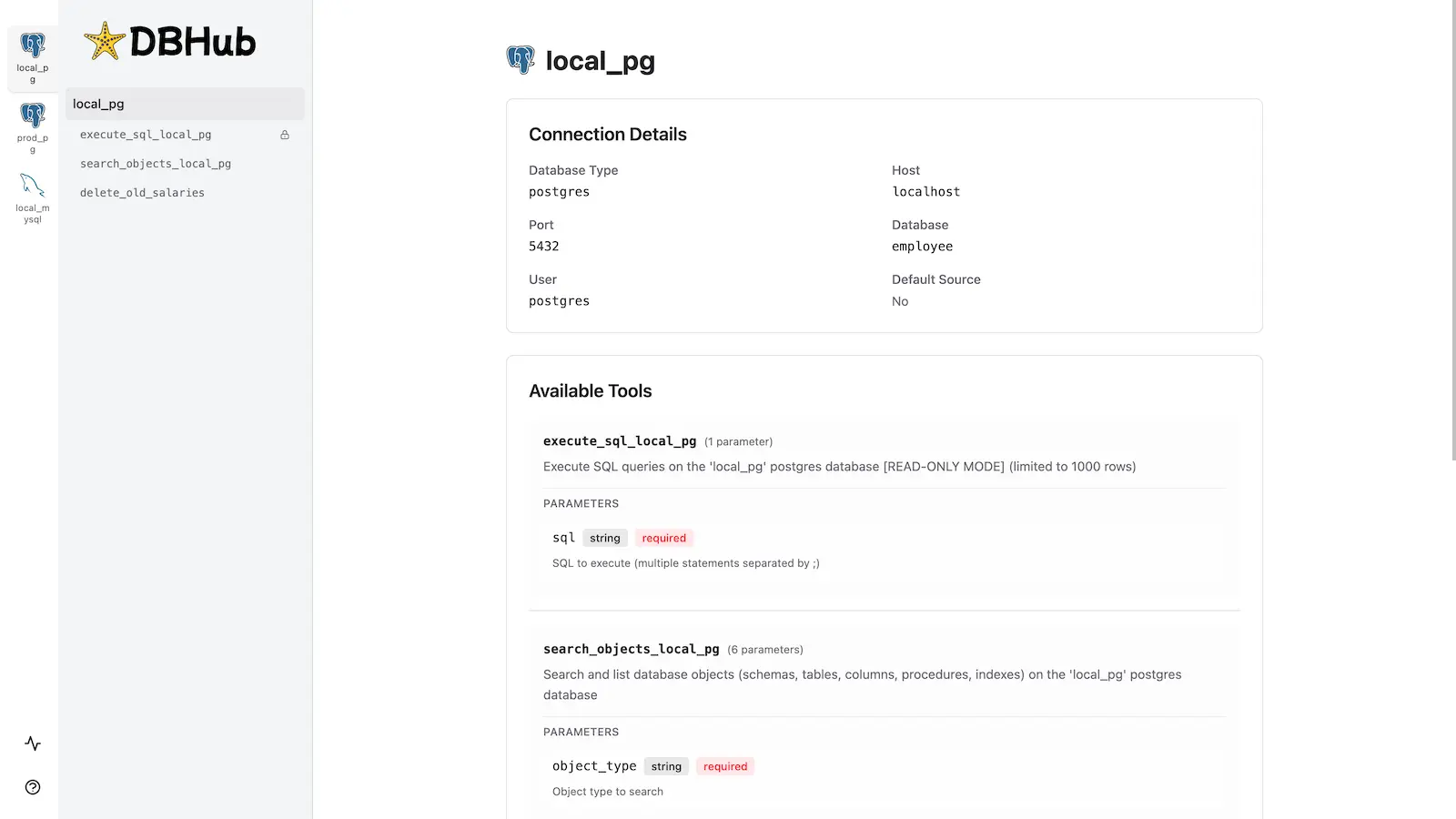
Workbench
DBHub includes a built-in web interface for interacting with your database tools. It provides a visual way to execute queries, run custom tools, and view request traces without requiring an MCP client.
Installation
npx @bytebase/dbhub@latest --transport http --port 8080 --dsn "postgres://user:password@localhost:5432/dbname?sslmode=disable"
Also available as:
- Docker image
- MCP Bundle (one-click install, read-only)
- Claude Code plugin
See the Installation Guide for all options, Command-Line Options for parameters, and Multi-Database Configuration for connecting several databases at once.
Development
Requires Node.js >= 22.5.0 (DBHub uses the built-in node:sqlite module).
# Install dependencies
pnpm install

# Run in development mode
pnpm dev

# Build and run for production
pnpm build && pnpm start --transport stdio --dsn "postgres://user:password@localhost:5432/dbname"
Star History
FAQ
Common questions
Discussion
Questions & comments · 0
Sign In Sign in to leave a comment.