
Search and Compare Flights with Google Flights
MCP server for real Google Flights search via a reverse-engineered API - one-way, round-trip, and multi-city fares, no scraping.
fli-js-v0.0.4Add to Favorites
Why it matters
Leverage real-time data from Google Flights to search for flights, compare prices, and identify the best travel routes. This asset provides a Python library and server for seamless integration with flight data.
Outcomes
What it gets done
Search for flights using Google Flights data.
Compare flight prices across different options.
Identify optimal flight routes.
Access real-time flight information.
Install
Add it to your toolbox
Run in your project directory:
curl -fsSL https://spark.entire.vc/get/fli-google-flights | bash Overview
fli - Google Flights MCP
MCP server that gives an AI assistant direct, reverse-engineered access to Google Flights data - no web scraping - through two tools: search_flights for a specific date with detailed filters, and search_dates for finding the cheapest fares across a flexible date range. Use it when an agent needs to search real flight prices and schedules - one-way, round-trip, or multi-city - filtered by cabin class, stops, airline, alliance, or layover duration, or to find the cheapest dates to fly between two airports.
What it does
Fli is an MCP server (and underlying Python/TypeScript library) that gives AI assistants like Claude direct access to Google Flights data by reverse-engineering its API, rather than scraping the website's HTML or driving a browser. That makes it faster and more resistant to breaking from UI changes than typical flight-search scrapers. It exposes two MCP tools: search_flights, for a specific departure (and optional return) date with detailed filters, and search_dates, for scanning a flexible date range to find the cheapest fares.
When to use - and when NOT to
Use it whenever a conversation needs real flight prices and schedules rather than general travel advice - "find flights from JFK to LAX on December 25th," "what are the cheapest dates to fly from NYC to London in January," or "search for business class flights from SFO to NRT with no stops." It supports one-way, round-trip, and multi-city itineraries with fine-grained filtering: cabin class (economy through first), stop count, specific airline inclusion/exclusion, alliance restriction/exclusion (ONEWORLD, SKYTEAM, STAR_ALLIANCE), layover duration bounds, departure time windows, currency, language, and country locale. The CLI's --format json machine-readable output is explicitly marked experimental, since its schema may still change.
Capabilities
search_flights takes origin/destination IATA codes (comma-separated for multi-airport search), a travel date, and an extensive filter set - cabin class, max stops, departure time window, airline include/exclude lists, alliance include/exclude, min/max layover minutes, currency, language, country, sort order (cheapest, duration, departure, or arrival time), and passenger count. search_dates covers the same filter surface but searches across a date range instead of one fixed date, with an optional trip duration for round-trips and a sort_by_price flag. Beyond the MCP tools, the underlying fli CLI and Python/TypeScript libraries support one-way, round-trip, and multi-city (multi-leg) searches directly, plus example scripts covering price tracking, complex validation, and pandas-based result processing.
How to install
Install with pipx install flights, then run fli-mcp for a local STDIO server or fli-mcp-http to serve it over HTTP at http://127.0.0.1:8000/mcp/. For Claude Desktop, add an MCP server entry pointing at the fli-mcp binary path (found via which fli-mcp) in claude_desktop_config.json, then restart Claude Desktop. A 1:1 TypeScript port, fli-js, is also available via npm/bun for direct programmatic use outside the MCP server.
Who it's for
Anyone who wants an AI assistant to search real flight prices and schedules conversationally - travelers comparing dates and cabin classes, developers building flight-search features on the same reverse-engineered API, or anyone who wants Google Flights data without web scraping.
Source README
🛫 Fli - Flight Search MCP Server and Library

A powerful Python library that provides programmatic access to Google Flights data with an elegant CLI interface. Search
flights, find the best deals, and filter results with ease.
🚀 What makes
flispecial?
Unlike other flight search libraries that rely on web scraping, Fli directly interacts with Google Flights' API
through reverse engineering.
This means:
- Fast: Direct API access means faster, more reliable results
- Zero Scraping: No HTML parsing, no browser automation, just pure API interaction
- Reliable: Less prone to breaking from UI changes
- Modular: Extensible architecture for easy customization and integration
MCP Server
pipx install flights

# Run the MCP server on STDIO
fli-mcp

# Run the MCP server over HTTP (streamable)
fli-mcp-http  # serves at http://127.0.0.1:8000/mcp/
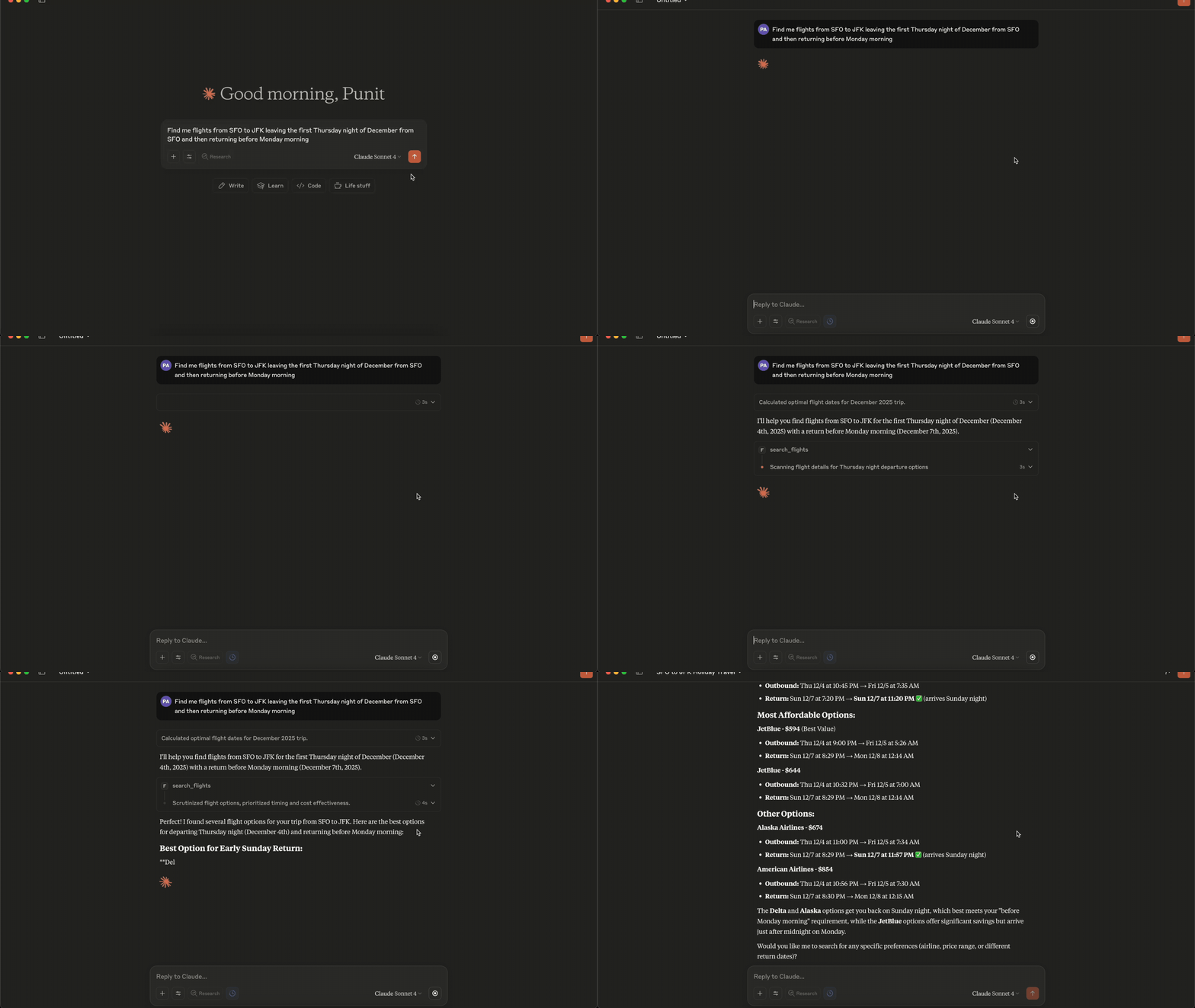
Connecting to Claude Desktop
{
  "mcpServers": {
    "fli": {
      "command": "/Users/<user>/.local/bin/fli-mcp"
    }
  }
}
Note: Replace
<user>with your actual username.
You can also find the path to the MCP server by runningwhich fli-mcpin your terminal.
MCP Tools Available
The MCP server provides two main tools:
| Tool | Description |
|---|---|
search_flights |
Search for flights on a specific date with detailed filters |
search_dates |
Find the cheapest travel dates across a flexible date range |
search_flights Parameters
| Parameter | Type | Description |
|---|---|---|
origin |
string | Departure airport IATA code(s) - comma-separated for multi |
destination |
string | Arrival airport IATA code(s) - comma-separated for multi |
departure_date |
string | Travel date in YYYY-MM-DD format |
return_date |
string | Return date for round trips (optional) |
cabin_class |
string | ECONOMY, PREMIUM_ECONOMY, BUSINESS, or FIRST |
max_stops |
string | ANY, NON_STOP, ONE_STOP, or TWO_PLUS_STOPS |
departure_window |
string | Time window in 'HH-HH' format (e.g., '6-20') |
airlines |
list | Filter by airline codes (e.g., ['BA', 'AA']) |
exclude_airlines |
list | Airline IATA codes to exclude (e.g., ['DL', 'B6']) |
alliance |
list | Restrict to alliances: ONEWORLD, SKYTEAM, STAR_ALLIANCE |
exclude_alliance |
list | Alliance names to exclude from results |
min_layover |
int | Minimum layover duration in minutes (multi-stop only) |
max_layover |
int | Maximum layover duration in minutes (multi-stop only) |
currency |
string | ISO 4217 code (e.g. 'EUR', 'JPY') - flows to curr= param |
language |
string | BCP-47 language code (e.g. 'en-GB') - flows to hl= param |
country |
string | ISO 3166-1 alpha-2 country code (e.g. 'GB') for gl= param |
sort_by |
string | CHEAPEST, DURATION, DEPARTURE_TIME, or ARRIVAL_TIME |
passengers |
int | Number of adult passengers |
search_dates Parameters
| Parameter | Type | Description |
|---|---|---|
origin |
string | Departure airport IATA code(s) - comma-separated for multi |
destination |
string | Arrival airport IATA code(s) - comma-separated for multi |
start_date |
string | Start of date range in YYYY-MM-DD format |
end_date |
string | End of date range in YYYY-MM-DD format |
trip_duration |
int | Trip duration in days (for round-trips) |
is_round_trip |
bool | Whether to search for round-trip flights |
cabin_class |
string | ECONOMY, PREMIUM_ECONOMY, BUSINESS, or FIRST |
max_stops |
string | ANY, NON_STOP, ONE_STOP, or TWO_PLUS_STOPS |
departure_window |
string | Time window in 'HH-HH' format (e.g., '6-20') |
airlines |
list | Filter by airline codes (e.g., ['BA', 'AA']) |
exclude_airlines |
list | Airline IATA codes to exclude |
alliance |
list | Restrict to alliances: ONEWORLD, SKYTEAM, STAR_ALLIANCE |
exclude_alliance |
list | Alliance names to exclude |
min_layover |
int | Minimum layover duration in minutes |
max_layover |
int | Maximum layover duration in minutes |
currency |
string | ISO 4217 currency code (e.g. 'EUR', 'JPY') |
language |
string | BCP-47 language code (e.g. 'en-GB') |
country |
string | ISO 3166-1 alpha-2 country code (e.g. 'GB') |
sort_by_price |
bool | Sort results by price (lowest first) |
passengers |
int | Number of adult passengers |
Quick Start
pip install flights
# Install using pipx (recommended for CLI)
pipx install flights

# Get started with CLI
fli --help
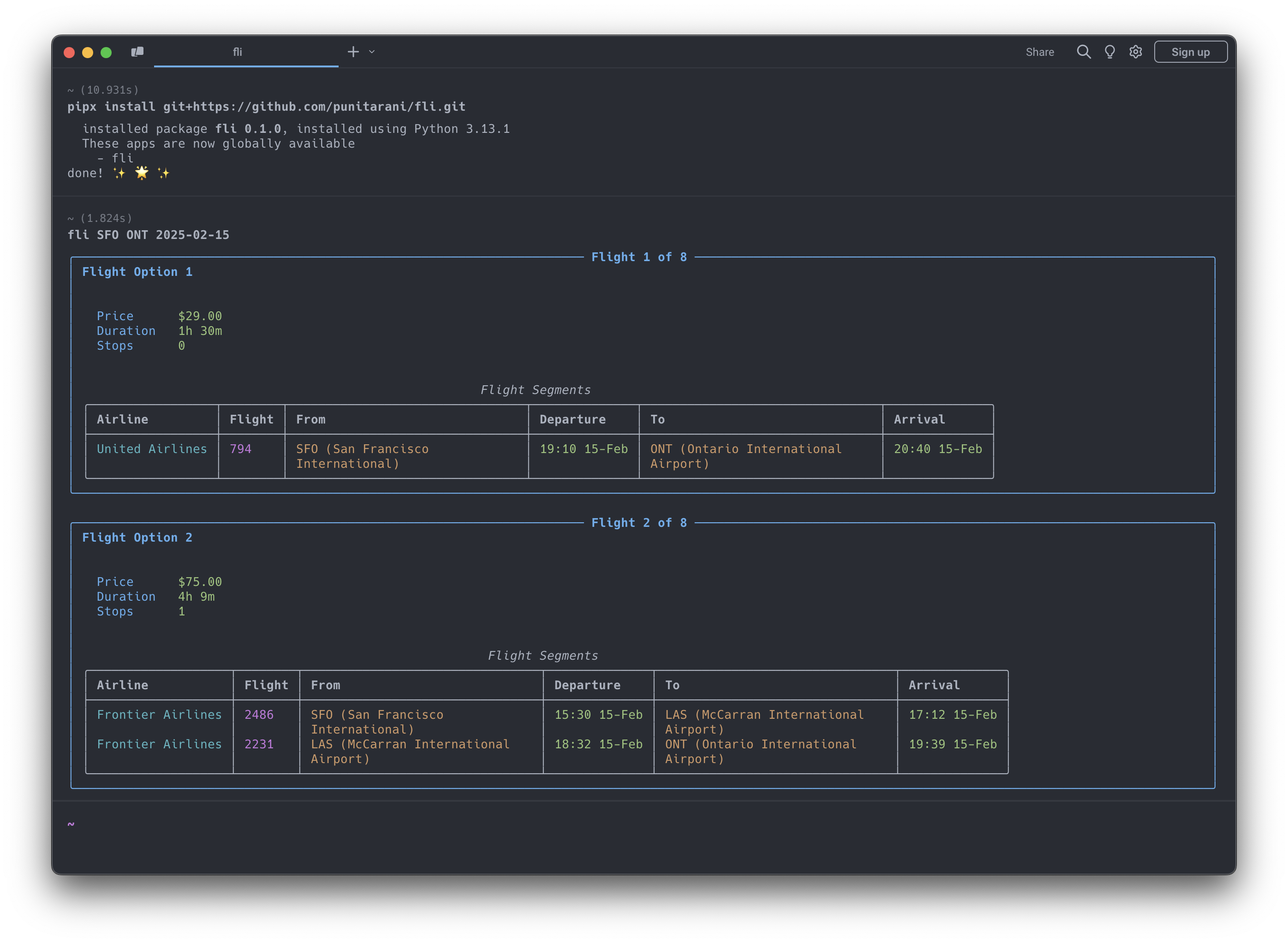
Features
🔍 Powerful Search
- One-way flight searches
- Multi-city flight searches
- Flexible departure times
- Multi-airline support
- Cabin class selection
- Stop preferences
- Custom result sorting
💺 Cabin Classes
- Economy
- Premium Economy
- Business
- First
🎯 Smart Sorting
- Price
- Duration
- Departure Time
- Arrival Time
🛡️ Built-in Protection
- Rate limiting
- Automatic retries
- Comprehensive error handling
- Input validation
CLI Usage
Search for Flights
# Basic flight search
fli flights JFK LHR 2026-10-25

# Advanced search with filters
fli flights JFK LHR 2026-10-25 \
    --time 6-20 \             # Departure time window (6 AM - 8 PM)
    --airlines BA,KL \        # Airlines (British Airways, KLM)
    --class BUSINESS \        # Cabin class
    --stops NON_STOP \        # Non-stop flights only
    --sort DURATION           # Sort by duration

# Alliance + exclude + locale (May-2026 filter additions)
fli flights JFK LHR 2026-10-25 \
    --alliance ONEWORLD \
    --exclude-airlines AA \
    --min-layover 90 \
    --max-layover 360 \
    --currency EUR --language en-GB --country GB
⚠️ Experimental
--format jsonis experimental. The JSON schema may change while the machine-readable CLI contract settles.# Return machine-readable flight results fli flights JFK LHR 2026-10-25 --format json
Find Cheapest Dates
# Basic date search
fli dates JFK LHR

# Advanced search with date range
fli dates JFK LHR \
    --from 2026-01-01 \
    --to 2026-02-01 \
    --monday --friday      # Only Mondays and Fridays
⚠️ Experimental
--format jsonis experimental for date searches as well.# Return machine-readable date search results fli dates JFK LHR --from 2026-01-01 --to 2026-02-01 --format json
Multi-city Search
# Two-leg multi-city trip
fli multi --leg SEA,HKG,2026-12-26 --leg PEK,SEA,2027-01-02

# Three-leg multi-city trip with filters
fli multi \
    -l SEA,NRT,2026-12-26 \
    -l NRT,HKG,2026-12-30 \
    -l HKG,SEA,2027-01-05 \
    --class BUSINESS \
    --stops 0
CLI Options
Flights Command (fli flights)
| Option | Description | Example |
|---|---|---|
--return, -r |
Return date | 2026-10-30 |
--time, -t |
Departure time window | 6-20 |
--airlines, -a |
Airline IATA codes | BA,KL |
--exclude-airlines, -A |
Airline IATA codes to exclude | DL,B6 |
--alliance |
Restrict to alliance(s) | ONEWORLD, SKYTEAM |
--exclude-alliance |
Alliance(s) to exclude | STAR_ALLIANCE |
--min-layover |
Minimum layover (minutes) | 90 |
--max-layover |
Maximum layover (minutes) | 360 |
--currency |
ISO 4217 currency code | EUR, JPY |
--language |
BCP-47 language code (Google hl=) |
en-GB |
--country |
ISO 3166-1 alpha-2 country (gl=) |
GB |
--class, -c |
Cabin class | ECONOMY, BUSINESS |
--stops, -s |
Maximum stops | NON_STOP, ONE_STOP |
--sort, -o |
Sort results by | CHEAPEST, DURATION |
--format |
Output format | text, json |
Dates Command (fli dates)
| Option | Description | Example |
|---|---|---|
--from |
Start date | 2026-01-01 |
--to |
End date | 2026-02-01 |
--duration, -d |
Trip duration in days | 3 |
--round, -R |
Round-trip search | (flag) |
--airlines, -a |
Airline IATA codes | BA,KL |
--exclude-airlines, -A |
Airline IATA codes to exclude | DL,B6 |
--alliance |
Restrict to alliance(s) | ONEWORLD |
--exclude-alliance |
Alliance(s) to exclude | STAR_ALLIANCE |
--min-layover |
Minimum layover (minutes) | 90 |
--max-layover |
Maximum layover (minutes) | 360 |
--currency |
ISO 4217 currency code | EUR, JPY |
--language |
BCP-47 language code | en-GB |
--country |
ISO 3166-1 alpha-2 country | GB |
--class, -c |
Cabin class | ECONOMY, BUSINESS |
--stops, -s |
Maximum stops | NON_STOP, ONE_STOP |
--time |
Departure time window | 6-20 |
--sort |
Sort by price | (flag) |
--[day] |
Day filters | --monday, --friday |
--format |
Output format | text, json |
Multi Command (fli multi)
| Option | Description | Example |
|---|---|---|
--leg, -l |
Flight leg (ORIGIN,DEST,DATE format) | SEA,HKG,2026-12-26 |
--time, -t |
Departure time window | 6-20 |
--airlines, -a |
Airline IATA codes | DL CX |
--class, -c |
Cabin class | ECONOMY, BUSINESS |
--stops, -s |
Maximum stops | NON_STOP, ONE_STOP |
--sort, -o |
Sort results by | CHEAPEST, DURATION |
MCP Server Integration
Fli includes a Model Context Protocol (MCP) server that allows AI assistants like Claude to search for flights directly.
This enables natural language flight search through conversation.
Running the MCP Server
# Run the MCP server on STDIO
fli-mcp

# Or with uv (for development)
uv run fli-mcp

# Or with make (for development)
make mcp

# Run the MCP server over HTTP (streamable)
fli-mcp-http  # serves at http://127.0.0.1:8000/mcp/
Claude Desktop Configuration
To use the flight search capabilities in Claude Desktop, add this configuration to your claude_desktop_config.json:
Location: ~/Library/Application Support/Claude/claude_desktop_config.json (macOS)
{
  "mcpServers": {
    "flight-search": {
      "command": "fli-mcp",
      "args": []
    }
  }
}
After adding this configuration:
- Restart Claude Desktop
- You can now ask Claude to search for flights naturally:
- "Find flights from JFK to LAX on December 25th"
- "What are the cheapest dates to fly from NYC to London in January?"
- "Search for business class flights from SFO to NRT with no stops"
Python API Usage
Basic Search Example
from datetime import datetime, timedelta
from fli.models import (
    Airport,
    PassengerInfo,
    SeatType,
    MaxStops,
    SortBy,
    FlightSearchFilters,
    FlightSegment
)
from fli.search import SearchFlights

# Create search filters
filters = FlightSearchFilters(
    passenger_info=PassengerInfo(adults=1),
    flight_segments=[
        FlightSegment(
            departure_airport=[[Airport.JFK, 0]],
            arrival_airport=[[Airport.LAX, 0]],
            travel_date=(datetime.now() + timedelta(days=30)).strftime("%Y-%m-%d"),
        )
    ],
    seat_type=SeatType.ECONOMY,
    stops=MaxStops.NON_STOP,
    sort_by=SortBy.CHEAPEST,
)

# Search flights
search = SearchFlights()
flights = search.search(filters)

# Process results
for flight in flights:
    print(f"💰 Price: ${flight.price}")
    print(f"⏱️ Duration: {flight.duration} minutes")
    print(f"✈️ Stops: {flight.stops}")

    for leg in flight.legs:
        print(f"\n🛫 Flight: {leg.airline.value} {leg.flight_number}")
        print(f"📍 From: {leg.departure_airport.value} at {leg.departure_datetime}")
        print(f"📍 To: {leg.arrival_airport.value} at {leg.arrival_datetime}")
Running Examples
Runnable examples live in examples/python/:
# Run examples with uv (recommended)
uv run python examples/python/basic_one_way_search.py
uv run python examples/python/round_trip_search.py
uv run python examples/python/date_range_search.py

# Or install dependencies first, then run directly
pip install pydantic curl_cffi httpx
python examples/python/basic_one_way_search.py
Available Examples:
basic_one_way_search.py- Simple one-way flight searchround_trip_search.py- Round-trip flight bookingdate_range_search.py- Find cheapest datesmulti_city_search.py- Multi-city itinerary across several legsadvanced_filters_search.py- Alliances, airline exclusions, layovers, localecomplex_flight_search.py- Advanced filtering and multi-passengertime_restrictions_search.py- Time-based filteringdate_search_with_preferences.py- Weekend filteringprice_tracking.py- Price monitoring over timeerror_handling_with_retries.py- Robust error handlingresult_processing.py- Data analysis with pandascomplex_round_trip_validation.py- Advanced round-trip with validationadvanced_date_search_validation.py- Complex date search with filtering
Examples
Examples are organized by language, with parallel scripts so you can compare the
two APIs:
- Python -
examples/python/ - TypeScript -
examples/typescript/
# Python
uv run python examples/python/complex_flight_search.py

# TypeScript (from examples/typescript, after `bun install`)
bun run multi_city_search.ts
Example Categories:
- Basic Usage: One-way, round-trip, date searches
- Advanced Filtering: Time restrictions, airlines, alliances, seat classes, locale
- Data Analysis: Price tracking, result processing with pandas
- Error Handling: Retry logic, robust error management
- Complex Scenarios: Multi-city, multi-passenger, validation, business rules
Each example is self-contained - change the airports, dates, and filters at the top of the script to fit your search.
TypeScript / JavaScript
Fli is also available as a 1:1 TypeScript port, published to npm asfli-js. Same models, same filter encoding,
same direct-API approach.
bun add fli-js # or: npm install fli-js
import { Airport, FlightSearchFilters, FlightSegment, SearchFlights, SeatType } from "fli-js";

const inDays = (n: number) => new Date(Date.now() + n * 86_400_000).toISOString().slice(0, 10);

const filters = new FlightSearchFilters({
  passenger_info: { adults: 1, children: 0, infants_in_seat: 0, infants_on_lap: 0 },
  flight_segments: [
    new FlightSegment({
      departure_airport: [[[Airport.JFK, 0]]],
      arrival_airport: [[[Airport.LAX, 0]]],
      travel_date: inDays(30),
    }),
  ],
  seat_type: SeatType.ECONOMY,
});

const results = await new SearchFlights().search(filters, { currency: "USD" });
The TypeScript source lives in fli-js/; see the
TypeScript Quick Start
for the full guide.
Development
# Clone the repository
git clone https://github.com/punitarani/fli.git
cd fli

# Install dependencies with uv
uv sync --all-extras

# Run tests
uv run pytest

# Run linting
uv run ruff check .
uv run ruff format .

# Build documentation
uv run mkdocs serve

# Or use the Makefile for common tasks
make install-all  # Install all dependencies
make test         # Run tests
make lint         # Check code style
make format       # Format code
Docker Development
# Build the devcontainer
docker build -t fli-dev -f .devcontainer/Dockerfile .

# Run CI inside the container
docker run --rm fli-dev make lint test-all

# Or run lint and tests separately
docker run --rm fli-dev make lint
docker run --rm fli-dev make test-all
Running CI Locally with act
To run GitHub Actions locally, install act:
brew install act

# Run CI locally (lint + tests on Python 3.10-3.13)
make ci

# Or run CI inside Docker (no local act installation needed)
make ci-docker
FAQ
Common questions
Discussion
Questions & comments · 0
Sign In Sign in to leave a comment.