
Build a Philosophy Quote Search and Generator
OpenAI quickstart building a philosophy quote search engine and generator with Astra DB and AstraPy vector embeddings.
Why it matters
Leverage OpenAI embeddings and Astra DB to create a sophisticated system for finding philosophical quotes and generating new ones based on existing knowledge.
Outcomes
What it gets done
Index philosophical quotes using OpenAI embeddings and store them in Astra DB.
Implement a semantic search engine to find quotes based on similarity.
Develop a quote generation feature using LLMs and retrieved quotes.
Optionally filter search results by author or tags.
Install
Add it to your toolbox
Run in your project directory:
curl -fsSL https://spark.entire.vc/get/oai-philosophicalquotesastrapy | bash Steps
Steps in the chain
Overview
Philosophy with Vector Embeddings, OpenAI and Astra DB
OpenAI quickstart (AstraPy version) building a philosophy quote search engine and generator using OpenAI embeddings and DataStax Astra DB, covering vector indexing, metadata-filtered search, similarity-threshold cutoffs, and LLM-based quote generation. Use when learning vector search fundamentals or prototyping a semantic search-plus-generation application on Astra DB.
What it does
This OpenAI quickstart (AstraPy version) builds a "philosophy quote finder & generator" using OpenAI vector embeddings and DataStax Astra DB as the vector store. It embeds a dataset of quotes by famous philosophers (adapted from a Kaggle philosopher-quotes dataset) using OpenAI's Embedding model, storing each vector in an Astra DB collection alongside metadata like the author's name and pre-computed tags for search customization. Indexing, search, and generation are each illustrated with a diagram: quotes become 1536-dimensional unit-length vectors in Astra DB; a search quote is embedded on the fly and used to find metrically close (semantically similar) stored vectors, optionally constrained by author or tag metadata; and for generation, the top search results are fed into an LLM prompt that invents a new quote in the style of the retrieved examples plus the original suggestion. Setup connects to Astra DB using an API endpoint and token from the Astra dashboard, creates a vector collection (specifying only the vector dimension and, optionally, a similarity metric), and connects to OpenAI with a secret key. Quotes are embedded in batches for speed and written via the collection's insert_many method, with the embedding stored in the required special $vector field. The quote-search use case wraps the collection's vector_find method into a reusable function, supporting plain similarity search plus filtering by author or tag; it also shows how to read the returned $similarity score (a 0-to-1 rescaling of cosine similarity, returned by default unless include_similarity=False is passed) and apply a manual cutoff threshold to discard irrelevant results, since nearest-neighbor search always returns the closest matches even if none are truly relevant. The quote-generator use case adds an LLM Chat Completion call, templated with search results, that can generate a new quote from a topic, a tentative quote, or inspiration limited to a single philosopher. A final cleanup cell irreversibly deletes the collection and its data.
When to use - and when NOT to
Use this quickstart when learning standard vector-search usage patterns - embedding, metadata-filtered search, similarity-threshold cutoffs, and retrieval-augmented generation - with DataStax Astra DB as the vector store, or as a starting template for a semantic search-plus-generation application over any small text corpus. It is not a deep dive into question-answering system design (see OpenAI's dedicated Question Answering Using Embeddings notebook for that) and does not cover production-scale ingestion, access control, or Astra DB administration beyond collection creation and cleanup.
Inputs and outputs
Input is a dataset of text quotes with author and tag metadata, plus a search quote, topic, or philosopher name at query time. Output is either a ranked list of semantically similar stored quotes (with a similarity score, optionally filtered by author/tag and thresholded) or an LLM-generated new quote in the style of the retrieved examples.
Integrations
Built on DataStax Astra DB (via the AstraPy client, insert_many and vector_find collection methods, the special $vector and $similarity fields) and the OpenAI API for both embedding generation and Chat Completion-based quote generation.
Who it's for
Developers learning vector search fundamentals or prototyping a semantic search-and-generation application - such as a quote, product, or content recommender - who want a minimal working example on Astra DB rather than building the indexing and retrieval logic from scratch.
Source README
Philosophy with Vector Embeddings, OpenAI and Astra DB
AstraPy version
In this quickstart you will learn how to build a "philosophy quote finder & generator" using OpenAI's vector embeddings and DataStax Astra DB as the vector store for data persistence.
The basic workflow of this notebook is outlined below. You will evaluate and store the vector embeddings for a number of quotes by famous philosophers, use them to build a powerful search engine and, after that, even a generator of new quotes!
The notebook exemplifies some of the standard usage patterns of vector search -- while showing how easy is it to get started with Astra DB.
For a background on using vector search and text embeddings to build a question-answering system, please check out this excellent hands-on notebook: Question answering using embeddings.
Table of contents:
- Setup
- Create vector collection
- Connect to OpenAI
- Load quotes into the Vector Store
- Use case 1: quote search engine
- Use case 2: quote generator
- Cleanup
How it works
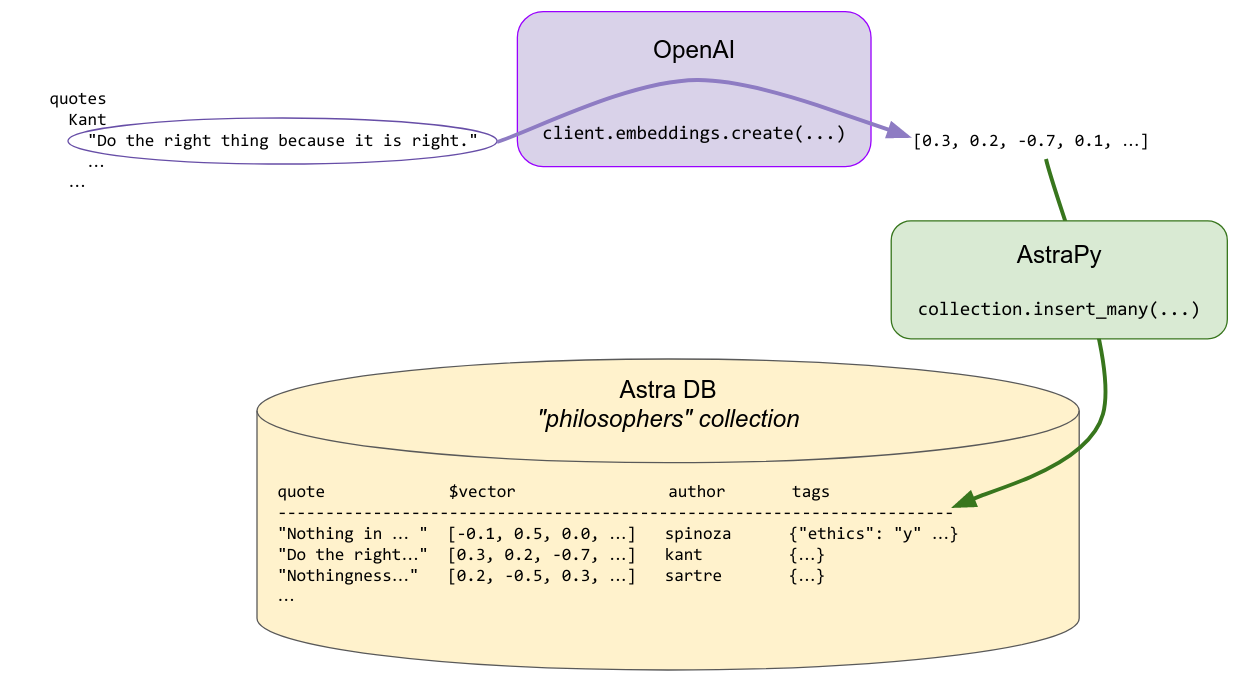
Indexing
Each quote is made into an embedding vector with OpenAI's Embedding. These are saved in the Vector Store for later use in searching. Some metadata, including the author's name and a few other pre-computed tags, are stored alongside, to allow for search customization.
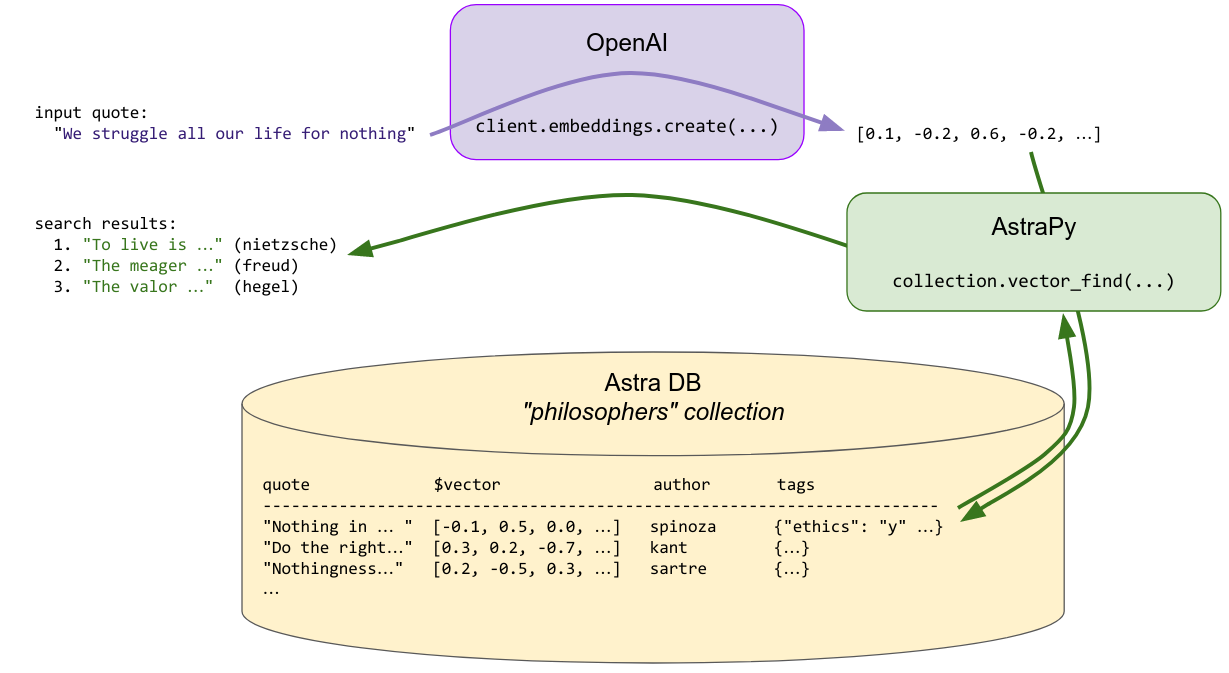
Search
To find a quote similar to the provided search quote, the latter is made into an embedding vector on the fly, and this vector is used to query the store for similar vectors ... i.e. similar quotes that were previously indexed. The search can optionally be constrained by additional metadata ("find me quotes by Spinoza similar to this one ...").
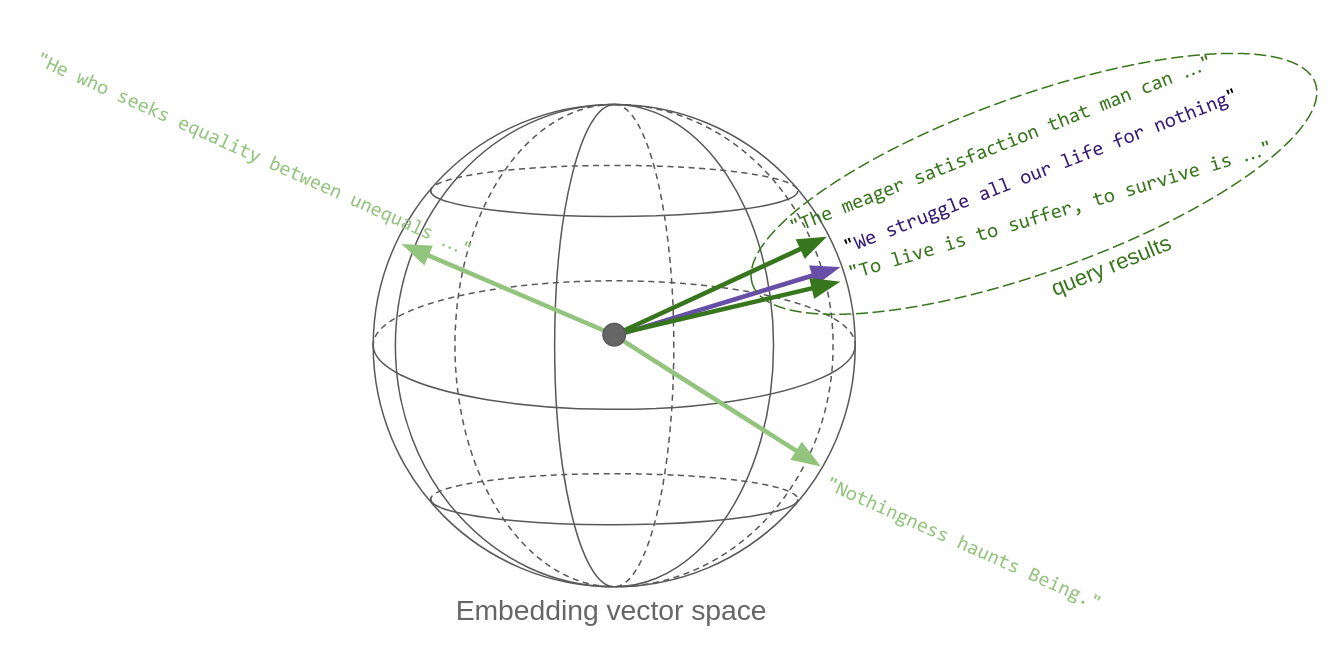
The key point here is that "quotes similar in content" translates, in vector space, to vectors that are metrically close to each other: thus, vector similarity search effectively implements semantic similarity. This is the key reason vector embeddings are so powerful.
The sketch below tries to convey this idea. Each quote, once it's made into a vector, is a point in space. Well, in this case it's on a sphere, since OpenAI's embedding vectors, as most others, are normalized to unit length. Oh, and the sphere is actually not three-dimensional, rather 1536-dimensional!
So, in essence, a similarity search in vector space returns the vectors that are closest to the query vector:
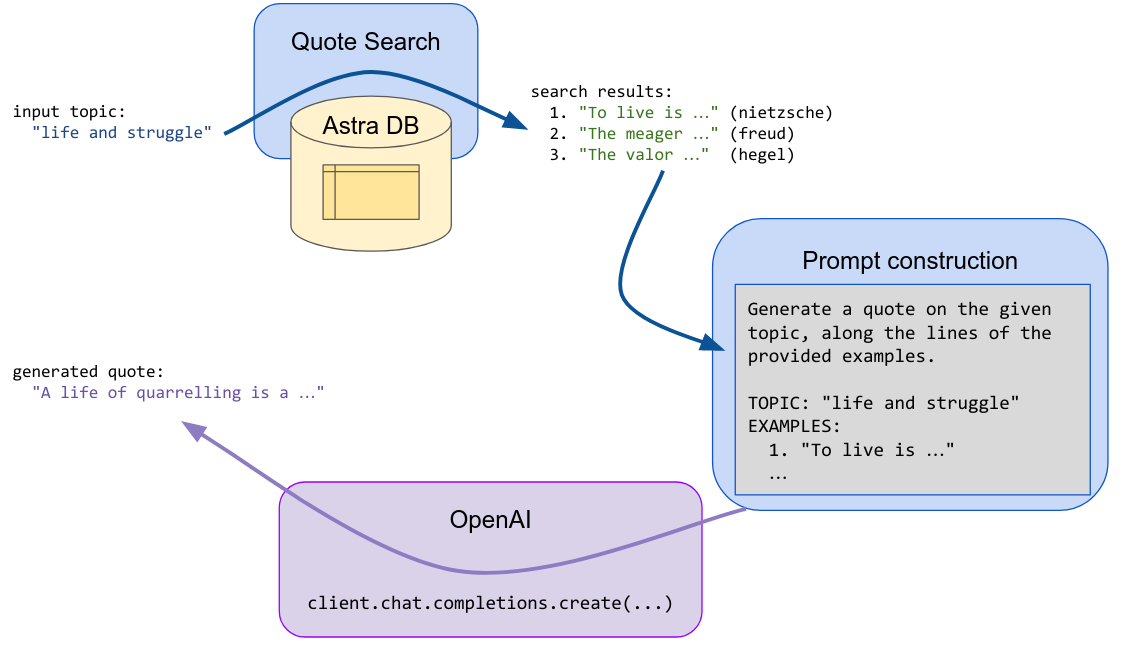
Generation
Given a suggestion (a topic or a tentative quote), the search step is performed, and the first returned results (quotes) are fed into an LLM prompt which asks the generative model to invent a new text along the lines of the passed examples and the initial suggestion.
Setup
Install and import the necessary dependencies:
Connection parameters
Please retrieve your database credentials on your Astra dashboard (info): you will supply them momentarily.
Example values:
- API Endpoint:
https://01234567-89ab-cdef-0123-456789abcdef-us-east1.apps.astra.datastax.com - Token:
AstraCS:6gBhNmsk135...
Instantiate an Astra DB client
Create vector collection
The only parameter to specify, other than the collection name, is the dimension of the vectors you'll store. Other parameters, notably the similarity metric to use for searches, are optional.
Connect to OpenAI
Set up your secret key
A test call for embeddings
Quickly check how one can get the embedding vectors for a list of input texts:
Note: the above is the syntax for OpenAI v1.0+. If using previous versions, the code to get the embeddings will look different.
Load quotes into the Vector Store
Get a dataset with the quotes. (We adapted and augmented the data from this Kaggle dataset, ready to use in this demo.)
A quick inspection:
Check the dataset size:
Write to the vector collection
You will compute the embeddings for the quotes and save them into the Vector Store, along with the text itself and the metadata you'll use later.
To optimize speed and reduce the calls, you'll perform batched calls to the embedding OpenAI service.
To store the quote objects, you will use the insert_many method of the collection (one call per batch). When preparing the documents for insertion you will choose suitable field names -- keep in mind, however, that the embedding vector must be the fixed special $vector field.
Use case 1: quote search engine
For the quote-search functionality, you need first to make the input quote into a vector, and then use it to query the store (besides handling the optional metadata into the search call, that is).
Encapsulate the search-engine functionality into a function for ease of re-use. At its core is the vector_find method of the collection:
Putting search to test
Passing just a quote:
Search restricted to an author:
Search constrained to a tag (out of those saved earlier with the quotes):
Cutting out irrelevant results
The vector similarity search generally returns the vectors that are closest to the query, even if that means results that might be somewhat irrelevant if there's nothing better.
To keep this issue under control, you can get the actual "similarity" between the query and each result, and then implement a cutoff on it, effectively discarding results that are beyond that threshold.
Tuning this threshold correctly is not an easy problem: here, we'll just show you the way.
To get a feeling on how this works, try the following query and play with the choice of quote and threshold to compare the results. Note that the similarity is returned as the special $similarity field in each result document - and it will be returned by default, unless you pass include_similarity = False to the search method.
Note (for the mathematically inclined): this value is a rescaling between zero and one of the cosine difference between the vectors, i.e. of the scalar product divided by the product of the norms of the two vectors. In other words, this is 0 for opposite-facing vectors and +1 for parallel vectors. For other measures of similarity (cosine is the default), check the metric parameter in AstraDB.create_collection and the documentation on allowed values.
Use case 2: quote generator
For this task you need another component from OpenAI, namely an LLM to generate the quote for us (based on input obtained by querying the Vector Store).
You also need a template for the prompt that will be filled for the generate-quote LLM completion task.
Like for search, this functionality is best wrapped into a handy function (which internally uses search):
Note: similar to the case of the embedding computation, the code for the Chat Completion API would be slightly different for OpenAI prior to v1.0.
Putting quote generation to test
Just passing a text (a "quote", but one can actually just suggest a topic since its vector embedding will still end up at the right place in the vector space):
Use inspiration from just a single philosopher:
Cleanup
If you want to remove all resources used for this demo, run this cell (warning: this will irreversibly delete the collection and its data!):
FAQ
Common questions
Discussion
Questions & comments · 0
Sign In Sign in to leave a comment.